There are two classes that intertact with each: passenger and driver gateways. Their capabilities are described in requiremens.
There is an interface in my program. Firstly, the user should login to the system. The program checks if there is such a user in the list of passengers or in the list of drivers. If there is no such user it asks the user to try again, othrerwise it prints out the general interface of a driver or passenger. This interface is implimented in the interface file. Depending on user's input it executes different functions from the Passenger class or Driver class. These user classes also provide additional interface for futher interaction with a user (for example to choose "from" and "to" of a ride or to choose payment method). User can print the number of the action he wants to be executed.
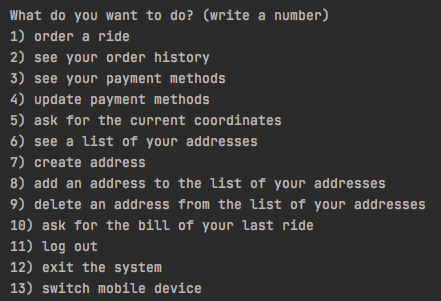
User can order a ride, specify payment method, car typr, and "from" and "to" addresses. He can also reject this ride when program calculates the price of the ride. When he confirms that he want to create an order: this order goes to the lists of available orders of all the suitable drivers (those who is working now and have suitable car type). After that driver need to login and confirm that he wants to take this ride (he also can decline it). When he confirms it, the ride starts. Actually the ride is created and pushed to the history of a driver and passenger. Anyway, driver need time to get to the "from" address (this time is calculated accrording the current position of a car and its speed). When the driver arrives to the "from" address, passenger can see the current coordinates of a car. After the ride he can request a bill of this ride and see it in his history. Driver also can see this ride in his history.
My data base is just a text file in a special (created by me) format. There are two functions: uploadData function parses all the data of the program (personal information of users, addresses, rides and etc) to the required format and uploads it to the file, downloadData function downloads all the necessary data from the file and parses it to the suitable format and downloads it to the program, creating objects and so on. These functions are called at the beginning and end of execution. So to save the result of execution it is required to call downloadData() function.
There are following sections: addresses, cars, drivers, passengers, and rides. Every sections is separated with double stars and every section contains informastion about objects of this sections (for example information of some users). Every object is separated with a single star. Every object has a number n, so if I need to bind two objects together (for example, a driver with a car), I will have a number of a car in the carList, so I can create a pointer to this object. There is also AdditionalDataFile that store the same information as Data file(just in case).
To check that data base works correctly you can enter the system as Ruslan Khakimov, create an address, exit the system (there is such option in the general interface), switch on the program, enter the system as "Ruslan Khakimov", choose "add an address to the list of your addresses", and you will see that newly created address will be in the list of available addresses. You can also see this address in the Data file after the execution of the program. (but to do this you need to call useInterface() function).
To test the program you can call showInterfaceTest() function after downloadData() function in the main function. This function launches interface, but it does not read the input from the console, it reads it from the example test file. In this file you can also find a description of all the steps to understand what is going on in this test and confirm that it really shows the almost all the functional of this program.
There is also a useInterface() function (you should insert it insted showInterfacetest()). It lets you to launch the interface and use it. You can print any name you can find in Data text file and execute make the program execute any instructions, but you should do it after you observed showInterfaceTest() because your actions can influence on the program behaviour in the example. You can also insert adminFunctionalExample() instead of it. This function shows how admin can interact with the program and other users. There are also many comments in this function that explain the output of this functions and show what is going on.
Some important functions are not covered in the "example" file, but you can check it yourself. You need to enter the system as "Pavel Roganin" (or any other user from the Data file), order ride, choose addresses "1" and "3", select "Business" class, confirm that you want ot create the ride, choose cash as a payment method, log out, enter the system as "Andrey Kuzmicky", check available orders, choose the first available order, accept it, log out, enter the system as Pavel Roganin, and begin requesting current coordinates. When the driver arrives to your location, you will see how coordinates are changed every time you request current coordinates until you come to "to" adderss. After that you will be able to see this ride in your order history and request a bill for this ride. You will also see this ride in the order history and you will also see the time of the order there. This functions are not presented in the example because the depend on time of execution.