Conversation


… deja e la imagen de x
…pacio entre los cuadros
…ntre los cuadrados de los 24 - cambiar la tipografia del 24 - cambiar span por botones - bajar el cuadrado de resolucion un poco - centrar resolucion y botones
…ar las imagenes dentro de los botones
 brankitoCruz17
requested review from
Ezequiiel98,
MMarussi,
briangerez and
vivianachoque
brankitoCruz17
requested review from
Ezequiiel98,
MMarussi,
briangerez and
vivianachoque

 MMarussi
left a comment
MMarussi
left a comment
MMarussi
left a comment
There was a problem hiding this comment.
Buen trabajo! Estamos cerca de tenerlo 👌
Hay 2 pares de componentes que tienen un compartamiento/estructura parecida (redButon/greenButton y ImagenSuperior/Inferior) en ambos casos se da que el jsx es muy parecido y el scss utilizado es casi el mismo excepto algun que otro atributo. Así no estaría mal fijarte que modificaciones tenés que hacer en algun par para eliminar sus duplicados y asi tener menos código que mantener!
src/components/App/index.js
Outdated
| function App() { | ||
| return <h1> Proyecto blockchain </h1>; | ||
| return ( | ||
| <div> |
There was a problem hiding this comment.
Me parece que este div sobra 👀
| <div className={styles.cell} > | ||
| <span className={styles.number}>24</span> | ||
| </div> | ||
|
|
||
| <div className={styles.cell} > | ||
| <span className={styles.number}>24</span> | ||
| </div> | ||
|
|
||
| <div className={styles.cell} > | ||
| <span className={styles.number}>24</span> | ||
| </div> | ||
|
|
||
| <div className={styles.cell} > | ||
| <span className={styles.number}>24</span> | ||
| </div> | ||
|
|
||
| <div className={styles.cell} > | ||
| <span className={styles.number}>24</span> | ||
| </div> | ||
|
|
||
| <div className={styles.cell} > | ||
| <span className={styles.number}>24</span> | ||
| </div> | ||
|
|
||
| <div className={styles.cell} > | ||
| <span className={styles.number}>24</span> | ||
| </div> | ||
|
|
||
| <div className={styles.cell} > | ||
| <span className={styles.number}>24</span> | ||
| </div> | ||
|
|
||
| <div className={styles.cell} > | ||
| <span className={styles.number}>24</span> | ||
| </div> | ||
|
|
||
| <div className={styles.cell} > | ||
| <span className={styles.number}>24</span> | ||
| </div> | ||
|
|
||
| <div className={styles.cell} > | ||
| <span className={styles.number}>24</span> | ||
| </div> | ||
|
|
||
| <div className={styles.cell} > | ||
| <span className={styles.number}>24</span> | ||
| </div> | ||
|
|
||
| <div className={styles.cell} > | ||
| <span className={styles.number}>24</span> | ||
| </div> | ||
|
|
||
| <div className={styles.cell} > | ||
| <span className={styles.number}>24</span> | ||
| </div> | ||
|
|
||
| <div className={styles.cell} > | ||
| <span className={styles.number}>24</span> | ||
| </div> | ||
|
|
||
| <div className={styles.cell} > | ||
| <span className={styles.number}>24</span> | ||
| </div> |
There was a problem hiding this comment.
Acá tenés repetido varias veces el mismo componente, acordate que en vez de tenerlo copiado y pegado varias veces podés hacerlo en menos líneas con una función.
function Board() {
  const renderCells = () =>
    [...Array(CELL_NUMBERS)].map(() => (
       <div className={styles.cell} >
          <span className={styles.number}>24</span>
        </div>)
    );

  return (
    <div className={styles.containerBoard}>
      <div className={styles.board}>
        {renderCells()}
      </div>
    </div>
  )
}
renderCells() va a crearnos un array vacío y por cada uno de esos elementos vamos a renderear una celda
CELLS_NUMBER es una constante con la cantidad de veces que se tiene que renderear una celda (creo que sería 16)
| border-radius: 4px; | ||
| background-color: #FFFFFF; | ||
| margin-right: 21px; | ||
|
|
There was a problem hiding this comment.
Esta línea vacía se puede borrar
| .cell { | ||
| min-width: 25%; | ||
| min-height: 25%; | ||
| text-align: center; | ||
| display: flex; | ||
| justify-content: center; | ||
| align-items: center; | ||
| } | ||
|
|
||
| .cell:nth-child(odd) { | ||
| background-color: #FEC34D; | ||
| } |
There was a problem hiding this comment.
Tené en cuenta que podés usar la sintaxis de SASS para anidar los pseudo selectores que apliquen a .cell
.cell {
  min-width: 25%;
  min-height: 25%;
  text-align: center;
  display: flex;
  justify-content: center;
  align-items: center;

  &:nth-child(odd) {
    background-color: #FEC34D;
  }

  &:nth-child(...) {
    background-color: ...;
  }
}| .cell:nth-child(9) { | ||
| background-color: #F2754C; | ||
| } | ||
|
|
||
| .cell:nth-child(7) { | ||
| background-color: #F2754C; | ||
| } | ||
|
|
||
| .cell:nth-child(10) { | ||
| background-color: #22465C; | ||
| } | ||
|
|
||
|
|
||
|
|
||
| .cell:nth-child(16) { | ||
| background-color: #33BFC6; | ||
| } | ||
|
|
||
| .cell:nth-child(1) { | ||
| background-color: #AED750; | ||
| } | ||
|
|
||
| .cell:nth-child(2) { | ||
| background-color: #33BFC6; | ||
| } | ||
|
|
||
| .cell:nth-child(3) { | ||
| background-color: #AED750; | ||
| } | ||
|
|
||
| .cell:nth-child(4) { | ||
| background-color: #F2754C; | ||
| } | ||
|
|
||
| .cell:nth-child(5) { | ||
| background-color: #F2754C; | ||
| } | ||
|
|
||
| .cell:nth-child(6) { | ||
| background-color: #AED750; | ||
| } | ||
|
|
||
| .cell:nth-child(7) { | ||
| background-color: #22465C; | ||
| } | ||
|
|
||
| .cell:nth-child(8) { | ||
| background-color: #22465C; | ||
| } | ||
|
|
||
| .cell:nth-child(9) { | ||
| background-color: #FEC34D; | ||
| } | ||
|
|
||
| .cell:nth-child(10) { | ||
| background-color: #22465C; | ||
| } | ||
|
|
||
| .cell:nth-child(11) { | ||
| background-color: #F2754C; | ||
| } | ||
|
|
||
| .cell:nth-child(12) { | ||
| background-color: #22465C; | ||
| } | ||
|
|
||
| .cell:nth-child(13) { | ||
| background-color: #22465C; | ||
| } | ||
|
|
||
| .cell:nth-child(14) { | ||
| background-color: #FEC34D; | ||
| } | ||
|
|
||
| .cell:nth-child(15) { | ||
| background-color: #22465C; | ||
| } | ||
|
|
||
| .cell:nth-child(16) { | ||
| background-color: #FEC34D; | ||
| } | ||
|
|
||
| .cell{ | ||
| border: 4px solid white; | ||
| } |
There was a problem hiding this comment.
.cell:nth-child(odd) {
  background-color: #FEC34D;
}
El pseudo-selector anterior aplica el color #FEC34D al background. Es necesario este estilo si va a ser sobreescrito por todos estos?
| <span className={styles.iconContainer}> | ||
| <span className={styles.iconScore}>+</span> | ||
| </span> |
There was a problem hiding this comment.
Podrías combinar las clases de scss .iconContainer y .iconScore en una sola, ya que no tiene mucho sentido tener 1 <span> que sólo tiene otro <span> adentro
| .container{ | ||
| display: flex; | ||
| justify-content: space-between; | ||
| margin-bottom: 36px; | ||
|
|
||
| } |
There was a problem hiding this comment.
| .container{ | |
| display: flex; | |
| justify-content: space-between; | |
| margin-bottom: 36px; | |
| } | |
| .container { | |
| display: flex; | |
| justify-content: space-between; | |
| margin-bottom: 36px; | |
| } |
|
|
||
| function Text() { | ||
| return ( | ||
|
|
There was a problem hiding this comment.
Esta línea se puede borrar
| @@ -0,0 +1,13 @@ | |||
| import React from 'react'; | |||
|
|
|||
| import Styles from './index.module.scss'; | |||
There was a problem hiding this comment.
Intenta que los imports que se usen en el código no empiecen con mayúscula así no se los confunde con otro componente.
| import Styles from './index.module.scss'; | |
| import styles from './index.module.scss'; |
| @@ -0,0 +1,13 @@ | |||
| import React from 'react'; | |||
|
|
|||
| import Styles from './index.module.scss'; | |||
There was a problem hiding this comment.
Mismo que Styles de redButton
MMarussi
left a comment
MMarussi
left a comment
There was a problem hiding this comment.
Sólo faltan unos detalles, ya casi estamoooos!!
| <Fragment> | ||
| <button type="button" className={styles.buttonRed} /> | ||
| </Fragment> | ||
| </div> | ||
| <div className={styles.containerGreen}> | ||
| <Fragment> | ||
| <button type="button" className={styles.buttonGreen} /> | ||
| </Fragment> |
There was a problem hiding this comment.
Estos 2 pares de fragments no son necesarios, así que podés borrarlos
| border-radius: 4px; | ||
| transition: background-color .1s ease, transform .2s ease; | ||
| } | ||
| .containerGreen { |
There was a problem hiding this comment.
Acordate de separar clase y clase con una línea vacía
| @@ -1,6 +1,6 @@ | |||
| .lineasGrises { | |||
| .lineasGrises{ | |||
There was a problem hiding this comment.
El espacio separando nombre de clase y { estaba bien 😇
| } | ||
|
|
||
| .button{ | ||
| .buttons{ |
There was a problem hiding this comment.
| .buttons{ | |
| .buttons { |
| .inferior { | ||
| transform: scaleY(-1); | ||
| } |
There was a problem hiding this comment.
Ojo con la identación de este file (pasalo todo a 2 espacios):
| .inferior { | |
| transform: scaleY(-1); | |
| } | |
| .inferior { | |
| transform: scaleY(-1); | |
| } |
|
|
||
| function ImageLineas() { | ||
| return ( | ||
| <div> |
There was a problem hiding this comment.
Me parece que no necesitas este div
| .pantallaValidacion{ | ||
| width: 1024px; | ||
| margin: 0 auto; | ||
| } |
There was a problem hiding this comment.
Cuidado con la identación en todo el archivo (se están usando 4 espacios y en el proyecto usan 2):
| .pantallaValidacion{ | |
| width: 1024px; | |
| margin: 0 auto; | |
| } | |
| .pantallaValidacion { | |
| width: 1024px; | |
| margin: 0 auto; | |
| } |
| html { | ||
| box-sizing: border-box; | ||
| } | ||
| *,*:before,*:after { |
There was a problem hiding this comment.
Agrega una línea vacía para separar estos selectores
| .texto { | ||
| width: 384px; | ||
| color: #525256; | ||
| font-family: 'Montserrat', sans-serif; | ||
| font-size: 24px; | ||
| font-weight: bold; | ||
| letter-spacing: 0; | ||
| } | ||
|
|
||
| .revision { | ||
| width: 92px; | ||
| color: #7758A2; | ||
| font-family: 'Montserrat', sans-serif; | ||
| font-size: 24px; | ||
| font-weight: bold; | ||
| letter-spacing: 0; | ||
| margin-bottom: 36px; | ||
| margin-top: 14px; | ||
| } |
There was a problem hiding this comment.
Cuidado con la identación:
| .texto { | |
| width: 384px; | |
| color: #525256; | |
| font-family: 'Montserrat', sans-serif; | |
| font-size: 24px; | |
| font-weight: bold; | |
| letter-spacing: 0; | |
| } | |
| .revision { | |
| width: 92px; | |
| color: #7758A2; | |
| font-family: 'Montserrat', sans-serif; | |
| font-size: 24px; | |
| font-weight: bold; | |
| letter-spacing: 0; | |
| margin-bottom: 36px; | |
| margin-top: 14px; | |
| } | |
| .texto { | |
| width: 384px; | |
| color: #525256; | |
| font-family: 'Montserrat', sans-serif; | |
| font-size: 24px; | |
| font-weight: bold; | |
| letter-spacing: 0; | |
| } | |
| .revision { | |
| width: 92px; | |
| color: #7758A2; | |
| font-family: 'Montserrat', sans-serif; | |
| font-size: 24px; | |
| font-weight: bold; | |
| letter-spacing: 0; | |
| margin-bottom: 36px; | |
| margin-top: 14px; | |
| } |
| .cell:nth-child(1n) { | ||
| border-bottom: 4px solid white; | ||
| border-left: 4px solid white; | ||
| } |
There was a problem hiding this comment.
Fijate que nth-child(1n) en realidad terminaría aplicando a todos los hijos, asi que podés redefinir esto usando el selector hijo:
Suponiendo que cell es el padre de un div que usa la clase .block
.cell {
  > .block { }
}5 participants


Summary
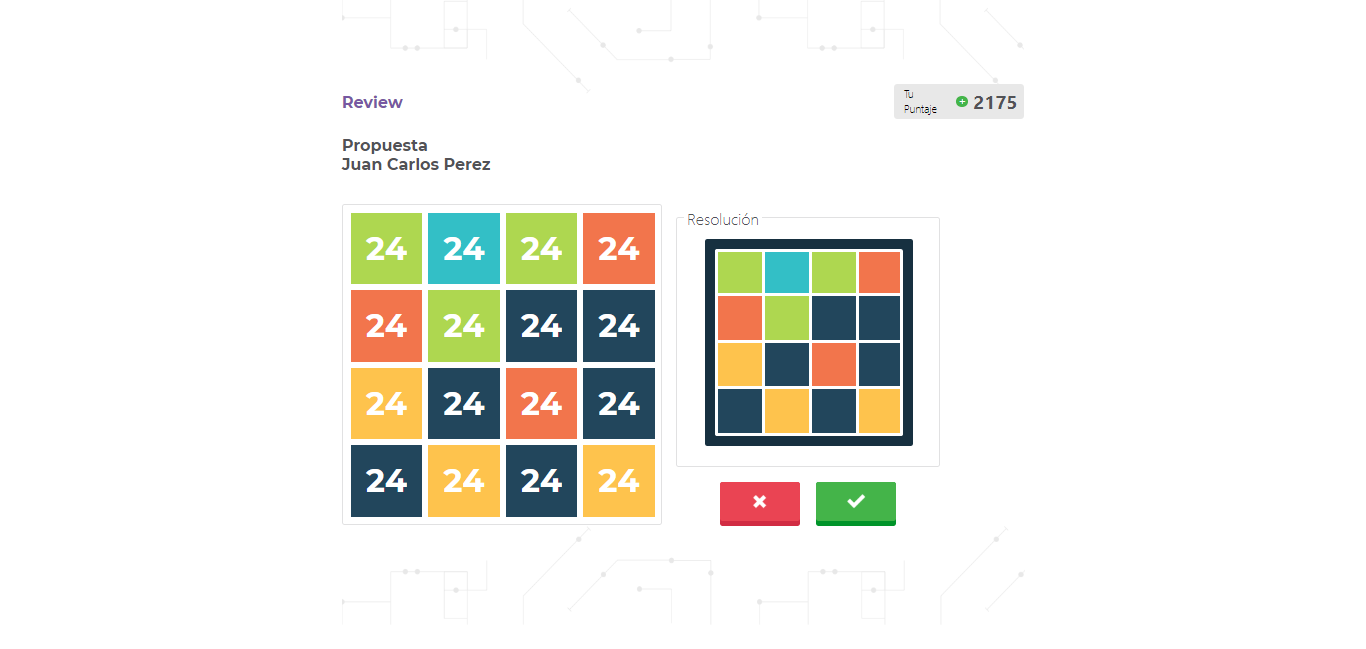
Maquete pantalla validación.
Hice pantalla de validación, coloque imágenes, hice tableros y botones.
Tuve problemas para empezar, para usar flexbox y hacer los botones.
Screenshots
InVision
https://projects.invisionapp.com/d/#/console/19366632/404500035/preview
Trello
https://trello.com/c/ZYtnjSlb/16-maquetar-pantalla-validacion