


Logo design: Moin


This repository, and README, aren't even a year old at the time of writing this, but I've learned so much about programming and C++ in that time that they are wildly out of date and not representitive of my current skill level, mental sanity, and intelligence. That being said, it is the most detailed repository I have, currently, and a near perfect preservation of my journey from script-kiddie to intermediate programmer.
When I started this journey, I had very little programming experience; a few basic Python programs (like, command-line output basic), some shell scripting, a bit of web-design, and some fun ventures in Blitz3D (which I highly recommend to anyone interested in the programming side of gamedev). Needless to say, I was in no position whatsoever to think to myself, "hmm, you know what? I want to learn C++ and OpenGL/Graphics Programming at the same exact time! Surely, nothing will go wrong". I am here to tell you I am lucky that I have autism and an autistic intrigue and passion for programming, because if I didn't, this project would have permanently died before a week's time. DO NOT DO WHAT I DID. If you want to learn something, especially learn how to make something, don't fucking jump into the deep end. You'll burn out so quickly that you'll never want to touch that thing ever again. I know this because I did just that with Blender, Unity, UE5, programming, video creation, video editing, working out, voice acting, animation, drawing, and so much more. It took years for me to pick some of those things back up, and some of them I still haven't tried since I burnt out on them. I am lucky that game engine programming just so happened to be an autistic hyperfixation of mine. That's quite literally the only thing that kept me going while essentially learning the most difficult three things you can ever learn: coding, C++, and graphics programming. Thank god I didn't try this on Windows. Oh yeah, my final word of advice: DO NOT USE WINDOWS TO LEARN HOW TO PROGRAM!!!!!! Holy fuck is Windows just the worst for beginners; Visual Studio, the Windows libraries, and shit like VisualC++ are all fucking awful for beginners. When you have to learn how to fucking open up and configure Visual Studio before even writing "Hello World!", you know there's a problem. Fuck Visual Studio, fuck solution files, fuck what it does to your beautiful project folder, fuck Microsoft and their stupid unique required libraries for executable compilation, and fuck the NT filesystem for existing. Rant over, you can all return to your desks.
I designed the Makefile to use unique variables and build rules when targeting either Windows or Linux, in an effort to isolate both architectures. When building for Linux, the Makefile will use the variables CXX, CC, CXXFLAGS, CFLAGS, INCLUDES, etc. When building for Windows, however, the Makefile uses the variables WCXX, WCC, WCXXFLAGS, WCFLAGS, WINCLUDES, etc.
My reasoning is that I wanted it to be easy for people to swap out compilers, linker flags, include locations, etc for either architecture while keeping them both separated. It feels neater and a little more modular like this (although it's probably less efficient). The way I handle embedding resources is less elegant and requires you to manually add each image/shader to an image/shader list, but I intend on changing that as soon as I've got resource embedding working on Windows, using xxd.exe.
To compile a Linux binary, you'll need:
GLFWclang&clang++make
If you don't want to use clang for whatever reason, you can change the CXX and CC variables in the Makefile. I've kept all the variables that people would most likely want/need to change at the top of the Makefile for ease of access. GraphX also relies on some headers that are only included in C++20, so don't remove the -std=c++20 from CXXFLAGS or WCXXFLAGS. If you're getting compiler errors related to std::lerp, it's probably because you're not telling the compiler to enable C++20; the way I do it is by using the -std=c++20 flag in the Makefile.
To build GraphX, just run make or make build from the root directory (the folder with the Makefile in it). If everything finishes successfully, the program will be inside the pre-existing build/ directory. Its name will be different depending on your distro, but it will always start with GraphX_Linux.
To compile a Windows executable, you'll need:
mingw-w64-gccmingw-w64-g++make
I've included all the libraries and header files needed to compile an executable on Linux using MinGW, and the Makefile is already configured to handle everything correctly, so all you need to do is run make windows from the root directory, and if it all finishes successfully, you'll find Graphx_Windows_x86_64.exe in the pre-existing build/ directory.
To compile a Windows executable, you'll need:
the grace of Godan exorcist or Catholic priestfifteen "Hail Marys"Microsoft Build ToolsCMake(this is what the exorcist/priest is for)Visual Studio- MSYS2
Previously, I was able to get GraphX compiling natively on Windows using CMake and some black magic, since I have a personal vendetta against Visual Studio. However, that came at a cost: Windows Janktm
Thankfully, there's a better way: MSYS2. MSYS2 is Cygwin's younger brother who just got his medical degree and is outshining his older brother in every way possible. MSYS2 isn't just one app, and installing it will give you a couple options that can be confusing at first. To help keep things simple, I'll make the explanation very anal.
Firstly, download and install MSYS2. In the msys64 directory, you'll find a few executables; to compile GraphX, you'll be using mingw64.exe. However, in order to set everything up in a way Windows likes, you need to install a package using msys2.exe first.
Launch msys2.exe and run the command pacman -S --needed mingw-w64-x86_64-toolchain. Now, launch mingw64.exe, and run pacman -S --needed mingw-w64-x86_64-gcc.
Congratulations! You're ready to compile GraphX on Windows! Using MINGW64, navigate to the git repository (if you need help finding your C: drive in MINGW64, it's /c/), and run make windows. If all goes well, you should see GraphX_Windows_x86_64.exe in the build/ directory.
I haven't explicitly written in support for compiling a Linux binary on Windows, but theoretically it should be possible using MINGW64 and some tweaking (like you might need to change CXX and CC from clang++ and clang to g++ and gcc). However, I haven't tested this and reccomend just using Linux to compile for Linux (why would you use Windows to do that if you have Linux, anyways?)
GraphXTheatre (also called "Theatre") files are custom files written in a custom format I created. They define the Actors and Devices contained in a Theatre, and are essentially game scenes or levels/maps. If you want to learn how to make one, check out the example files in src/theatres/, the GraphX Wiki, and if your IDE is supported, pick up some syntax highlighting!
Big shout out to LearnOpenGL, StackOverflow, and Desmos for teaching me everything I need to know.
Huge thank you to the Game Engine Black Book on DOOM, and autistic thank you to John Carmack for programming DOOM.
Kudos to sadmansk and his game engine for being a helpful reference during the first few days of this project.
Thank you to UE5 and Unity for making me annoyed, passionate, and foolish enough to say "this sucks, I dislike this, and I could do better".
Thank you to Godot for being a potentially helpful reference once I understand more about what the hell I'm doing, but mainly for being open-source, well made (mostly), and having a clear and concise chart detailing their graphics rendering pipeline.
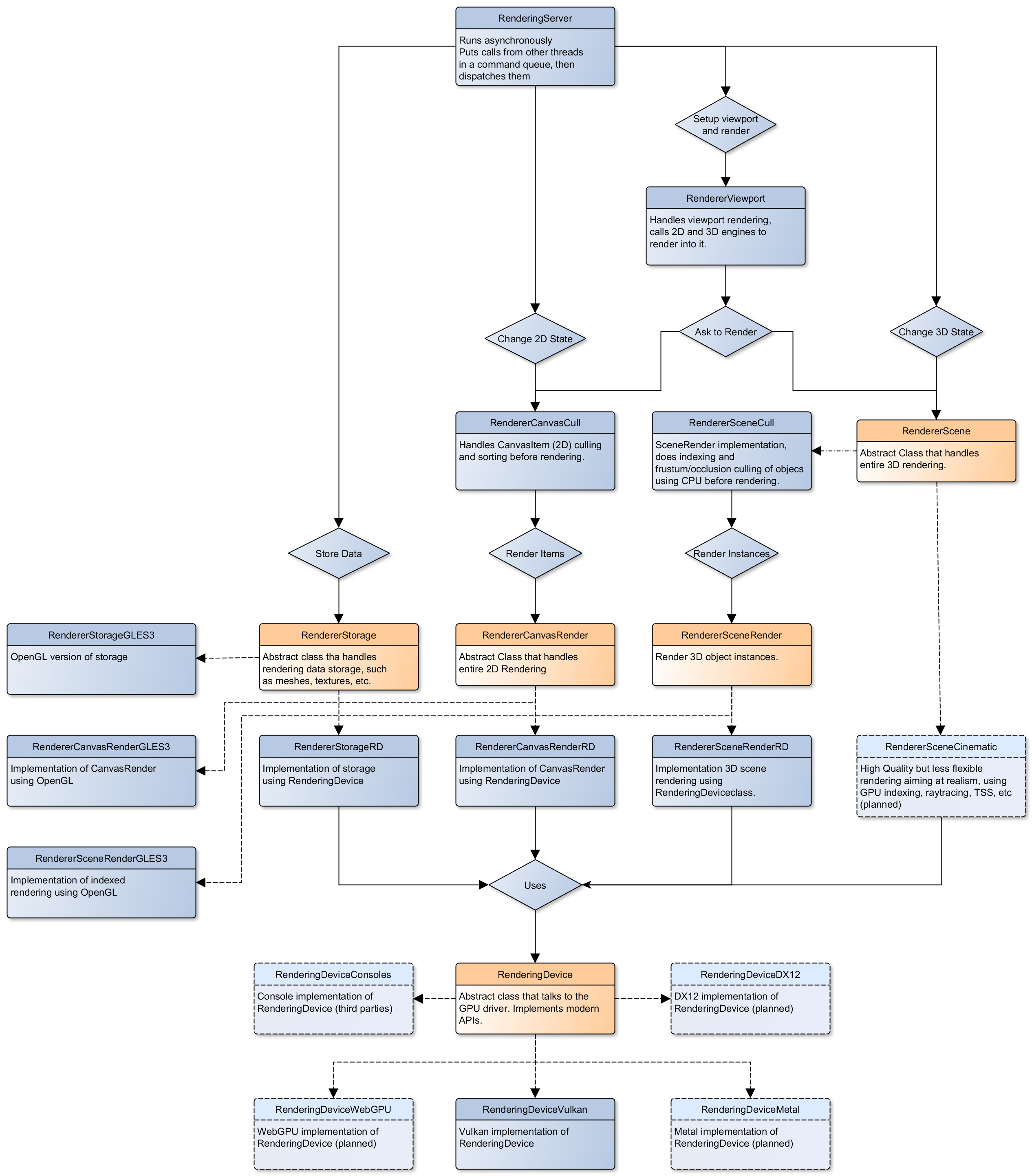
Finally, but most importantly, thank you to my dad for giving me his love of problem solving, a passion for knowledge, and "Algorithms in C: Third Edition" which is a very good read (that I have yet to finish).