
Automatic Net Content & Language Analysis (ANCLA) is a programming language that facilitates extracting and analyzing data from social media. It's main focus now is the Twitter Social Media analysis. 🐥
Features Included:
- Configurations
      -> Datalog
      -> Verbose
- Functions
      -> Print
      -> Average
- Analysis
      -> Competitiveness
      -> Lexical
      -> Sentiment
- Graphical Results
Configurations in ANCLA are a tool or medium to make your programming enviroment more comfortable, offering a variety of settings to change at your dispossal to ease the coding experience.
+ Generic Helper Setting:
Default setting that gives information of all other settings and configurations
-- help-setting
	> Gives a generic definition of the configurations or settings that can be changed in ANCLA
NULL
(see also: help-setting "verbose", help-setting "datalog")
+ Datalog Setting:
This settings indicates whether or not you want to save in a file log the output of the functions that the user is using for analysis.
-- config-datalog false
        > sets datalog to false, not letting the data collected to be stored on a log file

-- config-datalog true
       > sets datalog to true, letting the data collected on console to be saved or stored on a log file
-- BOOLEAN : true | false
(see also: help-setting "verbose", "help-setting") For related topics.
+ Verbose Setting:
This settings indicates whether or not you want to view tweets text and additional information such as like,retweets,sentiment analysis, among others on the console, depending of function outputs.
-- config-verbose false
	> sets verbose to false, doesn't let information of tweets to be shown on the console

-- config-verbose true
	> sets verbose to true, let's information of tweets to be shown on the console
-- BOOLEAN : true | false
(see also: help-setting "datalog", "help-setting") For related topics.
+ Generic Helper Function:
The help-function in ANCLA is a useful function call that displays a guide to know which functions are available. There are general descriptions to know what each function does, and several call suggestion in depth description of specific functions.
-- help-function
	> Gives a generic definition of the functions available in ANCLA
NULL
(see also: help-function "print" , help-function "average")
+ Print Function:
The print function prints a specified characteristic or all characteristics of a set of tweets.
-- print([ACTION]).VARIABLE*
        > Sample Call: print(search-tweets "Text" 100).faves
  -- Required :     ACTION speficied ACTION to retrieve tweets (i.e. search)
  -- Optional :     VARIABLE variable to print per tweet (i.e. faves)
(see also: help-function "print", "help-function") For related topics.
+ Average Function:
The average function calculates the average of all quantifiable or a specified quantifiable variable.
-- average([ACTION]).variable
	> Sample Call:
  -- Required :     ACTION speficied ACTION to retrieve tweets (i.e. search)
  -- Optional :     VARIABLE variable to print per tweet (i.e. faves)
(see also: help-function "average", "help-function") For related topics.
+ Analysis Helper Function:
The help-action in ANCLA is a useful action call that displays a guide to know which actions are available. There are general descriptions to know what each action does, and several call suggestion to more in depth description of specific actions.
-- help-action
	> Gives a generic definition of the actions or analysis available in ANCLA
NULL
(see also: help-action "analyze-sentiment" , help-action "live-sentiment")
+ Analyze Sentiment:
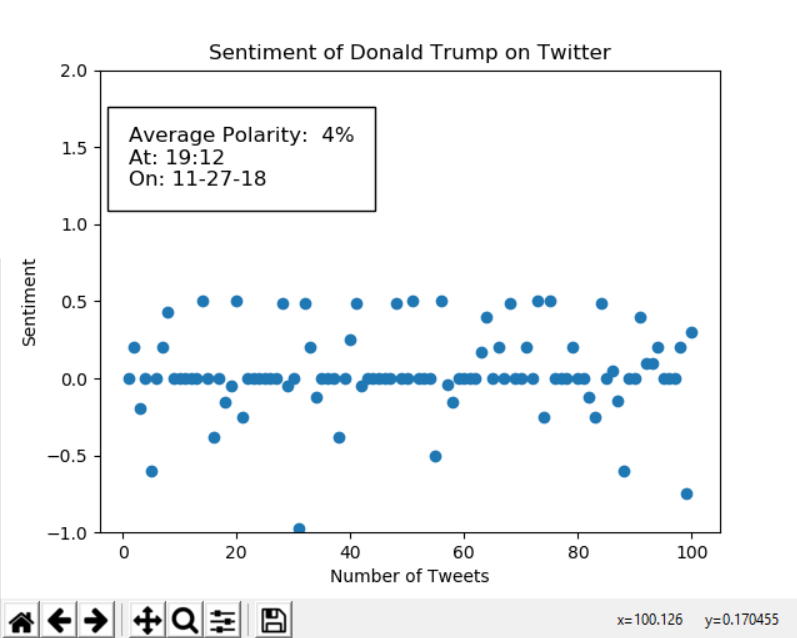
The analyze-sentiment action uses TextBlob's sentiment analysis implementation to determine the attitude of the author of a text with respect to some specified topic. The implementtion uses a polarity score, which is a float from -1 to 1. It signifies the emotion expressed in the text. It can be positive, negative or neutral. One being positive, 0 neutral, and negative -1.
-- analyze-sentiment ["STRING"] [NUMBER]* [NUMBER]*
        > Sample Call: analyze-sentiment "Donald Trump" 100 10
  -- Required :     STRING specified text to retrieve tweets that contain it
  -- Optional :     NUMBER quantity of tweets to be retrieved
  -- Optional :     NUMBER quantity of tweets per backup
(see also: help-action "analyze-sentiment", "help-action") For related topics.
+ Live Sentiment:
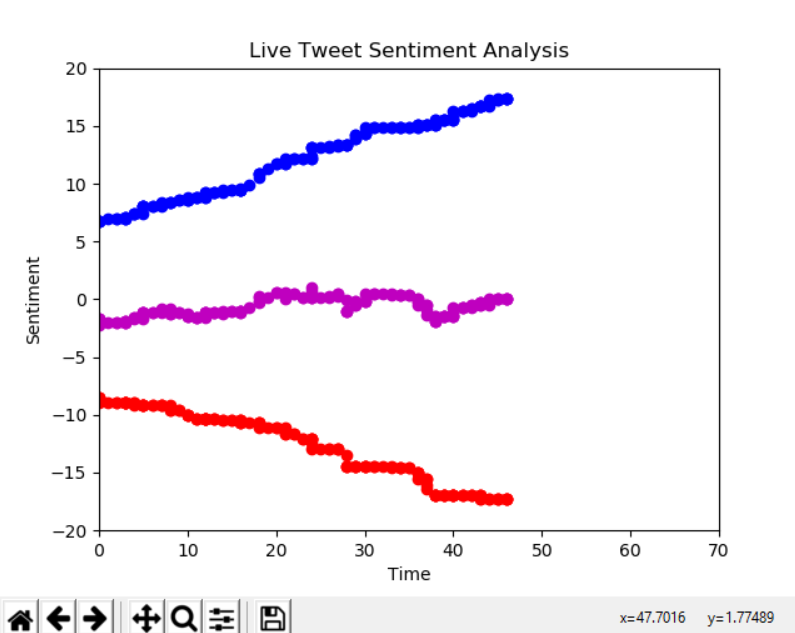
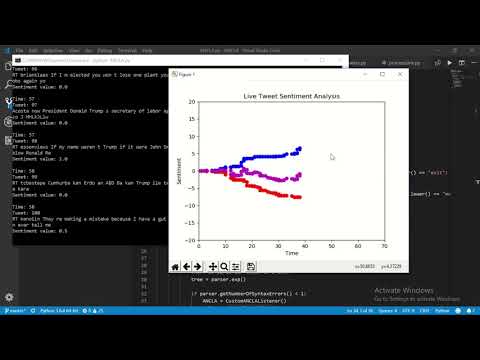
The live-sentiment action uses TextBlob's sentiment analysis implementation to determine the attitude of the author of a text with respect to some specified topic. It also uses Tweepy's live streaming API to retrieve Tweets in real time. The implementtion uses a polarity score, which is a float from -1 to 1. It signifies the emotion expressed in the text. It can be positive, negative or neutral. One being positive, 0 neutral, and negative -1.
The call generates a scatter plot of the polarity of all the tweets: positive in blue, negative in red, and the sum of both in purple.
-- live-sentiment ["STRING"] [NUMBER]* [NUMBER]* [NUMBER]*
	> Sample Call:
  -- Required :     STRING specified text to retrieve tweets that contain it
  -- Optional :     NUMBER quantity of tweets to be retrieved
  -- Optional :     NUMBER time in seconds before program stops running
  -- Optional :     NUMBER quantity of tweets per backup
(see also: help-action "live-sentiment", "help-action") For related topics.
+ Lexical Diversity:
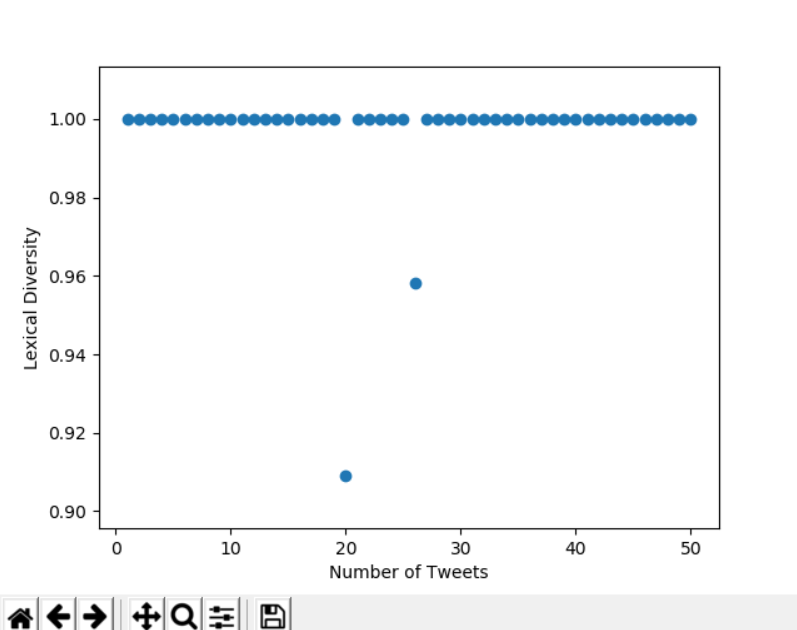
Mathematically, the lexical diversity is an expression of the number of unique tokens in the text divided by the total number of tokens in the text. Lexical Diversity is a quantitative measure of an individual's or group's vocabulary.
The call generates a scatter plot of the individual lexical diversity value of each tweet.
-- analyze-lexical ["STRING"] [NUMBER]*
	> Sample Call: analyze-lexical "Coca Cola" 50
  -- Required :     STRING specified text to retrieve tweets that contain it
  -- Optional :     NUMBER quantity of tweets to be retrieved
(see also: help-action "live-sentiment", "help-action") For related topics.
+ Competitiveness Analysis:
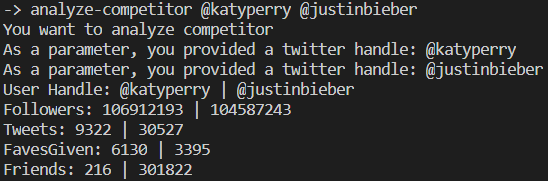
Compare the number of Followers, Tweets, Favorites and Friends of two specified Twitter users.
-- analyze-competitor @USER @USER
	> Sample Call: analyze-competitor @katyperry @justinbieber
  -- Required :     USER First Twitter user to compare
  -- Required :     USER Twitter user to compare with
(see also: help-action "analyze-competitor", "help-action") For related topics.
Watch the ANCLA Demo on YouTube
Download Link For Video Demostration:
https://drive.google.com/open?id=1TN4-eq3ZEXcOZ5yv_dySfoPuBJGQ9C8r
- The inclusion of several social media to our platform: Facebook, Instagram, etc. 💻
- The integration or adaptation of multilines of code implementation
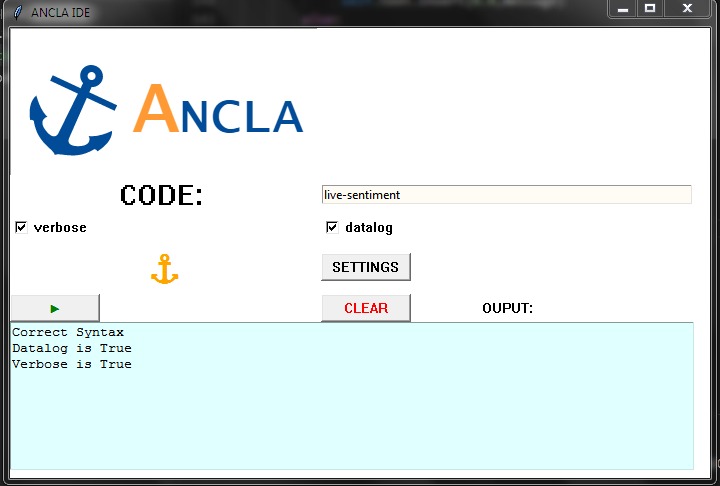
- ⚓ ANCLA IDE:
Luis F. Domenech : Lead Software Developer & DesignerChaliana Rolon : Software Developer & Business AnalystLuis R. Santiago : Project Manager & Software Developer