HareMq is an Elixir library for interacting with AMQP systems such as RabbitMQ. It provides supervised connection management, queue/exchange topology declaration, message publishing with deduplication, message consumption with automatic retry/dead-letter routing, and dynamic consumer scaling with an optional auto-scaler.
Learn the basics of HareMq and how it can simplify your interaction with AMQP systems.
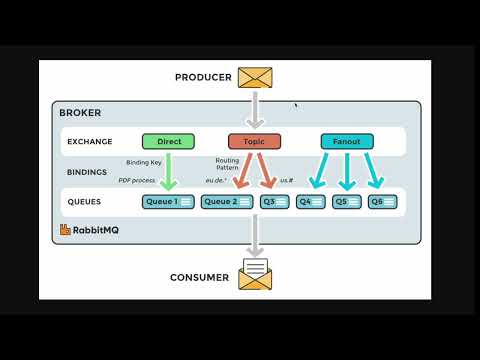
Dive deeper into the features and capabilities of HareMq with our step-by-step tutorial.

Add the dependency to your mix.exs:
defp deps do
  [
    {:hare_mq, "~> 1.4.0"}
  ]
end
HareMq starts HareMq.Connection and HareMq.DedupCache as part of its own OTP application. You do not need to start them manually — just add modules that use HareMq.Publisher or use HareMq.Consumer to your application's supervision tree.
# config/config.exs
config :hare_mq, :amqp,
  url: "amqp://guest:guest@localhost:5672"

# Optional overrides for retry/delay behaviour
config :hare_mq, :configuration,
  delay_in_ms: 10_000,       # delay before first retry (default 10 000)
  retry_limit: 15,            # retries before dead-lettering (default 15)
  message_ttl_ms: 31_449_600,    # queue message TTL in ms (default ~1 year)
  reconnect_interval_ms: 10_000  # AMQP reconnect delay (default 10 000)

# Optional auto-scaler defaults
config :hare_mq, :auto_scaler,
  min_consumers: 1,
  max_consumers: 20,
  messages_per_consumer: 10,
  check_interval_ms: 5_000
Note:
urltakes precedence overhost. Credentials embedded in the URL (amqp://user:pass@host) will appear in crash reports. Use environment variables to keep them out of source control:config :hare_mq, :amqp, url: System.get_env("RABBITMQ_URL", "amqp://guest:guest@localhost")
All configuration values are read at runtime with Application.get_env, so changes via Application.put_env in tests take effect immediately without recompilation.
defmodule MyApp.MessageProducer do
  use HareMq.Publisher,
    routing_key: "my_routing_key",
    exchange: "my_exchange"

  def send_message(message) do
    publish_message(message)
  end
end
publish_message/1 accepts a map (JSON-encoded automatically) or a binary. It returns :ok, {:error, :not_connected}, or {:error, {:encoding_failed, reason}}.
The publisher declares its exchange as durable on connect, so messages are never silently dropped even if consumers have not started yet.
defmodule MyApp.MessageProducer do
  use HareMq.Publisher,
    routing_key: "my_routing_key",
    exchange: "my_exchange",
    unique: [
      period: :infinity,   # TTL in ms, or :infinity
      keys: [:project_id]  # deduplicate by these map keys; omit for full-message hashing
    ]

  def send_message(message) do
    publish_message(message)  # returns {:duplicate, :not_published} if already seen
  end
enddefmodule MyApp.ProducerVhostA do
use HareMq.Publisher,
routing_key: "rk",
exchange: "ex",
connection_name: {:global, :conn_vhost_a}
enddefmodule MyApp.MessageConsumer do
use HareMq.Consumer,
queue_name: "my_queue",
routing_key: "my_routing_key",
exchange: "my_exchange"
def consume(message) do
IO.puts("Received: #{inspect(message)}")
:ok # return :ok | {:ok, any()} to ack, :error | {:error, any()} to retry
end
endOptions for use HareMq.Consumer:
| Option | Default | Description |
|---|---|---|
queue_name |
required | Queue to consume from |
routing_key |
queue_name |
AMQP routing key |
exchange |
nil |
Exchange to bind to |
prefetch_count |
1 |
AMQP QoS prefetch count |
retry_limit |
config / 15 |
Max retries before dead-lettering |
delay_in_ms |
config / 10_000 |
Delay before retry |
delay_cascade_in_ms |
[] |
List of per-retry delays, e.g. [1_000, 5_000, 30_000] |
connection_name |
{:global, HareMq.Connection} |
Named connection for multi-vhost use |
stream |
false |
true to consume a RabbitMQ stream queue |
stream_offset |
"next" |
Where to start reading — see Stream Consumer |
RabbitMQ stream queues are persistent, append-only logs. Unlike classic queues, messages are never removed after consumption — every consumer maintains its own read offset, making streams ideal for event-sourcing, audit logs, and fan-out replay.
Set stream: true on either HareMq.Consumer or HareMq.DynamicConsumer:
defmodule MyApp.EventLog do
  use HareMq.Consumer,
    queue_name: "domain.events",
    stream: true,
    stream_offset: "first"   # replay from the very beginning

  def consume(message) do
    IO.inspect(message, label: "event")
    :ok
  end
end| Value | Behaviour |
|---|---|
"next" |
Only messages published after the consumer registers (default) |
"first" |
Replay from the oldest retained message |
"last" |
Start from the last stored chunk |
42 |
Resume from a specific numeric offset |
%DateTime{} |
All messages published at or after the given UTC datetime |
| Classic queue | Stream queue | |
|---|---|---|
| Queue type declared | classic / quorum | x-queue-type: stream |
| Delay queue created | yes | no |
| Dead-letter queue created | yes | no |
consume_fn returns :error |
retried via delay queue | acked (stream is immutable) |
| Multiple consumers | compete for messages | each gets a full copy at its own offset |
Prerequisite: stream queues require the
rabbitmq_streamplugin to be enabled on your broker (rabbitmq-plugins enable rabbitmq_stream).
Starts a pool of consumer_count worker processes managed by a per-module DynamicSupervisor.
defmodule MyApp.MessageConsumer do
  use HareMq.DynamicConsumer,
    queue_name: "my_queue",
    routing_key: "my_routing_key",
    exchange: "my_exchange",
    consumer_count: 10

  def consume(message) do
    IO.puts("Received: #{inspect(message)}")
    :ok
  end
enddefmodule MyApp.MessageConsumer do
use HareMq.DynamicConsumer,
queue_name: "my_queue",
routing_key: "my_routing_key",
exchange: "my_exchange",
consumer_count: 2,
auto_scaling: [
min_consumers: 1,
max_consumers: 20,
messages_per_consumer: 100, # scale up 1 consumer per N queued messages
check_interval_ms: 5_000 # check every 5 s
]
def consume(message) do
:ok
end
endMultiple DynamicConsumer modules can coexist in the same node — each gets its own named supervisor (MyApp.MessageConsumer.Supervisor) and its own auto-scaler (MyApp.MessageConsumer.AutoScaler).
The HareMq.AutoScaler is a GenServer that runs alongside the consumer pool. Every check_interval_ms milliseconds it performs the following loop:
-
Sample queue depth — walks live workers
W1 → W{n}(via:globallookup) and asks the first responsive one for the current AMQP queue message count. If no worker responds it assumes depth 0 to avoid a false scale-down on transient failures. -
Calculate target — applies ceiling division:
target = ceil(queue_length / messages_per_consumer)
target = clamp(target, min_consumers, max_consumers)
So with
messages_per_consumer: 100and 350 queued messages the target is4. -
Scale up — if
target > current, startstarget - currentnew workers namedW{current+1},W{current+2}, … -
Scale down — if
target < current, gracefully removescurrent - targetworkers starting from the highest-numbered one (W{current}down). Each removal sends a:cancel_consumecall (with a 70-second timeout) to give the worker time to finish its current message. -
Reschedule — schedules the next check after
check_interval_msms.
Worker names always follow the pattern "<ModuleName>.W<n>", e.g. "MyApp.MessageConsumer.W3". This naming is stable across restarts, so the auto-scaler and supervisor always agree on which processes exist.
HareMq uses Erlang's :global distributed name registry for all long-lived processes. This has three consequences:
- Cluster-wide uniqueness — a process registered as
{:global, name}occupies that name on every node in the cluster. A secondstart_linkfor the same name returns{:ok, :already_started}instead of spawning a duplicate. - Location transparency — callers look up
{:global, name}without knowing which node hosts the PID. - Automatic failover — when the node hosting a worker goes down, the worker's supervisor (running on any remaining node) restarts it and re-registers it globally under the same name.
| Process | Registered as | Scope |
|---|---|---|
HareMq.Connection |
{:global, HareMq.Connection} or custom name |
global |
HareMq.Publisher |
{:global, MyApp.MyPublisher} |
global |
HareMq.Worker.Consumer (single) |
{:global, MyApp.MyConsumer} |
global |
HareMq.Worker.Consumer (pool worker) |
{:global, "MyApp.MyConsumer.W1"} etc. |
global |
HareMq.AutoScaler |
{:global, :"MyApp.MyConsumer.AutoScaler"} |
global |
HareMq.DedupCache |
{:global, HareMq.DedupCache} or custom name |
global |
HareMq.DynamicSupervisor |
:"MyApp.MyConsumer.Supervisor" (plain atom) |
local (per-node) |
The DynamicSupervisor is intentionally local — each node manages its own worker pool. Workers themselves are globally registered so the auto-scaler and retry machinery can find them regardless of which node they started on.
Before calling GenServer.start_link with a global name, HareMq.GlobalNodeManager.wait_for_all_nodes_ready/1 is called. On a single-node deployment it returns immediately. On a multi-node cluster it calls :global.sync/0, which blocks until the registry has been reconciled across all connected nodes. This prevents the split-brain scenario where two nodes simultaneously register the same name.
Because workers register globally, running the same DynamicConsumer module on multiple nodes results in one active worker per worker name across the whole cluster. Each node starts its own DynamicSupervisor (locally), but when W1 is started on node A, any attempt to start W1 on node B returns {:ok, :already_started} — no duplicate consumers, no double-processing.
If node A crashes, the supervisor on node B (or A after it restarts) creates a fresh W1 process and re-registers it globally. Message processing resumes from where RabbitMQ left off (unacked messages are re-queued automatically by the broker).
Node A                       Node B
──────────────────────────   ──────────────────────────
DynamicSupervisor (local)    DynamicSupervisor (local)
  └─ W1 {:global}  ◄─────── already_started, no-op
  └─ W2 {:global}  ◄─────── already_started, no-op
  └─ W3 {:global}            └─ W3 {:global}  (W3 not yet started on A)
If you want each node to run its own independent consumer pool (e.g., node-local processing, or fan-out to all nodes), use distinct module names or queue names per node:
# In your application start/2, pick a node-specific queue:
queue = "tasks.#{node()}"

children = [
  {MyApp.NodeConsumer, queue_name: queue}
]
Alternatively, define separate modules with different queue_name values for each role:
defmodule MyApp.PrimaryConsumer do
  use HareMq.DynamicConsumer, queue_name: "tasks.primary", consumer_count: 4
  def consume(msg), do: ...
end

defmodule MyApp.AuditConsumer do
  use HareMq.DynamicConsumer, queue_name: "tasks.audit", consumer_count: 1
  def consume(msg), do: ...
endHareMq relies on standard Erlang distribution. Nodes must be connected (via Node.connect/1 or the --name/--cookie VM flags) before consumers start registering globally, otherwise :global.sync/0 has no peers to synchronize with and each node registers its own copy.
A typical Kubernetes or distributed release set-up using libcluster:
children = [
  {Cluster.Supervisor, [topologies, [name: MyApp.ClusterSupervisor]]},
  # HareMq consumers start after the cluster is formed:
  MyApp.MessageConsumer,
  MyApp.MessageProducer
]defmodule MyApp.Application do
use Application
def start(_type, _args) do
children = [
MyApp.MessageConsumer,
MyApp.MessageProducer
]
opts = [strategy: :one_for_one, name: MyApp.Supervisor]
Supervisor.start_link(children, opts)
end
endStart additional named Connection (and optionally DedupCache) instances in your supervision tree, then reference them by name:
children = [
  {HareMq.Connection, name: {:global, :conn_vhost_a}},
  {HareMq.Connection, name: {:global, :conn_vhost_b}},
  MyApp.ConsumerA,   # uses connection_name: {:global, :conn_vhost_a}
  MyApp.ConsumerB,   # uses connection_name: {:global, :conn_vhost_b}
]Manages the AMQP TCP connection. Reconnects automatically on failure or broker-initiated close. Accepts an optional name: keyword in start_link/1 for multi-connection deployments.
use HareMq.Publisher, routing_key: ..., exchange: ... injects a GenServer that connects to RabbitMQ, declares its exchange on connect, and exposes publish_message/1. Supports optional deduplication via unique: and a custom connection_name: / dedup_cache_name:.
use HareMq.Consumer, queue_name: ..., exchange: ... injects a single-worker GenServer consumer with automatic retry and dead-letter routing.
use HareMq.DynamicConsumer, queue_name: ..., consumer_count: N starts a pool of N workers under a per-module HareMq.DynamicSupervisor. Supports auto-scaling via auto_scaling: [...].
Manages worker processes for a DynamicConsumer module. Each module gets a uniquely named supervisor so multiple modules can coexist. Exposes add_consumer/2, remove_consumer/2, list_consumers/1, and supervisor_name/1.
Periodically samples queue depth and scales consumer count between min_consumers and max_consumers. Registered globally as :"<ModuleName>.AutoScaler" — unique per consumer module.
ETS-backed deduplication cache. add/3 is synchronous (prevents race conditions with is_dup?/2). is_dup?/2 reads directly from ETS without going through the GenServer. Expires entries via a periodic :ets.select_delete sweep. Accepts an optional name: for multi-tenant isolation.
Handles retry routing: publishes to delay queues (with optional cascade of per-retry delays) and moves messages to the dead-letter queue after retry_limit attempts. Short-circuits immediately when the dead queue is empty during republish_dead_messages/2.
Struct + builder for per-queue runtime configuration. All default values (delay_in_ms, retry_limit, message_ttl_ms) are read from Application.get_env at call time. Accepts keys in any order.
Low-level helpers for declaring and binding exchanges and queues. Exchange type defaults to :direct but can be overridden via config :hare_mq, :exchange_type, :topic. HareMq.Queue.declare_stream_queue/1 declares a durable x-queue-type: stream queue — called automatically when stream: true is set on a consumer.
HareMq emits Telemetry events throughout its lifecycle. Attach handlers with :telemetry.attach_many/4:
:telemetry.attach_many(
  "my-app-hare-mq",
  [
    [:hare_mq, :connection, :connected],
    [:hare_mq, :connection, :disconnected],
    [:hare_mq, :connection, :reconnecting],
    [:hare_mq, :consumer, :message, :stop],
    [:hare_mq, :retry_publisher, :message, :dead_lettered]
  ],
  fn event, measurements, metadata, _config ->
    require Logger
    Logger.info("[hare_mq] #{inspect(event)} #{inspect(measurements)} #{inspect(metadata)}")
  end,
  nil
)| Event | When |
|---|---|
[:hare_mq, :connection, :connected] |
Broker connection opened |
[:hare_mq, :connection, :disconnected] |
Monitored connection process went down |
[:hare_mq, :connection, :reconnecting] |
Reconnect attempt scheduled |
| Event | When |
|---|---|
[:hare_mq, :consumer, :connected] |
Channel open and Basic.consume called |
[:hare_mq, :consumer, :message, :start] |
consume/1 callback is about to be invoked |
[:hare_mq, :consumer, :message, :stop] |
consume/1 returned; metadata includes :result (:ok/:error) and :duration |
[:hare_mq, :consumer, :message, :exception] |
consume/1 raised an exception |
The :start/:stop/:exception events follow the standard :telemetry.span contract.
| Event | When |
|---|---|
[:hare_mq, :publisher, :connected] |
Publisher channel opened |
[:hare_mq, :publisher, :message, :published] |
Message published successfully |
[:hare_mq, :publisher, :message, :not_connected] |
Publish attempted without a channel |
| Event | When |
|---|---|
[:hare_mq, :retry_publisher, :message, :retried] |
Failed message sent to a delay queue; measurements include :retry_count |
[:hare_mq, :retry_publisher, :message, :dead_lettered] |
Message exceeded retry_limit and moved to dead-letter queue |
See HareMq.Telemetry for the full measurements/metadata reference for each event.
We welcome contributions. Please write tests for any new features or bug fixes using ExUnit. Test files live under test/ and lib/ (integration tests alongside source).
mix testIntegration tests require a running RabbitMQ instance. Set RABBITMQ_URL (or RABBITMQ_HOST, RABBITMQ_USER, RABBITMQ_PASSWORD) to point at your broker:
RABBITMQ_URL=amqp://guest:guest@localhost mix testIf you enjoy using HareMq, please consider giving us a star on GitHub! Your feedback and support are highly appreciated. GitHub

