Milker is a discord bot made by me on my free time. For now, it's just a simple discord moderation bot, but I'm planning on making it bigger and adding a dashboard.
Make sure you have all the required tools installed, if so continue on with the instructions bellow.
In case you haven't yet setup the bot in Discord developers portal, follow these steps to do so.
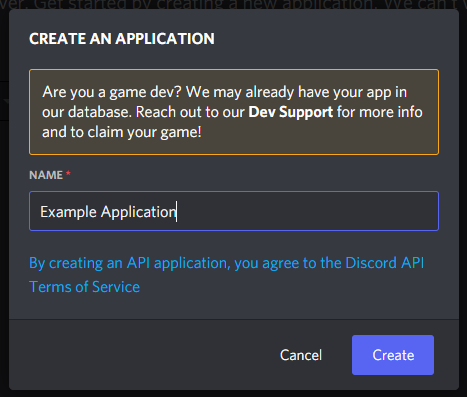
To create the application click the blue button saying 'New Application'.

Then, specify the name and click 'Create'.
To create the bot go to the section named 'Bot',

click the blue button saying 'Add Bot'

and then click 'Yes, do it!'.

After you create the bot, you can get the token by clicking 'Copy'. Do not share this token with anyone, since with it, they can do anything they want with the bot. Howewer, if your token gets out, just click the button saying 'Regenerate'.

Next, make sure 'Presence intent' and 'Server members intent' options are selected, since they are needed for the bot to work.

First, go to the section named 'OAuth2',

then, in the scopes selection, select 'bot'

and at bot permissions, select 'Administrator'.

Later, I'll see which individual permissions the bot needs, but for now, I'll just leave it at 'Administrator', since I'm still adding new features to it.
Finally, click the blue button saying Copy and enter the copied link in a new browser tab.

After that, just select the server, to which you want to add the bot, click 'Continue', and then 'Authorize'.


# Clone the repository
git clone https://github.com/Dax0s/milker-discord-bot.git

# Enter the bot directory
cd milker-discord-bot/After cloning the project, add your discord API token and specify the prefix in the config.json file.
# Start the bot by typing in the command bellow
npm run startFeel free to contact me on discord: 'Dax0s#2248'