


This repository contains a machine learning project that performs sentiment analysis on IMDB movie reviews. The project classifies reviews as either positive or negative using a Naive Bayes model.
The following diagram outlines the key steps in the machine learning pipeline:
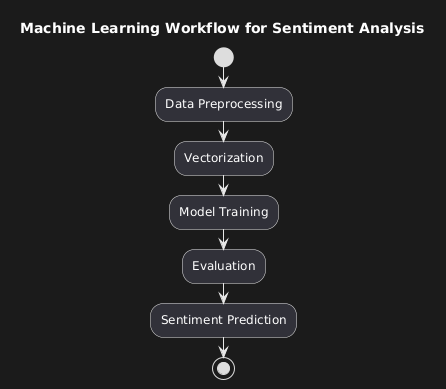
- Data Preprocessing: Converts reviews into a format suitable for model training by applying tokenization, stopword removal, and lemmatization.
- Model: Naive Bayes classifier trained with hyperparameter tuning.
- Evaluation: Model evaluated on small and large datasets, achieving an accuracy of over 84%.
- Prediction: Predicts sentiment for new movie reviews.
Important
Follow these instructions to set up and run the sentiment analysis project.
- Python 3.x installed on your local machine.
- Libraries listed in
requirements.txt.
-
Clone the repository:
git clone https://github.com/Danielkis97/Sentiment-Analysis-of-Movie-Reviews-Using-Machine-Learning.git cd Sentiment-Analysis-of-Movie-Reviews-Using-Machine-Learning -
Set up a virtual environment (optional but recommended):
-
On Windows:
python -m venv venv
venv\Scripts\activate
-
On macOS/Linux:
python3 -m venv venv
source venv/bin/activate
-
-
Install dependencies:
pip install -r requirements.txt
-
Download the dataset: The dataset used for this project is the IMDB Large Movie Review Dataset. Download it from here. After downloading, extract it into the project directory where you've placed the other NLP project files. The resulting directory structure should look like this:
project_directory/
├── train_model.py
├── predict_sentiment.py
├── data_preprocessing.py
├── load_data_big.py
├── load_data_small.py
├── requirements.txt
├── data/
│   ├── aclImdb/
│   │   ├── train/
│   │   │   ├── pos/
│   │   │   ├── neg/
│   │   ├── test/
│   │   │   ├── pos/
│   │   │   ├── neg/
- Load the Data: Before training the model, you need to load the dataset. Run one of the following commands depending on whether you want to train with a large or small dataset:
    python load_data_big.py  # For large dataset
python load_data_small.py # For small dataset- Train the Model: To train the model, run:
python train_model.py
- Predict Sentiment: To predict the sentiment of a new review, run:
python predict_sentiment.py
- train_model.py: Script for training the sentiment analysis model.
- predict_sentiment.py: Script for predicting the sentiment of new movie reviews.
- data_preprocessing.py: Script for preprocessing movie reviews (tokenization, stopword removal, lemmatization).
- load_data_big.py: Script for loading the large dataset of movie reviews.
- load_data_small.py: Script for loading the small dataset of movie reviews.
- latest_model.pkl: Trained Naive Bayes model.
- latest_vectorizer.pkl: Vectorizer for transforming text into numerical features.
- requirements.txt: List of Python dependencies required for the project.
- RESULTS.md: File containing detailed evaluation results for small and large datasets.
-
Data Loading Errors:
- Scenario: Issues with loading data or incorrect paths.
- Solution: Ensure the dataset is in the correct directory and paths are correctly specified in the scripts.
-
Model Performance Issues:
- Scenario: Lower-than-expected accuracy or incorrect predictions.
- Solution: Check data preprocessing steps and consider experimenting with different models or hyperparameters.
Detailed evaluation results, including confusion matrices and performance metrics for both small and large datasets, can be found in the Evaluation Results
The code for this project was developed using PyCharm, which offers a powerful IDE for Python development.
Happy Testing! 🚀