In this project we developed a web inspection app, implementing 2 user stories:
First User Story
A user connect to localhost:8080 using his perferred web browser, and is greeted with a GUI. The user chooses an algorithm from the drop-down table and selects a train csv file to train the model, and a test csv file to detect anomalies according to the correlations found in the train file and hits Submit. The data is sent to server, and after it has been proccessed, the detected anomalies (if any were found) are displayed on web-page.
Second User Story
A user sends an HTTP POST request to localhost:8080 that includes an algorithm, train csv file and an anomaly csv file. The server responds with a JSON including the anomaly inspection report for given files.
https://www.youtube.com/watch?v=MGTpONC_lAU
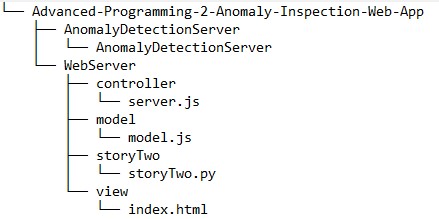
AnomalyDetectionServer - hold the c++ files for the remote anomaly server. WebServer - hold the web server files. controller - holds the web server itself. model - handles communication with the c++ server. storyTwo - holds the demo for user story 2. view - holds the HTML presentation for the web server.
** Please note - this project is meant to be run on Linux **
- Your IDE of choise (we used Visual Studio Code).
- node.js (version 12 or later).
- npm (Node Package Manager).
- python 3.
Installation instructions for node.js and npm: In a terminal, run the following commands:
$ sudo apt-get update
$ sudo apt-get install nodejs
$ sudo apt-get install npm
Make sure the installation finished successfully by running:
$ nodejs -v
$ npm -v
(make sure you have Node version 12 or newer)
Now, navigate to the folder /WebServer/controller (make sure the package.json file exists in there), and run:
$ npm -ito install the required node packages.
How to run the program:
- In a terminal, navigate to AnomalyDetectionServer/ and compile the c++ files by running:
$ g++ -std=c++11 -pthread *.cpp -o AnomalyDetectionServeror use the provided cmakelists.txt with cmake on VS Code.
- Run the executable, by running:
$ ./AnomalyDetectionServer- Navigate to /WebServer/controller and start the web-server by running:
$ node server.js- Run the provided storyTwo.py file to check user story 2, or open a web browser at localhost:8080 to check user story 1.
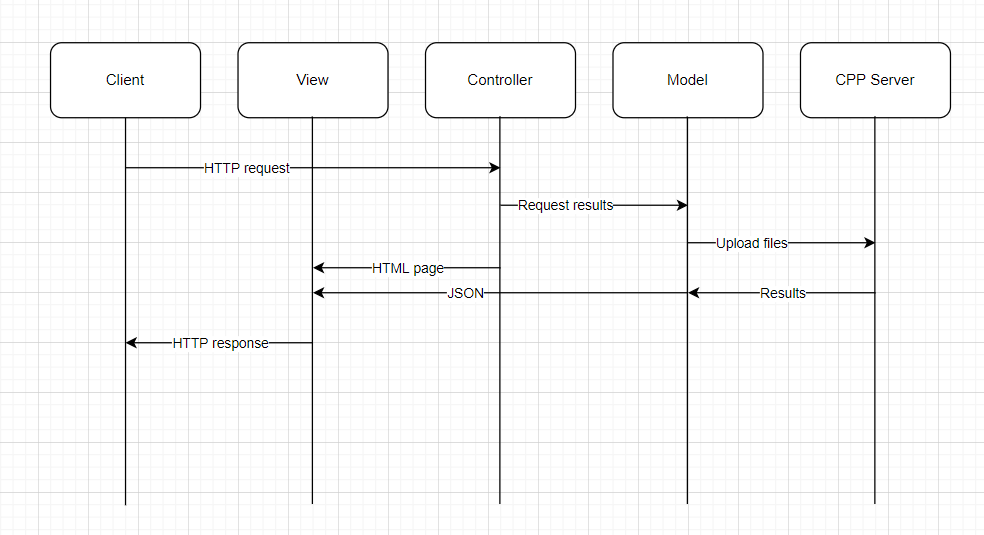
In our project we used the MVC architecture in order to make everything work.
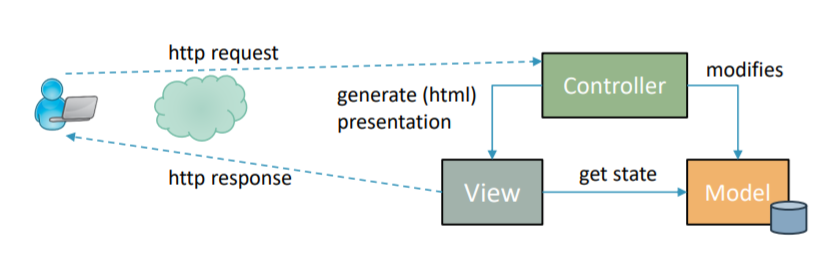
The MVC architectural pattern in web application is divided to three parts: View: responsiple for the visual display of the data to the user. Controler: manages between the View and the Model. Model: contains the algoritim to proccess the data for displaying. The order of the communication between the client and the web application:
- The client request http request from the Controler.
- The Controler pass the request to the Model.
- The Controler generates presentation for the View.
- The View gets the state from the Model.
- The View returns the HTTP response to the client.