Agentify is an intelligent orchestration platform designed to manage and coordinate multiple AI agents. It leverages OpenAI's GPT model to facilitate seamless interaction between agents and their tools, offering a dynamic environment for complex task execution.
- Features
- Installation
- Backend Structure
- Agent & Tool Format
- Configuration
- Usage
- Contributing
- License
- Agent Creation: Dynamically create AI agents with specific contexts and toolsets.
- Orchestration: Execute complex workflows by delegating tasks to various agents.
- Tool Integration: Easily extend agent capabilities with custom tools.
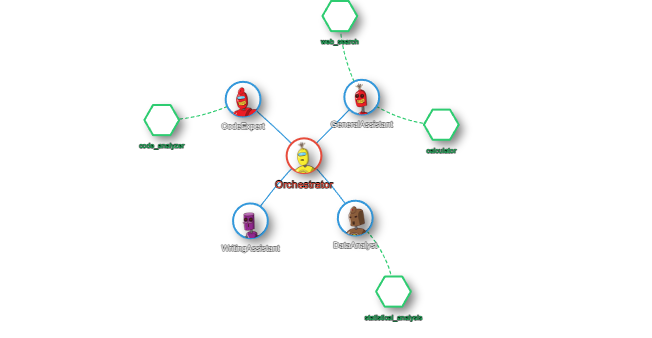
- Visualization: Visualize agent networks and interactions in real-time.
To get started with Agentify, follow these steps:
git clone https://github.com/corzed/agentify.git
cd agentify
pip install -r requirements.txt
cp .env.example .env
Ensure you set up your .env file with the appropriate environment variables, including your OpenAI API key.
Organized as follows:
backend/
│
├── agents/             # Folder for storing agent configuration files
│   ├── agent1.json
│   └── agent2.json
│
├── tools/              # Folder for storing tool scripts
│   ├── tool1.py
│   └── tool2.py
│
├── app.py              # Main Flask application
├── requirements.txt    # Python dependencies
└── .env.example        # Example environment variables
Each agent is represented by a JSON file stored in the agents/ directory. The file defines the agent's name, context, and associated tools.
Example: agents/agent1.json
{
    "name": "Agent1",
    "context": "This is the context for Agent1.",
    "tools": ["tool1", "tool2"]
}- name: The agent's name.
- context: The initial context or background information for the agent.
- tools: A list of tools available to the agent.
Tools are Python scripts located in the tools/ directory. Each tool should define a tool dictionary with at least a description and a function key.
Example: tools/tool1.py
tool = {
    "description": "This tool processes data and returns results.",
    "function": lambda data: f"Processed {data}"
}- description: A brief description of what the tool does.
- function: A callable that performs the tool's operation.
The main configurations are handled through the .env file:
- OPENAI_API_KEY: Your OpenAI API key.
- GPT_MODEL: The GPT model to be used (e.g.,
gpt-4o-mini).
To start the Agentify server, run:
python app.pyThis will start the Flask server with SocketIO enabled for real-time communication.
Agents can be added in real time on the website, or added/modified by updating the respective JSON files in the agents/ directory and Python scripts in the tools/ directory. The server will not automatically recognize these changes and will require a restart though.
Once the agents are created and active, you can visualize the network of agents, orchestrators, and tools in real-time.
Contributions are welcome! Please follow these steps:
- Fork the repository.
- Create a new branch (
git checkout -b feature-branch). - Make your changes.
- Commit your changes (
git commit -m 'Add some feature'). - Push to the branch (
git push origin feature-branch). - Open a pull request.
This project is licensed under the MIT License. See the LICENSE file for more details.