


Full code documentation available at

See LATEST RELEASE for available binary packages or join iOS TestFlight Betas:
| Mema.Mo Testflight | Mema.Re Testflight |
|---|---|
 |
 |
| Appveyor CI build status | Mema | Mema.Mo | Mema.Re |
|---|---|---|---|
| macOS Xcode | |||
| Windows Visual Studio | |||
| Linux makefile |
- Introduction
- How to build the tools
- Usecase: Studio sidecar monitoring
- Usecase: Mobile recording monitoring
- Usecase: ADM-OSC driven external panning control
- Architecture
Mema (MenubarMatrix) is a project initially created to try out JUCE C++ framework capabilities for creation of a macOS menubar tool, that provides audio matrix routing functionality - e.g. to route BlackHole 16ch virtual device to system output to enable flexible application and OS audio output routing to connected audio devices.
The tool has since evolved to full IO metering, IO mute and crosspoint enabled/gain processing. The UI per default can be opened from the macOS menubar or Windows notifcation area and can be toggled to open as a standalone permanent OS window. The appearance can be customized (coloring, dark/light mode) and the audio UI device configuration can be configured to match the usecases needs. On top of that, dedicated performance metering is visible on the UI - regaring audio processing load as well as regarding network traffic load for data transmission to connected metering and control clients.
Optionally the loading of an audio processing plug-in is supported to process the incoming audio before or after ('Post' UI toggle) it is fed into the routing matrix. Platform dependant, the usual VST, VST3, AU, LADSPA, LV2 plug-in formats are supported and their respective editor user interfaces can be used as a separate window. A usecase for this is an n-input to m-output upmix plug-in that, in combination with e.g. BlackHole, can serve to process stereo macOS system audio output to a 7.1.4 speaker system.
It is accompanied by a separate tool Mema.Mo (MenubarMatrixMonitor) to monitor the audio IO as levelmeters via network. It connects to Mema through a TCP connection and supports discovering the available instances through a multicast service announcement done by Mema. This supports different monitoring visualizations
- IO Meterbridge
- Studio speaker layout 2D field metering: LRS up to 9.1.6 ATMOS layouts
- Waveform plot
Also part of the project is another tool Mema.Re (MenubarMatrixRemote) to remote control the input, output and crosspoint parameters of Mema instances and connects through the same TCP server as Mema.Mo. It supports two different control approaches
- Faderbank mixer (single input to multiple output or multiple input to single output style)
- 2D field panning: LRS up to 9.1.6 ATMOS layouts
The sourcecode and prebuilt binaries are made publicly available to enable interested users to experiment, extend and create own adaptations.
Use what is provided here at your own risk!


ADM-OSC external control is affecting the 2D soundfield panning function in Mema.Re.
Currently only the cartesian coordinate control parameters are supported for panning control.

| Supported ADM-OSC parameter | address | type | range | Info |
|---|---|---|---|---|
| x coordinate | /adm/obj/n/x | f | -1.0f ... 1.0f | Horizontal panning position. |
| y coordinate | /adm/obj/n/y | f | -1.0f ... 1.0f | Vertical panning position. |
| z coordinate | /adm/obj/n/z | f | -1.0f ... 1.0f | Panning layer definition. Relevant for panning formats with a height layer, e.g. 5.1.2, 7.1.4, 9.1.6. Values above 0.5 are associated with height elevated outputs, values below with regular positioned outputs. |
| xy coordinate | /adm/obj/n/xy | f f | -1.0f ... 1.0f | Combined horizontal and vertical panning position. |
| xyz coordinate | /adm/obj/n/xyz | f f f | -1.0f ... 1.0f | Combined horizontal and vertical panning position and height layer association. |
| width | /adm/obj/n/w | f | 0.0f ... 1.0f | Associated with panning sharpness value. |
| mute | /adm/obj/n/mute | i | 0 ... 1 | Input mute. |
Mema and Mema.Mo are based on JUCE C++ framework, which is a submodule of this repository.
JUCE's Projucer tool can either be used from a local installation or from within the submodule (submodules/JUCE/extras/Projucer).
Mema Projucer project file can be found in repository root directory.
In macOS buildscripts, shellscripts for automated building of the app, dmg and notarization are kept. These require a properly prepared machine to run on (signing certificates, provisioning profiles, notarization cretentials).
In Windows buildscripts, bash scripts for automated building of the app and installer (Innosetup based) are kept. These require a properly prepared machine to run on (innosetup installation).
In Linux buildscripts, shell scripts for automated building of the app are kept. These are aimed at building on Debian/Ubuntu/RaspberryPiOS and TRY to collect the required dev packages via apt packetmanager automatically.
Mema.Mo Projucer project file can be found in /MemaMo subdirectory .
In macOS buildscripts, shellscripts for automated building of the app, dmg and notarization are kept. These require a properly prepared machine to run on (signing certificates, provisioning profiles, notarization cretentials).
In iOS buildscripts, shellscripts for automated building of the app and updloading to the appstore are kept. These require a properly prepared machine to run on (appstore cretentials).
In Windows buildscripts, bash scripts for automated building of the app and installer (Innosetup based) are kept. These require a properly prepared machine to run on (innosetup installation).
In Linux buildscripts, shell scripts for automated building of the app are kept. These are aimed at building on Debian/Ubuntu/RaspberryPiOS and TRY to collect the required dev packages via apt packetmanager automatically.
Mema.Re Projucer project file can be found in /MemaRe subdirectory .
In macOS buildscripts, shellscripts for automated building of the app, dmg and notarization are kept. These require a properly prepared machine to run on (signing certificates, provisioning profiles, notarization cretentials).
In iOS buildscripts, shellscripts for automated building of the app and updloading to the appstore are kept. These require a properly prepared machine to run on (appstore cretentials).
In Windows buildscripts, bash scripts for automated building of the app and installer (Innosetup based) are kept. These require a properly prepared machine to run on (innosetup installation).
In Linux buildscripts, shell scripts for automated building of the app are kept. These are aimed at building on Debian/Ubuntu/RaspberryPiOS and TRY to collect the required dev packages via apt packetmanager automatically.
The build scripts build_MemaMo_RaspberryPIOS.sh/build_MemaRe_RaspberryPIOS.sh in Resources/Deployment/Linux can be used on a vanilla installation of RaspberryPi OS to build the tool.
On RaspberriPi 3B it is required to run the build without graphical interface, to avoid the build failing due to going out of memory (e.g. sudo raspi-config -> System Options -> Boot -> Console Autologin).
The build result can be run in kind of a kiosk configuration by changing the system to not start the desktop session when running Xserver, but instead run Mema.Mo/Mema.Re directly in the X session. To do this, edit or create .xsession in user home and simply add a line
exec <PATH_TO_REPO>/Mema/MemaMo/Builds/LinuxMakefile/build/MemaMo
# or
exec <PATH_TO_REPO>/Mema/MemaRe/Builds/LinuxMakefile/build/MemaRe
Then configure the system to auto login to x session (e.g. sudo raspi-config -> System Options -> Boot -> Desktop Autologin).
This does only work when using X server as graphics backend. Using Wayland requires differing approaches.


- Mema on macOS
- BlackHole 16ch used to route signal from LogicPro, Apple Music, etc. to Mema
- Output to Allen&Heath QU-16 22ch audio driver interface
- Mema.Mo on DIY 19" rack display, based on RaspberryPi (32bit RaspberryPiOS, Bullseye)
- 16 audio input channel metering visible
- 22 audio output channel metering visible

- Mema on macOS
- BlackHole 16ch used to route signal from LogicPro, Apple Music, etc. to Mema
- Output to stereo audio driver interface
- Mema.Mo on iPadOS in Stagemanager mode
- 16 audio input channel metering visible
- 2 audio output channel metering visible
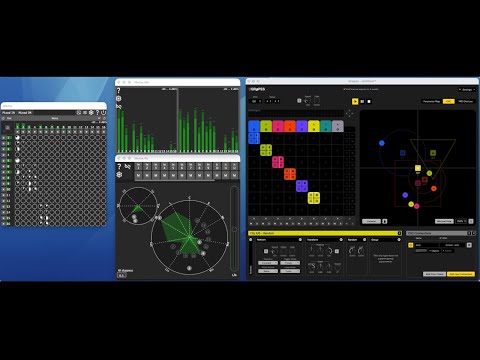
- Mema on macOS
- BlackHole 16ch used to route signal from macOS to Mema
- Output to multichannel interface, driving a 9.1.6 ATMOS immersive speaker setup
- Mema.Mo on macOS
- Meterbridge mode
- 16 audio input channel metering visible
- 16 audio output channel metering visible
- Mema.Re on macOS
- 9.1.6 panning layout active
- 16 input panning positions visible, 1-4 active in regular panning layer, 5-6 active in height panning layer
- Grapes on macOS
- Set up to control panning positions in Mema.Re via ADM-OSC
- Clips 1-4 configured to control ADM-OSC objects 1-4 with Z=0 -> Mema.Re regular panning layer
- Clips 5-6 configured to control ADM-OSC objects 5-6 with Z=1 -> Mema.Re height panning layer
flowchart LR
    subgraph mema["Mema — Audio Matrix Server"]
        subgraph mema_audio["Audio Engine"]
            audio_dev["Audio Device I/O"]
            matrix["Routing Matrix & Mutes"]
            pluginhost["Plugin Host\nVST / AU / LV2"]
            analyzers["Input & Output Analyzers"]
        end
        subgraph mema_net["Network"]
            tcp_srv["TCP Server :55668"]
            svc_srv["Multicast Discovery"]
        end
    end

    subgraph memo["Mema.Mo — Monitor"]
        subgraph memo_net["Connection"]
            mo_disc["Multicast Discovery"]
            mo_sock["TCP Client"]
        end
        subgraph memo_viz["Visualization"]
            mo_anlz["Local Analyzer"]
            mo_meter["Meterbridge"]
            mo_2d["2D Field Output"]
            mo_wave["Waveform"]
            mo_spect["Spectrum"]
        end
    end

    subgraph mere["Mema.Re — Remote Control"]
        subgraph mere_net["Connection"]
            re_disc["Multicast Discovery"]
            re_sock["TCP Client"]
        end
        subgraph mere_ctrl["Controls"]
            re_fader["Faderbank Control"]
            re_pan["2D Panning Control"]
            re_plugin["Plugin Parameter Control"]
            re_osc["ADM-OSC Receiver"]
        end
    end

    audio_dev --> matrix
    matrix --> pluginhost
    matrix --> analyzers
    analyzers --> tcp_srv
    tcp_srv --> svc_srv

    mo_disc --> mo_sock
    mo_sock --> mo_anlz
    mo_anlz --> mo_meter
    mo_anlz --> mo_2d
    mo_anlz --> mo_wave
    mo_anlz --> mo_spect

    re_disc --> re_sock
    re_sock --> re_fader
    re_sock --> re_pan
    re_sock --> re_plugin
    re_osc --> re_pan

    mo_sock -- TCP --> tcp_srv
    re_sock -- TCP --> tcp_srv
Mema is the core tool, providing matrix processing, a popup-style UI and tcp server for clients to connect and monitor/control data:
MemaProcessordrives audio I/O via JUCEAudioDeviceManager, applying per-channel input/output mutes and a full crosspoint gain matrix- An optional plugin (VST/VST3/AU/LADSPA/LV2) can be inserted pre- or post-matrix; each plugin parameter can be individually marked as remotely controllable with a configurable control type (
Continuous,Discrete,Toggle) ProcessorDataAnalyzer(one per direction) performs peak/RMS/hold metering and FFT spectrum analysis at ~10 ms intervalsInterprocessConnectionServerImplserves multiple simultaneous TCP clients on port 55668;ServiceTopologyManagerannounces the server via multicast- Network protocol messages include:
ControlParametersMessage,AudioInputBufferMessage/AudioOutputBufferMessage,PluginParameterInfosMessage,PluginParameterValueMessage
Mema.Mo is the monitoring client:
- Discovers Mema via multicast and opens a persistent TCP socket to receive streaming audio output buffers
- Received buffers are fed into a local
ProcessorDataAnalyzerreplica for level and spectrum computation - Four pluggable visualization components subscribe to the analyzer:
MeterbridgeComponent,TwoDFieldOutputComponent(LRS up to 9.1.6 ATMOS layouts),WaveformAudioComponent, andSpectrumAudioComponent
Mema.Re is the remote control client:
- Discovers Mema via multicast and opens a persistent TCP socket
- Receives a full
ControlParametersMessagestate snapshot on connect, then sends updated snapshots on user interaction - Three control modes:
FaderbankControlComponent(input×output crosspoint sliders/mutes),PanningControlComponent(interactive 2D spatial field backed byTwoDFieldMultisliderComponent), andPluginControlComponent(per-parameter controls rendered dynamically as slider, combo box, or toggle button based onParameterControlType) ADMOSControllerlistens for ADM-OSC UDP packets (x/y/z/width/mute per object) and feeds them directly into the panning control
flowchart LR
    adm["AudioDeviceManager\n(JUCE)"]
    cfg["MemaAppConfiguration\n(XML)"]

    subgraph proc["MemaProcessor"]
        in_mutes["Input Mutes"]
        xp["Crosspoint Matrix\ngains & enables"]
        out_mutes["Output Mutes"]
        plugin["Plugin Host\nVST / AU / LV2\n(optional, pre or post matrix)"]
        in_anlz["Input Analyzer\npeak · RMS · hold · FFT"]
        out_anlz["Output Analyzer\npeak · RMS · hold · FFT"]
    end

    subgraph ui["MemaProcessorEditor"]
        in_ctrl["InputControlComponent"]
        xp_ctrl["CrosspointsControlComponent"]
        out_ctrl["OutputControlComponent"]
        plug_ctrl["PluginControlComponent\n(load · pre/post · param types)"]
        meter["MeterbridgeComponent"]
    end

    subgraph net["Network"]
        tcp["InterprocessConnectionServerImpl\n:55668"]
        disc["ServiceTopologyManager\n(multicast)"]
    end

    adm -->|audio in| in_mutes
    in_mutes --> xp
    xp --> out_mutes
    out_mutes -->|audio out| adm
    xp -.- plugin

    in_mutes --> in_anlz
    out_mutes --> out_anlz

    in_anlz --> in_ctrl
    in_anlz --> meter
    out_anlz --> out_ctrl
    out_anlz --> meter
    xp --> xp_ctrl
    plug_ctrl --> plugin

    xp -->|state & audio buffers| tcp
    tcp --> disc

    cfg -.- proc
flowchart TD
    multicast[/"Mema Multicast Announcement"/]
    mema_srv[/"Mema TCP Server :55668"/]

    subgraph app["Mema.Mo Application"]
        cfg["MemaMoAppConfiguration\n(XML)"]
        main["MainComponent\n(state machine:\nDiscovering → Connecting → Monitoring)"]

        subgraph connection["Discovery & Connection"]
            disc_comp["MemaClientDiscoverComponent"]
            conn_comp["MemaClientConnectingComponent"]
            sock["InterprocessConnectionImpl\n(TCP client)"]
        end

        subgraph monitor["MemaMoComponent"]
            anlz["ProcessorDataAnalyzer\n(local replica)\npeak · RMS · hold · FFT"]

            subgraph viz["Visualization (switchable)"]
                meter2["MeterbridgeComponent\n(level meters)"]
                field["TwoDFieldOutputComponent\n(2D spatial: LRS to 9.1.6 ATMOS)"]
                wave["WaveformAudioComponent"]
                spect["SpectrumAudioComponent"]
            end
        end
    end

    multicast -->|discovery| disc_comp
    disc_comp -->|selected service| conn_comp
    conn_comp --> sock
    sock <-->|TCP| mema_srv
    sock -->|AudioOutputBufferMessage\nAnalyzerParametersMessage\nEnvironmentParametersMessage| anlz
    anlz --> meter2
    anlz --> field
    anlz --> wave
    anlz --> spect
    cfg -.- main
    main --> disc_comp
flowchart TD
    multicast[/"Mema Multicast Announcement"/]
    mema_srv[/"Mema TCP Server :55668"/]
    ext_ctrl[/"External Controller\n(e.g. Grapes)\nADM-OSC UDP"/]

    subgraph app["Mema.Re Application"]
        cfg["MemaReAppConfiguration\n(XML)"]
        main["MainComponent\n(state machine:\nDiscovering → Connecting → Controlling)"]

        subgraph connection["Discovery & Connection"]
            disc_comp["MemaClientDiscoverComponent"]
            conn_comp["MemaClientConnectingComponent"]
            sock["InterprocessConnectionImpl\n(TCP client)"]
        end

        subgraph remote["MemaReComponent"]
            subgraph modes["Control Modes (switchable)"]
                fader["FaderbankControlComponent\ninput x output crosspoint sliders & mutes"]
                pan["PanningControlComponent\n+ TwoDFieldMultisliderComponent\n(LRS to 9.1.6 ATMOS)"]
                plug["PluginControlComponent\nslider / combobox / toggle\nper ParameterControlType"]
            end
            admosc["ADMOSController\n(ADM-OSC UDP)\nx · y · z · width · mute per object"]
        end
    end

    multicast -->|discovery| disc_comp
    disc_comp -->|selected service| conn_comp
    conn_comp --> sock
    sock <-->|TCP| mema_srv
    sock -->|ControlParametersMessage\nPluginParameterInfosMessage| fader
    sock -->|ControlParametersMessage\nPluginParameterInfosMessage| pan
    sock -->|PluginParameterInfosMessage| plug
    fader -->|ControlParametersMessage| sock
    pan -->|ControlParametersMessage| sock
    plug -->|PluginParameterValueMessage| sock
    ext_ctrl -->|OSC UDP| admosc
    admosc -->|position & mute updates| pan
    cfg -.- main
    main --> disc_comp