Full Stack Project with MySQL that explains the functionalities of a credit card
Welcome to the Interactive Credit Card Simulator Web application, created with Python Flask, MySQL, JavaScript, HTML, and CSS, offers a unique, real-time experience in managing credit card transactions. This simulator is designed to demonstrate the intricacies of credit card operations, providing users with a hands-on understanding of various transaction types and their impact on credit card balances.
Upon launching the application, users are prompted to select a profile from a MySQL database. This profile selection sets the stage for personalized interaction with the credit card interface.

Once a profile is chosen, the Credit Card Interface appears. This interface is where the credit card information is placed. It accurately represents real-life credit card functionalities.

Alongside the credit card interface, users are shown items pulled from our items database. This feature simulates a shopping experience, allowing users to make purchases and see the direct effect on their virtual credit card.
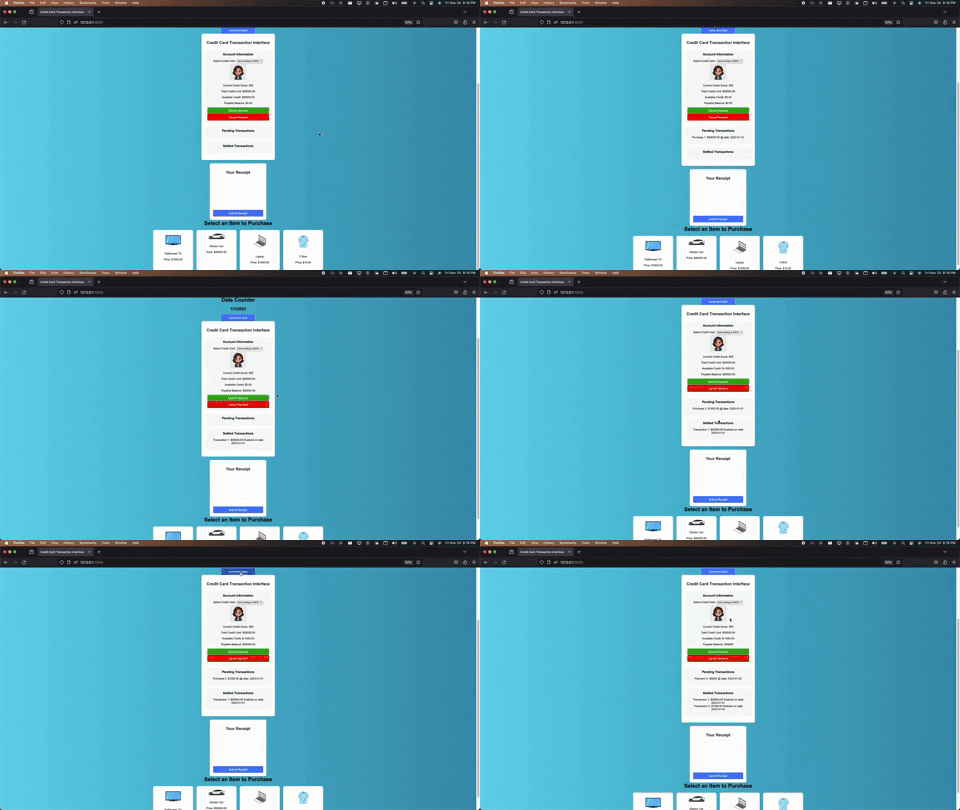
The receipt panel provides users with a view of their transactions.
Authorize a new Transaction. This decreases the Available Credit but does not change the payable balance.
- Send Request: From the client to the server using 'POST' with input as (userID, cardId, current date).
- Authenticate & Authorize: Verify user's identity and authorization to perform a transaction.
- Note: Implementation of Token-Based Authentication is pending.
- Validate Input: Ensure input is valid and within acceptable limits.
- Record Creation: Create a new transaction record in the database with a unique transaction ID in a Pending State.
- Currency Conversion: If needed, convert local currency at a specific exchange rate.
- Adjust Credit: Adjust the Available Credit by the Transaction Amount.
- Return Response: Provide a response of Pending Transactions and Available Credit.
Finalize a Transaction, increase Payable Balance, and decrease Available Credit if the settled amount differs from the authorization amount.
- Send Request: From the client to the server using 'POST' with input as (userId, pending transactions).
- Validate Transaction: Check transactionID exists and is in a state that can be settled.
- Transaction Details: Find Initial Amount & CardID for the specific transaction.
- Verify Funds: Check if sufficient credit is available.
- Note: Implementation of a warning for low credit is pending.
- Adjust Credit: Update Available Credit if initial amount differs from settled amount.
- Increase Balance: Increase Payable Balance by the settled amount.
- Update Status: Change the Transaction status to 'settled'.
- Return Response: Provide updated Available Credit, Payable Balance, and Finalized Transactions.
Clears an Authorized Transaction, releasing a hold on funds and increasing the Available Credit back to its previous state.
- Send Request: From the client to the server using 'POST' with input as (userID, transactions being cleared).
- Validate Transaction: Check transactionID exists and is in a state that can be cleared.
- Transaction Details: Find amount & cardID of the specific transaction.
- Restore Credit: Increase Available Credit by the Transaction amount.
- Update Status: Change the Transaction Status to 'cleared'.
- Return Response: Provide updated Cards' Available Credits.
Represents the initiation of a payment towards the card's balance, decreasing the payable balance but not immediately affecting the available credit.
- Send Request: From the client to the server using 'POST' with input as (userID, cardId, current date).
- Authenticate & Authorize: Verify user's identity and authorization.
- Validate Input: Ensure input is valid and within acceptable limits.
- Record Creation: Create a new payment record in the database with a unique ID in a Pending State.
- Currency Conversion: If needed, convert local currency at a specific exchange rate.
- Decrease Balance: Decrease the Payable Balance by the Payment Amount.
- Return Response: Provide a response of Pending Payments and Available Credit.
Finalizes a payment and increases the available credit. This occurs one day after the payment is sent as pending.
- Send Request: From the client to the server using 'POST' with input as (userId, pending payments).
- Validate Payment: Check ID exists and is in a state that can be posted.
- Payment Details: Find Payment Amount & CardID of the specific Payment.
- Increase Credit: Increase Available Credit by the initial amount of Payment.
- Update Status: Change the Payment status to 'posted'.
- Return Response: Provide updated Available Credit, and Finalized Payments.
Cancel a Payment before it posts, restoring the Payable Balance to its previous state.
- Send Request: From the client to the server using 'POST' with input as (userID, payments being canceled).
- Validate Payment: Check ID exists and is in a state that can be canceled.
- Payment Details: Find amount & cardID of the specific transaction.
- Restore Balance: Decrease Payable Balance by the Payment amount.
- Update Status: Change the Payment Status to 'canceled'.
- Return Response: Provide updated Cards' Payable Balances.
Before you begin, ensure you have the following installed:
- Python (3.x or later)
- MySQL Server
- pip (Python package manager)
-
Clone the repository to your local machine. git clone https://github.com/Castro19/CreditCard-Project.git
-
Install the required Python packages. pip install -r requirements.txt
- Start your MySQL server.
- Create a new database for the application called
credit_card_simulator - Import the initial schema located in SQL/DDL
- Input the Values located in SQL/DDL
- Create config.py in the root directory, as: class Config: SQLALCHEMY_DATABASE_URI = 'mysql+pymysql://[username]:[password]@localhost/credit_card_simulator'
-
More Credit Card Functionalities: AUTH Cleared Refunds Payment Cancelled ...
-
API Integration to Summarize how each transaction might affect the credit score
-
A more normalized structure for my database system including relational tables Receipts & ReceiptItems for extra practice (Look at SQL/NormalizedDB.png)