A Twitch chatbot running in Python.
- Interact with Google Gemini to ask it questions, generate images, describe image and video links, and summarize Youtube videos.
- Generate Braille/ASCII art from emotes/image links.
- Get a random news headline from Google News.
- Play various games: Gambling with points, Guess the Emote
- Show lyrics of a song from Genius.
- Fetch a random post or comment from a subreddit on Reddit.
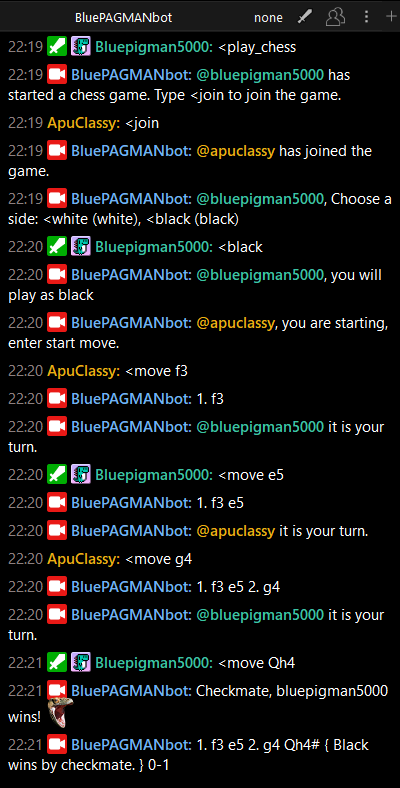
- Play a chess game through sending messages, with a dynamically updated PGN of the ongoing game.
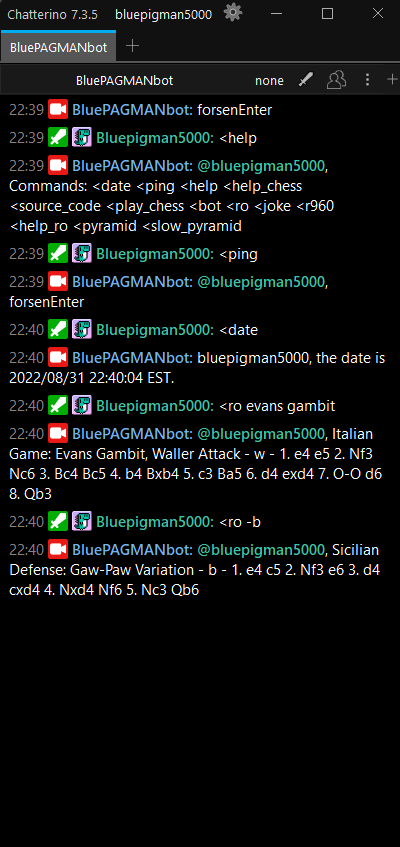
- Get a random chess opening name, can add specific keywords, and/or indicate the side.
- Python 3.9+
- MongoDB Server (Atlas is the easiest to set up)
- Twitch Account
- Fork or clone this repository.
- Create a python virtual environment and run
pip install -e .in the project's directory. (The-eflag installs the package in editable mode, which is useful for development.) - Get an OAuth token of the Twitch account for the bot. I used this to generate one, but the site has now shut down, so please find another way to get one. You can get the access token and Client ID here
- Rename
config_example.pytoconfig.py, and fill in the details. - Set up a Mongo database, add a database named "test" and a collection named "Users". Then add the connection string into
config.pyin db_uri. - Run
bot.py. The bot will now join the channels you put inconfig.py.
uv add to add packages. Then pip install -e . to update.
Screen.Recording.2024-06-30.170209.mp4
This bot takes a lot of functionality from https://github.com/VJ-Duardo/VJBotardo
https://github.com/VJ-Duardo/PyBrailleArt for Braille Art
https://github.com/SSujitX/google-news-url-decoder to decode Google News URLs
And everyone else that helped me with testing by using the bot, thank you!