
A server that bridges two or more connections in software to avoid port forwarding or dealing with NATs.
| Argument | Description | Requires additional parameter |
|---|---|---|
| -e | Echo data back to sending client | No |
| -d | Start in daemon mode | No |
| -p | Set bind port of bounce server | Yes, integer port to bind to |
| --max-connections | Set max number of connections allowed within a connection group | Yes, max connection integer |
| --max-pairs | Set the maximum number of connection groups allowed | Yes, max pairs integer |
| -v -vv -vvv -vvvv | Set initial verbosity. 1: Print connections and disconnections 2: Print state changes and full error stack traces 3: Print received packet information (size, type) 4: Print all bytes received |
No |
All arguments must be provided seperately.
Starting the bounce server in daemon mode will open a socket on port 32565. Accepted connections will then be presented with a command prompt similar to the one in the default interactive mode. All commands from interactive mode will work in this mode as well. The connection to the control socket can simply be closed to exit the command prompt, or the exit command may be given. Only one connection may be connected to the control socket at a time. This running mode is meant to allow this server to be run as a service, then allow a connection to monitor and control the state of the bounce server.
The maximum number of connection groups this server allows. By default, this number is set to 65536 connection groups. It is recommended to set this number to be a power of 2, as it directly affects the n in the version string sent to clients.
The maximum number of connections allowed in a particular connection group. A connection will be disconnected with the message "Connection Group Full", if it tries to connect to an already filled connection group. Because of certain conditions causing a TCP TIME_WAIT state, it may be recommended to set this number higher than the desired maximum number of connections. The default number is 2.
| Command | Description | Parameters |
|---|---|---|
| Prints information about the current bounce server state | connections, channels | |
| verbose | Sets the verbosity | 1, 2, 3, or 4 |
| echo | Sets whether this server should echo back messages to clients | on or off |
| kill | Closes the given connection | A connection id(found in print connections), or socket address |
| stop | Stop the bounce server | N/A |
| exit (daemon only) | Closes the current control connection, but continues listening | N/A |
| help | Print the help menu | N/A |
Immediately after connecting, the bounce server will send a version string to the client, which will look something like this:
4-BounceServer_1.0
This version string follow the format:
n-BounceServer_{VERSION_NUMBER}
Where n is the maximum number of digits, in hex, the channel number can be.
The client should wait to receive this string before sending any data.
The next bytes that the bounce server expects to receive from the client is the authentication string. As of BounceServer 1.0, there is no longer a limit on the length of the authentication string.
This string is preset by the user of the bounce server to ensure that random connections are not permitted. The client has, by default, 5 seconds to send the authentication string before it is disconnected by the bounce server. This timeout is configurable by the user.
The next n bytes are expected to be the client's channel number as a hex string. It is not required that the client pad the channel number with 0s, but it is recommended to ensure that the requested channel is correct.
Once the authentication string and channel number have been sent, the client is free to send data to the bounce server, where it will blindly forward the data to all other connections on the same channel. Depedning on the configuration of the bounce server, it may also echo data back to the sending channel.
An example handshake between the bounceserver and a client would be as follows:
BounceServer -> Client1: "4-BounceServer_1.0"
Client1 -> BounceServer: "hello"
Client1 -> BounceServer: "00ac"
BounceServer -> Client2: "4-BounceServer_1.0"
Client2 -> BounceServer: "hello"
Client2 -> BounceServer: "00ac"
Client1 -> BounceServer: DATA
BounceServer -> Client2: DATA
First, Client1 sends the authentication message "hello", then requests to join channel 172. Then Client2 sends the authentication message and requests to join channel 172. Now all data sent from Client1 is forwardrd to Client2, and vice versa
Other than the authentication message to prevent unwanted connections, as of yet, the bounce server has no implemented encryption features, so all data is sent in plaintext. This is to allow the user to wrap the bounce server in any security features that are needed. A good example of this is using an HTTP(s) proxy through Apache. This allows the http server to handle SSL and wraps the data in an HTTP connection making the connection more friendly to some routers/networks.
Here is a tutorial on how to setup an http proxy server with Apache (example uses ssh, but can be easily extended to forward to this bounce server): https://geek.co.il/2017/04/18/ssh-over-https-for-fame-profit
The same tutorial also explains how to setup SSL using letsencrypt
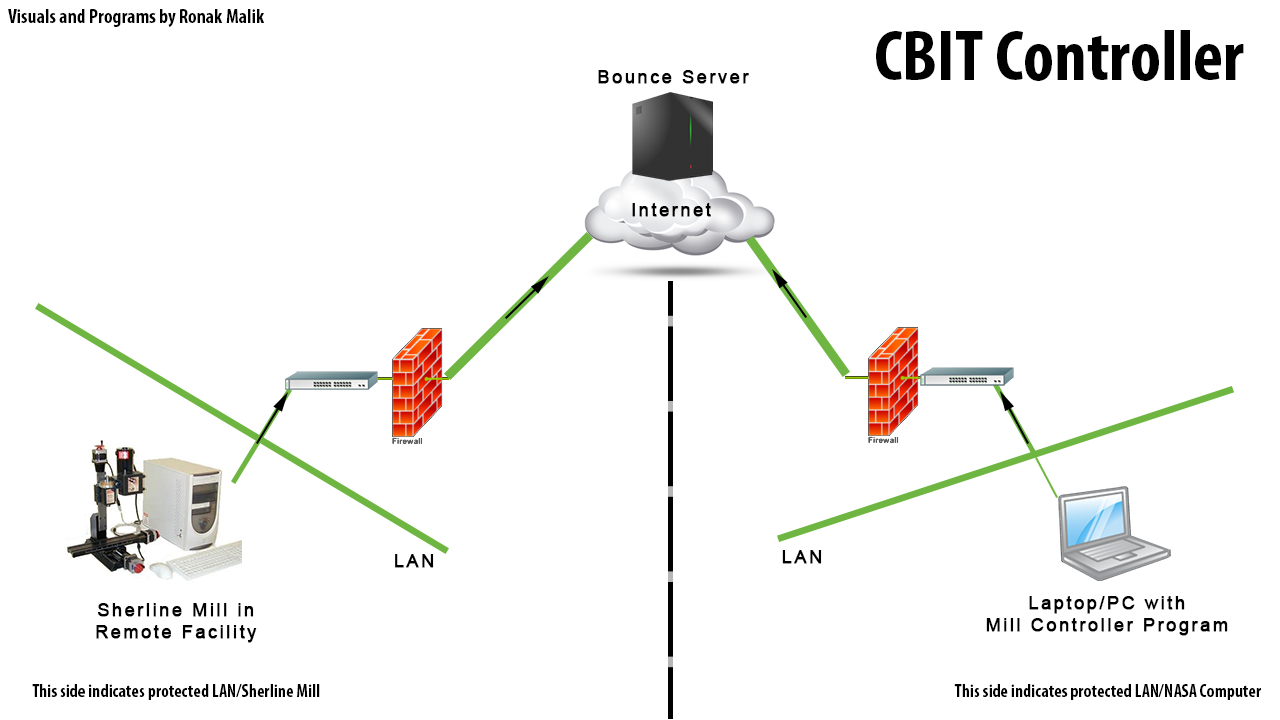
Here is an example image which shows how the the bounce server can be used to connect two computers behind NATs using the case of the mill program suite.
See the MillClientController, the SherlineClientController, or the SherlineVideoController for example implementations of clients using the BounceServer.