Run multiple Claude Code agents in parallel. Monitor status, track changes, and switch between codebases without losing context.
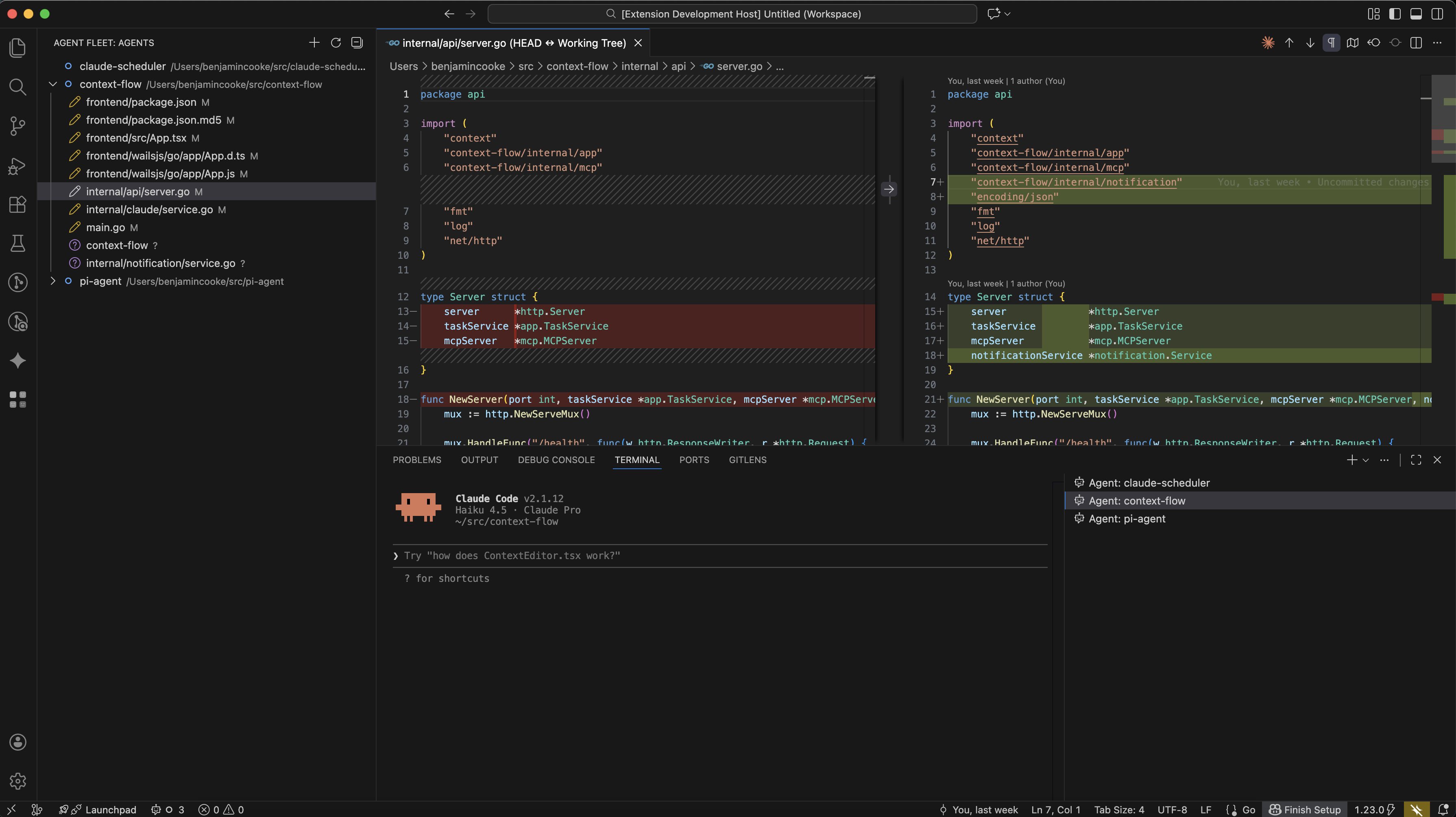
Agent Fleet lets you orchestrate multiple Claude Code sessions from a single VS Code window. Each agent runs in its own terminal, working on a specific directory, while you monitor their status and changes in real time.
Key capabilities:
- Multi-agent management: Add agents for different directories, repos, or git worktrees
- Real-time status tracking: See when agents are idle, running, stuck (waiting for input), or complete
- Git change detection: View uncommitted changes made by each agent directly in the tree view
- Integrated terminals: Each agent gets a dedicated VS Code terminal running Claude Code
- Workspace focus: Quickly switch your VS Code workspace to any agent's directory for full file exploration
- Notifications: Get alerts when agents complete tasks or need attention
Agent Fleet is designed for developers who:
- Work across multiple repositories or git worktrees simultaneously
- Want to run parallel Claude Code sessions on different codebases
- Need visibility into what multiple AI agents are doing without constantly switching terminals
- Claude Code CLI: Must be installed and available in your PATH (
claudecommand) - VS Code 1.85.0 or higher
- macOS or Linux: Windows is not currently supported (hooks require bash)
- Install the extension
- Click the Agent Fleet icon in the activity bar
- Click "Add Project" and select a directory
- The extension will prompt you to install hooks on first use (required for status tracking)
| Command | Description |
|---|---|
| Add Project | Select a code directory to start a Claude agent |
| Remove Agent | Remove an agent from the fleet |
| Open Terminal | Open or focus the agent's Claude Code terminal |
| Focus Workspace | Add the agent's directory to your VS Code workspace |
| Install Hooks | Install Claude Code hooks for status tracking |
| Uninstall Hooks | Remove the installed hooks |
Agent Fleet uses Claude Code's hook system to receive real-time status updates:
| Status | Meaning |
|---|---|
| Idle | Terminal is open but not actively processing |
| Running | Agent is executing tools or generating responses |
| Stuck | Agent is waiting for user input (permission prompt, question, etc.) |
| Complete | Agent has finished its current task |
Hooks are installed to ~/.claude/hooks.json and write events to a FIFO pipe that the extension monitors.
| Setting | Description | Default |
|---|---|---|
agentFleet.shellPath |
Path to shell executable for agent terminals | System default |
MIT