Chat with the Antigravity AI Agent from your phone, tablet, or any browser
Control your Antigravity IDE remotely — ask questions, run commands, edit files, and approve actions — all from a beautiful mobile-friendly chat interface with a secure tunnel to your machine.





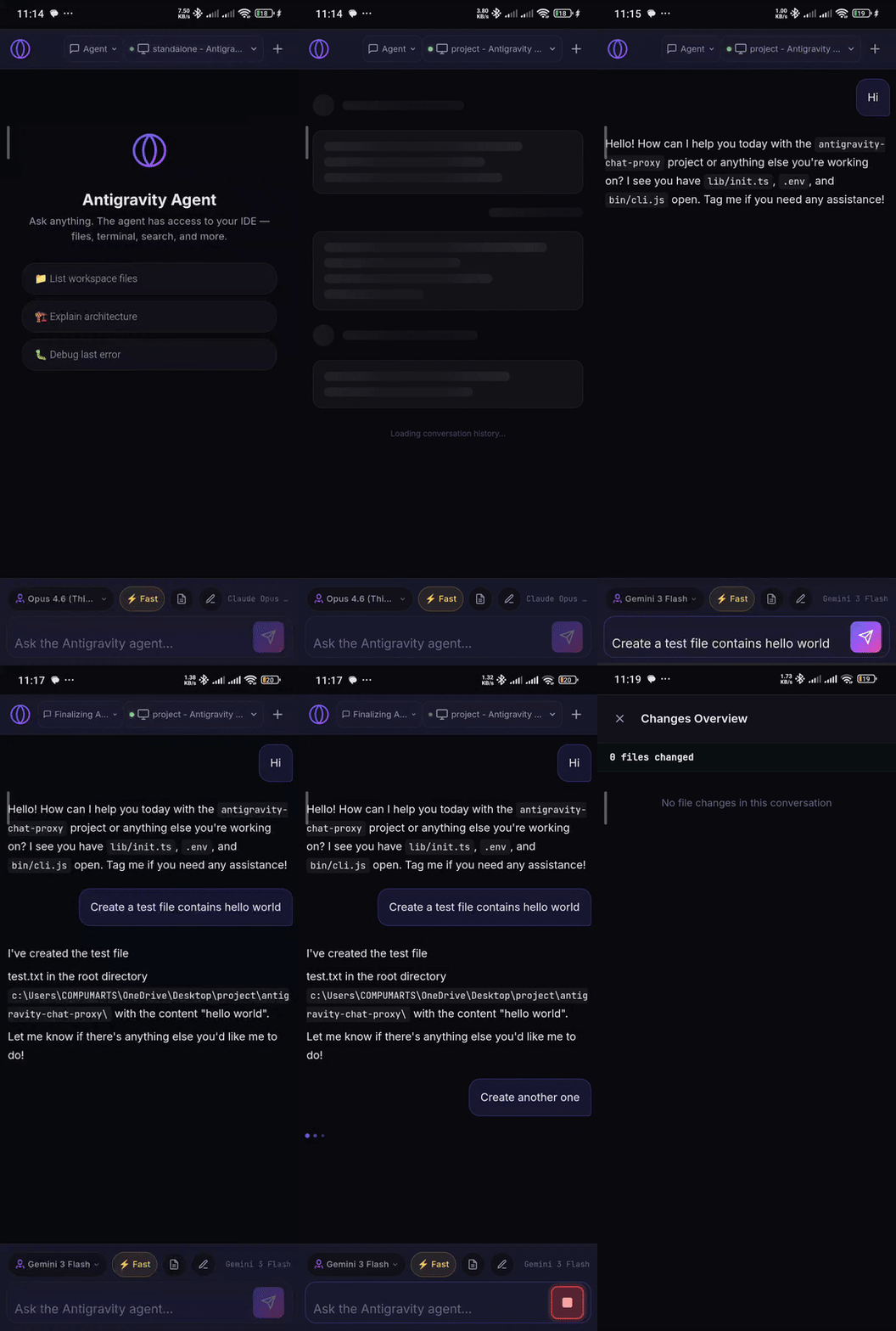
Antigravity is an AI coding agent that lives inside your IDE. Normally, you can only interact with it from the IDE window on your computer.
Antigravity Mobile Proxy lets you chat with that same agent from any device — your phone, your tablet, another computer — through a web browser. It creates a secure link (tunnel) so you can:
- 💬 Send messages to the AI agent from anywhere
- 👀 See everything the agent does in real-time — file edits, terminal commands, search results
- ✅ Approve or reject actions that need your permission (like running commands or modifying files)
- 📁 Browse artifacts the agent creates during your conversation
- 🪟 Switch between IDE windows if you have multiple open
- 🔒 Stay secure — only your Google account can access the tunnel
npx antigravity-mobile-proxy@latestThis downloads and runs the latest version every time — no global install required.
npm install -g antigravity-mobile-proxy@latestThen run it anytime with:
antigravity-mobile-proxy💡 Which should I use? Use
npxif you want to always run the latest version with zero setup. Usenpm install -gif you prefer a persistent global command or plan to use the--installservice feature.
- Node.js 18 or newer — Download here if you don't have it
- Antigravity IDE installed (it doesn't need to be running — the proxy will start it automatically)
Open your terminal and run:
npx antigravity-mobile-proxy@latestThat's it! The proxy will automatically detect and connect to Antigravity (or start it if it's not running). A setup wizard will walk you through the tunnel configuration:
  ╔═══════════════════════════════════════════════════════╗
  ║  🚀 Antigravity Mobile Proxy                          ║
  ║  Secure tunnel to your IDE with Google OAuth          ║
  ╚═══════════════════════════════════════════════════════╝

  ℹ Welcome! Let's set up your Antigravity Mobile Proxy.

  [1/3] ngrok Authentication
  [2/3] Access Control (your Google email)
  [3/3] Server Configuration (port)
Once complete, you'll get a public URL that you can open on any device:
  ╔═══════════════════════════════════════════════════════╗
  ║   🌐 Your app is live!                                ║
  ║                                                       ║
  ║   https://abc123.ngrok-free.app                       ║
  ║                                                       ║
  ║   🔒 Google OAuth → you@gmail.com                     ║
  ╚═══════════════════════════════════════════════════════╝
Open that URL on your phone or any browser — sign in with your Google account, and you're chatting with your AI agent! 🎉
The proxy uses ngrok to create a secure tunnel from the internet to your local machine. You need a free ngrok account:
- Run the proxy — it will automatically open the ngrok dashboard in your browser
- Sign up or log in (it's free)
- Click the copy button next to your authtoken
- The CLI detects it from your clipboard automatically ✨
💡 Your token is saved locally so you only need to do this once.
If clipboard detection isn't available (e.g., headless server), you can paste the token manually or pass it via
--authtokenor theNGROK_AUTHTOKENenvironment variable.
Your tunnel is protected by Google OAuth — only the email address you specify during setup can access it. Nobody else can see or use your proxy, even if they have the URL.
npx antigravity-mobile-proxy@latestThe wizard remembers your settings, so next time it will just ask you to confirm and start.
npx antigravity-mobile-proxy@latest --email you@gmail.comIf you only want to access the proxy from your own computer (no phone/remote access):
npx antigravity-mobile-proxy@latest --no-tunnelThis starts the chat UI at http://localhost:5555 without creating a public URL.
npx antigravity-mobile-proxy@latest --port 8080Want the proxy to be always available whenever your computer is on? Install it as a background service:
# First run the wizard once to save your settings
npx antigravity-mobile-proxy@latest

# Then install the auto-start service
npx antigravity-mobile-proxy@latest --install
This works automatically on:
- 🐧 Linux — creates a
systemduser service - 🍎 macOS — creates a
launchdagent - 🪟 Windows — creates a Task Scheduler task
The service auto-starts on login and auto-restarts on crashes. Your ngrok URL stays active as long as your computer is on.
# Check if the service is running
npx antigravity-mobile-proxy@latest --status

# Remove the auto-start service
npx antigravity-mobile-proxy@latest --uninstallnpx antigravity-mobile-proxy@latest --reset| Option | Description |
|---|---|
--email <email> |
Your Google email (skips the wizard question) |
--port <number> |
Server port (default: 5555) |
--authtoken <token> |
ngrok auth token (skips the wizard question) |
--no-tunnel |
Run locally without creating a public URL |
--install |
Install as auto-start background service (survives reboot) |
--uninstall |
Remove the auto-start service |
--status |
Check if the auto-start service is running |
--reset |
Clear saved settings and start fresh |
--help |
Show all available options |
| Variable | Description |
|---|---|
NGROK_AUTHTOKEN |
Your ngrok auth token (alternative to passing --authtoken) |
CDP_PORT |
Antigravity IDE debugging port (default: 9223) |
PROXY_PAGE |
Which IDE window to connect to (default: 0, the first one) |
Send messages and see the AI agent's responses stream in real-time — just like chatting in the IDE, but from any device.
Watch the agent work in real-time:
- Terminal commands — see the command, its output, and exit code
- File edits — see what files are being created or modified with additions/deletions
- Search results — see what the agent finds in your codebase
- MCP tools — see any external tool calls and their results
When the agent wants to do something that needs your permission (like running a command or modifying a file), you'll see an approve/reject dialog right in the chat — tap to allow or deny.
Browse files the agent creates during your conversation — documentation, code, reports, and more.
If you have multiple Antigravity IDE windows open, you can switch between them from the proxy UI.
Switch between conversations, start new chats, and load conversation history — all from the web interface.
A premium glassmorphism dark UI with:
- Smooth animated gradients (indigo → purple → pink)
- Tool call cards with status-based colors and animations
- Thinking indicators, typing animations, and micro-interactions
- Optimized for both desktop and mobile screens
The proxy automatically starts Antigravity if it's not running. If it still can't connect:
- Make sure Antigravity IDE is installed on your system
- On Linux, check that
/usr/share/antigravity/antigravityexists - On macOS, check that Antigravity is in your Applications folder
- On Windows, check the standard install location or set the
ANTIGRAVITY_BINARYenv var - You can also start Antigravity manually with:
antigravity --remote-debugging-port=9223
Your token may have expired. Get a new one from dashboard.ngrok.com/get-started/your-authtoken and run:
npx antigravity-mobile-proxy@latest --resetThe proxy automatically reconnects when the tunnel drops (e.g., if your network temporarily goes offline). You'll see a message in the terminal when it reconnects. Just wait — it handles this for you.
Use a different port:
npx antigravity-mobile-proxy@latest --port 8080┌─────────────────┐ ┌──────────────────────┐ ┌─────────────────┐
│ │ │ │ │ │
│ Your Phone / │◄─SSE──│ Antigravity Mobile │◄─CDP──│ Antigravity │
│ Any Browser │──REST─│ Proxy (Next.js) │──────│ IDE (Electron) │
│ │ │ │ │ │
└─────────────────┘ └──────────────────────┘ └─────────────────┘
Any Device Your Computer :5555 Port 9223
│ │
└──── ngrok tunnel ──────┘
(encrypted)
- You run
npx antigravity-mobile-proxy→ the proxy auto-starts Antigravity if needed - You type a message in the web chat → it goes to the proxy server on your computer
- The proxy types it into the IDE using Chrome DevTools Protocol (CDP)
- The proxy watches the IDE by reading the agent panel's state every 500ms
- Changes are streamed back to your browser in real-time via Server-Sent Events (SSE)
- ngrok tunnel makes it all accessible from any device through an encrypted public URL
Click to expand developer documentation
git clone <repo-url>
cd antigravity-mobile-proxy
npm install
npm run devAll endpoints are versioned under /api/v1/.
| Method | Endpoint | Description |
|---|---|---|
GET |
/api/v1/health |
Connection status |
| Method | Endpoint | Description |
|---|---|---|
POST |
/api/v1/chat |
Send message (blocking — waits for full response) |
POST |
/api/v1/chat/stream |
Send message (SSE streaming — real-time events) |
GET |
/api/v1/chat/state |
Current agent panel state snapshot |
GET |
/api/v1/chat/history |
Full conversation history |
POST |
/api/v1/chat/new |
Start a new chat session |
POST |
/api/v1/chat/approve |
Approve a HITL action |
POST |
/api/v1/chat/reject |
Reject a HITL action |
POST |
/api/v1/chat/action |
Click any footer button by toolId + buttonText |
| Method | Endpoint | Description |
|---|---|---|
GET |
/api/v1/conversations |
List all conversations with metadata |
POST |
/api/v1/conversations/select |
Set active conversation |
GET |
/api/v1/conversations/active |
Get current active conversation |
| Method | Endpoint | Description |
|---|---|---|
GET |
/api/v1/artifacts |
List all artifact directories |
GET |
/api/v1/artifacts/:convId |
List files in a conversation |
GET |
/api/v1/artifacts/:convId/:filename |
Serve a specific artifact file |
| Method | Endpoint | Description |
|---|---|---|
GET |
/api/v1/windows |
List available IDE windows |
POST |
/api/v1/windows/select |
Switch to a different window |
| Method | Endpoint | Description |
|---|---|---|
GET |
/api/v1/debug/dom |
Raw HTML dump of the agent panel |
When using /api/v1/chat/stream:
antigravity-mobile-proxy/
├── app/                          # Next.js App Router
│   ├── layout.tsx                # Root layout
│   ├── page.tsx                  # Main chat page
│   ├── globals.css               # Design system
│   └── api/v1/                   # Versioned API routes
│       ├── health/route.ts
│       ├── chat/                 # Chat endpoints
│       ├── conversations/        # Conversation management
│       ├── artifacts/            # Artifact browsing
│       ├── windows/              # Window management
│       └── debug/                # Debug tools
├── components/                   # React UI components
├── hooks/                        # React hooks (chat, conversations, artifacts)
├── lib/                          # Server-side services
│   ├── cdp/                      # Chrome DevTools Protocol connection
│   ├── scraper/                  # Agent state DOM scraper
│   ├── actions/                  # IDE automation (send message, approve, etc.)
│   └── sse/                      # State diffing for real-time events
├── bin/cli.js                    # CLI entry point (npx command)
└── package.json
| Decision | Why |
|---|---|
| Module singleton for shared state | Next.js API routes share the Node.js process — persists across requests |
| Lazy CDP init | Connection established on first request, not at import — avoids crashes when IDE isn't running |
| 4-signal completion detection | Using a single signal (e.g., spinner) is unreliable — combining spinner, stop button, pending tools, and step indicators prevents premature stream termination |
| HTML response preservation | innerHTML extraction preserves rich formatting (code blocks, lists, links) |
| Standalone build | The npm package ships pre-built — no build step needed when running via npx |
Built with Next.js · Puppeteer · ngrok · TypeScript
MIT License · Made with ❤️