


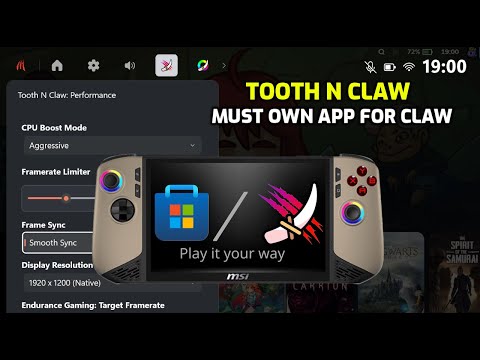
Tooth N Claw Xbox Game Bar Widget brings native, controller-friendly performance tuning directly into your gameplay experience.
- On-the-fly tuning: Adjust APU power and graphics settings instantly from gamebar, mid-game, without interrupting your session.
- Controller-first experience: Designed for handheld and couch gaming — no need to navigate desktop apps with tiny UI elements made for mouse and keyboard.
- Filling Windows XBox Fullscreen Experience gaps letting gamers fine-tune system performance directly from the Xbox Game Bar — no more dropping to Desktop mode for simple APU changes.
- Zero compute footprint: Uses no CPU or GPU compute and has no power impact.

Tooth N Claw Color Remaster
- Bring your games to life with Color Remaster, a hardware-accelerated color enhancement tool inspired by VibrantDeck.
- Remaster your visuals: Transform your game’s color and mood — go full Matrix with deep green hues or recreate the golden tones of Lisan al Gaib from Dune.
- OLED-like experience with punchy colors: Boost your display’s color intensity with Saturation and Contrast controls for rich, vivid output. (Contrast 55, Saturation: 58)
- Hardware-accelerated performance: Powered by LUT (Look-Up Tables) blocks running directly on the display pipeline — 0% GPU compute usage and exceptional power efficiency from Intel.
- Fine-tune your visuals: Adjust Brightness, Contrast, and Gamma to find your perfect balance between light and darkness.

- Next-gen LunarLake/PantherLake sharpness: Unlock Intel Adaptive Sharpening — a novel feature by Intel that enhances blurred or upscaled content for a crisper, more detailed image while preserving natural textures.
- Adaptive Sharpening is Efficient and smart: Runs entirely on Intel’s display engine block — no GPU load, no performance hit, and minimal power draw.

If you like my work, you can buy me a coffee:

Tooth N Claw is now officially available on the Microsoft Store!
Click the badge below open directly:

- CPU Boost Toggle – Enable or disable CPU Boost to reduce power consumption by up to 50%, freeing power headroom for the GPU.
- Frame Limiter – Lock your frame rate for consistent performance and thermals. With VRR displays, optimal values are typically 48–116 FPS.
- Frame Sync Options – Choose your preferred frame synchronization mode to balance latency and visual smoothness.
- Display Resolution Control – Some Windows games and apps behave unpredictably when changing resolutions dynamically; this tool helps manage those scenarios cleanly.
- Endurance Gaming (Auto-TDP) – Intel’s adaptive power management feature that automatically adjusts CPU/GPU power allocation to maintain a target frame rate while extending battery life.
- Xe Low Latency (XeLL) – Reduces input latency by intelligently delaying frame presentation for improved responsiveness.
- Intel Graphics Software Launcher – Provides quick access to the Intel Graphics Control Center, even when running in Xbox Game Bar full-screen mode.
- Hot Key function using View button and X button marked in blue in the image [Only in Desktop mode, not XBox Fullscreen experience]
- Color Remaster Contrast, Saturation, Brightness, Hue and Gamma.
- Intel Adaptive Sharpening Enhance details in blurred or upscaled content to make it crisper.
Note: This is designed to be lightweight and complement MSI Quick Settings options. This is not intended to replace MSI Quick Settings.
- MSI Claw 8 AI+ A2VM with Intel Lunar Lake.
- MSI Claw 7 AI+ A2VM with Intel Lunar Lake.
- Requires Intel Graphics Software and Intel Drivers for Lunar Lake APU.
Found a bug and want it fixed? Have an idea for a new feature? Please open an issue in the tracker.
The Tooth N Claw experience is made possible thanks to Intel’s commitment to open source. A big thank-you to the Intel Graphics Team for providing the IGCL library, along with thorough documentation and numerous practical examples. Their well-designed APIs and samples have been invaluable in enabling Tooth N Claw to offer seamless Game Bar widget controls.
Open Windows Settings -> Apps -> Installed Apps Uninstall Tooth N Claw using the ... -> Uninstall

