유니티를 활용하여 저희 집 고양이 방울이를 테마로 방울이가 점프하는 게임을 개발하였습니다.
default.mp4
게임플레이 영상입니다

저희집 고양이 방울이 입니다.

평소에 유니티로 게임 개발하는 것에 관심이 많았었는 데 어떤 주제로 게임을 만들지 고민하다가 집에서 방울이가 점프하는 것을 보고 이를 주제로 게임을 만들면 재미있겠다는 생각이 들어서 이러한 프로젝트를 기획하게 되었습니다.
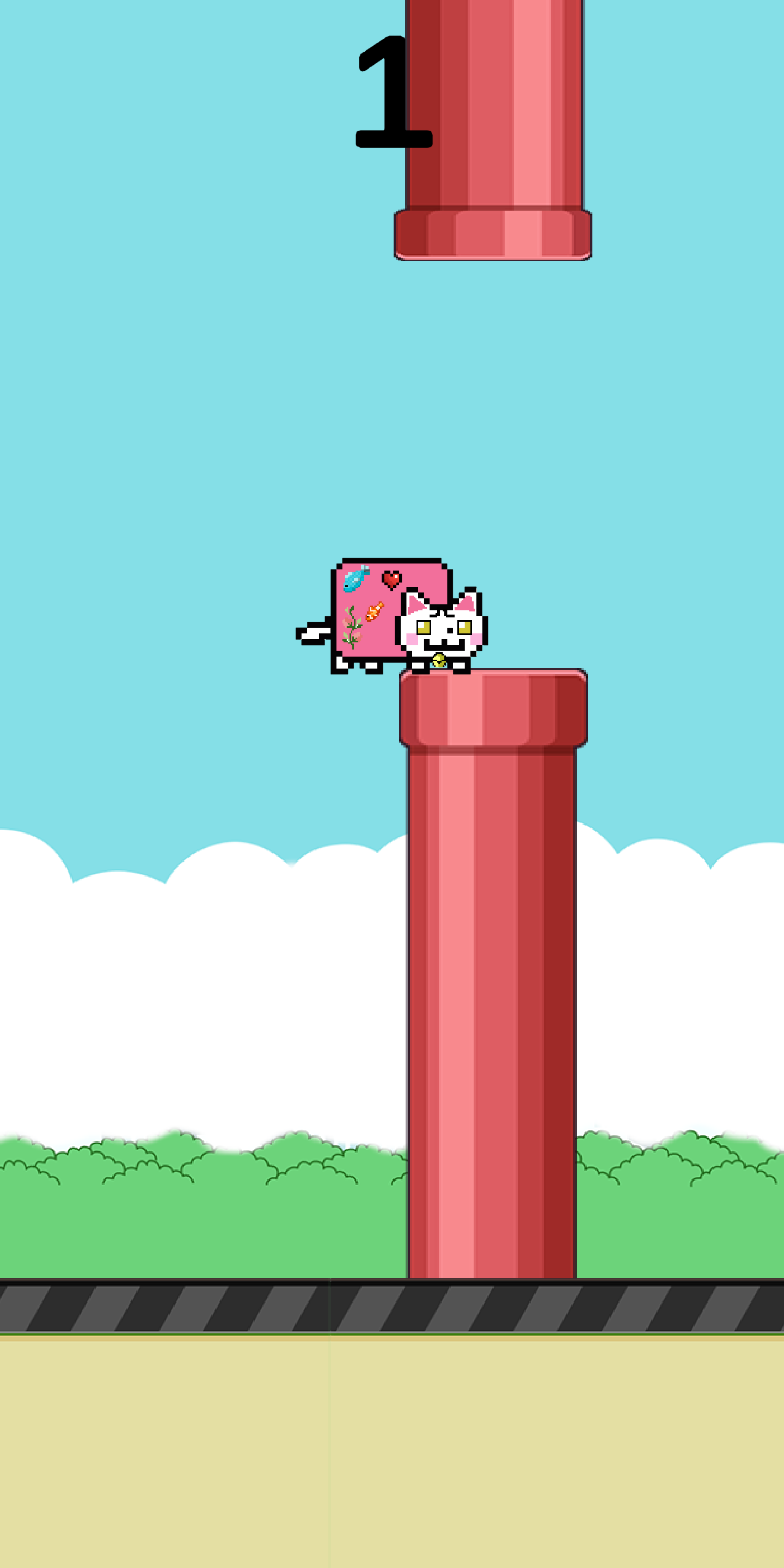
방울이 캐릭터를 터치해서 빨간색 파이프를 통과해서 점수를 얻어 최대한 많은 점수를 획득하는 게임입니다.
간단한 조작의 게임으로 화면을 터치하면 고양이 캐릭터가 공중에서 점프합니다. 그러나 캐릭터의 낙하속도가 빠르므로 타이밍을 맞추어 터치하지 않으면 캐릭터가 곧장 바닥으로 떨어지거나 파이프에 부딪히기 때문에 높이를 조정해 가면서 파이프사이를 통과해서 고득점을 노리는 게임입니다.
*플래피 버드 게임을 참고하였습니다.

무료로 사용가능한 곳에서 다운 받아 사용했습니다. https://soundeffect-lab.info/sound/button/
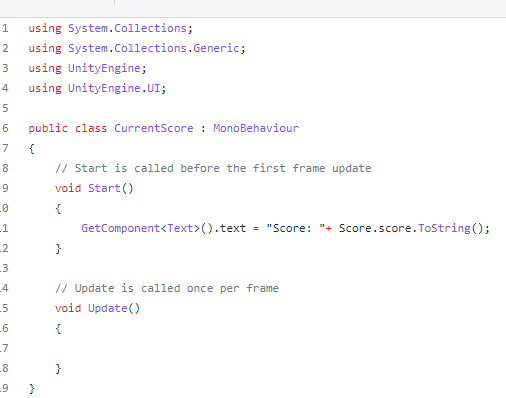
CurrentScore.cs 현재 스코어를 저장하고 전달하는 코드입니다.
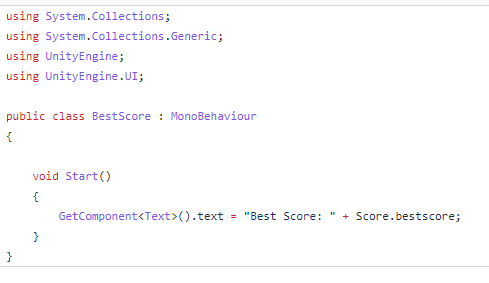
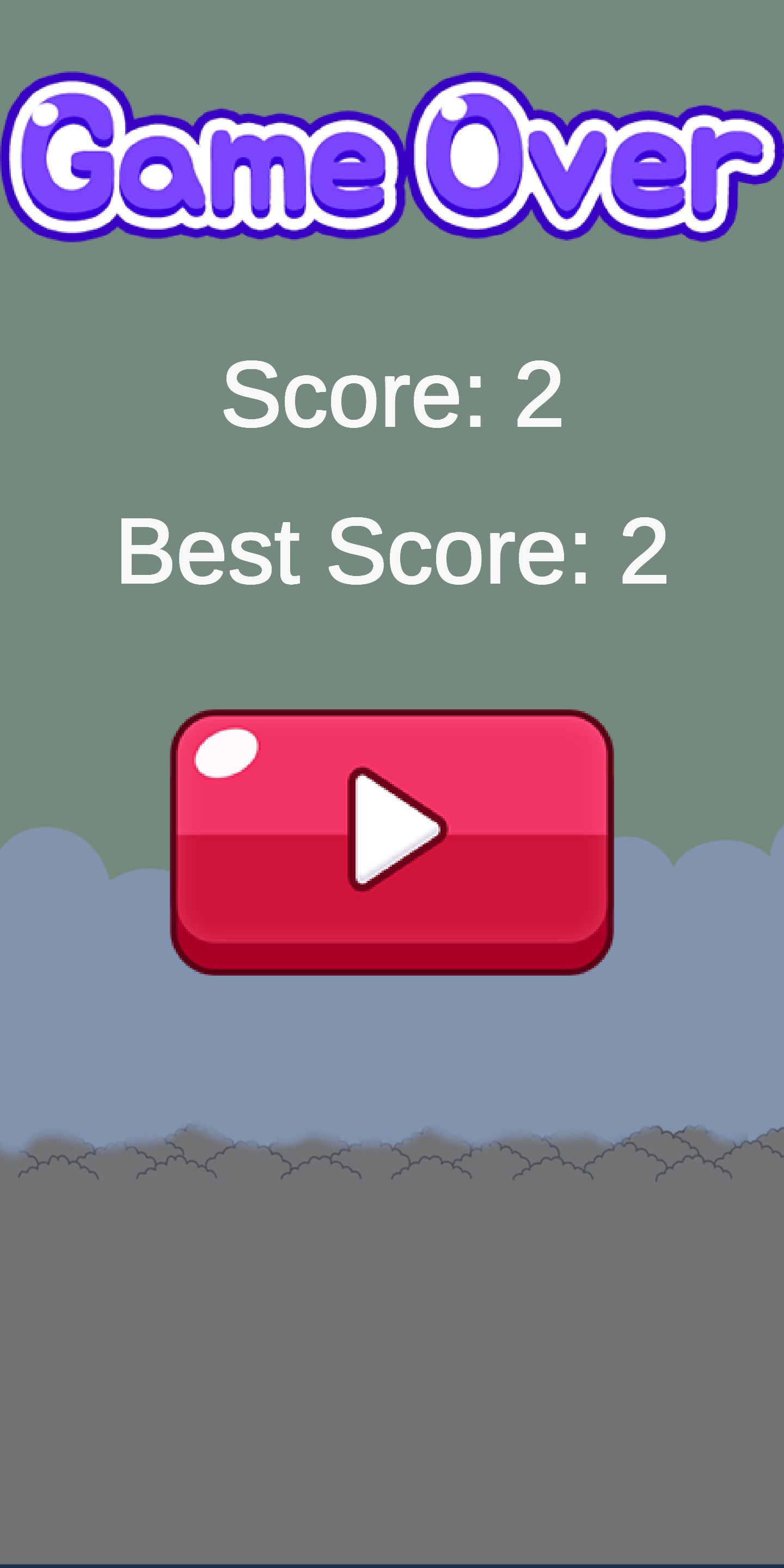
BestScore.cs 스코어중에서 가장 좋은 스코어를 저장하고 전달하는 코드입니다.
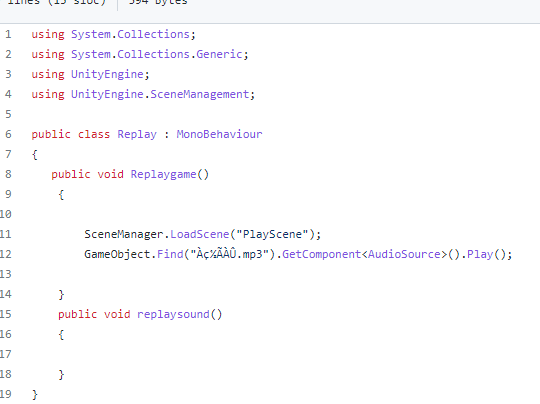
Replay.cs 게임을 다시 실행하게 만드는 코드입니다. 버튼에 적용시켜서 게임을 다시 시작하게 만듭니다.
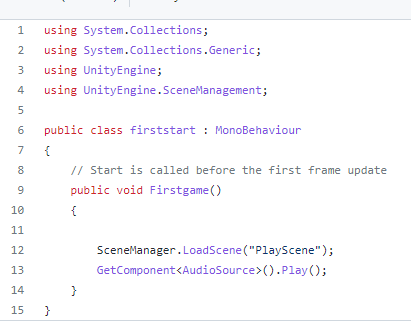
Firststart.cs 게임의 첫화면을 지정하는 코드입니다.
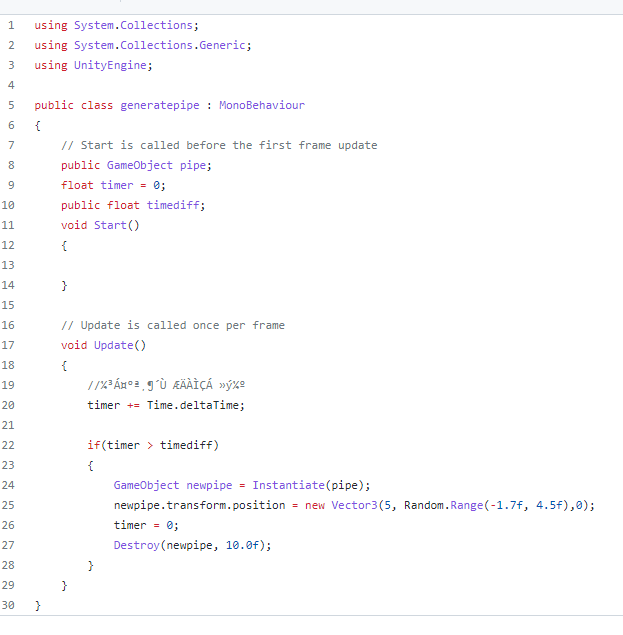
generatepipe.cs 장애물인 파이프를 생성하는 코드입니다. 랜덤으로 y값을 바꾸어서 생성되도록 만들었고, 시간이 지나면 destroy함수를 통해서 시간이 지나면 자동으로 사라지게 만들었고 효과음을 넣어서 파이프를 통과할 경우 소리가 나게 만들었습니다.
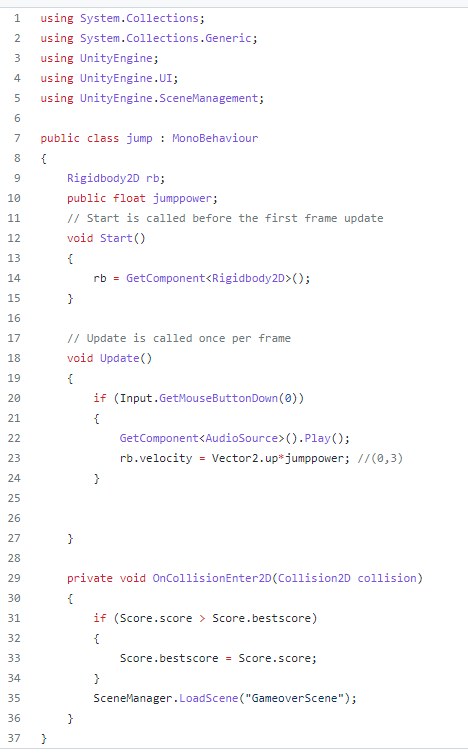
jump.cs 캐릭터인 방울이가 점프하게 만드는 코드입니다. 터치할 때 마다 점프하도록 만들었고, 충돌판정을 넣어서 부딪힐 경우 게임 오버 씬으로 전환되도록 만들었습니다. 효과음을 주어서 점프할 때마다 소리가 나도록 만들었습니다.
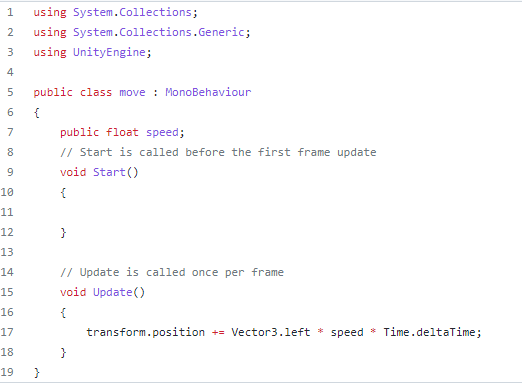
move.cs 게임의 속도를 조정하는 코드입니다. public float를 써서 에디터에서 speeed를 편리하게 조절하도록 만들었습니다. 피드백 결과 현재의 속도가 적절하다는 의견이 많아서 현재의 속도로 결정하게 되었습니다.
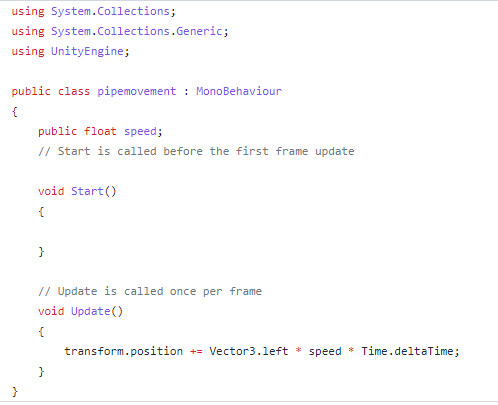
pipemovement.cs 장애물인 파이프가 속도에 맞춰서 게임의 진행방향인 옆으로 이동하도록 만든 코드입니다. public float를 써서 에디터에서 speeed를 편리하게 조절하도록 만들었습니다. 피드백 결과 현재의 속도가 적절하다는 의견이 많아서 현재의 속도로 결정하게 되었습니다.
groundanimation.anim
땅 에셋에 효과를 주어서 게임이 더 움직이도록 보이게 만듭니다.
이 레포지토리의 릴리즈에서 최신 버전을 다운로드해서 안드로이드폰에 APK파일을 넣어준 뒤 설치를 하면 실행이 됩니다.

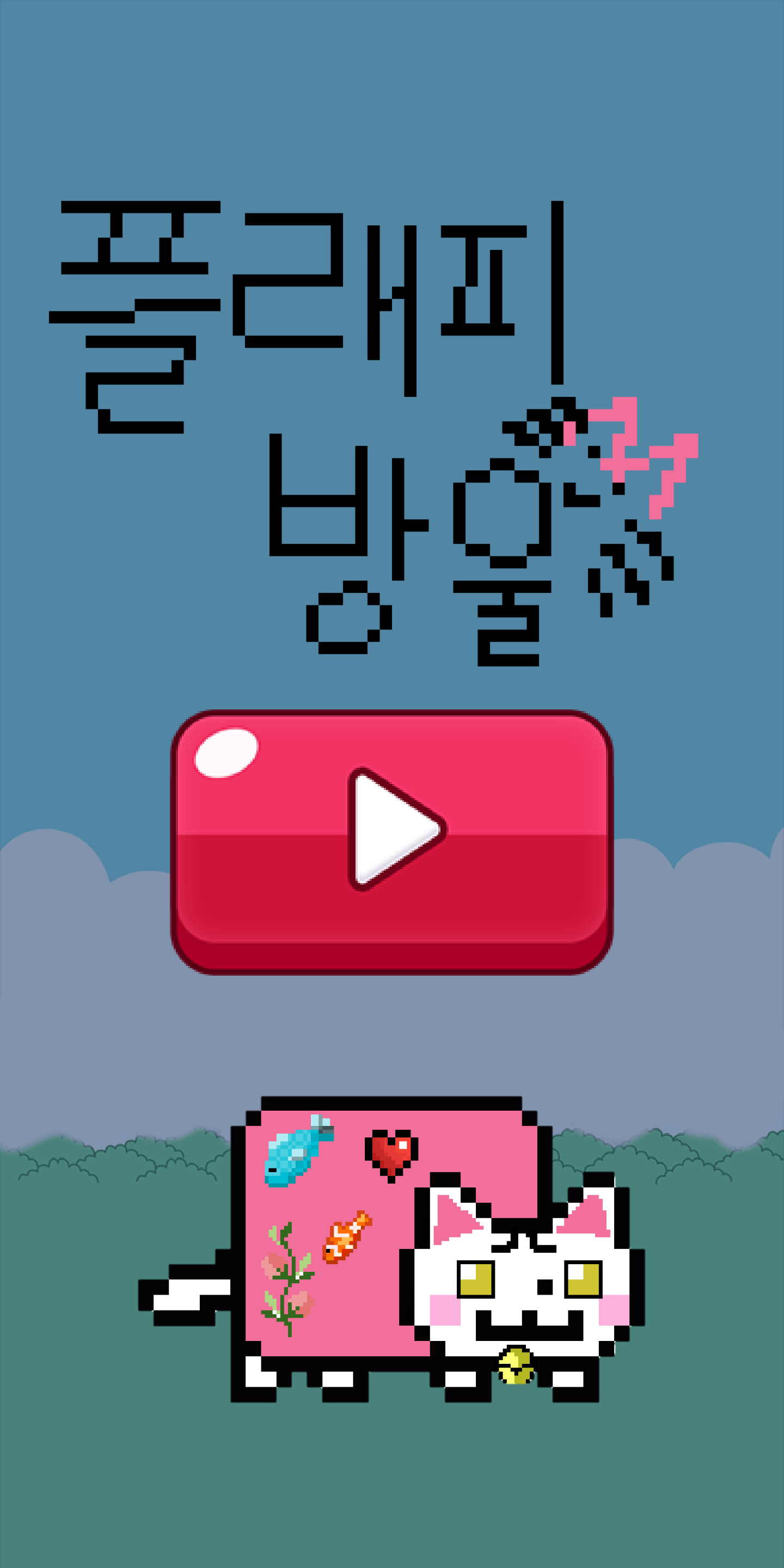
게임 로딩할때 나오는 창입니다, 유니티의 기능을 활용하여 게임의 로고가 나오도록 만들었습니다.
| 리뷰,피드백 | 별점 |
|---|---|
| 게임 난이도가 어렵다, 게임은 재미있다 | 5/5 |
| 디자인이 아쉽다. 디자인은 디자이너에게 | 4/5 |
| 땅 애니메이션이 안맞는다, 첫 화면에서 이미지가 작게나온다. | 4/5 |
| 난이도가 어렵다. 좀 낮추면 좋을 것 같다. | 4/5 |
v1.0.0: 게임의 첫번째 버전입니다.
v1.1: 게임의 현재 최신 업데이트 버전 입니다. 피드백을 반영하여 어색했던 땅의 애니메이션 부분과 첫 화면을 수정하였습니다. 이 릴리즈를 설치해 게임을 플레이하시면 됩니다.
게임을 내가 직접 만들어 볼 수 있다는 점이 좋았고, 강의 시간때 교수님이 말씀하신 것처럼 본인이 하고싶은 프로젝트를 진행하고 본인의 깃허브에 자랑스럽게 올릴 수있다는 말을 기억하고 프로젝트를 진행하였다. 내가 왜 컴퓨터공학과에 진학했는지 게임을 만들면서 다시금 생각할 수 있었고 내가 좋아하는 프로젝트를 하다보니 타 프로젝트보다 더 주도적으로 진행할 수 있었다. 아쉬웠던 점은 캐릭터에 애니메이션을 더 넣으면 좋았을 것 같았는데 나의 부족한 디자인 능력과 센스 때문에 진행하지 못한 점이 아쉬웠고 종강후 겨울방학 동안에 유니티나 다른 게임엔진에 대해서 더 배워서 내가 그동한 구상하고 기획했던 게임 프로젝트들을 직접 만들어 봐야겠다는 각오도 다질 수 있었다. 구글플레이 앱스토어에도 올려서 많은 사람이 플레이하도록 만들고 싶었는데 개발자 계정 등록시 비용이 들어서 다음번에 좀더 자신있는 게임을 만들고 나서 등록해야겠다는 생각이 들었다.
무료 쉬운 게임 개발 강의 - 3시간만에 개발, 출시, 수익화까지 완성 - https://www.youtube.com/watch?v=EqoU1PodQQ4&t=6591s
[유니티] 플래피버드 30분 만에 만들기 (자막 있음) - https://www.youtube.com/watch?v=RgTZRT-LHcw&t=2s
MIT License를 따릅니다. 레포지토리 안에 license.md파일을 만들어 두었습니다.
https://www.youtube.com/shorts/A_zOd4DcTT0
19101191 김경준
## This is a manual for English speakers
Using Unity, I developed a game that cat,BangUlEe jump under the theme of our cat BangUlEe.
https://user-images.githubusercontent.com/49617190/204946622-e49dc28b-c3db-43c2-8144-e84237251176.mp4
It's a game play video
- [Reason for project planning]
- [Game description]
- [Asset Description]
- [Code, Animation Description]
- [How to play - Screenshot]
- [Review, feedback]
- [Release]
- [Feeling, learning, disappointing]
- [Reference]
- [License]
This is my cat, BangUlEe.
I was interested in developing a game with UNITY. Usually, I was thinking about what topic to make a game, and I thought it would be fun to make a game with this topic after seeing BangUlEe jump at home.
The bell touches the character and passes through the red pipe to score as many points as possible. Touch the screen with a simple game and the cat character jumps in the air. However, the character's drop speed is fast, so if you don't touch it at the right time, the character falls directly to the floor or hits the pipe, so it's a game that aims for high scores by passing through the pipes while adjusting the height. *Refer to the Flappy Bird game.
I downloaded and used it at a place where it was available for free. https://soundeffect-lab.info/sound/button/
CurrentScore.cs Code to store and forward the current score.
Code to store and deliver the best score among BestScore.cs scores.
Code that causes the game Replay.cs to run again. Apply to buttons to restart the game.
Code that specifies the first screen of the Firststart.cs game.
Code for generating generatepipe.cs obstruction pipe. It was created by randomly changing the y value, and it was made to disappear automatically over time through the destroy function over time, and it was made to make a sound when passing through the pipe by adding a sound effect.
Code to make the character jump.cs jump. I made it jump every time I touched it, and I made it switch to the game over scene if I hit it by adding a crash decision. I made a sound effect every time I jumped.
Code to adjust the speed of the move.cs game. I made it convenient to adjust the speed in the editor by using the public float. As a result of the feedback, there were many opinions that the current speed was appropriate, so we decided on the current speed.
pipemovement.cs Code for pipe, an obstacle, to move to the side, which is the direction of the game, at speed. I made it convenient to adjust the speed in the editor by using the public float. As a result of the feedback, there were many opinions that the current speed was appropriate, so we decided on the current speed.
groundanimation.anim It has an effect on the ground asset, making the game look more mobile.
Download the latest version from the release of this repository, insert the APK file into your Android phone, and install it to run.
| Review, Feedback | Stars |
|---|---|
| It's hard to play. It's fun | 5/5 |
| The design is unfortunate. Design to Designer | 4/5 |
| The ground animation doesn't fit, the image comes out small on the first screen. | 4/5 |
| The difficulty level is difficult. I think it would be good to lower it a little. | 4/5 |
v1.0.0: This is the first version of the game.
v1.1: Current latest update for the game. The animation part of the land that was awkward and the first screen was modified by reflecting the feedback. You can install this release to play the game.
I liked that I could make my own games, and as the professor said during the lecture, I remembered that I could proceed with the project I wanted to do and proudly upload it on my GitHub. I was able to think about why I went to the computer engineering department again while making a game, and as I did my favorite project, I was able to take more initiative than other projects.
https://www.youtube.com/watch?v=EqoU1PodQQ4&t=6591s https://www.youtube.com/watch?v=RgTZRT-LHcw&t=2s
Follow the MIT License. I've created a license.md file in my repository.
https://www.youtube.com/shorts/A_zOd4DcTT0
19101191 Kim Kyung-Jun