


AI-powered hazard detection system with real-time alerts and emergency response. Mobile app (Flutter) + Backend (Node.js) on AWS.
- ✅ Real-time Hazard Detection - Camera feed with frame processing ready for ML model integration
- ✅ Location Tracking - GPS-based location tracking with geolocator
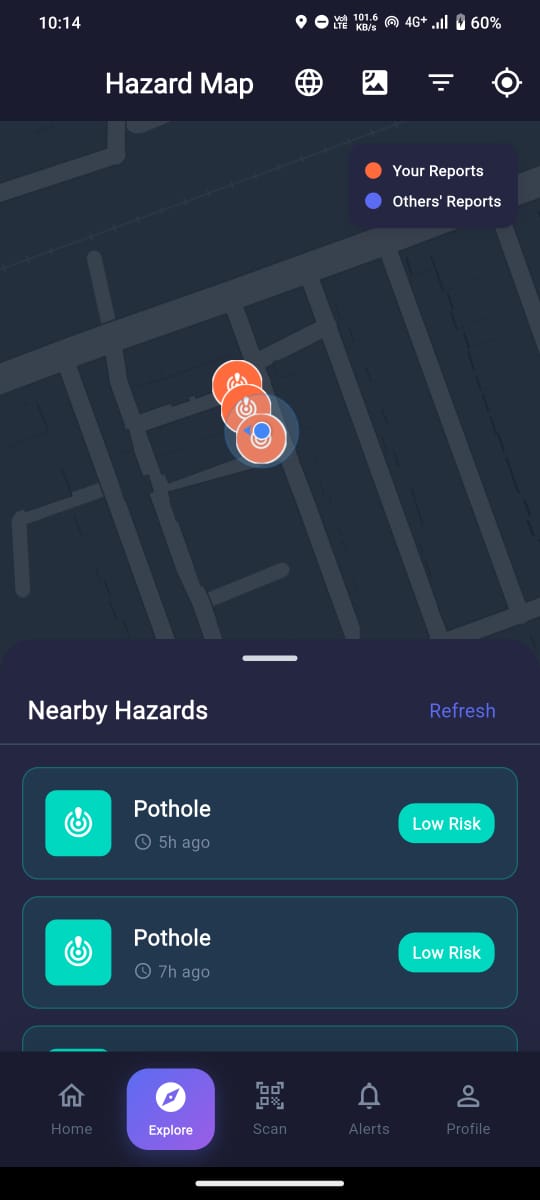
- ✅ Interactive Map with OSM - OpenStreetMap integration showing hazards with color-coded pins
- 🔵 Blue pins: Your own reported hazards
- 🟠 Orange pins: Hazards reported by other users
- ✅ Verified hazards marked with green checkmark
- 📍 Real-time user location tracking
- 🗺️ Dark mode support for maps
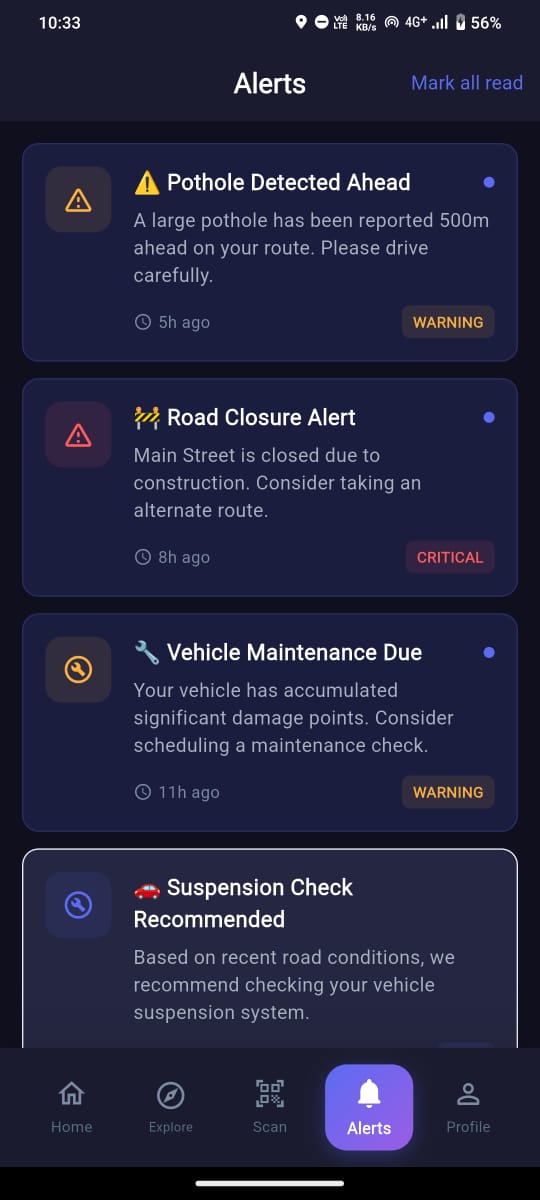
- ✅ Alert System - Real-time notifications for nearby hazards
- ✅ User Authentication - Mock auth ready for backend API integration
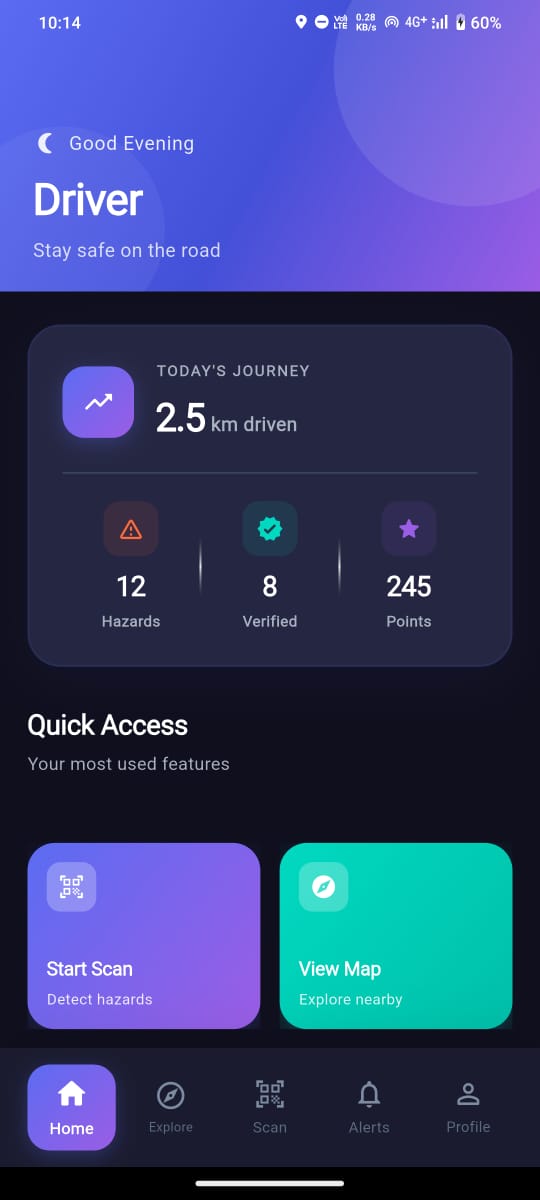
- ✅ Dashboard - Quick access to all features with stats
- ✅ Vehicle Health Tracking - Cumulative damage scoring system
- ✅ Beautiful UI - Material 3 design with smooth animations and dark mode
- 🕳️ Potholes
- 🚧 Unmarked Speed Breakers
- 🚫 Obstacles on Road
- 🛑 Closed/Blocked Roads
- 🚦 Lane Blockages
| Dashboard | Hazard Map | Detection |
|---|---|---|
 |
 |
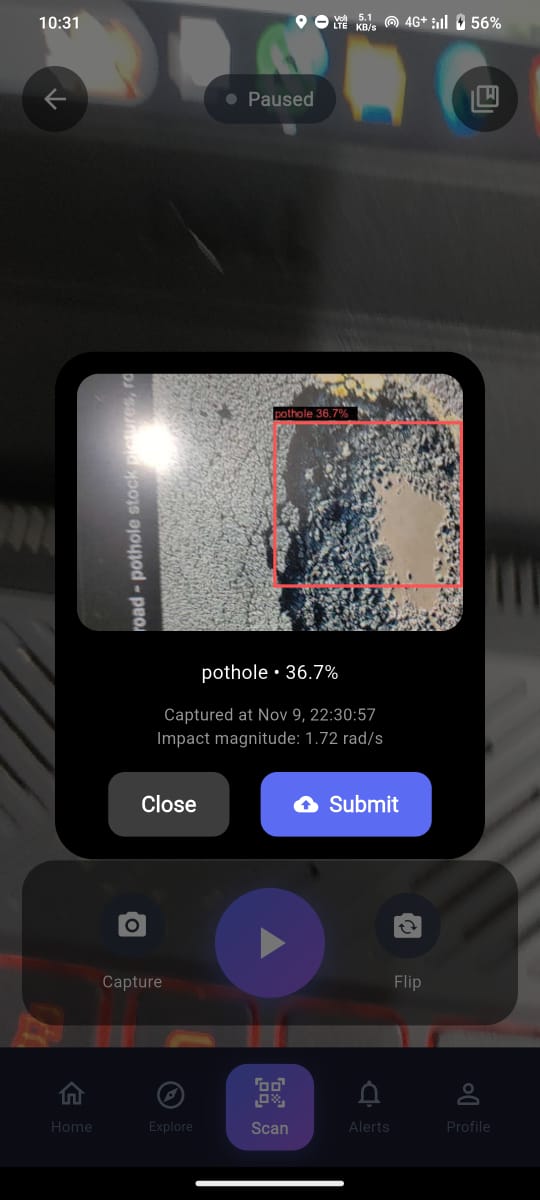 |
| Home screen with journey stats, hazards count, and verified reports | Interactive map showing all hazards with real-time updates | Camera feed with AI hazard detection and bounding boxes |
| Hazard Details | Alerts | Scan Screen |
|---|---|---|
 |
 |
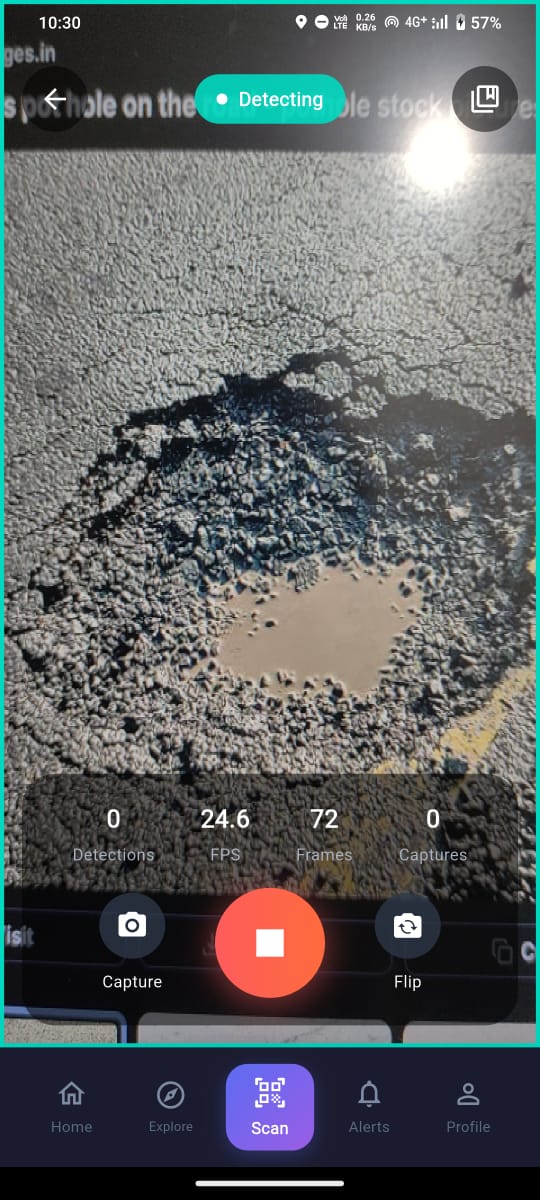 |
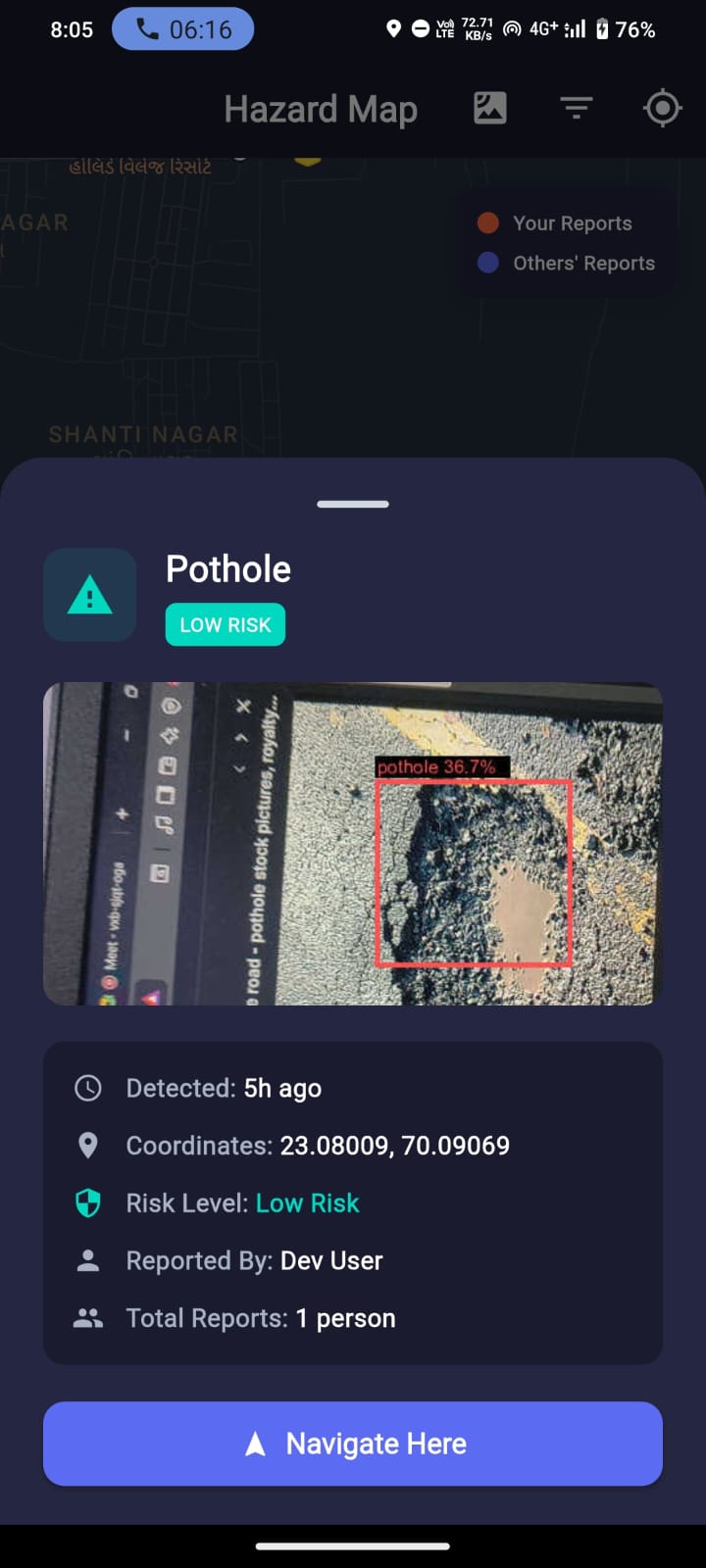
| Full information about detected hazards with photo and location | Real-time notifications for approaching hazards and warnings | Active hazard detection interface with FPS metrics |
Mobile (Frontend)
- Flutter 3.24.5 & Dart 3.9.2
- Material Design 3
- BLoC Pattern (State Management)
- Google Maps API
- TensorFlow Lite (On-device ML)
Backend
- Node.js 20 with Express.js
- AWS Elastic Beanstalk (hazardnet-production)
- AWS RDS PostgreSQL
- JWT Authentication with bcrypt
Deployment
- GitHub Actions CI/CD
- AWS Infrastructure
- Environment: Production
lib/
├── core/
│   ├── constants/      # App constants, API endpoints
│   ├── theme/          # App theme, colors, typography
│   └── utils/          # Helper utilities
├── data/
│   ├── repositories/   # Data layer abstraction
│   └── services/       # API services, local storage
├── models/             # Data models (User, Hazard, Alert, etc.)
├── bloc/               # BLoC state management
│   ├── auth/           # Authentication state
│   ├── camera/         # Camera & detection logic
│   ├── hazard/         # Hazard detection state
│   ├── location/       # Location tracking state
│   └── alerts/         # Alerts management state
├── screens/            # UI screens
│   ├── welcome/        # Welcome/Onboarding screen
│   ├── dashboard/      # Main dashboard
│   ├── camera/         # Real-time hazard detection
│   ├── map/            # Google Maps with markers
│   ├── alerts/         # Alerts list
│   └── profile/        # User profile
└── widgets/            # Reusable widgets
Backend
backend/
├── routes/
│   ├── auth.js         # Authentication endpoints
│   ├── emergency.js    # Emergency/SOS endpoints
│   ├── alerts.js       # Alert management
│   └── authority.js    # Authority dashboard
├── middleware/
│   └── auth.js         # JWT verification middleware
├── services/           # Business logic
├── database/           # Database schemas & migrations
├── server.js           # Express app entry point
└── package.json        # Dependencies
git clone https://github.com/Ayush-1789/HazardNet.git
cd HazardNetcd backend
npm install
cp .env.example .envEdit .env:
PORT=8080
DATABASE_URL=postgresql://user:password@localhost:5432/hazardnet
JWT_SECRET=your_local_secret_key
NODE_ENV=developmentStart the server:
npm startServer runs on http://localhost:8080
For production deployment on AWS Elastic Beanstalk:
cd backend
eb init
eb deployAWS Configuration:
- Elastic Beanstalk Environment: hazardnet-production
- RDS PostgreSQL: Configured and running
- CI/CD: GitHub Actions automated deployment
Update lib/core/constants/app_constants.dart:
For Local Development:
static const String apiUrl = 'http://localhost:8080/api'; // Local backend
static const String googleMapsKey = 'YOUR_GOOGLE_MAPS_KEY';For AWS Deployment (when ready):
static const String apiUrl = 'http://hazardnet-production.eba-74z3ihsf.us-east-1.elasticbeanstalk.com/api'; // AWS backend
static const String googleMapsKey = 'YOUR_GOOGLE_MAPS_KEY';- Flutter SDK 3.24.5+
- Node.js 20+
- PostgreSQL
- Android Studio / VS Code
1. Clone Repository:
git clone https://github.com/Ayush-1789/HazardNet.git
cd HazardNet2. Frontend Setup:
flutter pub get3. Backend Setup:
cd backend
npm install
cp .env.example .env
Edit .env:
PORT=8080
DATABASE_URL=postgresql://user:password@localhost:5432/hazardnet
JWT_SECRET=your_local_secret_key
NODE_ENV=development
Start the server:
npm startFrontend (Flutter)
lib/- Flutter application source codebloc/- BLoC state managementscreens/- UI screenswidgets/- Reusable componentscore/- Constants and utilitiesdata/- API services and models
Backend (Node.js)
backend/- Express.js serverroutes/- API endpointsmiddleware/- Authenticationservices/- Business logicdatabase/- Schema and migrations
POST /api/auth/register- User registrationPOST /api/auth/login- User loginGET /api/auth/status- Check auth statusGET /api/auth/profile- Get user profile
GET /api/hazards- Get all hazardsGET /api/hazards/nearby- Get nearby hazardsPOST /api/hazards/report- Report new hazardPUT /api/hazards/:id/verify- Verify hazard
GET /api/alerts- Get user alertsPUT /api/alerts/:id/read- Mark alert as read
POST /api/trips/start- Start tripPOST /api/trips/end- End tripGET /api/trips/history- Get trip history
flutter testcd backend
npm testcurl http://localhost:8080/healthPush to main branch triggers automatic deployment:
- Code linting and testing
- Build application
- Deploy to AWS Elastic Beanstalk (when configured)
- Database migrations
- Health check verification
- Fork the repository
- Create feature branch:
git checkout -b feature/amazing-feature - Commit changes:
git commit -m 'Add amazing feature' - Push to branch:
git push origin feature/amazing-feature - Open Pull Request
- Follow Flutter best practices
- Use BLoC pattern for state management
- Write meaningful commit messages
- Add tests for new features
- Update documentation
- Verify API URL in
app_constants.dart - Check if backend server is running
- Verify Android network security config
- Grant camera and location permissions
- Ensure device has sufficient storage
- Check TensorFlow Lite model is loaded
flutter clean
flutter pub get
flutter build apk --releasecd backend
npm install
cp .env.example .envEdit .env:
PORT=8080
DATABASE_URL=postgresql://user:password@localhost:5432/hazardnet
JWT_SECRET=your_local_secret_key
NODE_ENV=developmentStart the server:
npm startServer runs on http://localhost:8080
For production deployment on AWS Elastic Beanstalk:
cd backend
eb init
eb deployUpdate lib/core/constants/app_constants.dart:
// Local Backend
static const String apiUrl = 'http://192.168.x.x:8080/api';

// AWS Backend
static const String apiUrl = 'http://hazardnet-production.eba-74z3ihsf.us-east-1.elasticbeanstalk.com/api';-
Install dependencies
flutter pub get
-
Run the app
flutter run
Auth:
- POST /api/auth/register
- POST /api/auth/login
- GET /api/auth/status
Emergency:
- POST /api/emergency/sos
- GET /api/emergency/active
- PUT /api/emergency/:id/resolve
Alerts:
- GET /api/alerts
- POST /api/alerts
- PUT /api/alerts/:id
Authority:
- GET /api/authority/dashboard
- GET /api/authority/alerts
- PUT /api/authority/verify/:id
The camera feed sends frames to the ML model API. Update lib/bloc/camera/camera_bloc.dart in the _onProcessFrame method to call your YOLOv8 API.
Expected Request:
{
  "image": "base64_encoded_image",
  "timestamp": "2025-11-06T10:30:00Z",
  "location": {
    "latitude": 28.6139,
    "longitude": 77.2090
  }
}
Expected Response:
{
  "detections": [
    {
      "type": "pothole",
      "confidence": 0.92,
      "severity": "high"
    }
  ]
}-
Setup Backend API
- Copy
.env.exampleto.envand configure your backend API URL - Update
lib/core/constants/app_constants.dartwith your API endpoints - Implement authentication endpoints (JWT-based recommended)
- Copy
-
Connect ML Model
- Update API endpoint in
lib/core/constants/app_constants.dart - Implement API call in
lib/bloc/camera/camera_bloc.dart
- Update API endpoint in
-
Setup Google Maps
- Get API key from Google Cloud Console
- Add to Android manifest and iOS AppDelegate
-
Setup PostgreSQL Backend
- Create database schema for users, hazards, alerts
- Implement REST API endpoints for CRUD operations
- Setup JWT authentication
- Flutter 3.35.7
- BLoC for state management
- Material 3 Design
- Camera, GPS, Sensors integration
- Backend-ready (Postgres/REST API)
- Animations with flutter_animate
This project is licensed under the MIT License.
MIT License

Copyright (c) 2025 HazardNet Team

Permission is hereby granted, free of charge, to any person obtaining a copy
of this software and associated documentation files (the "Software"), to deal
in the Software without restriction, including without limitation the rights
to use, copy, modify, merge, publish, distribute, sublicense, and/or sell
copies of the Software, and to permit persons to whom the Software is
furnished to do so, subject to the following conditions:

The above copyright notice and this permission notice shall be included in all
copies or substantial portions of the Software.

THE SOFTWARE IS PROVIDED "AS IS", WITHOUT WARRANTY OF ANY KIND, EXPRESS OR
IMPLIED, INCLUDING BUT NOT LIMITED TO THE WARRANTIES OF MERCHANTABILITY,
FITNESS FOR A PARTICULAR PURPOSE AND NONINFRINGEMENT. IN NO EVENT SHALL THE
AUTHORS OR COPYRIGHT HOLDERS BE LIABLE FOR ANY CLAIM, DAMAGES OR OTHER
LIABILITY, WHETHER IN AN ACTION OF CONTRACT, TORT OR OTHERWISE, ARISING FROM,
OUT OF OR IN CONNECTION WITH THE SOFTWARE OR THE USE OR OTHER DEALINGS IN THE
SOFTWARE.
Built with ❤️ for safer Indian roads