#ColorPicker 

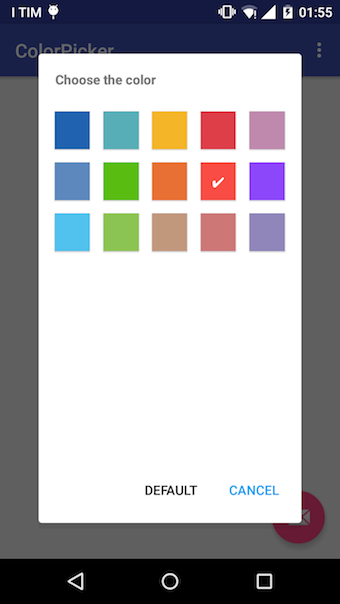
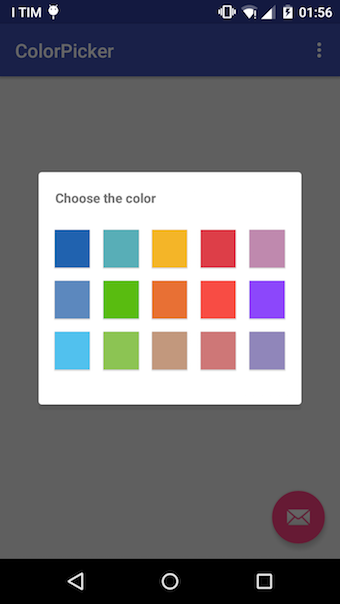
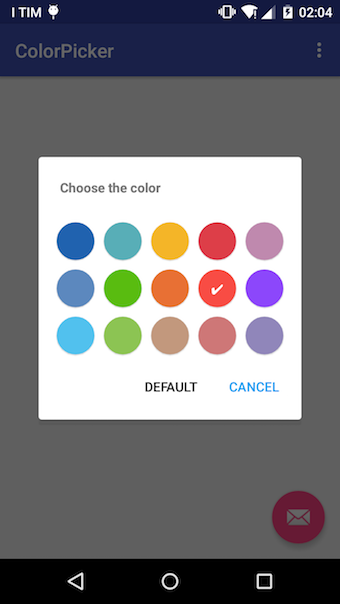
A simple Android color picker library


Download the latest JAR or grab via Gradle:
compile 'petrov.kristiyan.colorpicker:colorpicker-library:1.0.4'or Maven:
<dependency>
  <groupId>petrov.kristiyan.colorpicker</groupId>
  <artifactId>colorpicker-library</artifactId>
  <version>1.0.4</version>
</dependency>Simple example :
  ColorPicker colorPicker = new ColorPicker(activity);
  colorPicker.show();
  colorPicker.setOnChooseColorListener(new ColorPicker.OnChooseColorListener() {
      @Override
      public void onChooseColor(int position,int color) {
            //put code
      }
  });
Complex example :
  final ColorPicker colorPicker = new ColorPicker(SampleActivity.this);
  colorPicker.setFastChooser(new ColorPicker.OnFastChooseColorListener() {
              @Override
              public void setOnFastChooseColorListener(int position, int color) {
                  colorPicker.dismissDialog();
              }
          }).setNegativeButton("DEFAULT",new ColorPicker.OnButtonListener() {
              @Override
              public void onClick(View v) {
                  Log.d("DEFAULT","default");
              }
          }).setPositiveButton("CANCEL", new ColorPicker.OnButtonListener() {
              @Override
              public void onClick(View v) {
                  Log.d("CANCEL","cancel");
              }
}).setDefaultColor(Color.parseColor("#f84c44")).setColumns(5).setDialogFullHeight().show();Choose your own colors
setColors(int resId); // using an array resource
setColors(ArrayList<String> colorsHexList); // using a list of hex colors
setColors(int... colorsList); // use a list of colors Color.RED,Color.Black etc
setDefaultColor(int color);
Listeners
setFastChooser(OnFastChooseColorListener listener);
setOnChooseColorListener(OnChooseColorListener listener);
General changes you can do:
setDialogFullHeight();
setColumns(int c);
setTitle(String title);
setTitlePadding(int left, int top, int right, int bottom);
setMargin(int left, int top, int right, int bottom);
setPositiveButton(String text, OnButtonListener listener);
setNegativeButton(String text, OnButtonListener listener);
setDismissOnButtonClick(boolean dismiss);
Buttons changes you can do:
setButtonsTickColor(int color);
setButtonDrawable(int drawable);
setButtonSize(int width, int height);
setButtonMargin(int left, int top, int right, int bottom);
setRoundButton(boolean roundButton);for the Material Dialog library incorporated in the code https://github.com/drakeet/MaterialDialog
The MIT License
Copyright (c) 2016 Petrov Kristiyan
Permission is hereby granted, free of charge, to any person obtaining a copy of this software and associated documentation files (the "Software"), to deal in the Software without restriction, including without limitation the rights to use, copy, modify, merge, publish, distribute, sublicense, and/or sell copies of the Software, and to permit persons to whom the Software is furnished to do so, subject to the following conditions:
The above copyright notice and this permission notice shall be included in all copies or substantial portions of the Software.
THE SOFTWARE IS PROVIDED "AS IS", WITHOUT WARRANTY OF ANY KIND, EXPRESS OR IMPLIED, INCLUDING BUT NOT LIMITED TO THE WARRANTIES OF MERCHANTABILITY, FITNESS FOR A PARTICULAR PURPOSE AND NONINFRINGEMENT. IN NO EVENT SHALL THE AUTHORS OR COPYRIGHT HOLDERS BE LIABLE FOR ANY CLAIM, DAMAGES OR OTHER LIABILITY, WHETHER IN AN ACTION OF CONTRACT, TORT OR OTHERWISE, ARISING FROM, OUT OF OR IN CONNECTION WITH THE SOFTWARE OR THE USE OR OTHER DEALINGS IN THE SOFTWARE.