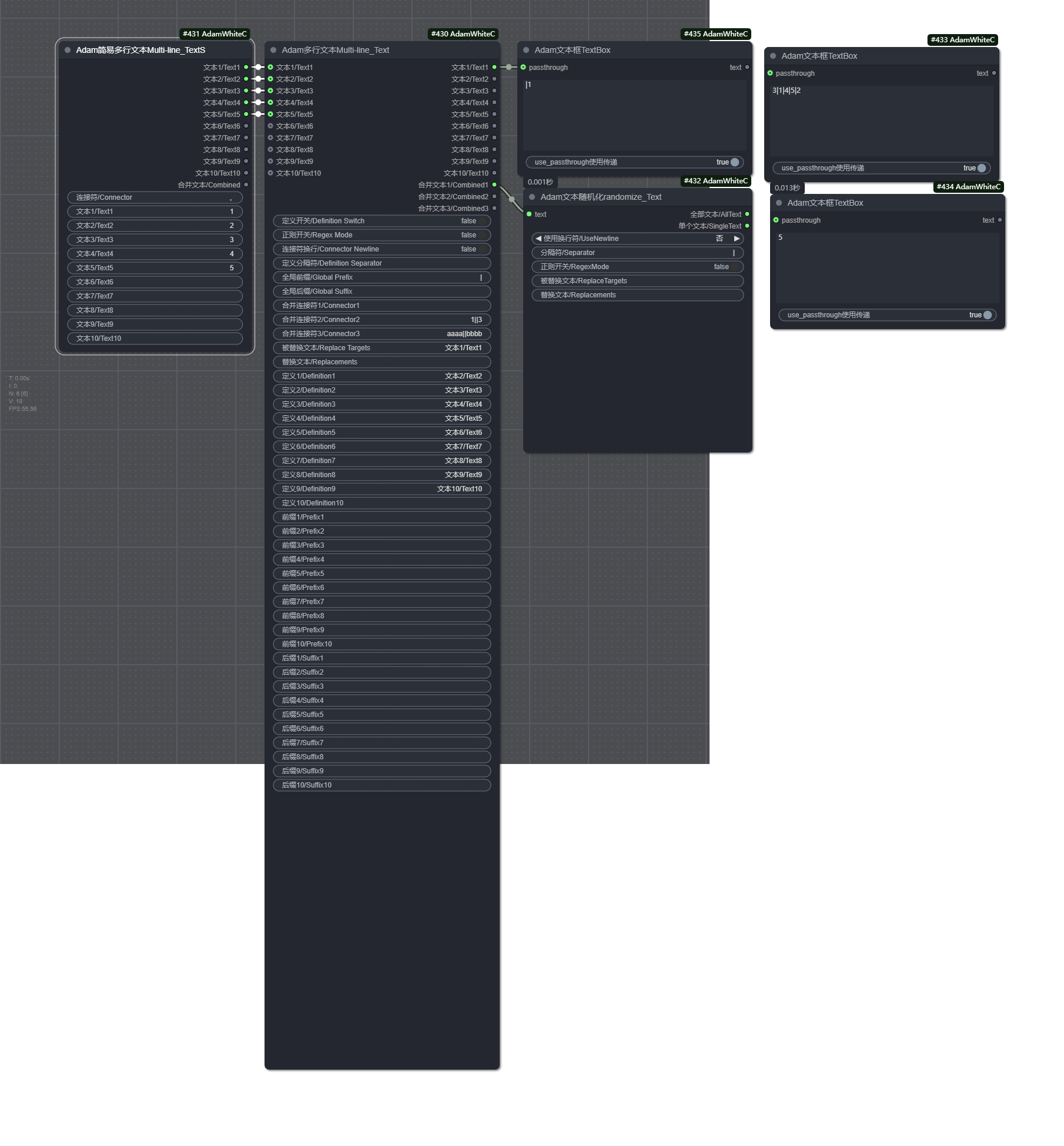
ComfyUI-AdamNodes 是一组专注于文本处理的节点集合,为 ComfyUI 提供了丰富的文本操作功能。这些节点可以帮助用户进行多行文本处理、文本随机化、正则表达式处理等操作,极大地增强了 ComfyUI 在文本处理方面的能力。
ComfyUI-AdamNodes is a collection of nodes focused on text processing, providing rich text operation functions for ComfyUI. These nodes can help users perform multi-line text processing, text randomization, regular expression processing, and other operations, greatly enhancing ComfyUI's capabilities in text processing.
这是一个功能强大的多行文本处理节点,支持多行文本输入、正则替换、全局前后缀和可扩展文本处理。它可以处理最多10个文本输入,并提供3种不同的合并输出方式。
This is a powerful multi-line text processing node that supports multi-line text input, regular expression replacement, global prefixes/suffixes, and extensible text processing. It can handle up to 10 text inputs and provides 3 different ways to combine outputs.
控制参数组 / Control Parameters:
定义开关/Definition Switch: 是否显示文本定义 (Whether to display text definitions)正则开关/Regex Mode: 是否启用正则表达式模式 (Whether to enable regex mode)连接符换行/Connector Newline: 是否在连接符后添加换行符 (Whether to add newline after connector)定义分隔符/Definition Separator: 定义与文本之间的分隔符 (Separator between definition and text)全局前缀/Global Prefix: 应用于所有文本的前缀 (Prefix applied to all texts)全局后缀/Global Suffix: 应用于所有文本的后缀 (Suffix applied to all texts)
合并参数组 / Combination Parameters:
合并连接符1/Connector1: 第一种合并方式的连接符,默认为逗号+空格 (Connector for first combination method, default is comma+space)合并连接符2/Connector2: 第二种合并方式的连接符,默认为换行符 (Connector for second combination method, default is newline)合并连接符3/Connector3: 第三种合并方式的连接符,默认为竖线+空格 (Connector for third combination method, default is pipe+space)
替换参数组 / Replacement Parameters:
被替换文本/Replace Targets: 需要被替换的文本,多个目标使用||分隔 (Text to be replaced, multiple targets separated by||)替换文本/Replacements: 替换后的文本,多个替换使用||分隔 (Replacement text, multiple replacements separated by||)
文本输入 / Text Inputs:
- 10个文本输入框,每个都有对应的定义、前缀和后缀 (10 text input boxes, each with corresponding definition, prefix, and suffix)
- 10个单独处理后的文本输出 (10 individually processed text outputs)
- 3种不同连接符合并的文本输出 (3 text outputs combined with different connectors)
这是一个简化版的多行文本处理节点,支持多行文本输入和合并输出。相比AdamMultiTextNode,它的功能更加简单直接,只提供基本的文本合并功能。
This is a simplified version of the multi-line text processing node, supporting multi-line text input and combined output. Compared to AdamMultiTextNode, its functionality is simpler and more direct, providing only basic text combination features.
连接符/Connector: 用于合并文本的连接符,默认为逗号+空格 (Connector for combining texts, default is comma+space)- 10个文本输入框 (10 text input boxes)
- 10个原始文本输出 (10 original text outputs)
- 1个合并后的文本输出 (1 combined text output)
这个节点用于随机化文本顺序,可以将输入的多行文本按行随机打乱顺序,并支持正则表达式替换功能。每次执行时都会生成不同的随机结果。
This node is used to randomize text order. It can randomly shuffle the order of multiple lines of input text and supports regular expression replacement. Each execution generates a different random result.
text: 输入的多行文本 (Input multi-line text)使用换行符/UseNewline: 是否使用换行符作为分隔符 (Whether to use newline as separator)分隔符/Separator: 当不使用换行符时的分隔符 (Separator when not using newline)正则开关/RegexMode: 是否启用正则表达式模式 (Whether to enable regex mode)被替换文本/ReplaceTargets: 需要被替换的文本,多个目标使用||分隔 (Text to be replaced, multiple targets separated by||)替换文本/Replacements: 替换后的文本,多个替换使用||分隔 (Replacement text, multiple replacements separated by||)
全部文本/AllText: 所有随机化后的文本 (All randomized text)单个文本/SingleText: 随机选择的第一个文本 (First randomly selected text)
这个节点用于显示文本内容,可以将输入的文本显示在节点上,便于查看和调试。
This node is used to display text content. It can display the input text on the node for easy viewing and debugging.
text: 需要显示的文本 (Text to be displayed)
- 原始文本 (Original text)
这个节点专门用于正则表达式处理,可以使用正则表达式对输入文本进行查找和替换操作。
This node is specifically used for regular expression processing. It can use regular expressions to find and replace operations on input text.
input_text: 输入的文本 (Input text)regex_pattern: 正则表达式模式 (Regular expression pattern)replace_with: 替换为的内容 (Content to replace with)
- 处理后的文本 (Processed text)
这个节点提供了一个文本框,可以直接输入文本或者接收传递的文本,并将其显示和输出。
This node provides a text box that can directly input text or receive passed text, and display and output it.
text: 文本框中的文本 (Text in the text box)use_passthrough使用传递: 是否使用传递的文本 (Whether to use passed text)passthrough: 传递的文本 (Passed text)
- 文本内容 (Text content)
- 使用
AdamMultiTextNode节点输入多行文本 - 设置适当的前缀、后缀和连接符
- 获取处理后的合并文本用于提示词生成
- 在
AdamRandomizeText节点中输入多行文本(如多个提示词) - 设置分隔符为换行符
- 每次执行时获取随机排序的提示词
- 使用
AdamTextRegexProcessor节点输入需要处理的文本 - 设置正则表达式模式和替换内容
- 获取处理后的文本用于后续操作
- 所有节点都支持中英双语参数名称,方便不同语言用户使用
- 正则表达式功能需要了解基本的正则表达式语法
- 多行文本处理时,请注意连接符的选择,不同连接符可能导致不同的效果
- 随机文本节点每次执行都会生成不同的结果,适合需要变化的场景
欢迎提交问题和改进建议,一起让这个节点组变得更好!
Welcome to submit issues and improvement suggestions to make this node group better together!