Skip to content

Conversation

@Debilski
Copy link
Member

Suggestion for #881

Makes the buttons on macOS all in all nicer by removing the colouring completely, thereby getting rid of grey or black background mismatches. (There are alternative button sets like https://pypi.org/project/tkmacosx/ that solve the whole issue much nicer but it is not really clear, how stable these solutions are in the long run.)

As the default background colour for Tk has this sad grey, this obviously sets the whole status section apart. Can we live with that? Is this all in all worse?

Tk unfortunately doesn’t have any border-top or margin-top stylings to improve the appearance here. I had to resort to a dummy row on top of the status section with ipady=2 to add a few more pixels on top of the status bar, otherwise it wouldn’t really look ok.

image image

Haven’t tested on Linux yet or with anything other than macOS.

@Debilski
Copy link
Member Author

… and in the first commit is the simple fix that makes the text for the error count always black.

@Debilski
Copy link
Member Author

Yeah, not sure. I think the alternative would be to replace all buttons with a Label with a border and some hover effect … Should also not be too hard.

@otizonaizit
Copy link
Member

If this doesn't break Linux or Windows I think we can live with it. This will make the status bar grey in Linux and Windows too, right? This is a downgrade, but I think it's less important.

If you come up with a better solution for the buttons then we can revert it.

Or maybe just fix the black text issue in one separate PR, so we can bikeshed the buttons and status bar stuff a bit longer independent of the fix?

A point release with the fix would be welcome, so that my students with Macs can work properly, is it doable?

@Debilski
Copy link
Member Author

Yeah, will publish the first commit with the black text separately. (You can also tell the students to disable dark mode. :) )

I experimented with Labels instead of Buttons in Tk but they have a bit of a sluggish feel to them (if we want to have some tricks like changing the background color on hover). If I have some more ideas over the weekend, I’ll add the screenshots here and we can decide. Otherwise we will just release the first commit and do the rest later.

@Debilski
Copy link
Member Author

Maybe we can make the dark status bar work when we make it smaller? Like putting all buttons in one row?

@Debilski
Copy link
Member Author

With only two rows it looks better. (I also think we can get rid of the fps?) We can also discuss if we need all of the buttons.

image image

@Debilski
Copy link
Member Author

Debilski commented May 24, 2025

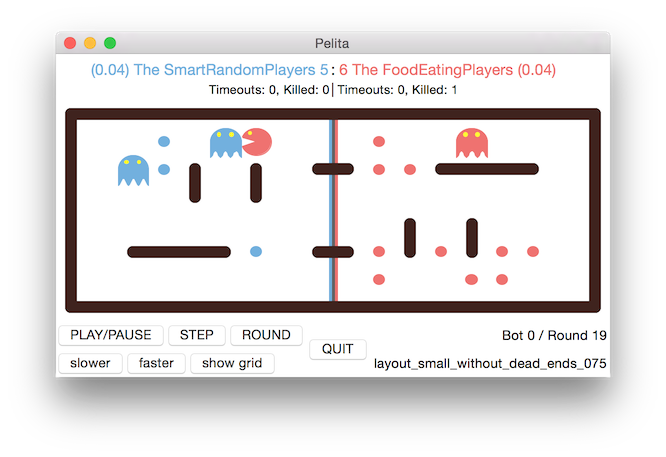
Historic reminder, we used to have only two rows of status info (as can be seen in our Readme still – last changed 10 years ago):

Interestingly, back then, it was possible to have the white buttons on a white background on macOS look normal, but when I run pelitagame from 2015 (2072195) today, it is also with the messy grey background:

image

In PyQt6 #756 it was also not really possible to design the background frame colour, I think (or was I just lazy? screenshots for reference) so all in all I believe that this is just something that we have to live with in macOS from now. (At least in Qt we could however move the whole game inside the Canvas and draw our own buttons and it would still look fine with anti-aliasing on Linux and Windows as well. Plus we’d have a workable dark mode.)

image image

I also looked into https://github.com/flet-dev/flet (completely different framework; has library problems in Linux) and https://customtkinter.tomschimansky.com (might work but its promises of an anti-aliased canvas are unfortunately not quite true?).


All that said, my suggestion would be to not mess with third-party Tk wrappers (not even ttk) at all for now and go with the frame styling suggested in this PR. I’ll see that I clean up the button spacing. It really gives use the most natural and bug-free button appearance in macOS that seems to be possible with Tk.

As far as Linux and Windows are concerned: If you thing the grey background is a step backwards, we could have conditional colourisation and make it white as before on these systems.

@otizonaizit
Copy link
Member

No, let's go for grey everywhere then. Conditionals are evil ;)

Debilski added 3 commits May 24, 2025 23:08
Removes the fps and rearranges the layout in the status section.
The title section is not a separate canvas anymore; we draw the team
names directly on the game canvas. This allows for tighter spacing.

Default geometry has been changed to make the cells square again.
@Debilski Debilski force-pushed the feature/fix-dark-mode branch from ffac457 to 60a8094 Compare May 24, 2025 21:14
@Debilski
Copy link
Member Author

Two small additional technical changes made:

The title section is not a separate canvas anymore; we draw the team names directly on the game canvas. This allows for tighter spacing (MeshGraph takes an offset parameter now).

Default geometry has been changed to make the cells square again.

@Debilski Debilski assigned Debilski and otizonaizit and unassigned Debilski and otizonaizit May 24, 2025
@Debilski Debilski requested a review from otizonaizit May 24, 2025 21:19
@Debilski
Copy link
Member Author

image

@otizonaizit
Copy link
Member

Some issues on Linux still:

  • with debug on, the axis labels are almost overlapping with the status line...:

screenshot1

  • The slower, faster and debug button labels are in a smaller font than before, maybe too small? (see screenshot below)
  • The quit button has become smaller too, but that's the button people try to reach quite often, why make it smaller? (see screenshot below)

out

  • The grey is really ugly, but I guess it's just a matter of getting used to it?
  • The buttons on macOS are nicely spaced, the one on Linux are crammed together: I know it has been like this forever, but can't they be spaced on Linux too?
  • Given how platform dependent all this seems to be, we have to make sure that the appearance on Windows is also OK

@otizonaizit
Copy link
Member

This is for another time, but what about changing the button labels like this:

  • PLAY/PAUSE ➔ ⏯
  • STEP ➔ ⏭
  • ROUND ➔ get rid of this
  • slower and faster: we can find symbols for these two, maybe: « and » ?
  • debug could be moved on the right, near to the debug info?

@otizonaizit
Copy link
Member

Another glitch in Linux: the button bar now has almost no padding anymore on the border with the maze. It was a bit more spaced before. Or maybe it wasn't, but because it was the same color, it wasn't noticeable. Now that it is grey, it seems a bit crammed to me...

@Debilski
Copy link
Member Author

Some issues on Linux still:

  • with debug on, the axis labels are almost overlapping with the status line...:

Ah, too bad. We are off by two rows of pixels compared to macOS here (macOS is still rather close but I think it works and doesn’t overlap). Will see if I can solve this with better font sizes.

  • The slower, faster and debug button labels are in a smaller font than before, maybe too small? (see screenshot below)

Yeah, I wanted to remove the visual weight from the second row there. (The ‘nothing selected’ text is also in a smaller font.) If it’s not readable (or you think it looks worse), we can revert it.

  • The quit button has become smaller too, but that's the button people try to reach quite often, why make it smaller? (see screenshot below)

I wanted to give the buttons to the left more space when the window is made smaller and adjusted the weights for the grid layout. (Resizing still doesn’t work too well, I haven’t figured out a good way to make all the buttons shrink at the same time.)

People who regularly use the quit button and still have trouble finding it, should really learn about the letter q. ;)

  • The grey is really ugly, but I guess it's just a matter of getting used to it?
FRAME_STYLE = {} if platform.is_macos else { "bg": "white" }

tk.Frame(window, *FRAME_STYLE)
  • The buttons on macOS are nicely spaced, the one on Linux are crammed together: I know it has been like this forever, but can't they be spaced on Linux too?

In principle yes. The problem is: This will make them even further apart on macOS and if you’re not careful and use the wrong button styles (like height), they will change their look on macOS completely. It’s all a big mess.

  • Given how platform dependent all this seems to be, we have to make sure that the appearance on Windows is also OK

Windows and Linux looked similar but I am not sure how much this is actually dependent on how Python itself is installed.

Another glitch in Linux: the button bar now has almost no padding anymore on the border with the maze. It was a bit more spaced before. Or maybe it wasn't, but because it was the same color, it wasn't noticeable. Now that it is grey, it seems a bit crammed to me...

Yeah, I agree. It kind of works on macOS I think but the effect on Linux is worse.

@Debilski
Copy link
Member Author

This is for another time, but what about changing the button labels like this:

  • PLAY/PAUSE ➔ ⏯
  • STEP ➔ ⏭

This sign clearly means play until the end without stopping.

  • ROUND ➔ get rid of this
  • slower and faster: we can find symbols for these two, maybe: « and » ?

The canonical icons are 🐢 and 🐇.

  • debug could be moved on the right, near to the debug info?

I think slower and faster are also debug-mode buttons. (In the sense that in a normal game you should never need to press them.)

We can test it but I’m a little doubtful that this will have an improved look with Tk. The only thing that makes these oversized buttons work is that we have oversized text in them. :)

@otizonaizit
Copy link
Member

Some issues on Linux still:

  • with debug on, the axis labels are almost overlapping with the status line...:

Ah, too bad. We are off by two rows of pixels compared to macOS here (macOS is still rather close but I think it works and doesn’t overlap). Will see if I can solve this with better font sizes.

yes, but please do not make the labels smaller: old people (me) still need to see it ;)

  • The slower, faster and debug button labels are in a smaller font than before, maybe too small? (see screenshot below)

Yeah, I wanted to remove the visual weight from the second row there. (The ‘nothing selected’ text is also in a smaller font.) If it’s not readable (or you think it looks worse), we can revert it.

it's ok for the slower and faster buttons. The debug button is different though, because that's a button people use very very often and sometimes in a hurry.

  • The quit button has become smaller too, but that's the button people try to reach quite often, why make it smaller? (see screenshot below)

I wanted to give the buttons to the left more space when the window is made smaller and adjusted the weights for the grid layout. (Resizing still doesn’t work too well, I haven’t figured out a good way to make all the buttons shrink at the same time.)

I don't know. To me it looked better before, but I am not terribly attached to that either.

People who regularly use the quit button and still have trouble finding it, should really learn about the letter q. ;)

Yes. Is there anything bad to expect if we just remove the QUIT button? If closing the window has the same effect, I think we can even get rid of it completely.

  • The grey is really ugly, but I guess it's just a matter of getting used to it?
FRAME_STYLE = {} if platform.is_macos else { "bg": "white" }

tk.Frame(window, *FRAME_STYLE)

OK, go for it!

  • The buttons on macOS are nicely spaced, the one on Linux are crammed together: I know it has been like this forever, but can't they be spaced on Linux too?

In principle yes. The problem is: This will make them even further apart on macOS and if you’re not careful and use the wrong button styles (like height), they will change their look on macOS completely. It’s all a big mess.

Then maybe until we have the right™ solution we just go for the conditional above even in this case?

  • Given how platform dependent all this seems to be, we have to make sure that the appearance on Windows is also OK

Windows and Linux looked similar but I am not sure how much this is actually dependent on how Python itself is installed.

Another glitch in Linux: the button bar now has almost no padding anymore on the border with the maze. It was a bit more spaced before. Or maybe it wasn't, but because it was the same color, it wasn't noticeable. Now that it is grey, it seems a bit crammed to me...

Yeah, I agree. It kind of works on macOS I think but the effect on Linux is worse.

so, another conditional?

@otizonaizit
Copy link
Member

This is for another time, but what about changing the button labels like this:

  • PLAY/PAUSE ➔ ⏯
  • STEP ➔ ⏭

This sign clearly means play until the end without stopping.

  • ROUND ➔ get rid of this
  • slower and faster: we can find symbols for these two, maybe: « and » ?

The canonical icons are 🐢 and 🐇.

  • debug could be moved on the right, near to the debug info?

I think slower and faster are also debug-mode buttons. (In the sense that in a normal game you should never need to press them.)

no, really, I see a lot of students pressing faster faster faster when they test their bot without using the debug mode. They should learn --fps, yes, but pressing the button is easier for most ;)

We can test it but I’m a little doubtful that this will have an improved look with Tk. The only thing that makes these oversized buttons work is that we have oversized text in them. :)

yes, yes, the unicode thing is just to nice to be applicable here ;)

@Debilski
Copy link
Member Author

  • debug could be moved on the right, near to the debug info?

I think slower and faster are also debug-mode buttons. (In the sense that in a normal game you should never need to press them.)

no, really, I see a lot of students pressing faster faster faster when they test their bot without using the debug mode. They should learn --fps, yes, but pressing the button is easier for most ;)

No, I agree, people use it a lot and it should be easily reachable. But what I meant is, once you press it, you are – by my definition – not in a normal game anymore but you are debugging. Therefore the button location should be adjacent to the other debug tools and not next to the regular game controls.

That said, I think these buttons gives an illusion of power that is not really there, suggesting infinite steps of speed that are neither useful nor possible. Something like this would be more fitting:

image

OTOH, buttons are easier to press, so we should keep them I guess, but maybe reduce the number of available steps?

@Debilski
Copy link
Member Author

Ah, too bad. We are off by two rows of pixels compared to macOS here (macOS is still rather close but I think it works and doesn’t overlap). Will see if I can solve this with better font sizes.

yes, but please do not make the labels smaller: old people (me) still need to see it ;)

We can have flite screen-read the numbers for you. Would that help? :)

  • The quit button has become smaller too, but that's the button people try to reach quite often, why make it smaller? (see screenshot below)

I wanted to give the buttons to the left more space when the window is made smaller and adjusted the weights for the grid layout. (Resizing still doesn’t work too well, I haven’t figured out a good way to make all the buttons shrink at the same time.)

I don't know. To me it looked better before, but I am not terribly attached to that either.

I agree that vastly oversized is better than this mid-range size button (it just needs to be able to auto-shrink). The large quit button really ties the status area together.

People who regularly use the quit button and still have trouble finding it, should really learn about the letter q. ;)

Yes. Is there anything bad to expect if we just remove the QUIT button? If closing the window has the same effect, I think we can even get rid of it completely.

I guess so. Why did we add it in the first place?

@Debilski Debilski force-pushed the feature/fix-dark-mode branch from 79df4f6 to 5801edf Compare May 26, 2025 21:35
@Debilski
Copy link
Member Author

(Not tested on Windows yet)

@Debilski Debilski force-pushed the feature/fix-dark-mode branch from 5801edf to 00e2890 Compare May 27, 2025 16:27
@Debilski
Copy link
Member Author

Look on Windows.
image

image

@otizonaizit
Copy link
Member

Looks good!

@Debilski
Copy link
Member Author

image

Buttons on Linux are bigger (there is commented-out code for this in the PR but in the end I think this has been enough fine-tuning already)

@Debilski
Copy link
Member Author

Merge and make a point release then?

@otizonaizit otizonaizit merged commit da96487 into ASPP:main May 28, 2025
34 checks passed
@otizonaizit
Copy link
Member

release!

github-actions bot pushed a commit that referenced this pull request May 28, 2025
@Debilski Debilski deleted the feature/fix-dark-mode branch May 29, 2025 11:42
@jbdyn jbdyn mentioned this pull request Jun 17, 2025
16 tasks
Sign up for free to join this conversation on GitHub. Already have an account? Sign in to comment

Labels

None yet

Projects

None yet

Development

Successfully merging this pull request may close these issues.

2 participants