creates a web app using markdown files
fetch the repo using the command
git clone https://github.com/ADGSTUDIOS/ADGDOCS/
install modules found in ADGDOCS/requirements.txt using the command below
pip install -r requirements.txt
Change the following in buildblog.yml to your config

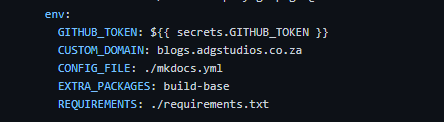
Also enable GitHub Pages to gh-pages branch for you to host the website.

in mkdocs.yml
site_name: ADGDOCS
copyright: "ADGSTUDIOS"
site_url: https://adgstudios.com
repo_url: https://github.com/ADGSTUDIOS/ADGDOCS
repo_name: ADGSTUDIOS/ADGDOCS
you can change all values with appropriate values
in mkdocs.yml
nav:
      - Title:
        - Subtitle: index.md
work with the syntax here to add more pages and markup files
in mkdocs.yml
  social:
            - icon: fontawesome/brands/github
              link: "https://github.com/ADGSTUDIOS"
            - icon: fontawesome/brands/linkedin
              link: "https://www.linkedin.com/in/adgsenpai/"
for icons look up into fontawesome docs
change the links to your social media links
add your markdown files in /docs/
for example adding file2.md and file3.md
-ADGDOCS
    -docs
        -index.md
        -file2.md
        -file3.md
in mkdocs.yml
under themes
to change the icons/favicon change the paths down below
      favicon: ./static/favicon.png
      logo: ./static/favicon.png
To run the web app you can run this command
python -m mkdocs serve
To build webfiles you can run
python -m mkdocs build
you will find your stuff in ADGDOCS/site