Releases: 5axes/ProfilePlus
V1.2.2 Cura 5.4

Update from master profile template :

Edition functions
-
Material Settings
- Remove Settings present in the material profile : Remove from the active profile parameters already existing in the Material definition
- Remove Settings present in the Machine Materials profiles : Remove from the active profile parameters already existing in every material associated with this machine
- Link Settings present in the material profile : Replace the Settings present in the profile and the material definition by a extruderValueFromContainer instruction
-
Remove Settings : Advanced expert mode to remove some existing parameters in the active profile
-
Update from master profile template :Update the settings of your profile according to the parameters set in a Master Profile. This Master Profile is defined in the parameter Master Profile Template in the Experimental section. of Cura.
-
Discard or Keep Changes : Only from Cura 5.3 , Dis play Windows "Discard or Keep Changes"
Analyse functions
- View Custom Parameters : View the parameters defined in the active profile
- View Active Material : View the parameters defined in the material definition
- View Machine Material : View the parameters defined in every material definition associated with the machine
- View Active Configuration : View the parameters defined in the active configuration
Installation
Drop the curapackage in the 3d viewport in Cura as if you were opening a 3d model. You will then be prompted to restart Cura.
ProfilePlus-2023-09-20.curapackage -> Cura 4.12 - Cura 5.4
V1.2.1 Cura 5.3
Update from master profile template :
Edition functions
-
Material Settings
- Remove Settings present in the material profile : Remove from the active profile parameters already existing in the Material definition
- Remove Settings present in the Machine Materials profiles : Remove from the active profile parameters already existing in every material associated with this machine
- Link Settings present in the material profile : Replace the Settings present in the profile and the material definition by a extruderValueFromContainer instruction
-
Remove Settings : Advanced expert mode to remove some existing parameters in the active profile
-
Update from master profile template :Update the settings of your profile according to the parameters set in a Master Profile. This Master Profile is defined in the parameter Master Profile Template in the Experimental section. of Cura.
-
Discard or Keep Changes : Only from Cura 5.3 , Dis play Windows "Discard or Keep Changes"
Analyse functions
- View Custom Parameters : View the parameters defined in the active profile
- View Active Material : View the parameters defined in the material definition
- View Machine Material : View the parameters defined in every material definition associated with the machine
- View Active Configuration : View the parameters defined in the active configuration
Installation
Drop the curapackage in the 3d viewport in Cura as if you were opening a 3d model. You will then be prompted to restart Cura.
ProfilePlus-v1.2.1-2023-03-13T21_01_29Z.curapackage -> Cura 4.12 - Cura 5.3
V1.1.0 Cura 5.2
Update from master profile template :
Edition functions
-
Material Settings
- Remove Settings present in the material profile : Remove from the active profile parameters already existing in the Material definition
- Remove Settings present in the Machine Materials profiles : Remove from the active profile parameters already existing in every material associated with this machine
- Link Settings present in the material profile : Replace the Settings present in the profile and the material definition by a extruderValueFromContainer instruction
-
Remove Settings : Advanced expert mode to remove some existing parameters in the active profile
-
Update from master profile template :Update the settings of your profile according to the parameters set in a Master Profile. This Master Profile is defined in the parameter Master Profile Template in the Experimental section. of Cura.
Analyse functions
- View Custom Parameters : View the parameters defined in the active profile
- View Active Material : View the parameters defined in the material definition
- View Machine Material : View the parameters defined in every material definition associated with the machine
- View Active Configuration : View the parameters defined in the active configuration
Installation
Drop the curapackage in the 3d viewport in Cura as if you were opening a 3d model. You will then be prompted to restart Cura.
ProfilePlus-v1.1.0-2023-03-09T18_01_12Z.curapackage-> Cura 4.12 - Cura 5.3
V1.0.9 Cura 5.2
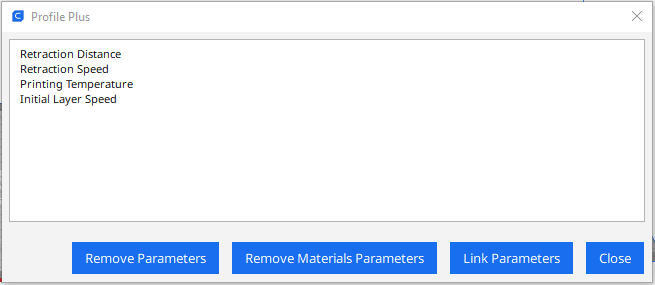
Modification with a list of parameters modified by the material function.
Edition functions
-
Material Settings
- Remove Settings present in the material profile : Remove from the active profile parameters already existing in the Material definition
- Remove Settings present in the Machine Materials profiles : Remove from the active profile parameters already existing in every material associated with this machine
- Link Settings present in the material profile : Replace the Settings present in the profile and the material definition by a extruderValueFromContainer instruction
-
Remove Settings : Advanced expert mode to remove some existing parameters in the active profile
-
Update from master profile template : Update the settings of your profile according to the parameters set in a Master Profile. This Master Profile is defined in the parameter Master Profile Template in the Experimental section. of Cura.
Analyse functions
- View Custom Parameters : View the parameters defined in the active profile
- View Active Material : View the parameters defined in the material definition
- View Machine Material : View the parameters defined in every material definition associated with the machine
- View Active Configuration : View the parameters defined in the active configuration
Installation
Drop the curapackage in the 3d viewport in Cura as if you were opening a 3d model. You will then be prompted to restart Cura.
ProfilePlus-v1.0.9-2023-03-09T11_02_37Z.curapackage -> Cura 4.12 - Cura 5.3