
Home Assistant custom component for heat recovery ventilation units. See below sections for details about 'supported' ventilation units.
✅ Updated for Home Assistant 2024.5.0+ - Version 1.4 includes fixes for the latest Home Assistant fan entity requirements.
The recommended way of installing this component is using the Home Assistant Community Store. To install the integration follow these steps:
- Go to the HACS Settings and add the custom repository
49jan/hass-ecoventwith category "Integration". - Open the "Integrations" tab and search for "EcoVent".
- Follow the instructions on the page to set the integration up.
Copy the contents of the custom_components folder to the custom_components folder in your Home Assistant config directory.
You may need to create the custom_components folder if this is the first integration you're installing.
It should look something like this:
├── custom_components
│   └── ecovent
│       ├── __init__.py
│       ├── configuration.yaml
│       ├── const.py
│       ├── fan.py
│       ├── manifest.json
│       └── services.yaml
Follow the instructions in the info.md file for the configuration and usage documentation.
The device must be pre-connected to the network and in the same LAN as home-assistant.
- name (Optional): Friendly name for this fan
- ip_address (Required): IP address of this fan
- port (Optional): Port of device. Need to be set if you have changed port or your device has a different port than the default value. The default port is 4000
- device_id (Optional): The ID of the device. Sometimes the integration fails to get the device ID. In this case, try restarting HomeAssistant or manually enter your device ID in this field.
- password (Optional): Password of the fan. Necessary to set if you have changed password or your device has a different password than the default. The default pass is 1111
This configuration example assumes that the fan is already paired on the local network.
fan:
  - platform: ecovent
    ip_address: "192.168.1.200"

  - platform: ecovent
    name: Kitchen fan
    ip_address: "192.168.1.205"
    device_id: "85481285"
    port: 4000
password: !secret blauberg_passThe following is a basic Lovelace card using the fan-percent-button-row customization:

- entity: fan.basement_fan
  type: custom:fan-percent-button-row
And another example with multiple Blauberg ventilation fans and ability to turn on/off the entire house:
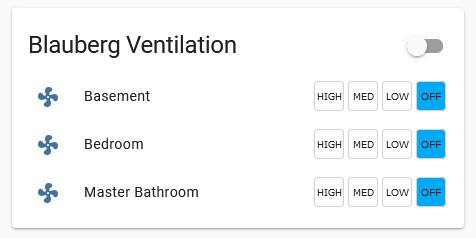
type: entities
title: Blauberg Ventilation
entities:
  - entity: fan.basement_fan
    name: Basement
    type: 'custom:fan-percent-button-row'
  - entity: fan.bedrooms_fan
    type: 'custom:fan-percent-button-row'
  - entity: fan.bathroom_fan
    name: Master Bathroom
type: 'custom:fan-percent-button-row'This component has only been tested on two Blauberg Vento Expert A50-1 W which are configured as master.
There are fans from Blauberg and Flexit that are identical and should work, but I have not verified that.
- Blauberg Vento Expert Duo A30-1 W V.2
- Blauberg Vento Expert A30 W V.2
- Twinfresh Expert RW1-50
- Single room ventilator Roomie Dual