
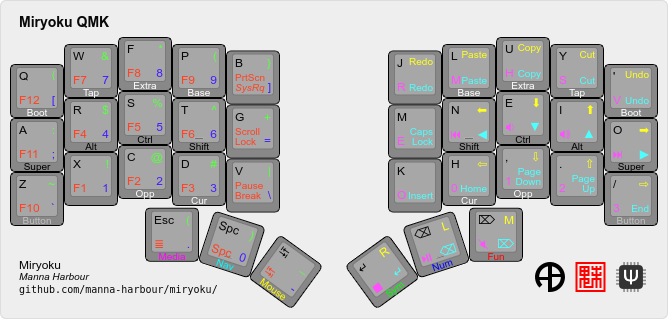
Miryoku is an ergonomic, minimal, orthogonal, and universal keyboard layout. Miryoku QMK is the Miryoku implementation for QMK.
QMK master is the current version of QMK, but usually does not contain the current version of Miryoku QMK.
QMK master is at https://github.com/qmk/qmk_firmware/tree/master. The corresponding Miryoku QMK readme is at https://github.com/qmk/qmk_firmware/tree/master/users/manna-harbour_miryoku and describes the version of Miryoku QMK in QMK master.
The Miryoku QMK development branch is the current version of Miryoku QMK, but usually does not contain the current version of QMK.
The Miryoku QMK development branch is named miryoku and is at https://github.com/manna-harbour/miryoku_qmk/tree/miryoku. The corresponding Miryoku QMK readme is at https://github.com/manna-harbour/miryoku_qmk/tree/miryoku/users/manna-harbour_miryoku.
New commits can be seen at the top of the history with commit messages beginning [miryoku] or [miryoku-github]
Periodically, the [miryoku] commits are squashed and merged upstream into QMK master by pull request, the miryoku branch is renamed, and a new miryoku branch is created from QMK master.
To use both the current versions of QMK and Miryoku QMK together, the QMK master and miryoku branches need to be merged.
The [miryoku-github] commits relate to GitHub specific functions of the Miryoku QMK repository and forks, such as workflows. Directly merging miryoku with a branch based on QMK master will lead to conflicts due to those commits. To avoid conflicts, first drop or revert all [miryoku-github] commits from miryoku before merging.
Merging branches can be performed automatically at build time for workflow builds using the merge option, which will automatically revert all [miryoku-github] commits before merging. For local builds, see Checkout, Update, and Merge below.
Any local changes to existing workflow files should be made independently in commits with messages starting [miryoku-github] so that they can also be automatically excluded in workflow builds.
First set up the QMK build environment and build the default keymap for your keyboard.
Next choose the branch. If using miryoku, checkout, update, or merge as needed.
Build with manna-harbour_miryoku as the keymap name. Personalised defaults for alternative layout options can be set in custom_rules.mk. Options can also be set or overridden at build time. Build with qmk or make.
All of the following examples operate in your existing QMK build environment.
cd qmk_firmwareTo checkout the miryoku branch from Miryoku QMK:
git remote add miryoku_qmk git@github.com:manna-harbour/miryoku_qmk.git # if using SSH
git remote add miryoku_qmk https://github.com/manna-harbour/miryoku_qmk.git # if using HTTPS
git fetch miryoku_qmk
git checkout --track miryoku_qmk/miryoku
make git-submodule
To update the miryoku branch from Miryoku QMK:
git checkout miryoku
git fetch miryoku_qmk
git merge miryoku_qmk/miryoku
If a new miryoku branch has been created in Miryoku QMK you will see (forced update) after the fetch. To rename the existing miryoku branch and create a new miryoku branch from Miryoku QMK:
git checkout miryoku
git branch -m miryoku-`whoami`-`date --rfc-3339=date`
git fetch miryoku_qmk
git checkout --track miryoku_qmk/miryoku
make git-submodule
To merge the miryoku branch with QMK master:
git checkout miryoku
git checkout -b miryoku-merge-master
git revert --no-edit `git log --grep='^\[miryoku-github\]' --pretty='format:%H' | tr '\n' ' '`
git fetch origin
git merge origin/master
make git-submoduleBuild with the qmk command. E.g.
qmk compile -c -kb crkbd -km manna-harbour_miryoku # build for crkbd
qmk flash -c -kb crkbd -km manna-harbour_miryoku # build for crkbd and flash
qmk compile -c -kb crkbd -km manna-harbour_miryoku \
  -e MIRYOKU_ALPHAS=QWERTY \
  -e MIRYOKU_EXTRA=COLEMAKDH \
  -e MIRYOKU_TAP=QWERTY \
  -e MIRYOKU_NAV=INVERTEDT \
  -e MIRYOKU_CLIPBOARD=WIN \
-e MIRYOKU_LAYERS=FLIP # build for crkbd with alternative layoutsFirst cd to the repository root. Then build with make. E.g.
make clean crkbd:manna-harbour_miryoku # build for crkbd
make clean crkbd:manna-harbour_miryoku:flash # build for crkbd and flash
make clean crkbd:manna-harbour_miryoku \
  MIRYOKU_ALPHAS=QWERTY \
  MIRYOKU_EXTRA=COLEMAKDH \
  MIRYOKU_TAP=QWERTY \
  MIRYOKU_NAV=INVERTEDT \
  MIRYOKU_CLIPBOARD=WIN \
MIRYOKU_LAYERS=FLIP # build for crkbd with alternative layoutsFirmware can be built via GitHub Actions workflows without use of a local build environment. Local tools are still required for flashing.
First fork the Miryoku QMK repository or sync the miryoku branch. Then use the Build Examples or Build Inputs workflows.
To access a workflow, visit the Actions tab and select the workflow. To download the firmware from a workflow run, select the workflow, select the workflow run, select the desired Artifacts, and unzip the downloaded zip file.
Workflow files are in ../../.github/workflows.
If you don’t have a fork, first create a GitHub account, login to GitHub, fork https://github.com/manna-harbour/miryoku_qmk, and visit the Actions tab and enable workflows.
If you already have a fork, sync the miryoku branch.
If a new miryoku branch has been created in Miryoku QMK, there will be a warning about conflicts when trying to sync. If you have local changes, first create a copy of the branch by creating a new branch and specifying the miryoku branch in your fork as the source, then sync the miryoku branch again. Accept the prompt to discard commits.
Copy one of the included Build Example workflow files, edit the name value, and edit and add options and values as desired. Select Run workflow, select the Branch if desired, and activate Run workflow.
Options are specified in the with section and are of the following form.
option: '["value"]'
For multiple values per option use the following form, and a matrix build will be performed for each combination of values across all options.
option: '["value1","value2"]'
The keyboard option specifies the keyboard and is required. All other options are optional.
The alphas, nav, clipboard, and layers options correspond to the alternative layout options. The mapping option corresponds to the alternative mapping options. Alternative layout and mapping options are given in the documentation in the form MIRYOKU_OPTION=VALUE. To use here, convert to the form specified above. Use default to represent the default value. Values for these five options are case-insensitive. See the Test All Configs workflow file for all supported values.
The rules and custom_config options can be used to specify values to be appended to custom_rules.mk and custom_config.h, respectively. Separate multiple lines with \n.
The merge option can be used to merge branches at build time. Branches are specified in the form <user>/<repo>/<branch>. E.g. QMK master and develop would be specified as qmk/qmk_firmware/master and qmk/qmk_firmware/develop respectively. Multiple space separated branches can be specified. For no merges, leave as default.
The Build Inputs workflow can be used without editing workflow files. Select Run workflow, select the Branch and fill out the form as desired, and activate Run workflow.
Most options are specified by entering values directly in the corresponding field. Multiple comma separated values can be entered per option and a matrix build will be performed for each combination of values across all options.
Values for Miryoku alternative layout options are selected from a list. As multiple selection is not supported, matrix builds across multiple values are not possible for these options, and the Test Inputs or Build Example workflows should be used instead.
The Keyboard option specifies the keyboard and is required. All other options are optional.
The Miryoku Alphas, Miryoku Nav, Miryoku Clipboard, and Miryoku Layers options correspond to the alternative layout options. The Miryoku Mapping option corresponds to the alternative mapping options. Alternative layout and mapping options are given in the documentation in the form MIRYOKU_OPTION=VALUE. To use here, enter the value in the corresponding Miryoku Option field. Use default to represent the default value. Values for these five options are case-insensitive.
The custom_rules.mk and custom_config.h options can be used to specify values to be appended to the corresponding files. Join multiple lines with \n.
The Merge QMK Branches option can be used to merge branches at build time. Branches are specified in the form <user>/<repo>/<branch>. E.g. QMK master and develop would be specified as qmk/qmk_firmware/master and qmk/qmk_firmware/develop respectively. Multiple space separated branches can be specified. For no merges, leave as default.
The keymap, build options, and configuration are shared between keyboards. The layout is mapped onto keyboards with different physical layouts as a subset without code duplication using the QMK userspace feature and C macros.
The keymap is defined for LAYOUT_miryoku which is 10x4, with the outer 2
positions on the bottom row unused and the rest of the bottom row being the
thumb keys.
- ./rules.mk
- Build options. Automatically included.
- ./custom_rules.mk
- Custom
makeoptions including customised defaults for alternative layout and mapping options. Included fromrules.mk. - ./post_rules.mk
- Handles Miryoku
makeoptions. Included fromrules.mk. - ./config.h
- Config options. Automatically included.
- ./custom_config.h
- Custom config options. Included from
config.h. - ./manna-harbour_miryoku.h
- Keymap-related definitions. Included from
manna-harbour_miryoku.c. Layer data is generated by Miryoku Babel and is included from files in the miryoku_babel directory. - ./manna-harbour_miryoku.c
- Contains the keymap. Added from
rules.mk.
To use the keymap on a keyboard supporting the community layouts feature,
LAYOUT_miryoku is defined as a macro mapping onto the layout’s own LAYOUT
macro, leaving the unused keys as KC_NO.
For keyboards supporting multiple layouts for which subset mappings are
available, select the layout with FORCE_LAYOUT in the make command line when
building. E.g.:
make planck/rev6:manna-harbour_miryoku:flash FORCE_LAYOUT=planck_mit # planck_mit
make planck/rev6:manna-harbour_miryoku:flash FORCE_LAYOUT=ortho_4x12 # ortho_4x12An angled ortho split layout is mapped onto the row-staggered keyboard. The rows are moved up to better position the thumb keys, the hands are separated as much as possible, and the left hand column angle is reversed to reduce ulnar deviation of the wrists.
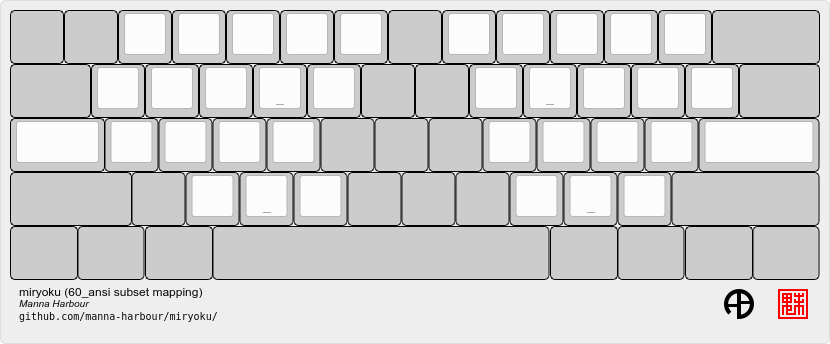
An alternative subset mapping is also provided without reverse column angle. To
select this mapping, append MIRYOKU_MAPPING=NOREVERSEANGLE to the make
command line when building.
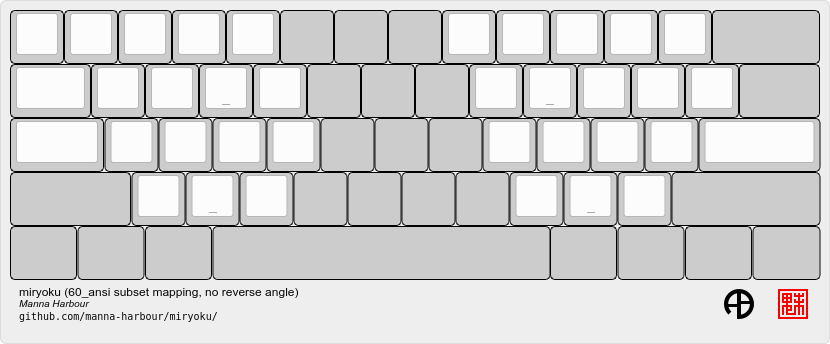
Another alternative subset mapping is provided mapping only the 3x10 alphas,
plus spacebar for space / Nav, with the remainder being the default 60_ansi
keymap with semicolon in place of quote. To select this mapping, append
MIRYOKU_MAPPING=LITE to the make command line when building.
Keyboards supporting this layout: alps64, amj60, bakeneko60, bm60poker, bm60rgb, do60, dp60, dz60, facew, gskt00, infinity60, jm60, kc60, kc60se, ok60, org60, paladin64, panc60, reviung61, smk60, v60_type_r, yd60mq, 1upkeyboards/1up60hse, 1upkeyboards/1up60rgb, 40percentclub/luddite, acheron/keebspcb, acheron/lasgweloth, ai03/polaris, akegata_denki/device_one, atxkb/1894, bioi/g60ble, bt66tech/bt66tech60, cannonkeys/an_c, cannonkeys/instant60, cannonkeys/practice60, clawsome/coupe, dm9records/tartan, duck/eagle_viper, evyd13/plain60, exclusive/e6_rgb, gh60/revc, gh60/satan, gh60/v1p3, handwired/xealousbrown, hineybush/h60, hs60/v1, keebio/wtf60, noxary/260, playkbtw/pk60, ryloo_studio/m0110, thevankeyboards/bananasplit, wilba_tech/zeal60, xd60/rev2, xd60/rev3, cannonkeys/db60/hotswap, cannonkeys/db60/j02, cannonkeys/db60/rev2, exclusive/e6v2/le, exclusive/e6v2/oe, foxlab/leaf60/universal, handwired/co60/rev1, handwired/co60/rev7, handwired/swiftrax/nodu, hs60/v2/ansi, inett_studio/sqx/universal, melgeek/mj61/rev1, melgeek/mj61/rev2, melgeek/mj63/rev1, melgeek/mj63/rev2, sentraq/s60_x/default, sentraq/s60_x/rgb.
Example build command lines:
make dz60:manna-harbour_miryoku:flash # dz60
make dz60:manna-harbour_miryoku:flash MIRYOKU_MAPPING=NOREVERSEANGLE  # dz60, without reverse column angle
make dz60:manna-harbour_miryoku:flash MIRYOKU_MAPPING=LITE # dz60, with lite mappingThis is a hybrid mapping. Only the 3x10 alphas plus spacebars as primary thumb keys are mapped. The remaining keys are the same as the default keymap but with semicolon in place of quote. The keys adjacent to the spacebars are also mapped as corresponding thumb keys but may not be usable as such.
Keyboards supporting this layout: cheshire/curiosity, handwired/owlet60, mechlovin/adelais, projectkb/alice, sck/osa, axolstudio/yeti, coarse/cordillera, edda, evyd13/wonderland, fallacy, kb_elmo/sesame, keebsforall/coarse60, ramonimbao/aelith, sneakbox/aliceclone, tkc/osav2, zoo/wampus.
This is a hybrid mapping. Only the 3x10 alphas plus spacebars as primary thumb keys are mapped. The remaining keys are the same as the default keymap but with semicolon in place of quote. The keys adjacent to the spacebars are also mapped as corresponding thumb keys but may not be usable as such.
Keyboards supporting this layout: cheshire/curiosity, ergosaurus, handwired/colorlice, handwired/owlet60, mechlovin/adelais, projectkb/alice, sck/osa, tgr/alice, xelus/valor/rev1, xelus/valor/rev2, axolstudio/yeti, coarse/cordillera, edda, evyd13/wonderland, fallacy, kb_elmo/sesame, keebsforall/coarse60, nightly_boards/alter/rev1, ramonimbao/aelith, seigaiha, sneakbox/aliceclone, tkc/osav2, zoo/wampus.
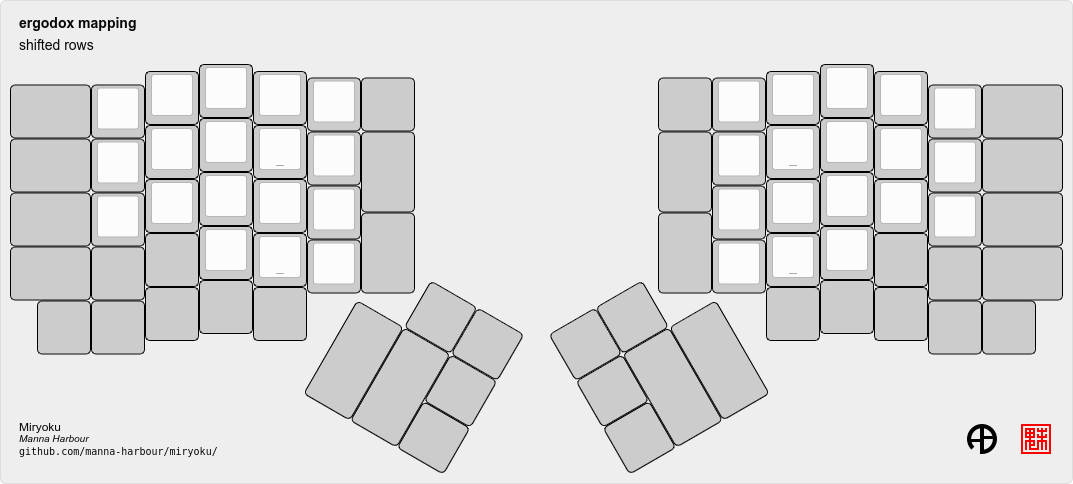
For the ergodox layout, the main 5x3 alphas are used as usual. The primary and secondary thumb keys are the inner and outer 2u thumb keys and the tertiary thumb key is the innermost key of the partial bottom row. The remaining keys are unused.
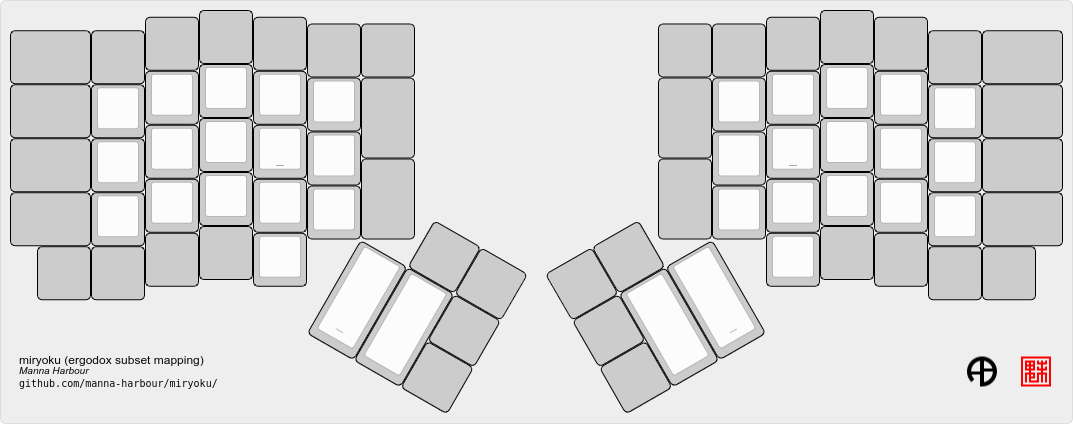
An alternative subset mapping is provided with all keys shifted up one row creating thumb keys in the original alpha area. To select this mapping, append MIRYOKU_MAPPING=SHIFTED_ROWS to the make command line when building.
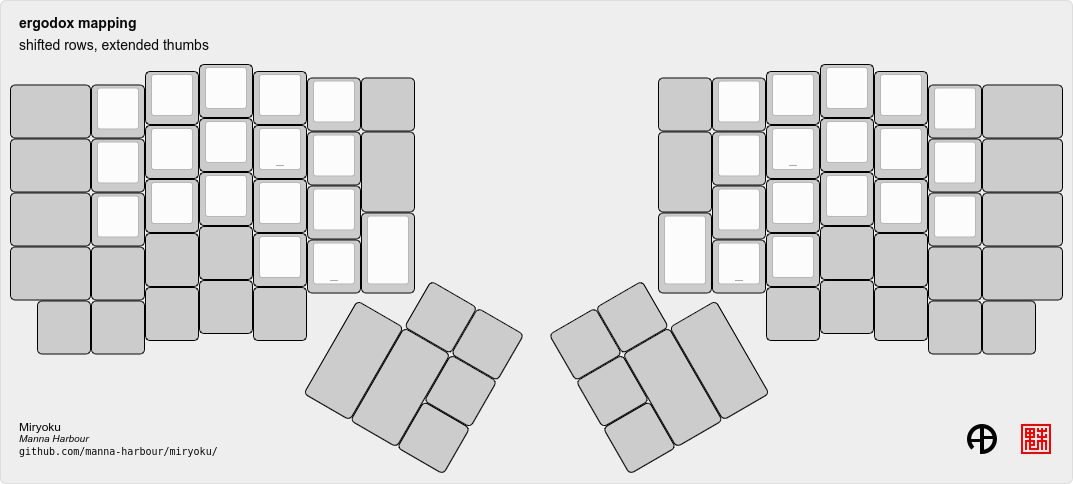
Another alternative subset mapping is provided as for MIRYOKU_MAPPING=SHIFTED_ROWS but with the thumb keys shifted one position in the direction of thumb extension. To select this mapping, append MIRYOKU_MAPPING=SHIFTED_ROWS_EXTENDED_THUMBS to the make command line when building.
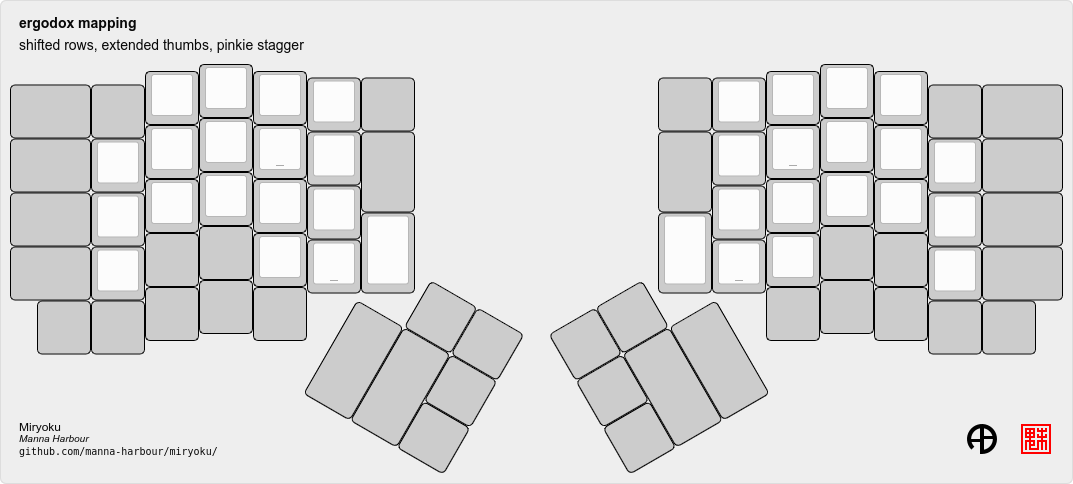
Another alternative subset mapping is provided as for MIRYOKU_MAPPING=SHIFTED_ROWS_EXTENDED_THUMBS but with the pinkie column moved down one row. To select this mapping, append MIRYOKU_MAPPING=SHIFTED_ROWS_EXTENDED_THUMBS_PINKIE_STAGGER to the make command line when building.
Keyboards supporting this layout: ergodone, ergodox_ez, ergodox_infinity, hotdox.
Example build command lines:
make ergodox_infinity:manna-harbour_miryoku:flash # ergodox_infinity
make ergodox_ez:manna-harbour_miryoku:flash # ergodox_ez
make ergodox_ez:manna-harbour_miryoku:flash MIRYOKU_MAPPING=SHIFTED_ROWS # ergodox_ez, shifted rows
make ergodox_ez:manna-harbour_miryoku:flash MIRYOKU_MAPPING=SHIFTED_ROWS_EXTENDED_THUMBS # ergodox_ez, shifted rows, extended thumbs
make ergodox_ez:manna-harbour_miryoku:flash MIRYOKU_MAPPING=SHIFTED_ROWS_EXTENDED_THUMBS_PINKIE_STAGGER # ergodox_ez, shifted rows, extended thumbs, pinkie stagger
An alternative with 180 degree rotation is also provided to enable the USB cable to be relocated for use with laptops. To select this mapping, append MIRYOKU_MAPPING=ROTATE to the make command line when building.
Keyboards supporting this layout: newgame40, nimrod, marksard/rhymestone, pabile/p40.
Example build command lines:
make marksard/rhymestone:manna-harbour_miryoku:flash # marksard/rhymestone
make pabile/p40:manna-harbour_miryoku:flash MIRYOKU_MAPPING=ROTATE # pabile/p40, rotateFor the ortho_4x12 layout, the middle two columns, and the 2 keys on each end of the bottom row are unused. This allows the hands to be positioned without ulnar deviation of the wrists.
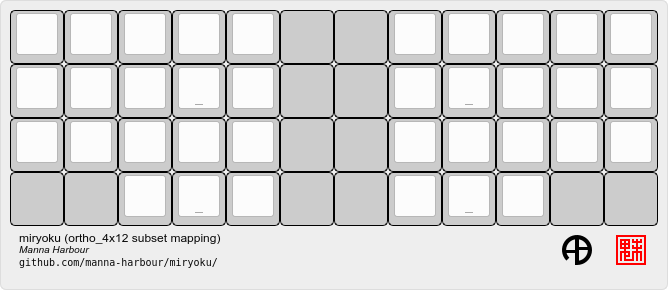
For split keyboards using this layout the halves can be positioned and rotated
for each hand and so an alternative mapping is provided. The right half is as
follows: The rightmost column bottom 3 keys is the pinkie column. The middle 4
columns top 3 rows are for the remaining fingers. The pinkie column is one row
lower than the other columns to provide some column stagger. The bottom row
left 3 keys are the thumb keys. The remaining keys are unused. To select this
mapping, append MIRYOKU_MAPPING=SPLIT to the make command line when
building.
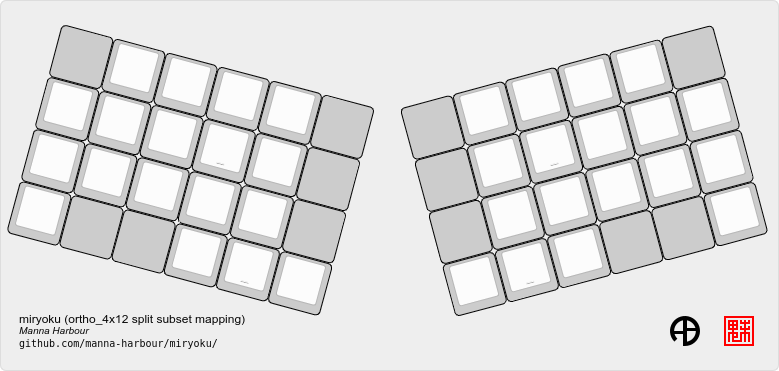
An alternative with extended thumb position but without pinkie column stagger is
also provided. To select this mapping, append MIRYOKU_MAPPING=EXTENDED_THUMBS
to the make command line when building.
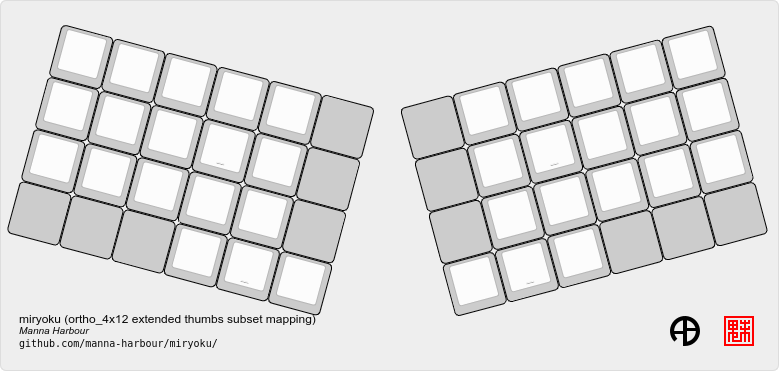
Keyboards supporting this layout: chimera_ls, contra, efreet, jj40, jnao, lets_split, lets_split_eh, meira, niu_mini, quark, tau4, telophase, vitamins_included, zlant, 40percentclub/4x4, 40percentclub/nori, acheron/shark, boardsource/4x12, cannonkeys/ortho48, dm9records/plaid, evyd13/eon40, evyd13/pockettype, handwired/floorboard, handwired/jotanck, handwired/wulkan, kbdfans/kbd4x, keebio/levinson, keebio/wavelet, mechstudio/ud_40_ortho, planck/ez, planck/light, planck/rev1, planck/rev2, planck/rev3, planck/rev4, planck/rev5, planck/rev6, planck/thk, rgbkb/zygomorph, zvecr/split_blackpill, zvecr/zv48, keebio/nyquist/rev1, keebio/nyquist/rev2, keebio/nyquist/rev3, montsinger/rebound/rev1, montsinger/rebound/rev2, montsinger/rebound/rev3, montsinger/rebound/rev4, signum/3_0/elitec, spaceman/pancake/feather, spaceman/pancake/promicro, ymdk/ymd40/v2.
Example build command lines:
make planck/rev6:manna-harbour_miryoku:flash FORCE_LAYOUT=ortho_4x12 # planck, ortho_4x12
make planck/rev6:manna-harbour_miryoku:flash FORCE_LAYOUT=ortho_4x12 MIRYOKU_MAPPING=EXTENDED_THUMBS # planck, ortho_4x12, extended thumbs
make keebio/levinson:manna-harbour_miryoku:flash MIRYOKU_MAPPING=SPLIT # levinson
make keebio/levinson:manna-harbour_miryoku:flash MIRYOKU_MAPPING=EXTENDED_THUMBS # levinson, extended thumbsAs per ortho_4x12 but the top row is unused.
Keyboards supporting this layout: fractal, jj50, jnao, boardsource/5x12, cannonkeys/atlas_alps, cannonkeys/ortho60, handwired/jot50, handwired/riblee_f401, handwired/riblee_f411, handwired/rs60, keycapsss/o4l_5x12, peej/lumberjack, preonic/rev1, preonic/rev2, preonic/rev3, rgbkb/zygomorph, keebio/nyquist/rev1, keebio/nyquist/rev2, keebio/nyquist/rev3.
Example build command lines:
make preonic/rev3:manna-harbour_miryoku:flash # preonic/rev3
make preonic/rev3:manna-harbour_miryoku:flash MIRYOKU_MAPPING=EXTENDED_THUMBS # preonic/rev3, extended thumbs
make keebio/nyquist/rev3:manna-harbour_miryoku:flash MIRYOKU_MAPPING=SPLIT # nyquist/rev3, split
make keebio/nyquist/rev3:manna-harbour_miryoku:flash MIRYOKU_MAPPING=EXTENDED_THUMBS # nyquist/rev3, extended thumbs
For the ortho_5x15 layout, the top row, middle 5 columns, and the 2 keys on each end of the bottom row are unused. This allows the hands to be positioned without ulnar deviation of the wrists.
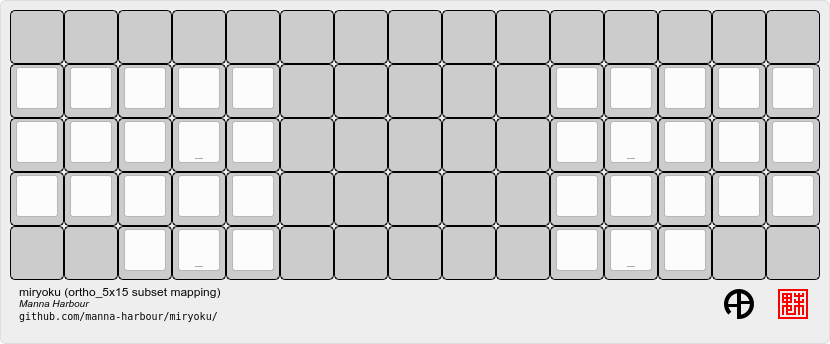
An alternative subset mapping is also provided with the thumb keys shifted
across one position in the direction of thumb extension. To select this
mapping, append MIRYOKU_MAPPING=EXTENDED_THUMBS to the make command line
when building.
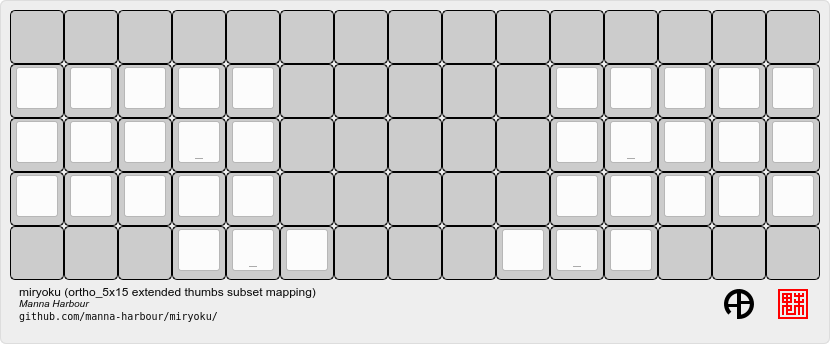
Keyboards supporting this layout: atomic, geminate60, idobo, punk75, xd75, 40percentclub/5x5, 40percentclub/i75, cannonkeys/ortho75, sendyyeah/75pixels.
Example build command lines:
make atomic:manna-harbour_miryoku:flash # atomic
make atomic:manna-harbour_miryoku:flash MIRYOKU_MAPPING=EXTENDED_THUMBS # atomic, extended thumbs
make idobo:manna-harbour_miryoku:flash # idoboThe middle two columns including the middle 2u key, and the 2 keys on each end of the bottom row are unused.
Keyboards supporting this layout: bm40hsrgb, contra, efreet, jj40, latin47ble, mt40, niu_mini, quark, zlant, dm9records/plaid, evyd13/eon40, handwired/aranck, handwired/heisenberg, kbdfans/kbd4x, planck/ez, planck/light, planck/rev1, planck/rev2, planck/rev3, planck/rev4, planck/rev5, planck/rev6, planck/thk, spaceman/pancake/feather, spaceman/pancake/promicro.
Example build command lines:
make planck/ez:manna-harbour_miryoku:flash # planck ez
make planck/rev6:manna-harbour_miryoku:flash FORCE_LAYOUT=planck_mit # planck rev6, mit
Thumb combos are enabled automatically for this layout.
Keyboards supporting this layout: a_dux, alt34/rev1, bastardkb/dilemma, cradio, ferris/0_1, ferris/0_2, ferris/sweep
Example build command lines:
make ferris/0_2:manna-harbour_miryoku:flash # ferris/0_2
make ferris/sweep:manna-harbour_miryoku:flash # ferris/sweepKeyboards supporting this layout: arch_36, boardsource/microdox, centromere, crkbd, eek, miniaxe, minidox/rev1, pteron36, squiggle/rev1, suihankey/split/rev1.
Example build command lines:
make crkbd:manna-harbour_miryoku:flash # crkbd
make minidox:manna-harbour_miryoku:flash # minidoxThe outer columns are unused.
Keyboards supporting this layout: centromere, crkbd, bastardkb/tbkmini.
Example build command lines:
make bastardkb/tbkmini:manna-harbour_miryoku:flash # bastardkb/tbkmini
make crkbd:manna-harbour_miryoku:flash # crkbdTo use the keymap on a keyboard which does not support the layouts feature,
LAYOUT_miryoku is defined as a macro mapping onto the keyboard’s own LAYOUT
macro, leaving the unused keys as KC_NO.
Thumb combos are enabled automatically for this keyboard.
To build for this keyboard,
make a_dux:manna-harbour_miryoku:flashOnly the main 5x3 alphas and the inner 3 thumb keys are used.
To build for this keyboard,
make atreus:manna-harbour_miryoku:flashThumb combos are enabled automatically for this keyboard.
To build for this keyboard,
make bastardkb/charybdis/3x5:manna-harbour_miryoku:flashOn the trackball side the bottom row thumb key is used as the tertiary thumb key. Additionally, thumb combos are enabled automatically for this keyboard.
To build for this keyboard,
make bastardkb/charybdis/4x6:manna-harbour_miryoku:flashTo build for this keyboard,
make bastardkb/scylla:manna-harbour_miryoku:flashTo build for this keyboard,
make draculad:manna-harbour_miryoku:flashTo build for this keyboard,
make ergotravel:manna-harbour_miryoku:flashThe top row is unused.
To build for this keyboard,
make for_science:manna-harbour_miryoku:flashTo build for this keyboard,
make fortitude60:manna-harbour_miryoku:flashOnly the main 5x3 alphas and the outer 3 thumb keys are used.
To build for this keyboard,
make gergo:manna-harbour_miryoku:flashOnly the main 5x3 alphas and the main 3 thumb keys are used.
To build for this keyboard,
make handwired/dactyl_manuform/4x5:manna-harbour_miryoku:flashOnly the main 5x3 alphas and the main 3 thumb keys are used.
To build for this keyboard,
make handwired/dactyl_manuform/4x6:manna-harbour_miryoku:flashOnly the main 5x3 alphas and the main 3 thumb keys are used.
To build for this keyboard,
make handwired/dactyl_manuform/5x6:manna-harbour_miryoku:flashTo build for this keyboard,
make jorne:manna-harbour_miryoku:flashOnly the main 5x3 alphas and the bottom 3 thumb keys are used.
To build for this keyboard,
make keebio/iris/rev4:manna-harbour_miryoku:flashOnly the main 5x3 alphas and the inner 3 thumb keys are used.
To build for this keyboard,
make keyboardio/atreus:manna-harbour_miryoku:flashOnly the main 5x3 alphas and the inner 3 thumb keys are used.
To build for this keyboard,
make keyboardio/model01:manna-harbour_miryoku:flashOnly the main 5x3 alphas and the inner 3 thumb keys are used.
To build for this keyboard,
make lily58:manna-harbour_miryoku:flashThe main 5x3 alphas are used as usual. The primary, secondary, and tertiary thumb keys are the closest piano key, middle piano key, and the innermost key of the partial bottom row, respectively. The remaining keys are unused.
To build for this keyboard,
make moonlander:manna-harbour_miryoku:flashOnly the main 5x3 alphas and the main 3 thumb keys are used.
To build for this keyboard,
make pluckey:manna-harbour_miryoku:flashOnly the main 5x3 alphas and the main 3 thumb keys are used.
To build for this keyboard,
make redox_w:manna-harbour_miryoku:flashTo build for this keyboard,
make satt/vision:manna-harbour_miryoku:flashTo build for this keyboard,
make sofle:manna-harbour_miryoku:flashOnly the main 5x3 alphas and the middle 3 lower thumb keys are used.
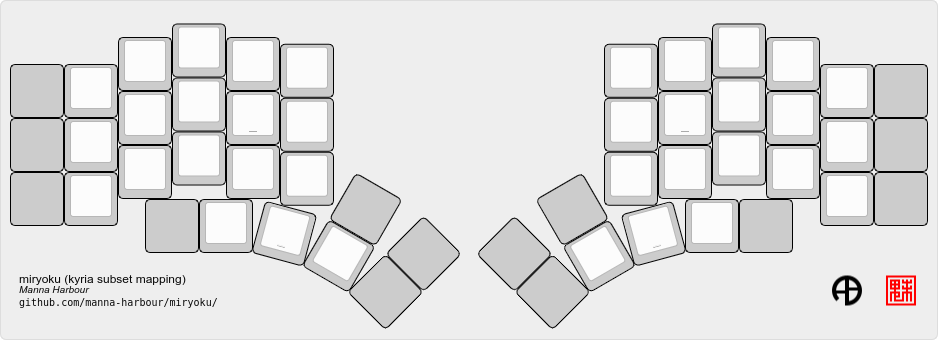
An alternative subset mapping is also provided with the thumb keys shifted one
position in the direction of thumb extension. To select this mapping, append
MIRYOKU_MAPPING=EXTENDED_THUMBS to the make command line when building.
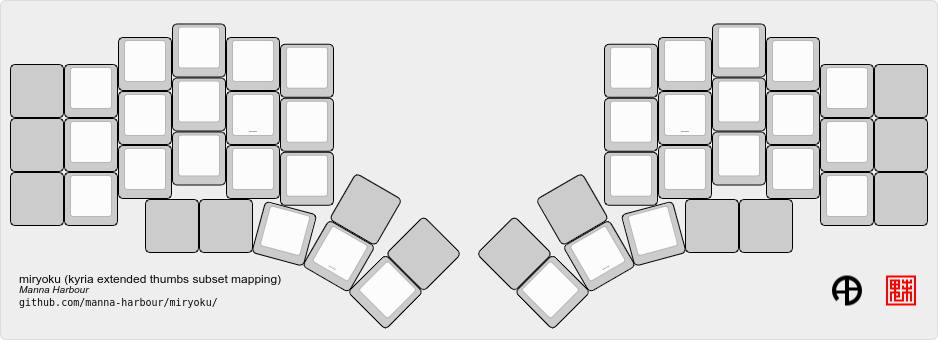
To build for this keyboard,
make splitkb/kyria:manna-harbour_miryoku:flash
make splitkb/kyria:manna-harbour_miryoku:flash MIRYOKU_MAPPING=EXTENDED_THUMBS # extended thumb positionThe bottom row middle two keys are mapped to left and right mouse buttons.
An alternative subset mapping is also provided with the thumb keys shifted one
position in the direction of thumb extension. To select this mapping, append
MIRYOKU_MAPPING=EXTENDED_THUMBS to the make command line when building.
To build for this keyboard,
make takashicompany/minizone:manna-harbour_miryoku:flash # make
make takashicompany/minizone:manna-harbour_miryoku:flash MIRYOKU_MAPPING=EXTENDED_THUMBS # make, extended thumb position
make takashicompany/minizone:manna-harbour_miryoku:flash POINTING_DEVICE_ENABLE=yes POINTING_DEVICE_DRIVER=pimoroni_trackball OLED_ENABLE=no # make, with pimoroni trackball
qmk compile -c -kb takashicompany/minizone -km manna-harbour_miryoku # qmk
qmk compile -c -kb takashicompany/minizone -km manna-harbour_miryoku -e MIRYOKU_MAPPING=EXTENDED_THUMBS # qmk, extended thumb position
qmk compile -c -kb takashicompany/minizone -km manna-harbour_miryoku -e POINTING_DEVICE_ENABLE=yes -e POINTING_DEVICE_DRIVER=pimoroni_trackball -e OLED_ENABLE=no # qmk, with pimoroni trackballTo build for this keyboard,
make torn:manna-harbour_miryoku:flashCaps Word is used in place of Caps Lock. Combine with Shift for Caps Lock.
MIRYOKU_KLUDGE_THUMBCOMBOS=yes
Combo the primary and secondary thumb keys to emulate the tertiary thumb key. Can be used on keyboards with missing or hard to reach tertiary thumb keys or for compatibility with same. Requires suitable keycaps to enable the thumb to press both keys simultaneously.
Use Miryoku QMK with any keyboard with 𝑥MK.
For local builds, merge https://github.com/manna-harbour/qmk_firmware/tree/xmk and build for keyboard converter/xmk.
For workflow builds, use the Build Inputs workflow and build with keyboard converter/xmk and merge manna-harbour/qmk_firmware/xmk, or use the Build Example 𝑥MK workflow.
Also see Miryoku KMonad.
