By: Team F10-2 Since: August 2019 Licence: MIT
- 1. Introduction
- 2. Setting Up
- 3. Design
- 4. Implementation
- 4.1. Undo/Redo Feature
- 4.2. NUS EventList
- 4.3. Degreelist Feature
- 4.4. Module Feature
- 4.5. Conjunctive Module Feature
- 4.6. NonDescriptive Module Feature
- 4.7. ModuleList Feature
- 4.8. Degree Feature
- 4.9. DegreeManager Feature
- 4.10. Graduate Employment Statistics Feature
- 4.11. Cohort Size Statistics Feature
- 4.12. TaskList Sorting
- 5. Testing
- 5.1. Notes for testing
- 5.2. Testing
add,detail,helpcommands - 5.3. Testing
comparecommand - 5.4. Testing
remove,delete,donecommand - 5.5. Testing
undo,redocommand - 5.6. Testing
todo,event,deadlinecommand - 5.7. Testing
view_employment,cohort_sizecommand - 5.8. Testing
swapcommand - 5.9. Testing
donecommand - 5.10. Testing
snoozecommand - 5.11. Testing
schedule,findcommand - 5.12. Testing
sortcommand - 5.13. Testing
choices,tasks,keywordcommand
- 5.1. Notes for testing
- 6. Documentation
- 7. Appendix A: User Stories
- 8. Appendix B: Use Cases
- 9. Appendix C: Non-Functional Requirements
This document illustrates on the architecture designs and the software decisions implemented for the desktop application DEGREES.NUS.
DEGREES.NUS (DN) is a desktop application which enables the prospective applicants of NUS Faculty of Engineering to better plan out their university life. It is an extended task manager, which not only allows for prospective applicants to manage their deadlines and events pertaining to the freshman orientations and document submission, but also provides a coherent and concise platform to compare two engineering degrees of their choice and explore many other details related to the degree. Students can also create lists of engineering degrees of their choice and update it as per their choice. The developer guide will provide you with information such as an overall view of the system hierarchy, logical view of the system’s components, and a process view of the system’s communications that will enable you to help contribute to it too.
This document describes the software architecture and various other software decisions undertaken for the implementation of DN. The intended audience of this document are developers, designers, software testers of DN and for those who wish to modify the source files to fit for their own purposes. You may also have a look at it if you wish to understand how this application works.
While DEGREES.NUS may work using different versions of Java and with other IDEs, the following are recommended because they have been used for testing:
-
Java Development Kit '11'
-
Intellij IDE
Manual Import:
-
Forkthis Repository andCloneyour remote repository locally to your computer -
Open Intellij IDE and set up JDK
11-
Click
Configure>Project Defaults>Project Structure -
Click
New…>JDKand select the path of the installed JDK11 -
Click
OK
-
-
Click
Import Project -
Locate project directory of the cloned repository
-
Click
Next -
Ensure that the
src folderis checked ✅, and ClickNextuntil theFinishbutton appears -
Click the
Finishbutton
Automatic Import using Intellij Check Out:
-
Forkthis Repository -
Open Intellij IDE and set up JDK
11-
Click
Configure>Project Defaults>Project Structure -
Click
New…>JDKand select the path of the installed JDK11 -
Click
OK
-
-
Click
Check out from Version Control>Git -
Enter URL of your remote repository > Click
Clone -
Wait for Intellij to Set Up the project
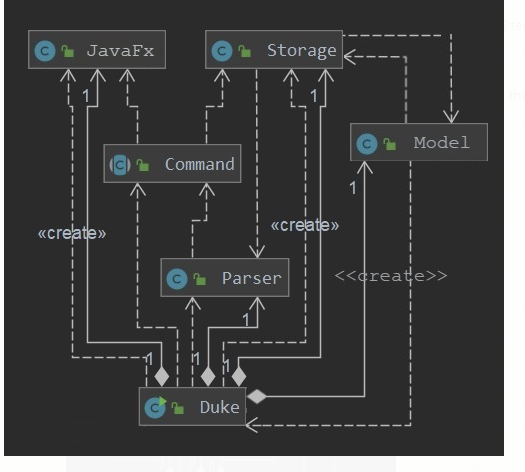
Figure 3.1.1 : Architecture Diagram
The Architecture Diagram given above explains the high-level design of the App. It consists of the following 6 components:
-
Main
-
Parser
-
UI
-
Command
-
Model
-
Storage
Main has only one class called Duke.
It is responsible for:
-
At app launch: Initialising the components in the correct sequence, and connects them up with each other.
-
On user input: Managing parser and executing commands.
-
At shut down: Shutting down the components and invokes cleanup method where necessary.
The Parser component processes user input and returns a command to be executed, and contains only one class called Parser.java.
API : Parser.java
The parser is able to do exception handling and weeds out errors in the initial commands. i.e. it checks for existences of inputs and checks whether commands like done or detail are spelled correctly, ignoring other inputs first.
Once the command has passed the check, the parser returns a command object to be executed, and this is where the input validation happens.
The UI component is the User Interface of the App.
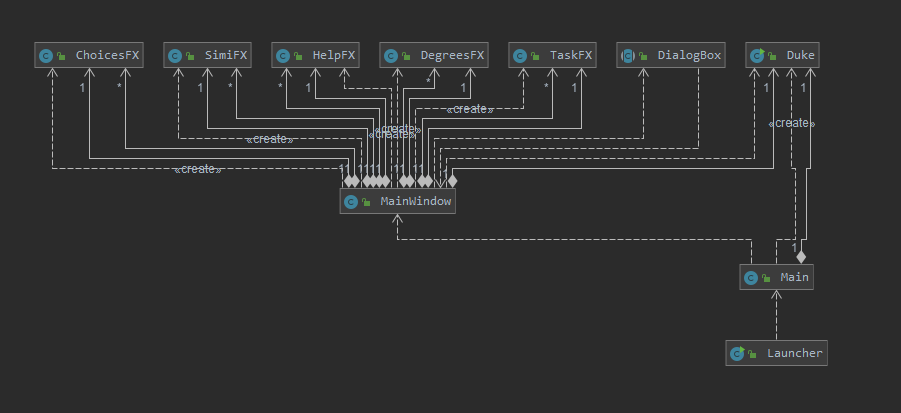
Figure 3.2.3 : Structure of the UI Component
API : MainWindow.java
The UI consists of a MainWindow that is made up of parts e.g. tableView, tabPane etc. All these, including the MainWindow, inherit from the abstract UiPart class.
The UI component uses JavaFx UI framework.
The layout of these UI parts are defined in matching .fxml files that are in the src/main/resources/view folder. For example, the layout of the MainWindow is specified in MainWindow.fxml.
The UI component:
-
Displays results from user inputs in a tabular format.
-
Reads some data in the Model so that the UI can update when a user inputs a command.
-
Responds to events raised from various parts of the App and updates the UI accordingly.
The Command component is the command executor and consists of multiple command classes. The following diagram illustrates the structure of Command component.
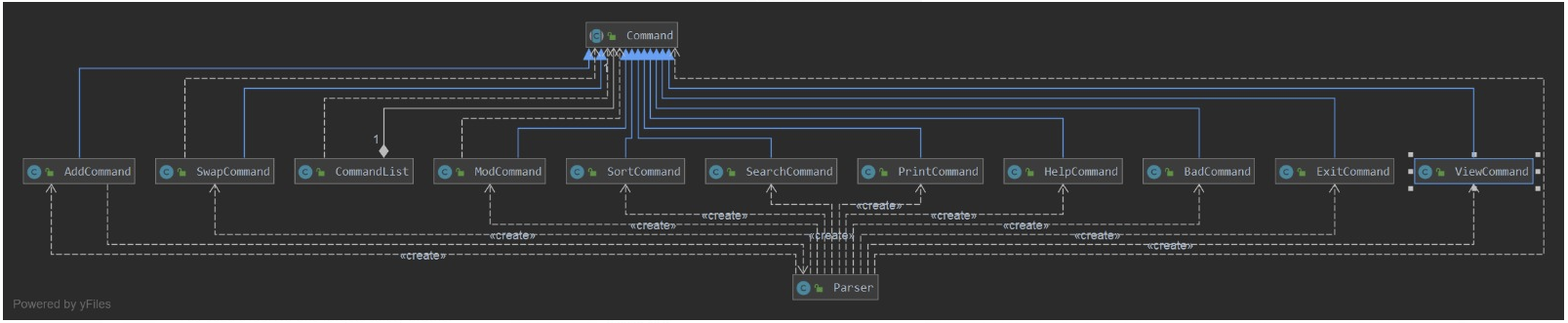
Figure 3.3.1 : Structure of the Command Component
-
Logicuses theParserclass to parse the user command. -
This results in a
Commandobject which is executed by theCommandclasses. -
The command execution can affect the
Model(e.g. adding a degree) and/or add events. -
Commands save a state of a
TaskListandDegreeListwithing themselves in amementoobject before executing changes to them. This is to be used in theundoandredocommand.
The Model component holds the data of the App in-memory and consists of the TaskList and DegreeList classes. The following diagram illustrates the structure of Model component.
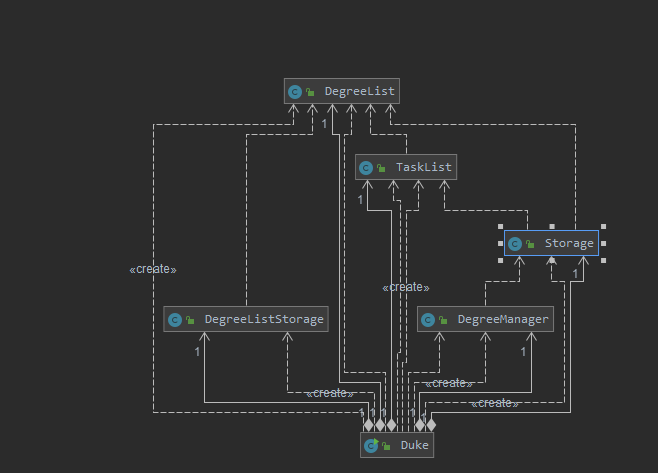
Figure 3.4.1 : Structure of the Model Component
The Model,
-
stores
TaskListandDegreeListobjects that represents the user’s preferences. -
stores the Degree data in
Degree Manager. -
stores the Statistics data for degrees in
Statistics. -
does not depend on any of the other three components.
The Storage component reads data from, and writes data to, the hard disk. The following diagram illustrates the structure of Storage component.
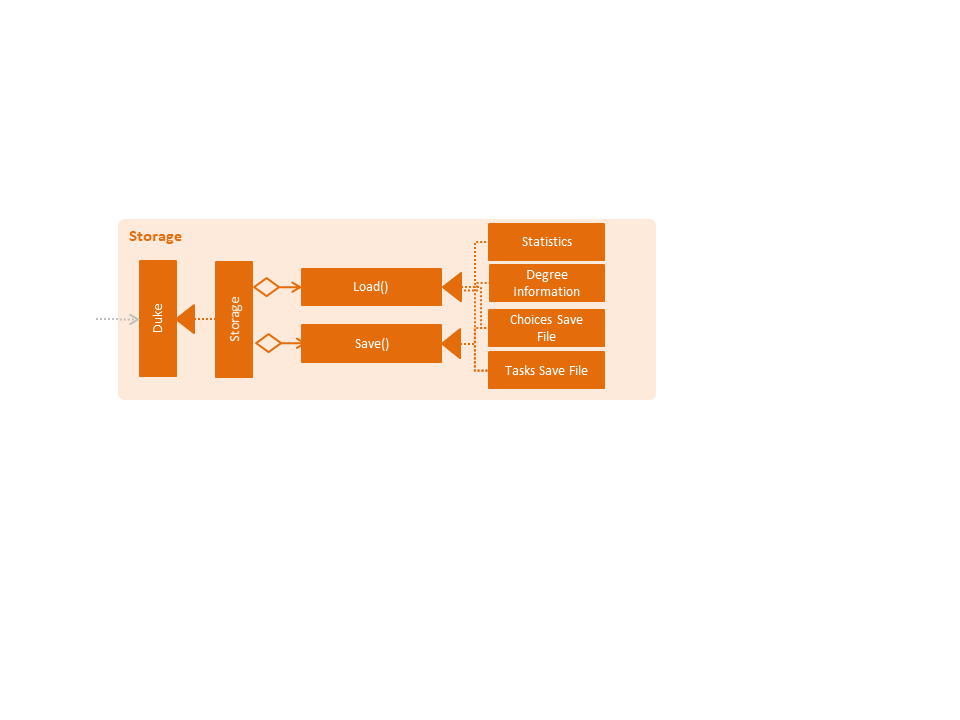
Figure 3.5.1 : Structure of the Storage Component
API : Storage.java
The Storage component,
-
can save
saveandsavedegreeobjects in txt format and read it back. -
can read the degree data in csv format.
-
can read the degree events and statistics data in txt format.
Storage also allows Duke to hold a Model, ready to be modified according to the user input.
The Sequence Diagram below shows how the components interact for the scenario where the user issues the command sort by priority.
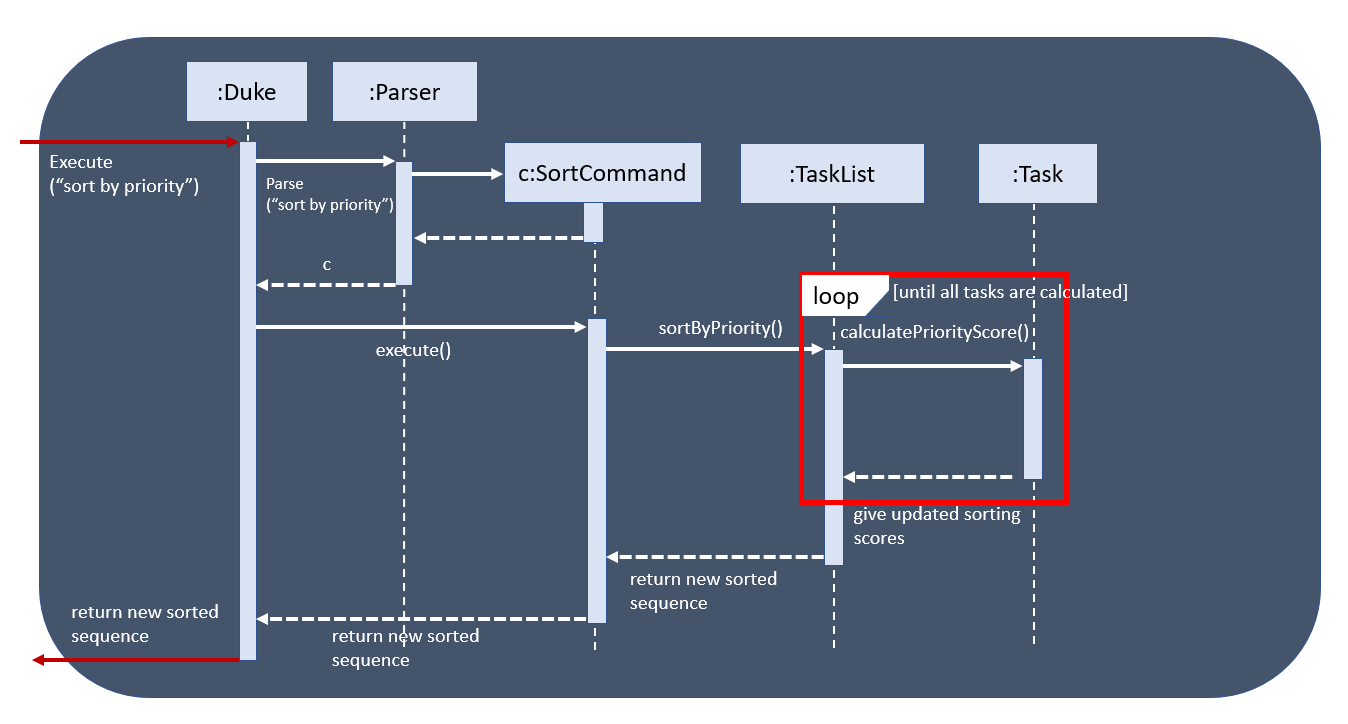
Figure 3.1.3 : Component interactions for sort by priority command (part 1)
|
ℹ️
|
Note how the Duke raises a sortByPriority event when a user inputs a command, eventually returning the updated TaskList to Duke and later the UI.
|
The undo/redo mechanism is done using a simplified memento pattern, since the command classes have already been implemented. This works as an extension of the command classes and makes use of existing code without any 3rd party libraries or additional dependencies.
Each command that modifies the task or degree lists saves the complete previous state within the command as a memento object. Thus, when we "unexecute" the command, we call this object and get the complete state of the task or degree list before it was modified by this command.
All of these commands are stored in a CommandList, where it has methods to retrieve the previous command whenever undo is input, or to manually retrieve a particular command using undoRedoPointer whenever redo is input.
Once a command has been undone and the user makes new changes to the task or degree list, all commands after the undoRedoPointer will be removed to make way for new commands.
Given below is an example usage scenario and how the undo/redo mechanism behaves at each step.
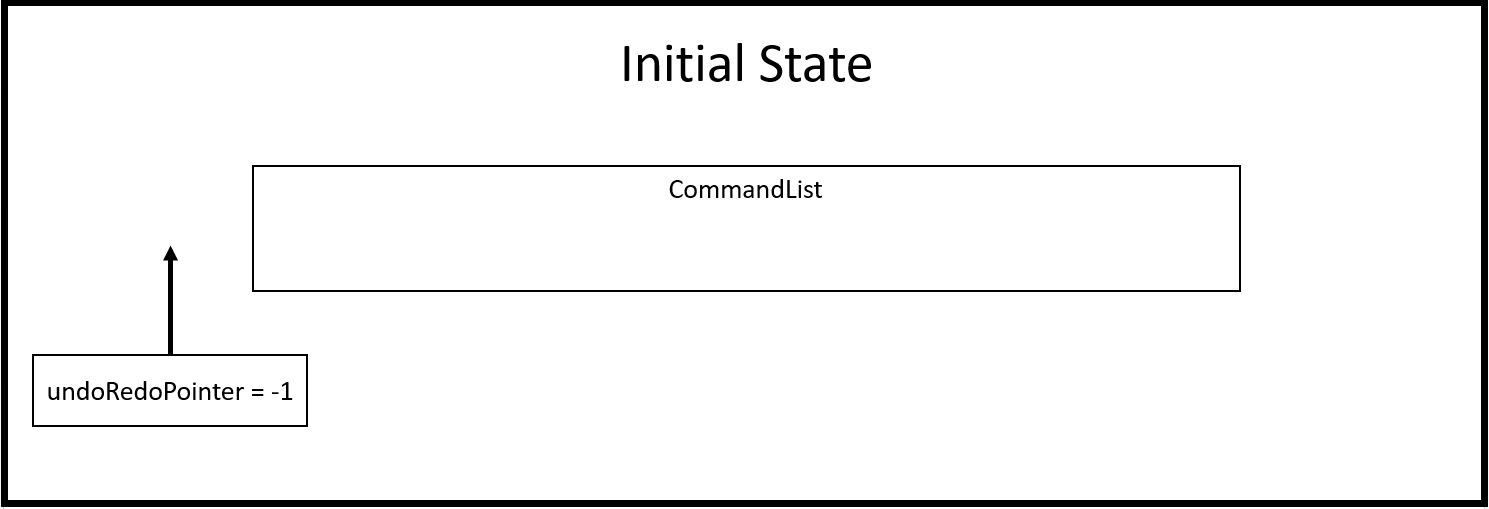
Step 1: The user launches the application, and duke initializes an empty CommandList. The undoRedoPointer points to -1 as there are currently no elements in CommandList.
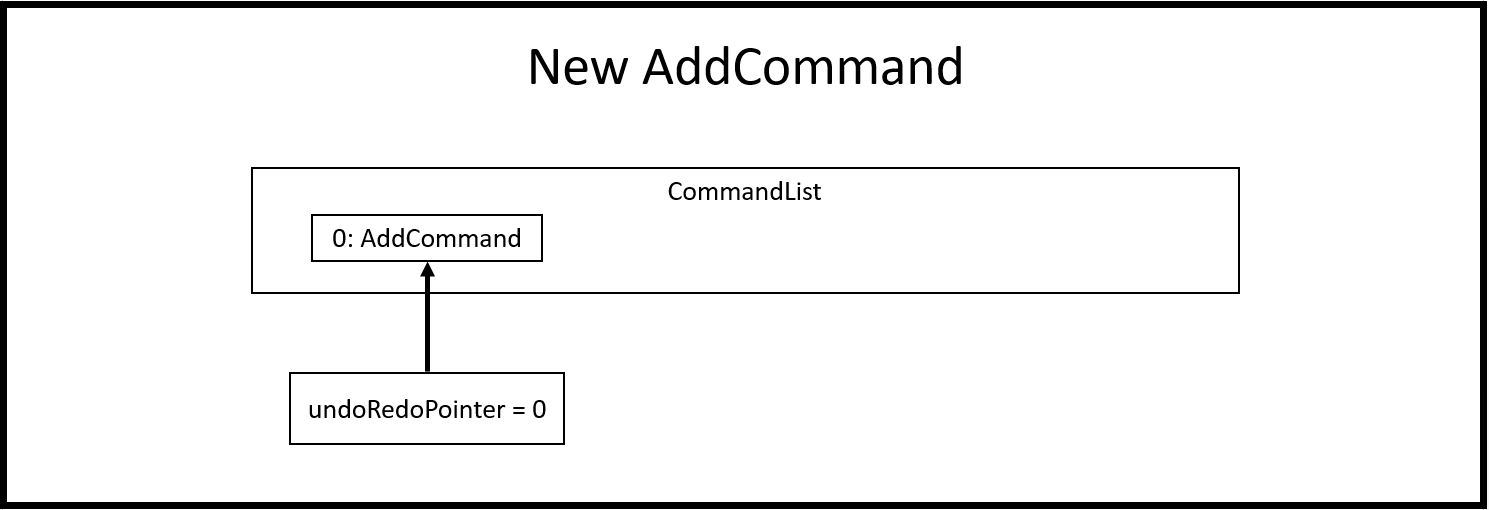
Step 2: The user inputs "todo Sleep". This adds a todo task to the TaskList and constructs an AddCommand object to be executed. Once that AddCommand is executed, it saves the current TaskList into a memento object, and then it adds "todo Sleep" into the TaskList.
Step 3: After command execution, the AddCommand object is added to CommandList. The undoRedoPointer increments by 1 and now points to the newly added AddCommand at index 0.
|
💡
|
CommandList supports modifications to both task and degree lists. Undo simply undoes the modification to one of the lists in order of commands.
|
Step 4: The user inputs "list" to double check the addition of the new task. This executes PrintCommand to display the contents of TaskList, but does not modify it in any way. Thus, it will not be added to CommandList.
Step 5: The user inputs "done 3" to mark the 3rd task in TaskList as done. This constructs a ModCommand object to change the contents of an element in TaskList. Once ModCommand is executed, it saves the current TaskList into a memento object, and then marks the 3rd task as done.
Step 6: After command execution, the ModCommand object is added to CommandList. The undoRedoPointer increments by 1 and now points to the newly added ModCommand at index 1.
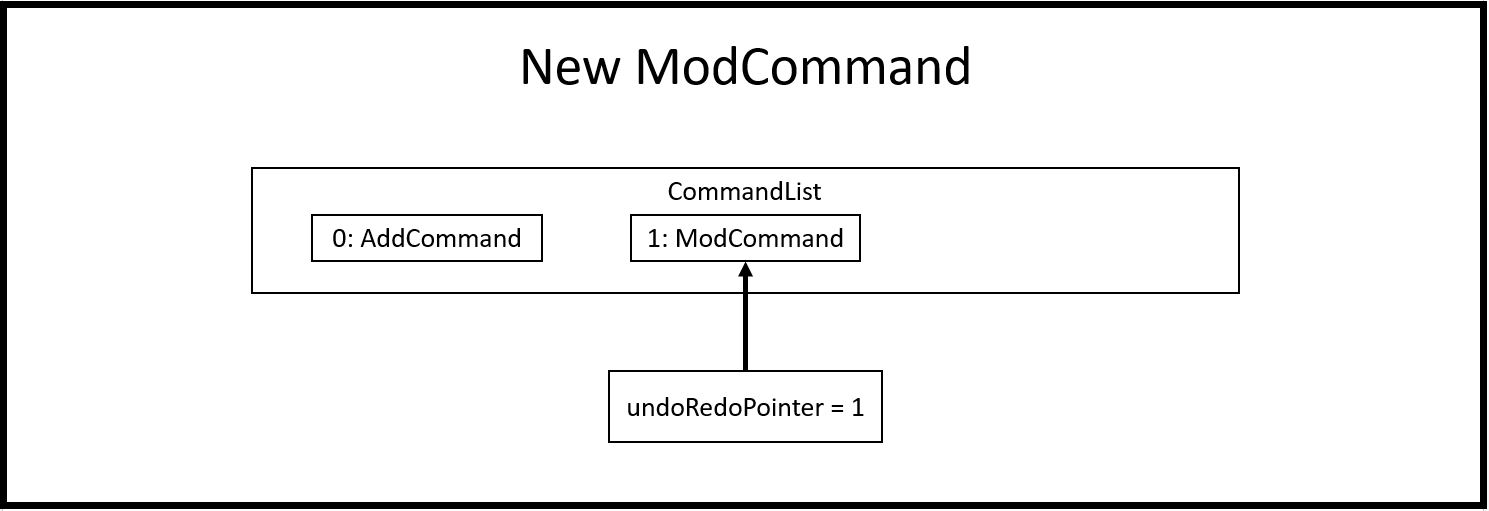
Step 7: The user now inputs "undo" to undo the task marking. This will call the undo method of CommandList, gets the command that undoRedoPointer is pointing to (which is ModCommand in this case) and unexecute it. ModCommand will call its memento object and replace the current TaskList. The undoRedoPointer decrements by 1, and now points to index 0. Note that ModCommand is not removed to facilitate redos.
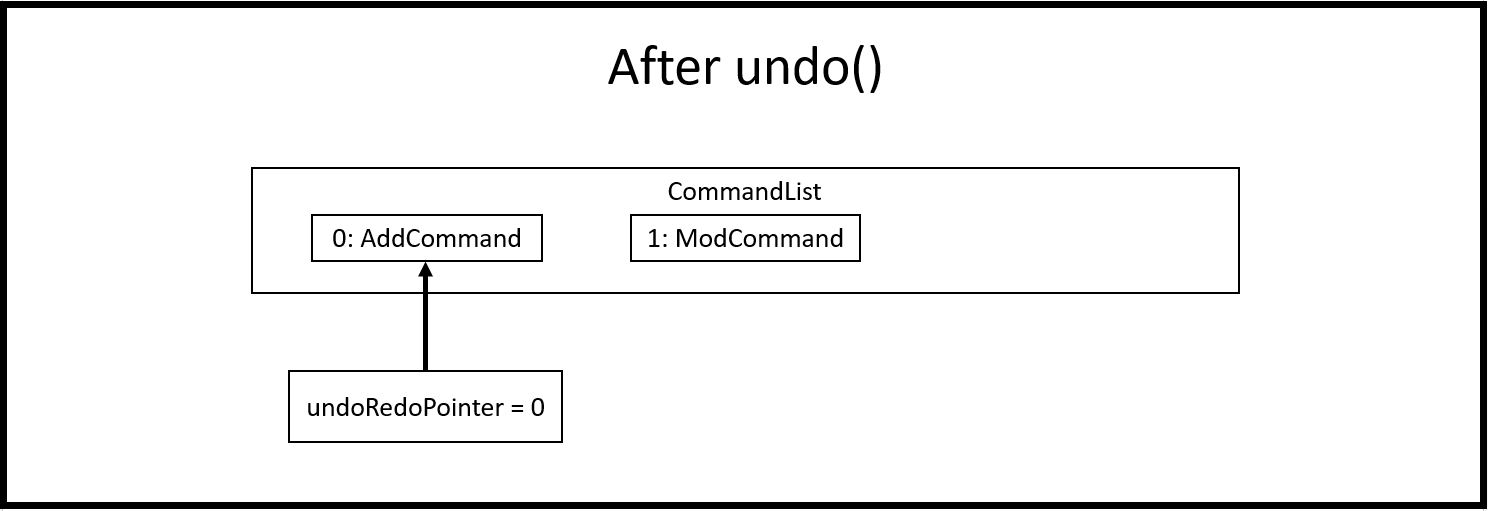
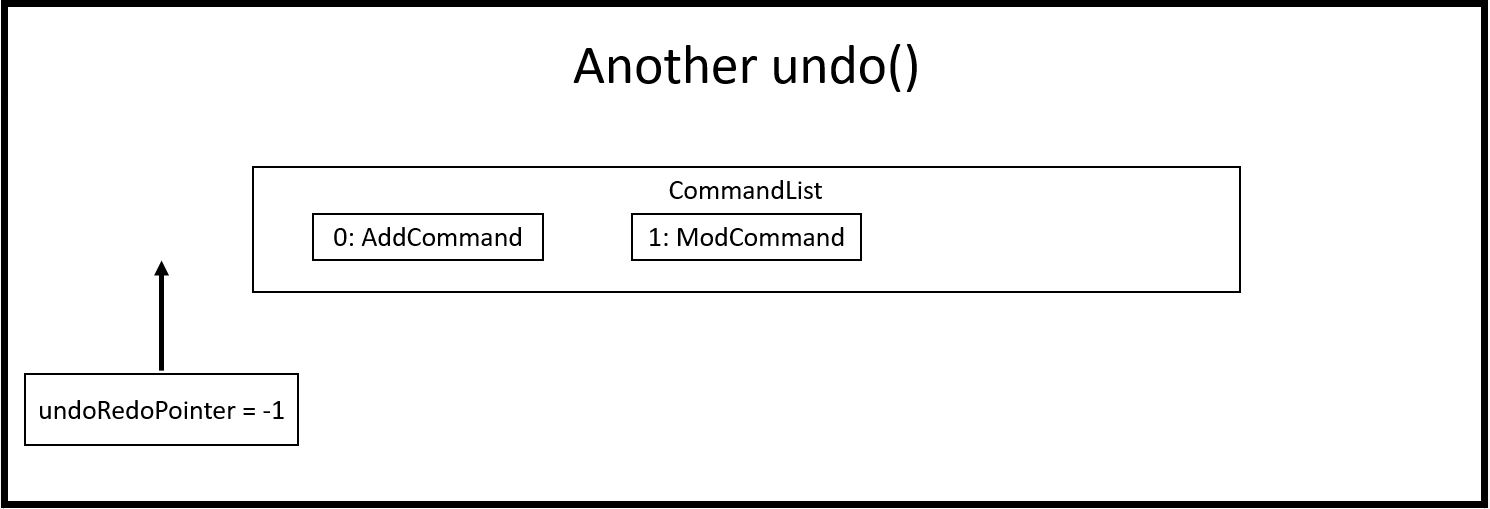
Step 8: The user inputs another "undo" to undo the task addition. Similar to step 7, it will call the undo method of CommandList again and unexecutes the command that undoRedoPointer is pointing to. AddCommand will call its memento object and replace the current TaskList with the one that does not have the new task. The undoRedoPointer decrements by 1, and now points to index -1.
|
ℹ️
|
Attempting to undo when there is nothing left to undo will return an error message. Similarly, attempting to redo when there is nothing left to redo will also return an error message. |
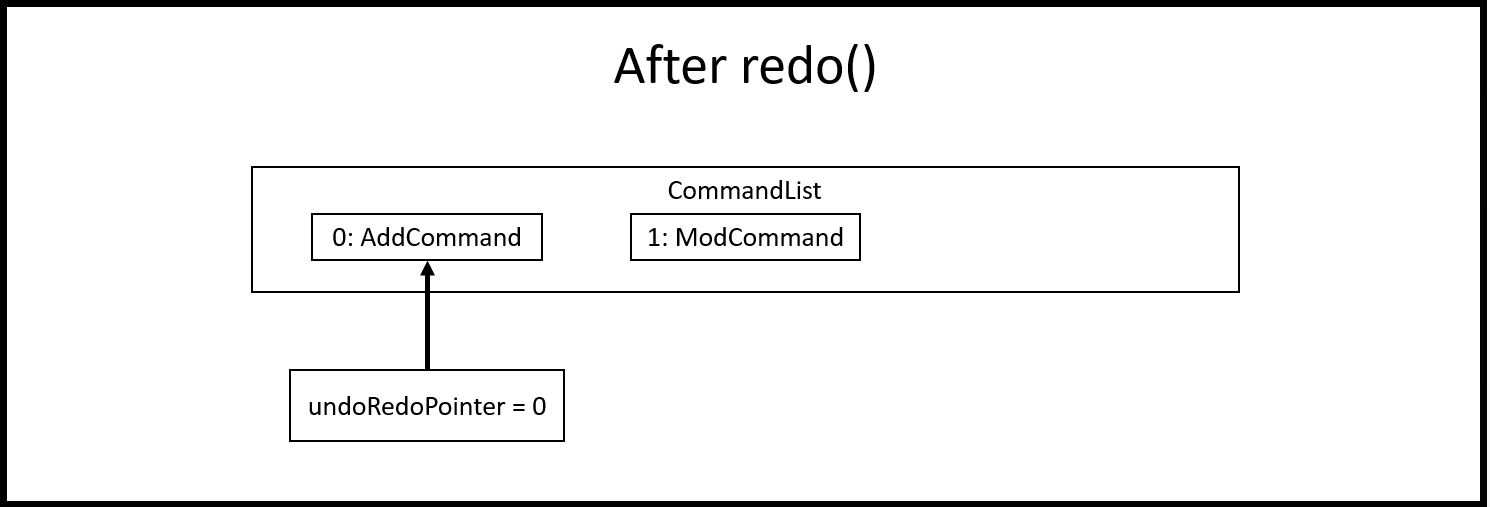
Step 9: The user now inputs "redo" to undo the undo. This will call the redo method of CommandList. It will first increment the undoRedoPointer by 1, and it will then execute the command at the pointed element. This will add "todo Sleep" back to the TaskList.
Step 10: The user now inputs "done 1" to mark the 1st task as done. Since its now a different command from "done 3" and not "redo", CommandList will check if there are commands past undoRedoPointer. Currently, ModCommand is the element after the one at undoRedoPointer, thus CommandList will pop all commands from the back of the Stack until undoRedoPointer.
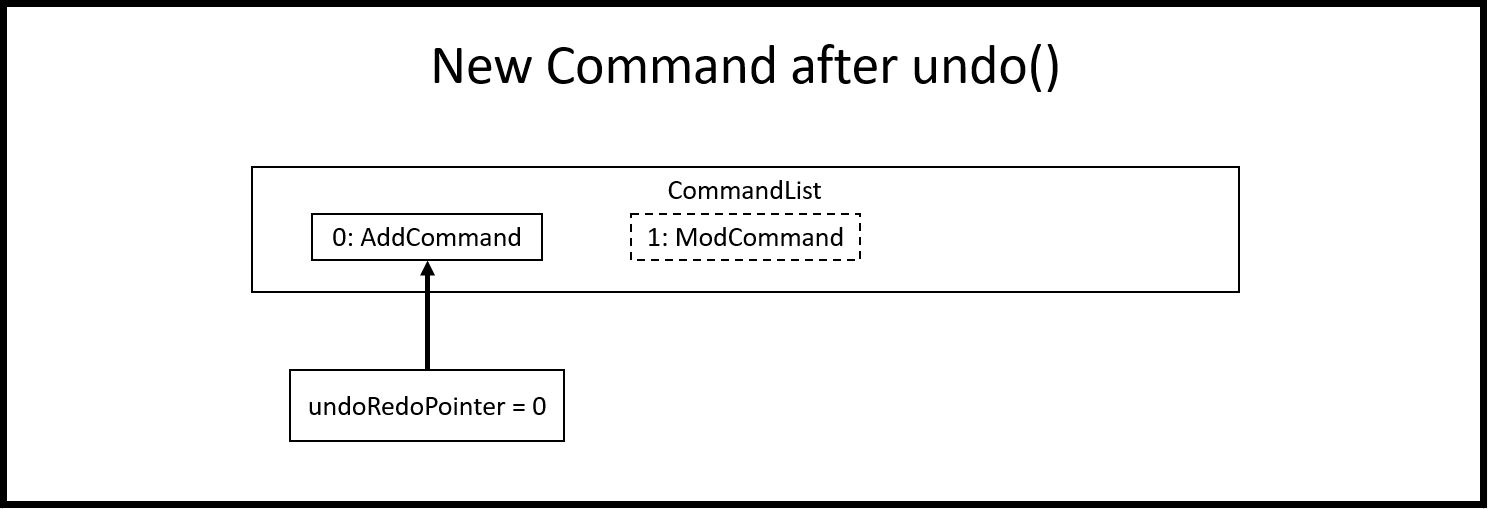
Step 11: Once the excess commands are removed, it will proceed back to normal by executing a new ModCommand and adding it to CommandList, and incrementing undoRedoPointer by 1.
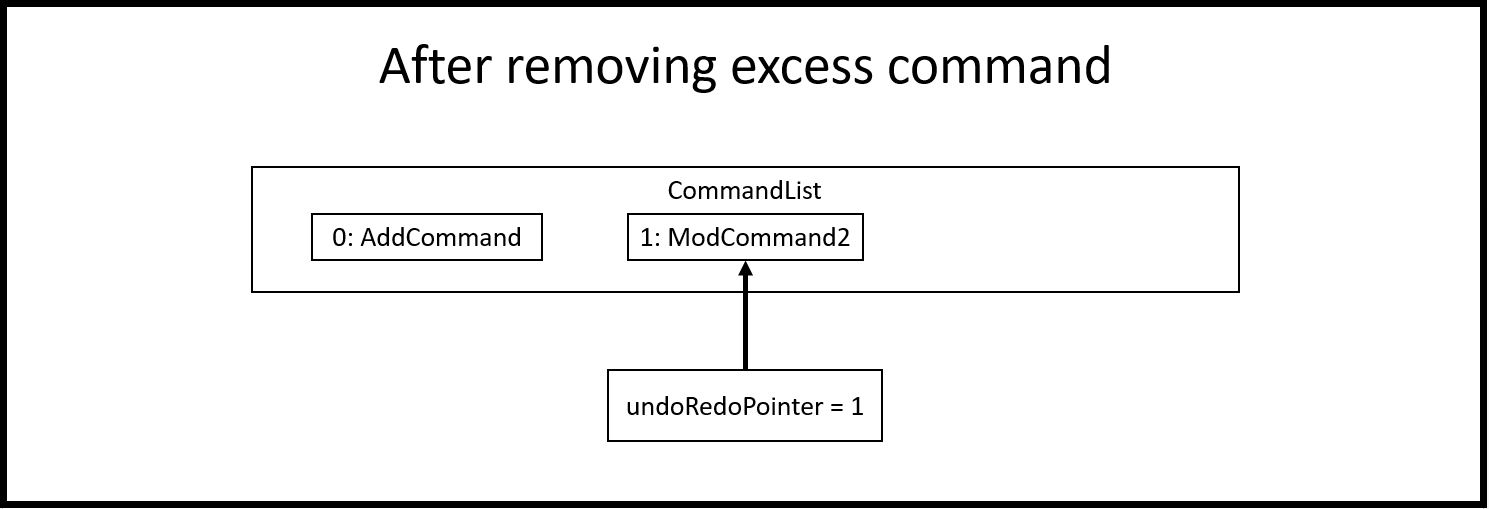
How undo/redo executes:
-
Alternative 1 (Current Choice): Commands saves a complete previous state if it modifies the degrees or task list
-
Pros:
-
Much easier to implement than a partial state save.
-
Easier to implement when new commands are added.
-
Common method in the industry to implement undo/redo.
-
-
Cons:
-
Memory issues once too many commands are executed.
-
-
-
Alternative 2: Saves the degree and task list to a history.
-
Pros:
-
Straightforward method to save previous states that can be called using undo/redo.
-
No work needed when new commands are added.
-
-
Cons:
-
Does not work when a modification changes multiple lists.
-
Memory issues once too many states are saved.
-
-
-
Alternative 3: Perform the opposite command whenever undo is called. (i.e. undoing add will delete the addition instead of recalling the previous state)
-
Pros:
-
Uses less memory than saving the state every time.
-
Proper implementation of the memento pattern.
-
-
Cons:
-
A lot of work needed to "unexecute" every command possible.
-
More commands means more "unexecution" is needed, and the workload scales higher than alternative 1.
-
-
Data Structure to support undo/redo:
-
Alternative 1 (Current Choice):
CommandListclass using a stack and a pointer.-
Pros:
-
Much faster pushing and popping the stack than adding into standard
ListsandArrayLists. -
More control than a simple stack, as it can also support redos and new commands added after undos.
-
-
Cons:
-
Have to manually write the CommandList mostly from scratch instead of using a pre-esxisting data structure or class. (Although it uses a stack to store and retrieve the commands)
-
-
-
Alternative 2:
ArrayListof commands and a pointer.-
Pros:
-
Less work needed to write methods as it uses a pre-existing data structure.
-
Easier for newer developers to understand how the undo/redo function works.
-
-
Cons:
-
Have to do all the work of adding, removing and choosing commands within another class, and can result in messy implementations.
-
Slightly slower than stacks when adding and deleting elements in the
ArrayList.
-
-
The actions involving the NUS EventList are performed mostly using the NUSEventList class.

This was done in preparation for some proposed additional changes to this feature that will be discussed later in the document.
Currently, the NUSEventList class implements three of the following operations:
-
loadEventLists
-
This method initializes an Arraylist of TaskLists. When it is called, each of these TaskLists will be populated with the specific tasks that are related to each degree programme. For example, all tasks related to
Computer Engineeringare stored in one of the TaskLists. The other two classes will be able to use this Arraylist to perform operations on the user’s TaskList.
-
-
addDegreeTasks
-
This method adds all tasks related to a specified degree programme to the user’s TaskList, while checking for duplicates.
-
-
removeDegreeTasks
-
This method removes all tasks related to a specified degree programme to the user’s TaskList.
-
An example usage scenario details how the mechanism behaves at each step:
Step 1: The user launches the application, and Duke will initialize an instance of the DegreeTasks command. Duke will call the loadEventLists method, and an ArrayList of TaskLists will be instantiated.
Step 2: The user inputs the command add ComE to add Computer Engineering to his choice of degree programmes
Step 3: The degree programme is added to his list of degree programmes by a seperate, unnamed class. Subsequently, addDegreeTasks is called to add all Computer Engineering tasks to his TaskList.
At this point, the user can choose to remove the degree programme from his list of degree programmes if he chooses. If he does, there will be additional steps to the mechanism:
Step 4: The user inputs the command remove 1 to remove the first-indexed degree programme in his list. In this case, it is Computer Engineering
Step 5: The tasks related to this degree programme are removed from his TaskList
Aspect: Implementing the Degree Tasks
-
Alternative 1: Implementing Degree Tasks as just Events and Deadlines (current choice):
-
Pro: The tasks can be instantiated and treated as Events and Deadlines, and use the methods from those classes
-
Con: Extra code needs to be written to parse the description of each task to tell whether it is a degree-related task or not
-
-
Alternative 2: Implementing Degree Tasks as an extension of the Event and Deadline class:
-
Pro: The tasks are defined as a new subclass of tasks called "Degree-Tasks". It would be a neat way of storing all Degree-Related Tasks
-
Con: The toString() method would produce an extra column in printing, as well as saving, and thus would require changing the Storage class
-
Aspect: Storing the Degree Tasks
-
Alternative 1: Storing them in an ArrayList of TaskLists (current choice):
-
Pro: Easy to call the index that is needed to take one of the TaskLists for interacting with the user’s TaskList
-
Con: Involves a slightly more expensive data structure
-
-
Alternative 2: Storing them in a continuous List of Strings
-
Pro: Efficient way of storing the Tasks
-
Con: Requires continuous parsing at every interaction with the user’s tasklist
-
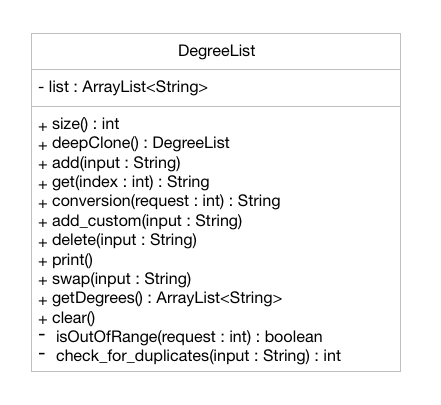
The degree list is a customizable list for the users to maintain a list to keep track of the degrees they are interested in and they can rank them in order of their preference as well. The degree list functionalities are facilitated by the class DegreeList. It makes use of a private static ArrayList of Strings to keep track of all the degrees entered. It implements the following methods that are needed for the user to add, remove or re-arrange degrees:
DegreeList#add_custom(String input): This function takes in the parameter of an input string which is the degree inputted by the user and adds the degree to the ArrayList, after checking if duplicates of the degree or its common aliases already exist in the ArrayList.
DegreeList#delete(String input): This function takes in a string which contains index of the degree the user wishes to remove from the degree list. This function deletes the degree the user wishes to remove from the ArrayList, after checking if it is within bounds or not.
DegreeList#swap(String input): This function takes in an input string, which is then split using the support of the Parser Class and the indices of the degrees to be swapped are obtained. They are then swapped using the Collections.swap() function.
An example usage scenario details how the mechanism behaves at each step:
Step 1: The user launches the application, and Duke will initialize the ArrayList by reading the corresponding text file of degrees using the DegreeListStorage#ReadFile() method.
Step 2 (i): The user inputs the command add ComE to add Computer Engineering to his/her choice of degree programmes and this is then added to the ArrayList of degrees.
Step 2 (ii): The user inputs the command remove 2 to remove the second degree on their list, and this is then removed from the ArrayList of degrees
Step 2 (iii): The user inputs the command swap 1 2 to swap the degrees at index 1 and 2, according to their preference and this is then updated on the ArrayList of degrees.
Step 3: The user inputs bye. The Storage#add_degrees method is then called in order to over-write the text file with the current degrees in the ArrayList in the specific order the user wants.
Aspect: Storing the Degree List
-
Alternative 1: Overwriting the file once the user enters
bye(current choice):-
Pro: This takes up lesser processing time as the prograam need not continuously update the file, and simply overwrites the file based on the final status of the Degree List.
-
Con: If the user forgets to enter the exit command, the degrees might not be saved, leading to confusion.
-
-
Alternative 2: Concurrently writing to the file based on user-input:
-
Pro: The storage is always up-to-date with the changes that have taken places
-
Con: A lot of extra code is required to simultaneously write to the text file, and can also lead to potential bugs when the degrees are swapped around as their order changes.
-
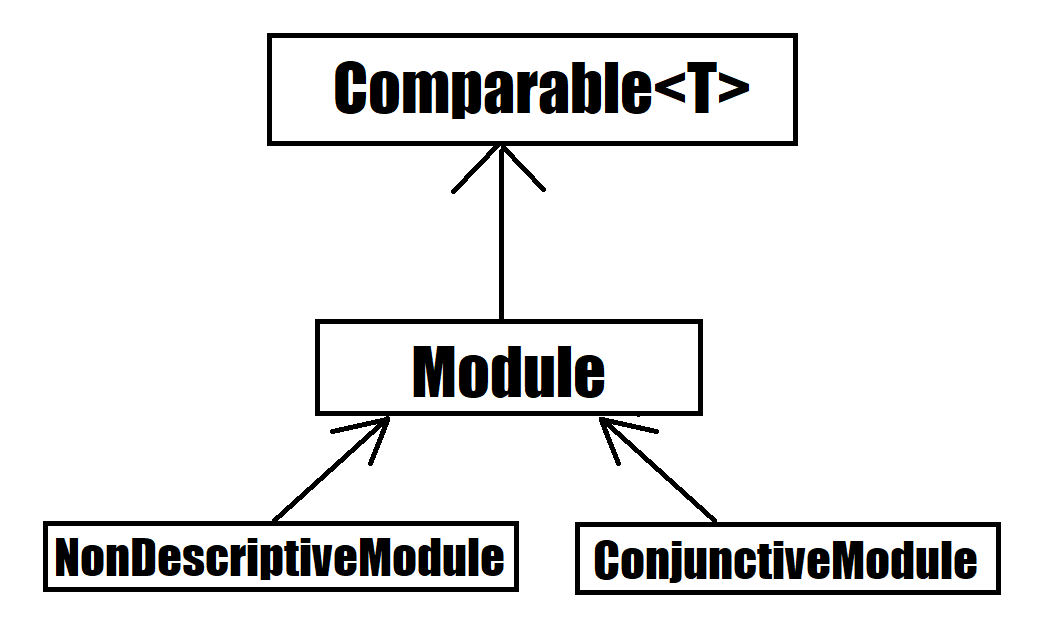
The module class stores default type of module information, represented by 2 Strings and an Integer. This module string should be of the accepted module code type (2-3 Letters followed by 4 digits and a suffix letter, or 2-3 letters followed by one digit and 3 'x’s). The module class is extended to 2 other types, the Conjuntive module and NonDescriptive Module. Module and it’s children are stored in the class ModuleList.
Module#print(void): This function outputs the user friendly view for people to know which module is it. It fetches the module code and name, and adds them together with a space separating them, it then adds spaces until it is of the maximum allowable length - 4, the module’s credits are then appended. The result is printed.
Module#getPrint(int setWidth): This function takes in an integer indicating the desired width of printing (in terms of characters). It outputs the Module Code and Name left aligned, and the Module MC right aligned. If the string is too long, it will be truncated and a "…" will indicate the truncation. A string is returned, according to the desired setWidth amount of characters.
Module#tabModuleCode(void): This function returns the Code for printing through the JavaFX interface. The subclasses of Module are expected to follow the same format, or override this function accordingly.
Module#tabModuleName(void): This function returns the Name for printing through the JavaFX interface. The subclasses of Module are expected to follow the same format, or override this function accordingly.
Module#toString(void): This function returns a string, the module’s code is returned.
Module#equals(Object obj): This function returns an boolean, representing if the object compared to it is equivalent to it. It checks if the toString result of the module matches the other module.
Module#compareTo(Module other): This function returns an int, indicating whether the other module is greater lesser or equivalent to it. It compares the results of the getCode function of both modules, ordering them in lexicographical order.
Given below is an example scenario where module will be constructed.
Step 1: The user launches the application, and duke initializes the list of degrees, the degrees contain ModuleList, which will contain Modules.
Step 2: If a degree’s csv file is parsed successfully, it will fetch the module data in the form of a string consisting of code and name, separated by a space, as well as an integer indicating the module credits allocated to that module. The check for valid module code will be done in the degree calling it.
Step 3: The Module is created and can be used as part of a ModuleList.
Furthermore, attached is an image depicted the hierachy between Module and its subclasses:
How module is implemented: * Alternative 1 (Current Choice): Separated code and name and credits. Pros: * Able to access information of each component separately. * Easier to make comparison based methods based on one of these 3 components. Cons: * Extra handling required to return a printable result
-
Alternative 2: Save the module code name and integer as a space separated string.
-
Pros:
-
Module is saved as is, and returned as is.
-
Module is extremely sensitive to differences between itself and other modules.
-
-
Cons:
-
Extra work required to separate it into various components.
-
Too sensitive, codes which match whereas the names do not will be flagged as different modules.
-
-
The conjunctive module class is an extension of module. It stores modules which are co-listed as requirements, represented by a Map of Strings to Strings and an Integer. The Map will have the a Code as a key, with a name as its value. This module’s strings should be of the accepted module code type (2-3 Letters followed by 4 digits and a suffix letter, or 2-3 letters followed by one digit and 3 'x’s). Each module’s code and name should be separated by an " OR ". It can be stored in the class ModuleList as an extension of Module.
Given below is an example scenario where module will be constructed.
Step 1: The user launches the application, and duke initializes the list of degrees, the degrees contain ModuleList, which will contain Modules.
Step 2: If a degree’s csv file is parsed successfully, it will fetch the module data in the form of a string consisting of multiple code and name, separated by a " OR ", as well as an integer indicating the module credits allocated to that module. The check for valid conjunctive module string will be done in the degree calling it.
Step 3: The Module is created and can be used as part of a ModuleList.
ConjunctiveModule#print(void): This function outputs the user friendly view for people to know which module is it. It fetches the module code and name, and adds them together with a space separating them. It does this for every module in the Map, and adds an " OR " between each module. It then adds spaces until it is of the maximum allowable length - 4, the module’s credits are then appended. The result is printed. The result is returned as a string.
ConjunctiveModule#getCode(void): This function iterates through every code in the Map and returns the codes separated by a "|".
Data structure used to hold ConjunctiveModule: * Alternative 1 (Current Choice): Treemap data structure. Pros: * Consistent and sorted iteration through codes and modules * No extra work required from user after placing the pairs in the list Cons: * Slightly more heavy memory usage.
-
Alternative 2: ArrayList.
-
Pros:
-
Simple data structure for beginners to understand.
-
Not memory intensive.
-
-
Cons:
-
Extra work required to sort.
-
Needs to use a non default data type, Pair, to store the code and name separately.
-
-
-
Alternative 3: HashMap.
-
Pros:
-
O(1) amortized access and storage.
-
-
Cons:
-
Memory intensive (To maintain low load factor, needs twice the amount of space devoted to the keys).
-
Randomized iteration is the nature of HashMap, requires further sorting of results after getting them.
-
-
The non-descriptive module class is an extension of module. It stores modules which do not follow the standard format. They can be placeholders for modules which are not named or belong to a certain group. It can be stored in the class ModuleList as an extension of Module.
Given below is an example scenario where module will be constructed.
Step 1: The user launches the application, and duke initializes the list of degrees, the degrees contain ModuleList, which will contain Modules.
Step 2: If a degree’s csv file is parsed successfully, it will fetch the module data in the form of a string consisting of multiple code and name, separated by a " OR ", as well as an integer indicating the module credits allocated to that module. The check for valid module string will be done in the degree calling it. If determined it is not a valid module string it will be created as a NonDescriptive Module.
Step 3: The Module is created and can be used as part of a ModuleList.
NonDesciptiveModule#toString(void): This function returns the module code and the credits allocated to it separated by a space.
How NonDescriptive is implemented: * Alternative 1 (Current Choice): Name field is empty. Pros: * Taps upon existing Module methods for printing and comparison * Able to implement class specific methods in the future.
-
Alternative 2: Non-empty name, uses the same string as code field.
-
Pros:
-
Leverages module class functions which require the name field to be used
-
-
Cons:
-
Have to write a custom printing method for the class
-
Does not capture the essence that Non-Descriptive is different from module because it had only one string /code.
-
-
The module list stores modules. It also has helper functions to determine the difference between itself and another instance of the modulelist
Module#add(Module wry): This function adds a module to the ModuleList class. It also adds the new module’s credits to the current sum of module credits.
Module#getModules(void): This function returns the set of modules which the ModuleList contains.
Module#compare( ModuleList other): This function compares itself to another instance of ModuleList. It returns the set of modules which are the same, as well as a pair of the set of modules which are not the same from each ModuleList.
Module#setDifference(Set<Module> subset): This function returns the set of modules which are not contained within the Set of modules passed in.
Module#getSum(void): This function returns the sum of the modules in ModuleList.
Module#updateSum(Integer mc): This function increments the current sum by the integer passed in.
Given below is an example scenario where module will be constructed.
Step 1: The user launches the application, and duke initializes the list of degrees, the degrees contain ModuleList, which will contain Modules.
Step 2: If a degree’s csv file is parsed successfully, it will fetch the module data.
Step 3: The Module is created and can be used as part of a ModuleList.
Step 4: The modules are placed in the appropriate ModuleList in the degree class
How ModuleList is implemented:
Data Structures used for ModuleList: * Alternative 1 (Current Choice): TreeSet of modules. Pros: * It is self sorting. * Able to use set method, retainAll(). Cons: * Takes a longer time in searching for modules in the set
-
Alternative 2: HashSet of modules.
-
Pros:
-
Fast access to any module in the set.
-
Able to use set method, retainAll().
-
-
Cons:
-
Random iteration through set.
-
Set is not in order.
-
-
Degree is a class which contains ModuleList class and other auxiliary information related to the degree. When being constructed, it accepts a list of Strings and validates that it is a .csv file type with the correct number of columns. Additionally it implements the following operations:
Degree#addAlias(String input): This function takes in the parameter which is the alias the degree should be referred to, this input is stored into a List of Strings within Degree.
Degree#addToList(Integer list, String module, String mcs): This function takes in three parameters, the first being an Integer which indicates which Module List the Module should be added to. The second and third parameters are Strings which are expected to contain the Module and th Module Credits respectively. This function is called when a new Degree is created with the csv file being input into it as a List of Strings. This function calls createNewModule and adds the (valid) Module result into the appropiate List suggested by the Integer parameter list.
Degree#createNewModule(String in, String mcs): This function takes in the string in and the string mcs. The String mcs is validated by validInt to ensure it is a validInt, following which the in string is checked for a " OR ". If an " OR " is found, it indicates the module is a conjunctive module and each module string is then checked for validity by this method. If all the strings checked are valid, a conjunctive module is returned. Otherwise, having validated that the String is a proper module, a default module is returned. Otherwise, a NonDescriptive Module is returned.
Degree#validateModule(String[] input): This function takes in the list of strings input. Each String in the list is checked by the validateModule(String input) function to ensure that it is of the proper format. If any String did not pass this check, an exception is thrown.
Degree#validateModule(String input): This function takes in the string input. It then splits the Strings into 2 portions, the first String up to the first white space, will be considered as the Module’s code. The remainder of the String is the module’s name. The Module Code will be checked against the Regular Expression in the Parser class to ensure that it is of the correct format. The name is checked to ensure it is not empty. If both of these conditions are passed it returns a true result. Otherwise an exception will be thrown.
Degree#setUem(String in): This function takes in the string input. If the string is blank, it assumes that no UEM value is to be set. If the uem value in Degree has already been set, it will throw an exception as there should not be multiple UEM values. It will otherwise ensure that the String is a valid Integer, then set the value resulting from validInt.
Degree#validInt(String in): This function takes in the string input. If the string is is parsed successfully as an Integer, it checks to ensure that it is non negative. If integer is not parsed sucessfully or it is negative, exceptions are thrown. It then returns the valid result.
Degree#validList(List<String> input): This function takes in a list of strings. First, the input is checked to make sure it is not null or empty, or only consists of one string. Then each string is then checked for the following criteria. Then the second string is checked to make sure it has 12 comma separated values.
Degree#compare(Degree other): This function prints result of comparison with another degree. It will print out the Proper Names of each degree, followed by the list headers. For each list header, it will print similar degrees followed by different degrees.
Degree#print(void): This function prints the degree list. It first prints out the hardcoded information, then it prints out the list headers followed by the lists.
Given below is an example usage scenario and how the degree mechanism behaves at each step.
Step 1: The user launches the application, and Duke will initalize the storage. Duke will then instantiate a new copy of DegreeManager, by handing it a copy of the Storage and its contents.
Step 2: DegreeManager will load the list of degrees it should initialize from storage. Then it will attempt to load the relevant save data from each file. If any Degree is unsucessful in loading, an empty instance of DegreeManager will be initialized instead.
Step 3: The degrees are created using the data from the csv files. It will then be linked via its key (the name of the Degree) to the Degree.
Step 4: If no errors occured, the map of degrees will be initialized, if not the maps and sets will be cleared and there will be a request to contact the System Adminstrator for assistance.
Step 5: Duke will continue refer to Degrees stored in DegreeManager in order to determine where to get the degree information from.
How Degree executes:
-
Alternative 1 (Current Choice): Degrees checks its own inputs and determines if they are valid.
-
Pros:
-
No dependency on other classes for validation.
-
Easier to implement when new commands are added.
-
Common method for complex classes which utilize other classes.
-
-
Cons:
-
Extension of the class is necessary if the degree format changes or there are multiple formats.
-
-
-
Alternative 2: Let the Parser class handle all validation and return the sanitized input if available.
-
Pros:
-
Maintenance and edits only need to be done in the Parser class.
-
No work needed when new commands are added.
-
-
Cons:
-
Bloats the Parser class further.
-
Parser class is not directly related to the Degree class yet it determines the validity of Degree.
-
-
Data Structure to support degree’s listing of modules:
-
Alternative 1 (Current Choice):
ModuleListclass which maintains lists of Modules for Degree. And other auxiliary primitive data types-
Pros:
-
Abstracts away the need to maintain the Lists of Modules and the information associated with it within the Degree class.
-
More control than primitive data types, supports differential operations.
-
-
Cons:
-
Have to create and maintain a new class.
-
-
-
Alternative 2: Primitive data containers used to contain modules, in addition to other auxiliary primitive data types.
-
Pros:
-
Easier for newer developers who are only aware of basic java primitive data containers.
-
-
Cons:
-
Unable to support extra operations outside of the template functions given to data containers.
-
Decreases cohesion of Degree class (Also doing the task of containing modules).
-
-
DegreeManager a class which contains the ModuleList class and Map of Strings to Degrees. When being constructed, it looks for a list of degrees in Storage class and then proceeds to attempt to load every degree.
Degree#print(String input): This functions takes in the input string and checks if it matches any alias of any degree. If a match was found, it will call that degree’s print function in order to print the degree’s details.
DegreeManager#isKey(String alias): This function takes in a string and verifies it against all aliases. It will return true for the first alias it matches to, false if there were no matches at all.
DegreeManager#findAnyKey(String degreeName): This function takes in a string and returns the valid degree key if any. An empty string is returned if a degree cannot be matched to the input. The key is used to access the correct Degree in the map of Strings to Degrees.
DegreeManager#twoKeyGenerator(String[] split): This function takes in an array of Strings. The array is then partitioned into two segments, each containing at least one String, white space is padded between each element. The corresponding partitions are run through a check for validity. If both partitions are successfully matched to a degree, degreeOneKey and degreeTwoKey (two String variables in DegreeManager) will hold the respective information collected. If both degree keys are unique, the result of the comparison between the two degrees will be printed.
DegreeManager#compare(String input): This function takes in an input string. The input string is then split into an Array of Strings (separated by whitespace). The resultant array is then passed to twoKeyGenerator. If two unique keys were generated and then stored in DegreeManager, DegreeManager will use degreeOneKey and degreeTwoKey in order to invoke a comparison of the first degree to the second.
Given below is the UML Diagram relating how DegreeManager is linked to the main() logic as well as how it utilizes Degree and Storage when being initialized
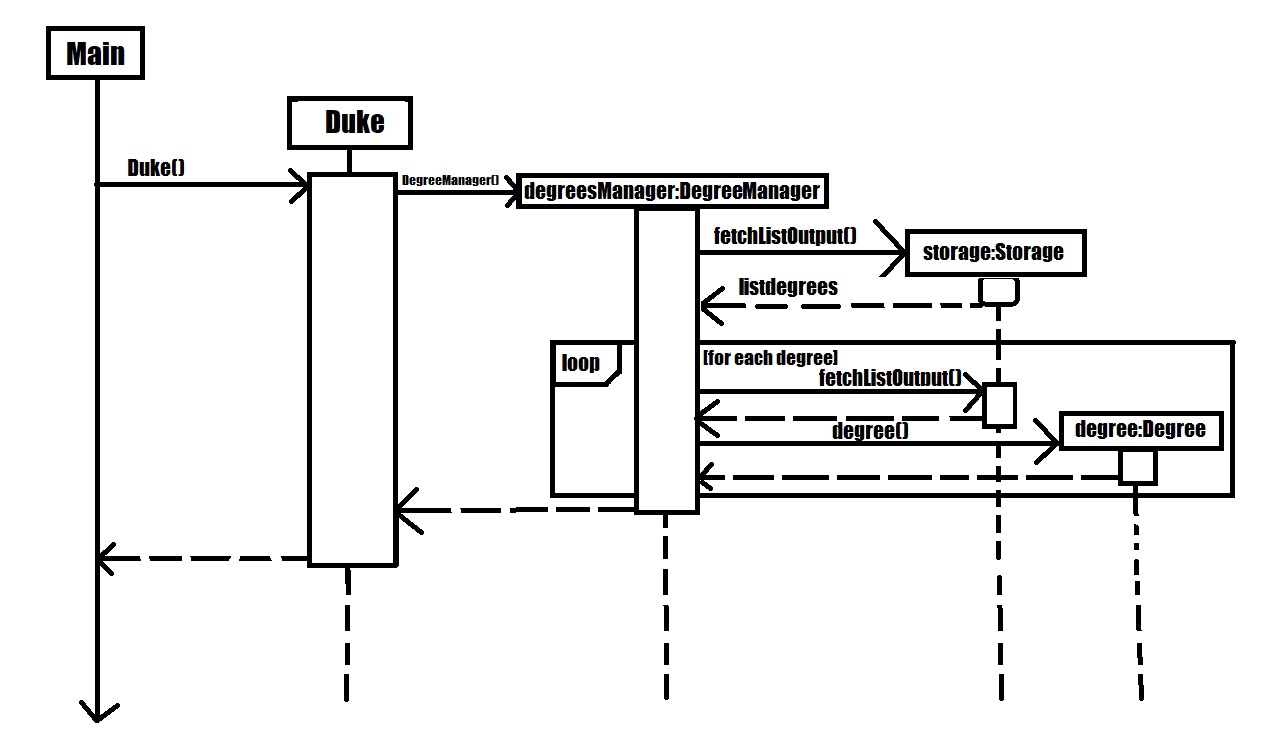
As detailed in the diagram above, when the main logic is initialized, an instance of Duke is created. Duke will subsequently create a Storage class. Duke will then create DegreeManager which will use Duke’s instance of Storage. DegreeManager will fetch the information regarding the list of degrees from Storage. Subsequently, for each degree in the list, it will create a Degree class to be stored within itself.
How DegreeManager handles the checking of valid degree names:
-
Alternative 1 (Current Choice): Iteration through every possible alias and checking if it matches
-
Pros:
-
Trivial to implement
-
It is readable.
-
Suitable for small and fixed number of aliases such as the current version of this program.
-
-
Cons:
-
It is not the best or most efficient way.
-
-
-
Alternative 2: Creation of Disjoint Set to find aliases.
-
Pros:
-
Extremely efficient Data Structure, O(4) time in searching for an entry.
-
Can be used to instantly determine if two keys belong to the same set as well.
-
Becomes faster over time through usage of Path Compression techniques.
-
-
Cons:
-
Non-primitive storage container, requires self implementation which may be flawed.
-
Complicated to use when handling non-integer members.
-
Extra Containers and functions needed to support the Disjoint Set.
-
-
A class GraduateEmployment is used in order to display employment percentage rates and basic mean salary of recent graduates in the form of a dual axis bar chart. This class is an implementation of the Statistics interface.
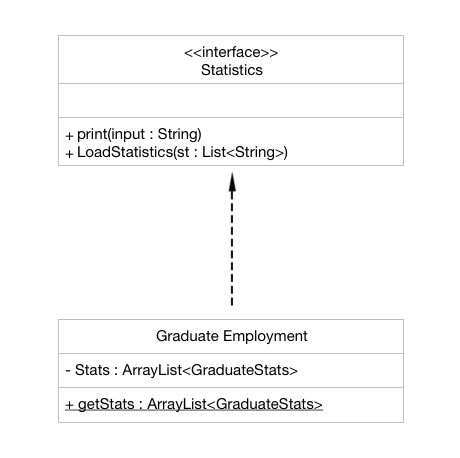
The Statistics interface comprises of two methods that are overridden in the GraduateEmployment class. These two methods are:
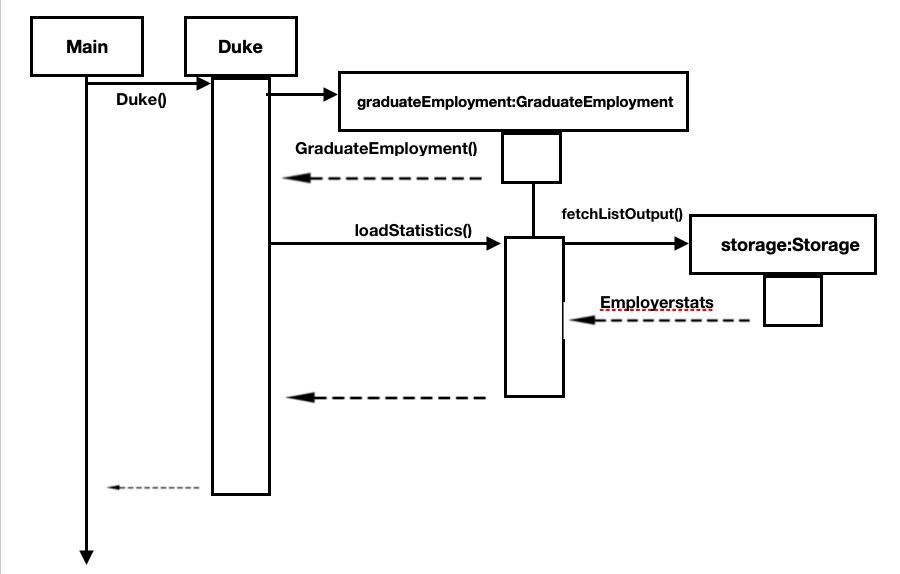
Statistics#loadStatistics(List<String>): This method takes in the parameter of a list of strings (List<String>) that have been fetched from the Storage class. They are then categorised as per the different degrees and year, following which it is added into an ArrayList of type GraduateStats and stored.
Statistics#print(String input): This method takes in the parameter of a string which is the degree inputted by the user. The end result is the display of a bar chart on a separate window, visually depicting the statistics. In the case of GraduateEmployment, an instance of the class Employment_BarChart is created and a dual axis bar chart is displayed with information for the employment percentage rates and basic mean salary.
The GraduateEmployment class also has the following function:
GraduateEmployment#getStats(): This method returns an ArrayList of type GraduateStats, named Stats, when called and is used to store the information needed.
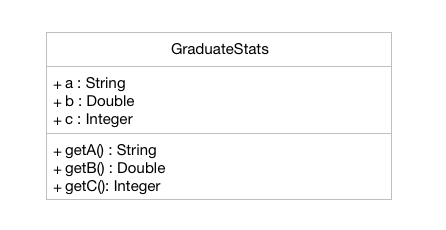
The GraduateStats class as mentioned above allows to store a string pertaining to the degree, a double value which is the employment percentage rate and an integer which corresponds to the basic mean salary. An array list of type GraduateStats is hence created to store all the necessary information.
Following is a sequence diagram to depict the process of the statistics being loaded and stored in the ArrayList:
Different ways were considered to display the employment statistics:
-
Alternative 1 (Current Choice): Display a dual axis bar chart
-
Pros:
-
Concise and clear display of data
-
Visually pleasing
-
Easy for the user to understand the data
-
-
Cons:
-
Needs two datasets to be rendered and then added to a single chart panel
-
Complicated implementation as a work-around needs to be used and a series of null values had to be added to prevent overlap the axes
-
-
-
Alternative 2: Display in the form of a table
-
Pros:
-
Easy implementation only requiring to manually draw a table
-
Data read is directly displayed on the CLI
-
-
Cons:
-
Too simplistic of a display
-
Doesn’t help users to visually compare the employment rates and mean salary for the past 3 years
-
Need to hardcode the table out
-
-
-
Alternative 3: Display two separate graphs for two separate commands
-
Pros:
-
Cleaner code as it clearly distinguishes between the commands for employment rates and salary
-
Distinction between data sets also for fewer bugs
-
-
Cons:
-
Troublesome for the user
-
Side-by-side analysis will not be available to have a better idea
-
-
A class CohortSize is used in order to display the cohort sizes for each degree in the form of a bar chart. This class is an implementation of the Statistics interface.
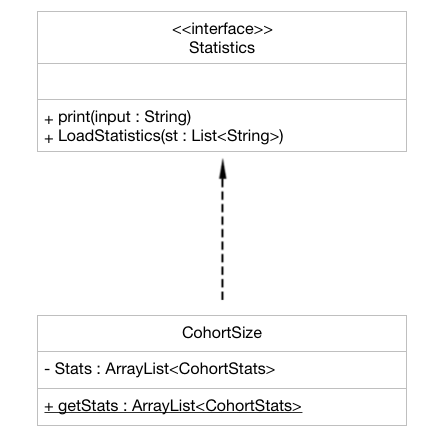
The Statistics interface comprises of two methods that are overridden in the CohortSize class. These two methods are:
Statistics#loadStatistics(List<String>): This method takes in the parameter of a list of strings (List<String>) that have been fetched from the Storage class. They are then categorised as per the different degrees and year, following which it is added into an ArrayList of type CohortStats and stored.
Statistics#print(String input): This method takes in the parameter of a string which is the degree inputted by the user. The end result is the display of a bar chart on a separate window, visually depicting the statistics. In this case, an instance of the class Cohort_BarChart is created and a bar chart is displayed with information of the number of male, female and total students in the years 2016-2018 for the degree requested.
The CohortSize class also has the following function:
CohortSize#getStats(): This method returns an ArrayList of type CohortStats, named cohortStats, when called and is used to store the information needed.
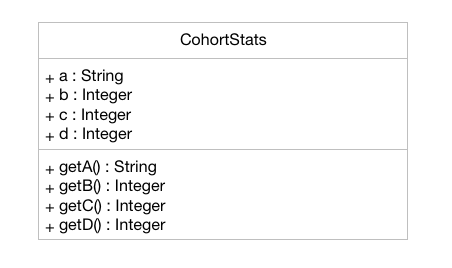
The CohortStats class as mentioned above allows to store a string pertaining to the degree and three integer values - the number of male students, the number of female students and the total number of students. An array list of type CohortStats is hence created to store all the necessary information. This is similar to how the data is loaded and stored in the case of the Graduate Employment statistics
Following is a sequence diagram to depict the process of a bar chart being displayed to the user for a particular (excluding the loading of the statistics):
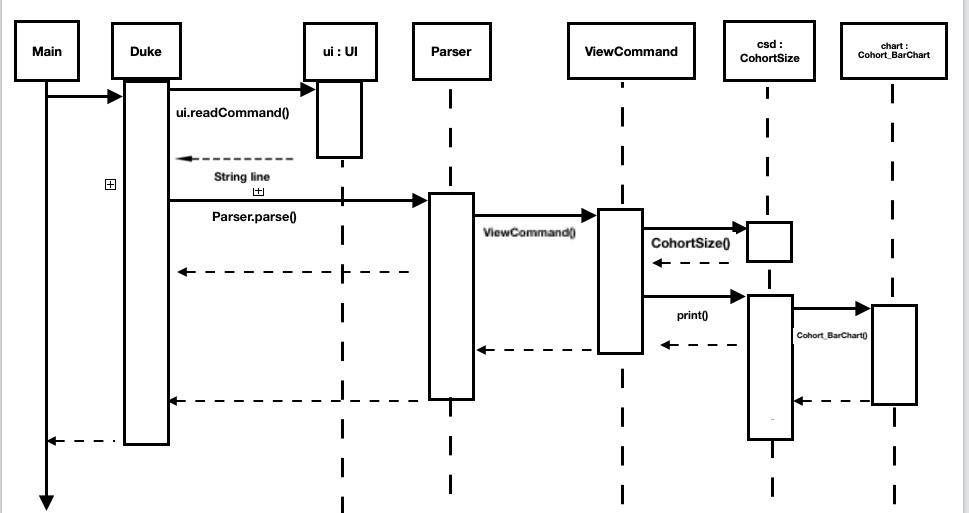
Different ways were considered to display the employment statistics:
-
Alternative 1 (Current Choice): Display through a colourful bar chart
-
Pros:
-
Concise and clear display of data
-
Visually pleasing
-
Easy for the user to understand the data
-
-
Cons:
-
Integration of a third party library and hence, the need to request for permission
-
-
-
Alternative 2: Display in the form of a table
-
Pros:
-
Easy implementation only requiring to manually draw a table
-
Data read is directly displayed on the CLI
-
-
Cons:
-
Too simplistic of a display
-
Doesn’t help users to visually compare the cohort sizes for the past 3 years
-
-
-
Alternative 3: Display using a bar graph with asterix
-
Pros:
-
Doesn’t require the hassle of a third-party library integration
-
-
Cons:
-
Troublesome for the user
-
May be confusing for the user
-
-
The SortCommand extends the Command class. It allows the sorting of the user’s tasks when given an input argument parsed by the Parser class.
The following class diagram outlines the SortCommand:
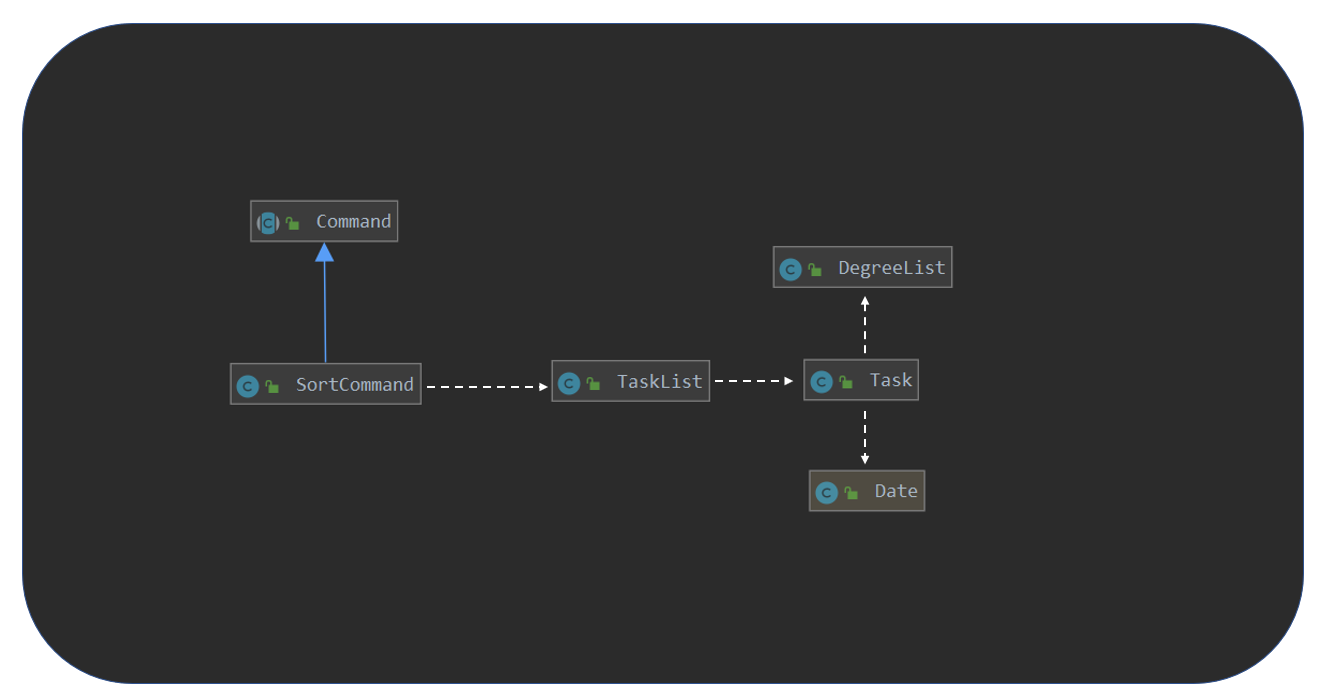
As seen from the figure above, the SortCommand class is highly dependent on the TaskList class. This high dependency is what allows for the sorting methods within the user’s tasklist to be carried out.
In turn, the TaskList class is dependent on both the Task class. This allows the sorting method within the TaskList class to utilise the the DegreeList class and Java’s Date class. These dependencies allow the sorting methods in TaskList to utilise variables of the in the instances of tasks so that they can be appropriately sorted.
Finally, the Task class is dependent on the DegreeList and Java’s Date class for when the user wishes to sort tasks by degree or by date.
In the case of a successful execution of a command, the sequence diagram of the Main Success Scenario is shown below:
Step 1: User inputs the sort command ("sort by priority")
Step 2: The command is called on the Parser, which parses the word, it then creates an instance of SortCommand, c, and returns it all the way back to Duke
Step 3: Duke then calls the execute() method on that instance of the SortCommand class, which is called c in the figure above
Step 4: Based on the arguments provided to c, in this case by priority, c will call the method sortByPriority on the user’s tasklist, which is of TaskList class
Step 5: The tasklist, which has numerous tasks in it, will call calculatePriorityScore() for every one of the tasks
Step 6: Using this sorting scores, sortByPriority method uses a comparator to re-order all of the tasks according to their priority levels, returning the new sorted sequence.
Step 7: The new sorted sequence is returned to Duke, and displayed to the user using UI.
At this point, the user receives the new sorted list according to the parameters that was specified, by priority.
Different ways were considered to display the employment statistics:
-
Alternative 1 (Current Choice): Re-ordering the user’s tasklist within itseld
-
Pros:
-
Self-contained mechanism within the
TaskListclass -
Less expensive in terms of memory
-
-
Cons:
-
Introduces new methods into the tasklist class
-
Requires more time to implement a comparator function
-
-
-
Alternative 2: Creating a new instance of
TaskListto hold the new order-
Pros:
-
Straightforward implementation with a copying over of tasks into the new TaskList
-
Allows the undo feature to easily call the previous tasklist to restore the old order
-
-
Cons:
-
Takes up more memory
-
-
-
If you receive the jar file in the format [CS2113T-F10-2][DEGREES.NUS].jar and the jar is unable to run, remove the square brackets.
-
This jar release will automatically populate with save data if the "data" folder is missing. It comes with a few degrees and tasks already loaded into its internal saves. It will generate external save files on its own as long as you follow these instructions for installing carefully:
-
Download the jar file.
-
Navigate to a directory you wish to use for testing and create a folder in it
-
Place the jar file in that folder and run it.
-
It should create a "data" folder in the same directory, as such that directory now has 2 folders: one containing the save files, and one containing the jar file.
-
-
It is assumed that cli is primarily used to open tabs, however clicking the tabs is fine as well.
-
This is compatible with mac os. Instructions for installing on Mac is the same as above.
-
If any external save files are missing or if the "data" folder is missing, the jar will use its internal save file, create a new external save file, and save its data there.
-
You can try using integers and negative numbers for <DEGREE> and <COMMAND>.
-
Its designed to only accept keywords and aliases, which is viewed in the
[Keywords]tabs. You can try any of them in various cases or with missing strings. -
For
help, only the commands in the help tab are accepted. You can try strings outside of those. -
Also for
help, it should swap tabs if used on its own. Whitespace is not acceptable. -
Multiple inputs separated by spaces are also viable test cases.
-
You can try using integers and negative numbers for <DEGREE>.
-
Can accept a combination of keywords and aliases.
-
Multiple inputs separated by spaces are viable test cases.
-
The limit for compare inputs is 7. You can try exceeding that.
-
You can try using words instead of numbers.
-
Negative numbers are viable test cases.
-
Multiple inputs in <ID>.
-
Only works for commands that modify the task or degree list:
add,remove,delete,done,swap,event,todo,deadline,snooze,sort. -
undoonly works once those commands has already been input, it should not work when the program is just started. -
Similarly,
redoonly works once anundowas successful.
-
Try adding deadlines to
todo. -
Mix up /at, /by, /priority.
-
Input something else in priority other than the standard <LEVEL>: low, normal, high or very high.
-
Mix cases for /at, /by, /priority and <LEVEL>.
-
Mix date and time formats from the standard: DD-MM-YYYY HHmm.
-
Mix the order of the command i.e. place /at before
event.
-
Only accepts keywords and are case sensitive.
-
Multiple inputs, numbers, negatives, different casings.
-
It should produce a bar graph in a separate window with the full name of the degree you input.
-
Only accepts 2 integers within the range of the size of the choices list.
-
Try adding 0s in front of your integers
-
Try more than 2 inputs.
-
Try integers outside the range, or negative numbers.
-
Only accepts 1 integer within the range of the size of the task list.
-
Try adding 0s in front of your integers
-
Try multiple inputs.
-
Try integers outside the range, or negative numbers.
-
Try marking a task that is already done.
-
Try multiple inputs and strings.
-
Mix the format of the date and time: DD-MM-YYYY HHmm.
-
Go outside the range.
-
Mix the format of the
snoozecommand.
-
Try multiple inputs and strings.
-
Use gibberish inputs that are cannot be found in deadlines and descriptions.
-
Mix the format of the date: DD-MM-YYYY
-
Try multiple inputs and strings.
-
Use strings not in the given <CATEGORY>: priority, date, degree
-
Add your own tasks and continue sorting.
| User Stories | Priority |
|---|---|
As a student entering NUS, I can view all the details of the course and their modules in one place rather than going through multiple websites so that I can avoid confusion |
High |
As a student applying to NUS, I can save a list of possible personal degrees so that I can have a neat way of accessing my list of possible degrees that I have brainstormed to apply for |
High |
As a student applying to NUS, I can compare the details of two majors on a single platform so that I can clearly see what details of the major are important and relevant to me. |
High |
As a student still making a decision, I can delete/rank degrees from my personal selection list so that I can correct old decisions that I made the last time in order to have my most updated list at all times. |
High |
As a student presented with too many options, I can have a narrowed-down view of the major requirements to make a clearer decision. |
High |
As a student applying to NUS, I can keep track of a list wherein I can add general/unrestricted modules I am interested in and also have the option to delete them whenever needed so that I can have the most updated list at all times. |
Medium |
As a prospective student choosing between NUS and other universities’ engineering courses, I can easily look up all the modules and their details required for the particular engineering degree in NUS |
High |
As a student applying to NUS, I can keep track of all the deadlines to submit documents or housing, and of the various freshman events so that I don’t miss out any. |
High |
As a new student, I can view the module details of the courses as soon as possible, without resorting to manually searching through all modules so that I can know easily learn more about upcoming modules. |
High |
As a student applying to NUS, I can view all the modules required and their details for the next few years so that I can make a more informed decision. |
High |
As a user who prefers side by side comparisons, I can be able to compare between any two majors simultaneously, without the need to switch tabs so as to not get confused. |
High |
As a novice user, I can type a “help” command and receive all the possible commands that Duke 2.0 provides so that I can use the software to its fullest potential |
Medium |
As a student applying to NUS and having specific interests, I can see if the core modules have any overlap with my interests so that I am better able to decide which engineering disciplines suits me the most |
Medium |
As a practical person, I can view what majors are the most in demand by employers in the job market so that I make my choices on my job prospects. |
Medium |
As a student applying to NUS, I can view the past cohort sizes so that I know what sort of competition awaits me in my university career. |
Medium |
As a student applying to NUS and who is organised, I can view the module requirements for the two degrees in a tabular format for better clarity |
Medium |
As a student selecting a degree, I can view the complexity of each module in the major and an overall calculation for the complexity of the entire degree so as to see other students’ perceptions regarding the major |
Medium |
As a careless typer, I can type mistakes into the command without the application crashing so that I do not have to re-run the program at every mistake. |
Medium |
As a user, I can save my personal module selection list onto the hard drive so that I can go back to it when I turn on the program the next time. |
Medium |
As a student applying to NUS, I can see a recommended schedule so that I can better plan around |
Medium |
As a student applying to NUS, I can see past statistics of the module so that I can make a better decision when choosing my modules based on my competency level |
Medium |
As a student applying to NUS, I can see the module workload for the upcoming semester so that I can better plan for electives. |
Medium |
As a person interested in a certain engineering discipline, I can have access to everything NUS offers such as modules, research projects, internships etc. for it on one platform so as to make a more informed decision. |
Medium |
As a person who likes to keep it short, I can have access to the user commands to be as simple as possible to search up for anything so that I don’t have to memorize and remember many long commands |
Medium |
As an advanced user, I can make/delete user defined commands which execute a certain command for me |
Medium |
As an ambitious student, I can see which majors have a rigorous course curriculum so that I can apply for degree that is personally challenging. |
Medium |
As an enthusiastic student applying to NUS, I can have links to resources (Eg textbooks, external websites) for the module so that I can have a headstart in my studies. |
Low |
As a lazy typer, I can be able to enter commands through auto suggestions according to my most frequently used words so that DEGREES.NUS becomes easier to use as time goes on |
Low |
This section lists a few Use Cases that shows the Actor, who is the user, interacting with the System, which is DEGREES.NUS.
-
User requires help with command syntax
-
User types in the command in the following manner:
help -
DEGREES.NUS returns all the possible commands that it will accept
-
User reads the information
-
User identifies a degree that he/she wishes to research, Electrical Engineering
-
User types in the command in the following manner:
details EE -
DEGREES.NUS displays the degree requirements, including the core modules
-
User reads the information
-
User identifies two degrees she wishes to compare
-
User types in the command in the following manner:
compare EE CEG -
DEGREES.NUS displays similar and different modules from the two degrees
-
User reads the information
-
User identifies the degree he/she wishes to add to his/her list of possible degrees
-
User types in the command in the following manner:
add EE -
DEGREES.NUS adds Electrical Engineering to the user’s degree list
-
User types in the command in the following manner:
degreelist -
DEGREES.NUS returns the user’s degree list with Electrical Engineering added
-
DEGREES.NUS is a fast application.
-
DEGREES.NUS can be used on any platform (any PC), and is hence light-weight.
-
The information provided is accurate as of the latest semester.
-
The application has simple functions
-
The application is fairly easy and understandable to navigate through.
-
It is inviting to the eye with a well-designed graphical user interface.
-
The response to any use action should be visible to the user within 5 seconds
-
The product is offered for free