



English | 中文文档
基于 WebWorker 的缓存机制,提供可靠高性能的缓存,帮助构建高性能的 webApp。
👋 类型安全,arrow Cache 用 ts 编写,对代码提示和类型约束有良好的支持。
🚀 高性能,对缓存库的操作都是异步的,背后是 Worker thread 在帮忙处理一切的存取操作。
🍰 控制内存,通过简单有效的算法筛选数据,保证内存中热数据缓存的占比。
🍷 丰富的 API 对缓存的可控性,提供一系列操作缓存的细粒度的方法,能更有效的控制缓存的生命周期。
🌲 数据持久化,对于冷数据会被 arrow cache 从内存中移除持久化到硬盘,有需要的时候再读入内存,提高访问速度。
Arrow Cache 和许多缓存库一样,通过 Key-Value 来缓存数据,任何存入 Arrow Cache 的数据都会被第一时间放入内存。当放入的东西越来越多,内存会逐渐膨胀,Arrow Cache 会启动一个定时器来每隔一段时间做一次标记清除,这种做法会使得内存里都是热数据,进而控制内存。这些被标记的数据并不会马上从内存里被清除,而是持久化到硬盘,下次再用到这个数据的时候会先从内存里寻找,如果没有找到,会发起一起 IO 从硬盘上寻找,如果发现会将它读入内存并且初始化。
每个存入 Cache Store 的数据都会有一个 isActive 标记和一个 lifeCount 标记。
isActive
当数据存在于内存中时,证明它是活跃的,这时候该数据的 isActive 是 TRUE,如果它被写入了磁盘,这时候变为 FALSE 代表它是不活跃的。
lifeCount
用来帮助 Arrow Cache 的标记清除机制,每隔一段时间(默认是 10min,可以通过设置 clearDuration 来更改)会检查当前容器中的数据的 lifeCount 是否为 0(初始化是 2),当 lifeCount 为 0 时,会将这个数据标记为 imminentDead 表示为可以被清除的,然后会将所有标记为 imminentDead 的数据持久化到磁盘。
# yarn
yarn add arrow-cache
# npm
npm install arrow-cache
/** Usage */
import { ArrowCache } from "arrow-cache";
const cache = new ArrowCache();
cache.setItem("name", "Jon");ArrowCache(Options)
你可以在实例化 ArrowCache 的时候传递一个 Options,可用属性如下:
isPermanentMemory [Boolean]
标记是否为“常驻内存”,如果开启此项,Arrow Cache 会在你每次 setItem 的时候都持久化到硬盘,下一次刷新页面的时候将它读到内存,调用者会感受到它一直存在于内存中。
clearDuration [Number]
设置清理周期,Arrow Cache 每隔一段时间会清理掉生命计数为 0 的缓存项。
为避免做一些冗余的非空判断,我们为个别方法提供了默认值,例如:
import { ArrowCache } from "arrow-cache";

const cache = new ArrowCache();

// 👎
const doSomething = async () => {
  const foo = await cache.getItem("foo");

  if (!foo) {
    cache.setItem("foo", 0);
  }

  // ...
};

// 👍
const doSomething = async () => {
  const foo = await cache.getItem("foo", 0);

  // ...
};

// 👍
const doSomething = async () => {
  const foo = await cache.append("foo", foo => foo + 1, 0);

  // ...
};Arrow Cache 提供了一些更新缓存项的方法,setItem 和 updateContent。我们称 setItem 是有副作用的,而 updateContent 是没有副作用的,setItem 在 key 对应的项不存在的时候会自动创建一个新的,而 updateContent 则会返回 false 并且不会自动创建。另一个区别是,当目标缓存项已经被写在硬盘并且被标记为 cold Data 时,使用 setItem 会使该缓存项被标记为 active 并且读入内存,而 updateContent 不论缓存项在内存还是硬盘都不会改变状态。
////////////////////////// SIDE EFFECT /////////////////////////

cache.setItem(CACHE_KEY, 0);

setTimeout(async () => {
  console.info(await cache.snapshot()); // {memory: {}, disk: {foo: "0"}}

  await cache.setItem(CACHE_KEY, 1);

  console.info(await cache.snapshot()); // {memory: {foo: {content: "1", lifeCount: 2, isActivated: true}}, disk: {}}
}, 2100);

cache.setItem(CACHE_KEY, 0);

//////////////////////////// PURE ////////////////////////////

setTimeout(async () => {
  console.info(await cache.snapshot()); // {memory: {}, disk: {foo: "0"}}

  await cache.updateContent(CACHE_KEY, 1);

  console.info(await cache.snapshot()); // {memory: {}, disk: {foo: "1"}}
}, 2100);Arrow Cache 会在构造函数调用的时候通过 Worker 将硬盘上的数据读入内存,这一过程为 Arrow Cache 的初始化,你可以通过传递一个回调在它初始化完成后做一些事情。
import { ArrowCache } from "arrow-cache";

const cache = new ArrowCache();

cache.onInit(() => {
  // do something...
});掌控缓存项的生命周期能更好的控制缓存的性能和当前情况。
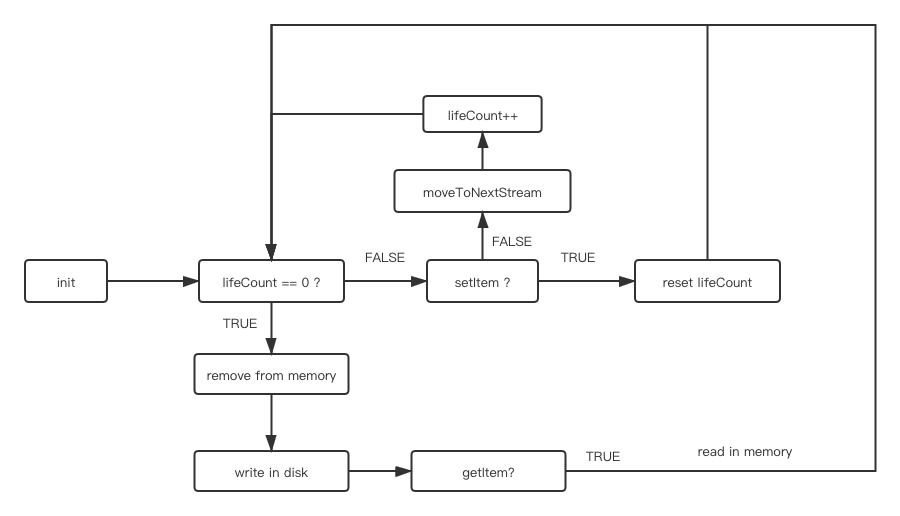
我们提供了三个 API 来帮助你控制缓存项的生命周期.
moveToNextStream(key: string): Promise<boolean>moveToNextStream 能够让指定的 key 对应的缓存项进入下一个清理周期。lifeCount 是影响缓存项是否活跃的唯一指标,lifeCount 会加一,随之进入下一个清理周期。如果 key 对应的缓存项不存在,则会返回 false。
markAsActive(key: string): Promise<boolean>markAsActive 帮助对应的缓存项从硬盘读入内存。如果 key 对应的缓存项不存在,则会返回 false。
markAsStatic(key: string): Promise<boolean>markAsStatic 会让对应的缓存项从内存写到硬盘。如果 key 对应的缓存项不存在,则会返回 false。
我们提供了一组 keys 的方法,可以轻松拿到所在空间的所有的 keys。
activeKeys(): Promise<string[]>activeKeys 将内存中所有的缓存项的 keys 返回出来。也意味着内存中所有的缓存项都是活跃的。
staticKeys(): Promise<string[]>staticKeys 将硬盘中所有的缓存项的 keys 返回出来。也意味着硬盘中所有的缓存项都是不活跃的。
keys(): Promise<string[]>keys 方法返回所有的 keys(包含内存和硬盘)
有时候,需要准确的知道内存中的缓存的情况。可以使用 snapshot 方法打印当前缓存的状况
import { ArrowCache } from "arrow-cache";

const cache = new ArrowCache();

(async () => {
  console.info(await cache.snapshot()); // {memory: {}, disk: {}}
})();
snapshot 返回当前时间点缓存的快照,它是对内存的一层浅拷贝
一些例子在 Examples 下,通过 npx parcel index.html 即可启动
import React, { useLayoutEffect, useState } from "react";
import { render } from "react-dom";
import { ArrowCache } from "arrow-cache";
import { Count } from "./styles";
import { Logo, Global, Button, Container } from "../common";

const cache = new ArrowCache({
  isPermanentMemory: true
});

const COUNT_KEY = "count_key";

const Counter = () => {
  const [num, setNum] = useState(0);

  const initNum = async () => setNum(await cache.getItem(COUNT_KEY, 0));

  const increment = async () =>
    setNum(await cache.append(COUNT_KEY, pre => pre + 1, 0));

  useLayoutEffect(() => {
    initNum();
  }, []);

  return (
    <Container>
      <Global></Global>
      <Logo></Logo>
      <Count>{num}</Count>
      <Button onClick={increment}>increment</Button>
    </Container>
  );
};

render(<Counter />, document.querySelector("#root"));import { ArrowCache } from "arrow-cache";
import { Button } from "../common";
import React from "react";
import { render } from "react-dom";
const cache = new ArrowCache({
clearDuration: 1000
});
const CACHE_KEY = "foo";
const App = () => {
const handleSideEffectClick = () => {
cache.setItem(CACHE_KEY, 0);
setTimeout(async () => {
console.info(await cache.snapshot());
await cache.setItem(CACHE_KEY, 1);
console.info(await cache.snapshot());
}, 2100);
};
const handlePureClick = () => {
cache.setItem(CACHE_KEY, 0);
setTimeout(async () => {
console.info(await cache.snapshot());
await cache.updateContent(CACHE_KEY, 1);
console.info(await cache.snapshot());
}, 2100);
};
return (
<>
<Button onClick={handleSideEffectClick}>side effect</Button>
<p></p>
<Button onClick={handlePureClick}>pure</Button>
</>
);
};
render(<App />, document.querySelector("#root"));MIT.