Objects group together a set of variables and functions to create a model of a something you would recognize from the real world. In an object, variables and functions take on new names.
- IN AN OBJECT: VARIABLES BECOME KNOWN AS PROPERTIES
- IN AN OBJECT: FUNCTIONS BECOME KNOWN AS METHODS
Literl Notation :is easiest and most popular way to creat object. There are severl way to creat object. Accessing an object and not notation.
- you access the properties or methods of an object using dot notation.
- you can also access properties using square brackets.
create an object: constructor notation :
the new keyword and the object constructor create a blank object .
you can then add properites and methods to the object .
how browsers should create a model of an HTML page and how JavaScript can access and update the contents of a web page while it is in the browser window. As a browser loads a web page, it creates a model of that page. The model is called a DOM tree, and it is stored in the browsers' memory. It consists of four main types of nodes.
DOM TREE
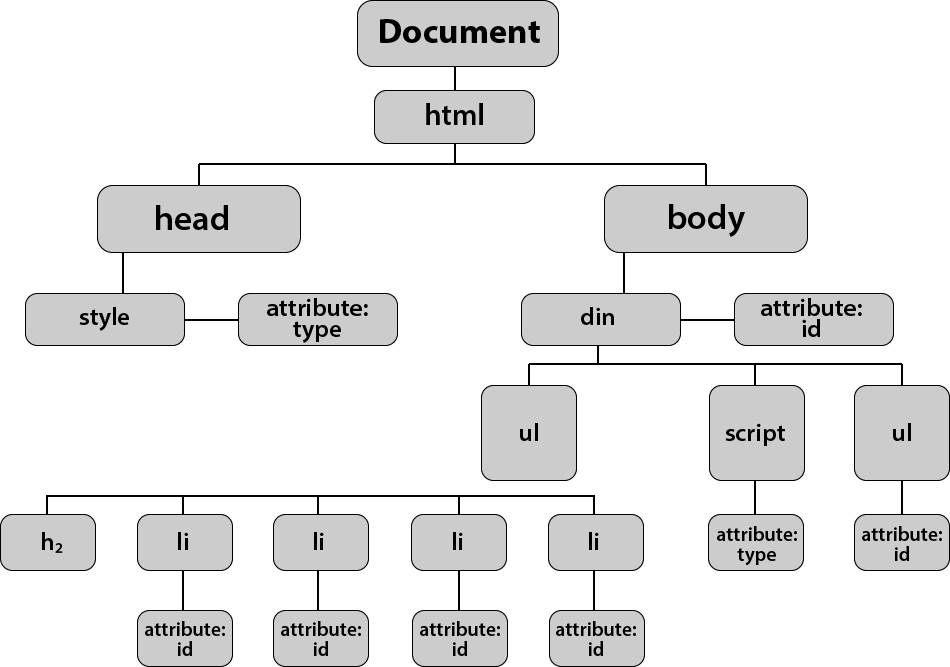
ccessing and updating the DOM tree involves two steps: 1: Locate the node that represents the element you want to work with. 2: Use its text content, child elements, and attributes.
caching DOM queries methods that find element in the DOM tree are called DOM queries. getelementbyid('one'); when people talk about storing elements in varibles,they are really storing the location of the elements within the DOM tree in avarible. var itemone=getelementbyid('one');
METHODS THAT RETURN ONE OR MORE ELEMENTS (AS A NODELIST):
-
getEl ementsByClassName( 1class 1 ) Selects one or more elements given the value of their cl ass attribute. The HTML must have a cl ass attribute for it to be selectable. This method is faster than querySe 1ectorA11 () .
-
getEl ementsByTagName( 1tagName 1)
Selects all elements on the page with the specified tag name. This method is faster than querySe 1ectorA11 ().
- querySelectorAll ( 1css select or•) Uses CSS selector syntax to select one or more elements and returns all of those that match.
Select individual elements: getElementById()and querySelector() can both entire document and return individual elements.
When a DOM method can return more than one element, it returns a Nodelist : is a collection of element nodes. Each node is given an index number (a number that starts at zero, just like an array).
There are two way to select an elements from nodelist:
- the item methods ()
Looping through a nodelist :play by play
TRAVERSING THE DOM:When you have an element node, you can select another element in relation to it using these five properties. WHITESPACE NODES:Traversing the DOM can be difficult because some browsers add a text node whenever they come across whitespace between elements.
To work with the content of elements you can:
- Navigate to the text nodes. This works best when the element contains only text, no other elements.
- Work with the containing element. This allows you to access its text nodes and child elements. It works better when an element has text nodes and child elements that are siblings.
- DOM tree the innerHtml: Using the i nnerHTML property, you can access and amend the contents of an element, including any child elements.
- DOM mainpulation : It involves three steps:
- CREATE THE ELEMENT
- GIVE IT CONTENT
- ADD IT TO THE DOM
document.write() The document object's write () method is a simple way to add content that was not in the original source code to the page, but its use is rarely advised.