- Headings and paragraphs
- Bold, italic, emphasis
- Structural and semantic markup
HTML has six "levels" of headings:
from < h1.......to h6 >
-
< p> To create a paragraph, surround the words that make up the paragraph with an opening "p" tag and closing "p" tag
-
< b> By enclosing words in the tags b and b we can make characters appear bold
-
< i> By enclosing words in the tags i and i we can make characters appear italic
-
< sub> The sub element is used to contain characters that should be subscript. It is commonly used with foot notes or chemical formulas such as H2o
White Space In order to make code easier to read, web page authors often add extra spaces or start some elements on new lines
Line Breaks & Horizontal Rules
-
< br \ >
As you have already seen, the browser will automatically show each new paragraph or heading on a new line. -
< hr /> To create a break between themes — such as a change of topic in a book or a new scene in a play — you can add a horizontal rule between sections
There are some text elements that are not intended to affect the structure of your web pages, but they do add extra information to the pages — they are known as semantic markup.
-
< strong> The use of the < strong>element indicates that its content has strong importance. For example, the words contained in this element might be said with strong emphasis.
-
< em> The < em> element indicates emphasis that subtly changes the meaning of a sentence
-
< blockquote> The < blockquote> element is used for longer quotes that take up an entire paragraph. Note how the < p> element is still used inside the < blockquote> element.
HTML elements are used to describe the structure of the page (e.g. headings, subheadings, paragraphs).
They also provide semantic information (e.g. where emphasis should be placed, the definition of any acronyms used, when given text is a quotation).
A script is a series of instructions that a computer can follow one-by-one. Each individual instruction or step is known as a statement. Statements should end with a semicolon.
COMMENTS 1.SINGLE-LINE COMMENTS In a single-line comment, anything that follows the two forward slash characters I/ on that line will not be processed by the JavaScript interpreter.
2.MULTI-LINE COMM ENTS To write a comment that stretches over more than one line, you use a multi-line comment, starting with the /* characters and ending with the */ characters.
A script will have to temporarily store the bits of information it needs to do its job. It can store this data in variables.
RULES FOR NAMING VARIABLES 1.The name must begin with a letter, dollar sign ($),or an underscore (_). It must not start with a number
2.The name can contain letters, numbers, dollar sign ($), or an underscore (_). Note that you must not use a dash(-) or a period (.) in a variable name.
3.You cannot use keywords or reserved words. Keywords are special words that tell the interpreter to do something
An array is a special type of variable. It doesn't just store one value; it stores a list of values. var colors; colors ['white', 'black', ' custom']; var el document.getElementByld('col ors'); el . textContent = col ors[ O];
Values in an array are accessed as if they are in a numbered list. It is important to know that the numbering of this list starts at zero (not one).
An expression evaluates into (results in) a single value. Broadly speaking there are two types of expressions.
Expressions rely on things called operators; they allow programmers to create a single value from one or more values.
Expressions evaluate into a single value.
Expressions rely on operators to calculate a value.
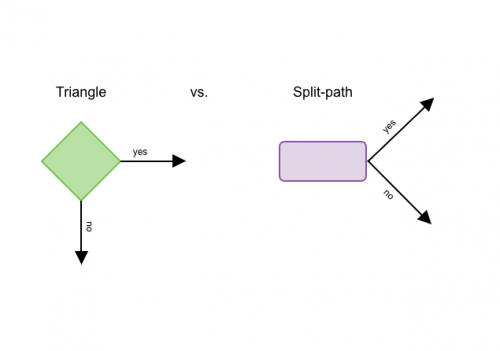
There are a lot of places in script where decition are made determinal which lines code made should be run next. flowchart can help you plan.
Flowchart shap represent a point where decition must be made and code can make one of two different paths.
- Evaluate conditions and condition statments There are two components to a decision:
- experssion is evalute which return value
- conditional statment
- Compartion operaters
- equal to ==
- not equal to != 3.strict equal to === 4.strict not equal to !== 5.gerater than > 6.less than < 7.greter than or equal >= 7.less than or equal <=
*Structuring comparsion operater :one operater and two operands.
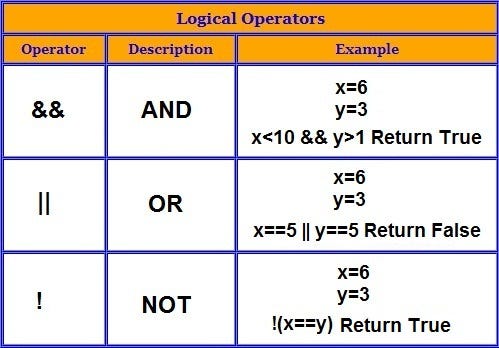
logical operater
if statment
-
if statment
-
else if