- What is a component? 'A component is a modular, portable, replaceable, and reusable set of well-defined functionality that encapsulates its implementation and exporting it as a higher-level interface.
A component is a software object, intended to interact with other components, encapsulating certain functionality or a set of functionalities. It has an obviously defined interface and conforms to a recommended behavior common to all components within an architecture.'
- What are the charactistics of a component? 1-Reusability − Components are usually designed to be reused in different situations in different applications. However, some components may be designed for a specific task.
2-Replaceable − Components may be freely substituted with other similar components.
Not context specific − Components are designed to operate in different environments and contexts.
3-Extensible − A component can be extended from existing components to provide new behavior.
4-Encapsulated − A A component depicts the interfaces, which allow the caller to use its functionality, and do not expose details of the internal processes or any internal variables or state.
5-Independent − Components are designed to have minimal dependencies on other components.
- What are the advantages of using component based architecture? 1-Ease of deployment .
2-Reduced cost .
3-Ease of development.
4-Reusable.
5-Modification of technical complexity.
6-Reliability.
7-System maintenance and evolution.
8-Independent.

-
What is props short for? Properites
-
How are props used in React? 1-Firstly, define an attribute and its value(data). 2-Then pass it to child component(s) by using Props. 3-Finally, render the Props Data.
-
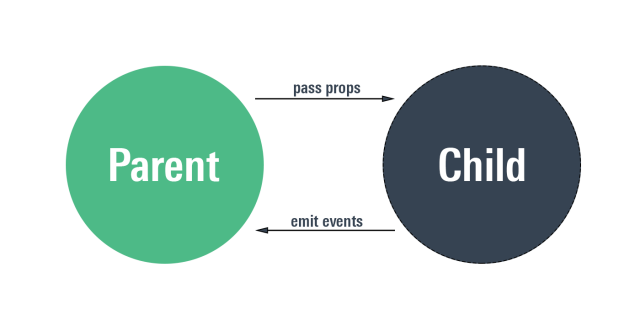
What is the flow of props? uni-directional flow. (one way from parent to child.
React is a declarative, efficient, and flexible JavaScript library for building user interfaces. It lets you compose complex UIs from small and isolated pieces of code called “components”.
- we have three React components:
1-Square. 2-Board. 3-Game.
- Why JSX? Teact doesn’t require using JSX, but most people find it helpful as a visual aid when working with UI inside the JavaScript code. It also allows React to show more useful error and warning messages.
We call this a “root” DOM node because everything inside it will be managed by React DOM.
Applications built with just React usually have a single root DOM node. If you are integrating React into an existing app, you may have as many isolated root DOM nodes as you like.
To render a React element into a root DOM node, pass both to ReactDOM.render():
- Updating the Rendered Element React elements are immutable. Once you create an element, you can’t change its children or attributes. An element is like a single frame in a movie: it represents the UI at a certain point in time.
With our knowledge so far, the only way to update the UI is to create a new element, and pass it to ReactDOM.render().
- Components and Props
Components let you split the UI into independent, reusable pieces, and think about each piece in isolation. This page provides an introduction to the idea of components. You can find a detailed component API reference here.
Conceptually, components are like JavaScript functions. They accept arbitrary inputs (called “props”) and return React elements describing what should appear on the screen.
How to practice react.