In today’s data-driven financial environment, organizations require real-time visibility into transaction patterns, customer demographics, and revenue trends to support informed decision-making.
This project focuses on building an interactive Credit Card Transaction Dashboard that:
- Stores structured data in a SQL database
- Models and transforms data in Power BI
- Uses DAX measures for KPIs and time intelligence
- Provides weekly, quarterly, and YTD insights
The dashboard enables stakeholders to monitor performance, identify trends, and evaluate risk efficiently.
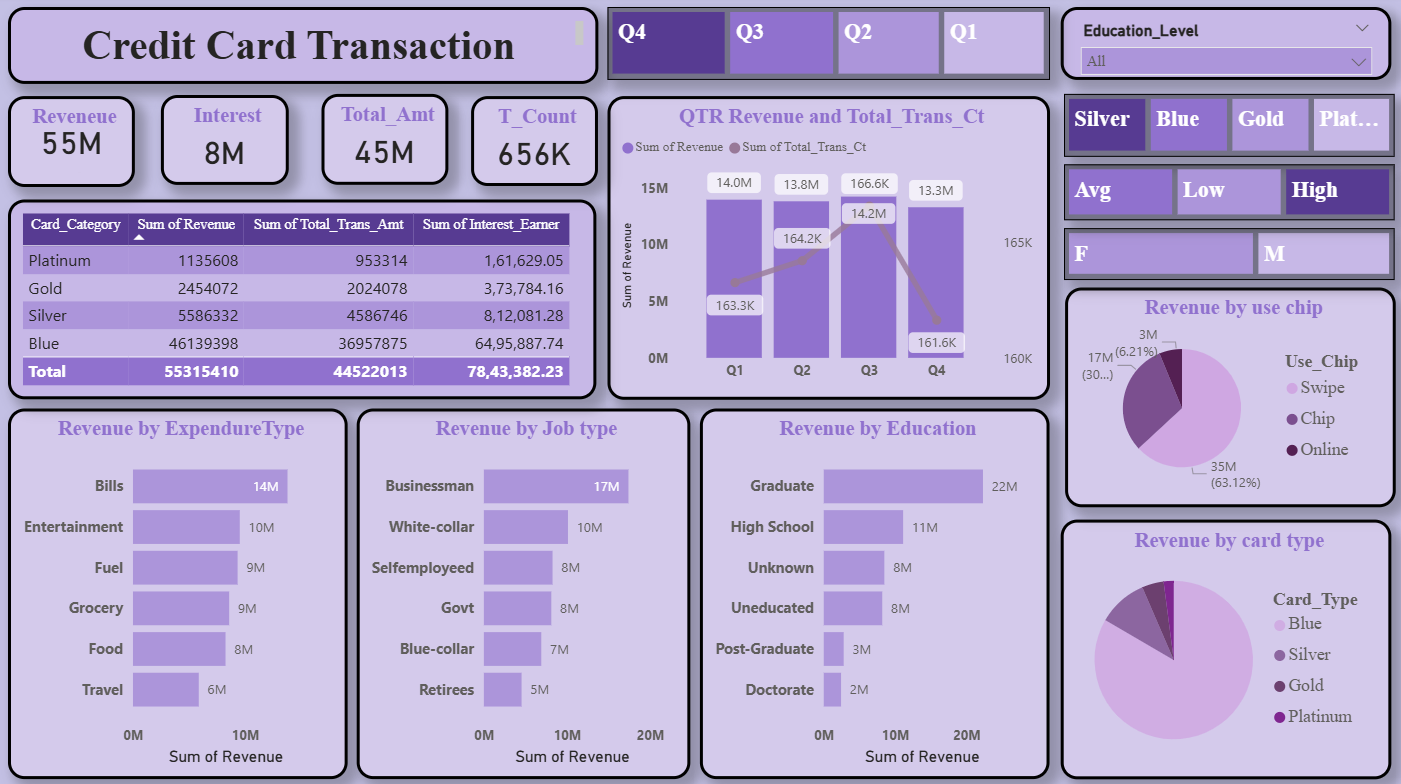
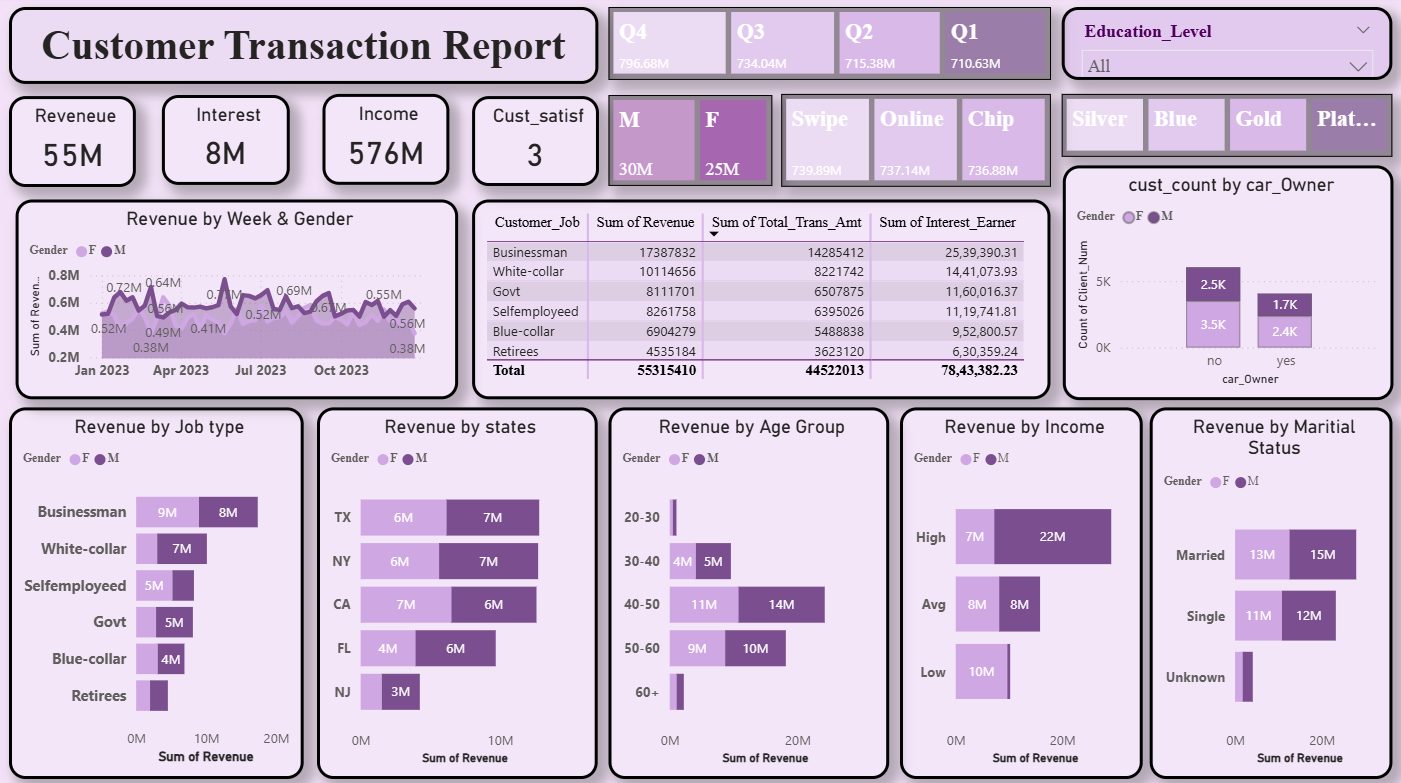
- Build an interactive Power BI dashboard for credit card analytics
- Provide insights into:
- Revenue & interest earned
- Transaction amount & transaction count
- Customer demographics & behavior
- Card category & usage patterns
- Enable Weekly, Quarterly, and YTD performance tracking
- Support data-driven business decisions
End-to-End Workflow
- CSV data preparation
- SQL database creation
- Table design & schema definition
- Data loading using
LOAD DATA INFILE - Data validation & corrections
- Power BI data modeling
- DAX calculations & KPI creation
- Interactive dashboard development
- Insight extraction & reporting
flowchart LR
    A[CSV Data Collection] --> B[SQL Database Creation]
    B --> C[Table Design: cc_details & cust_details]
    C --> D[Load Data using LOAD DATA INFILE]
    D --> E[Data Validation & Cleaning in SQL]
    E --> F[Connect SQL Database to Power BI]
    F --> G[Data Modeling & Relationships]
    G --> H[DAX Measures & Calculations]
    H --> I[Interactive Dashboard Design]
    I --> J[Insights, Export & Sharing]

    %% Styles
    style A fill:#FFD54F,stroke:#F57F17,stroke-width:2px,color:#000;
    style B fill:#4FC3F7,stroke:#0277BD,stroke-width:2px,color:#fff;
    style C fill:#AED581,stroke:#33691E,stroke-width:2px,color:#000;
    style D fill:#FFCC80,stroke:#EF6C00,stroke-width:2px,color:#000;
    style E fill:#81D4FA,stroke:#01579B,stroke-width:2px,color:#000;
    style F fill:#BA68C8,stroke:#4A148C,stroke-width:2px,color:#fff;
    style G fill:#90CAF9,stroke:#0D47A1,stroke-width:2px,color:#000;
    style H fill:#CE93D8,stroke:#6A1B9A,stroke-width:2px,color:#000;
    style I fill:#FF8A65,stroke:#BF360C,stroke-width:2px,color:#fff;
    style J fill:#B39DDB,stroke:#311B92,stroke-width:2px,color:#fff;
- Data stored and managed in a SQL Database
- Imported from CSV files into SQL tables
- Two primary tables:
cc_details– Credit card transaction datacust_details– Customer demographic data
- Power BI – Dashboard development & visualization
- SQL (MySQL / PostgreSQL) – Data storage & querying
- DAX – Measures, KPIs & time intelligence
- Data Modeling – Relationships & schema design
- Data Visualization – KPIs, charts, slicers
- CSV Files – Raw data source
CREATE DATABASE ccdb;
USE ccdb;CREATE TABLE cc_details (
Client_Num INT,
Card_Category VARCHAR(20),
Annual_Fees INT,
Activation_30_Days INT,
Customer_Acq_Cost INT,
Week_Start_Date DATE,
Week_Num VARCHAR(20),
Qtr VARCHAR(10),
current_year INT,
Credit_Limit DECIMAL(10,2),
Total_Revolving_Bal INT,
Total_Trans_Amt INT,
Total_Trans_Ct INT,
Avg_Utilization_Ratio DECIMAL(10,3),
Use_Chip VARCHAR(10),
Exp_Type VARCHAR(30),
Interest_Earner DECIMAL(10,3),
Delinquent_Acc VARCHAR(5)
);
CREATE TABLE cust_details (
    Client_Num INT,
    Customer_Age INT,
    Gender VARCHAR(10),
    Dependent_Count INT,
    Education_Level VARCHAR(50),
    Maritial_Status VARCHAR(20),
    State_cd VARCHAR(50),
    Zipcode VARCHAR(20),
    car_Owner VARCHAR(10),
    House_Owner VARCHAR(5),
    Personal_Loan VARCHAR(5),
    Contact VARCHAR(20),
    Customer_Job VARCHAR(20),
    Income INT,
    Customer_Satisfaction_Score INT
);LOAD DATA INFILE 'C:/ProgramData/MySQL/MySQL Server 8.0/Uploads/credit_card.csv'
INTO TABLE cc_details
FIELDS TERMINATED BY ','
ENCLOSED BY '"'
LINES TERMINATED BY '\n'
IGNORE 1 ROWS;The following SQL command is used to import customer demographic data from a CSV file into the cust_details table.
LOAD DATA INFILE 'C:/ProgramData/MySQL/MySQL Server 8.0/Uploads/customer.csv'
INTO TABLE cust_details
FIELDS TERMINATED BY ','
ENCLOSED BY '"'
LINES TERMINATED BY '\n'
IGNORE 1 ROWS;- 💰 Total Revenue
- 💳 Total Transaction Amount
- 🔢 Transaction Count
- 💸 Interest Earned
- 👥 Customer Count
⚠️ Delinquency Rate- ✅ Activation Rate
- 💰 Total Revenue: 55M
- 💳 Blue & Silver cards contribute ~93% of total transactions
- 🔄 Swipe transactions dominate overall usage
- 👥 Significant variation across age, income, and job groups
- 🌎 TX, NY & CA together contribute ~68% of total revenue
⚠️ Delinquent Rate: 6.06%- ✅ Activation Rate: 57.5%
Dashboard outputs were shared as:
- PDF reports
- Power BI Service dashboards
Used for:
- Weekly performance reviews
- Business & strategic discussions
🔗 https://drive.google.com/drive/folders/16T65EOoXPGIZTcLpNTc-AbGHeKpTW9zG?usp=sharing
🔗 https://github.com/shivareddy2002/Credit_Card_Transaction_Report
- Predictive analytics for:
- Revenue forecasting
- Delinquency prediction
- Automated data refresh using Power BI Service
- Drill-through customer-level analysis
- Integration with Machine Learning models
Lomada Siva Gangi Reddy
- 🎓 B.Tech CSE (Data Science), RGMCET (2021–2025)
- 💡 Interests: Python | Machine Learning | Deep Learning | Data Science
- 📍 Open to Internships & Job Offers
Contact Me:
- 📧 Email: lomadasivagangireddy3@gmail.com
- 📞 Phone: 9346493592
- 💼 LinkedIn 🌐 GitHub 🚀 Portfolio