OAuth is an open-standard authorization protocol or framework that describes how unrelated servers and services can safely allow authenticated access to their assets without actually sharing the initial, related, single logon credential. In authentication parlance, this is known as secure, third-party, user-agent, delegated authorization.
-
when you go to log onto a website and it offers one or more opportunities to log on using another website’s/service’s logon. You then click on the button linked to the other website, the other website authenticates you, and the website you were originally connecting to logs you on itself afterward using permission gained from the second website.
-
when a user sending cloud-stored files to another user via email, when the cloud storage and email systems are otherwise unrelated other than supporting the OAuth framework (e.g., Google Gmail and Microsoft OneDrive). When the end-user attaches the files to their email and browses to select the files to attach, OAuth could be used behind the scenes to allow the email system to seamlessly authenticate and browse to the protected files without requiring a second logon to the file storage system.
-
The first website connects to the second website on behalf of the user, using OAuth, providing the user’s verified identity.
-
The second site generates a one-time token and a one-time secret unique to the transaction and parties involved.
-
The second site generates a one-time token and a one-time secret unique to the transaction and parties involved.
-
The client’s software presents the request token and secret to their authorization provider (which may or may not be the second site).
-
If not already authenticated to the authorization provider, the client may be asked to authenticate. After authentication, the client is asked to approve the authorization transaction to the second website.
-
The user approves (or their software silently approves) a particular transaction type at the first website.
-
The user is given an approved access token (notice it’s no longer a request token).
-
The user gives the approved access token to the first website.
-
The first website gives the access token to the second website as proof of authentication on behalf of the user.
-
The second website lets the first website access their site on behalf of the user.
-
The user sees a successfully completed transaction occurring.
-
OAuth is not the first authentication/authorization system to work this way on behalf of the end-user. In fact, many authentication systems, notably Kerberos, work similarly. What is special about OAuth is its ability to work across the web and its wide adoption. It succeeded with adoption rates where previous attempts failed (for various reasons).
-
OpenID is about authentication
-
OpenID is for humans logging into machines, OAuth is for machines logging into machines on behalf of humans.
-
rather than having multiple logins for multiple websites, OpenID would serve as a single sign-in, vouching for the identities of users.
\ Coders and users should look to ensure that OAuth is running inside of TLS protection. Developers can implement code to enforce TLS use and users should be aware that TLS (Transport Layer Security) is being used whenever they are begin asked to input authentication credentials
Because of the lack of inherent security binding, it’s possible for a rogue website to phish a user’s legitimate credentials during the part of the process where the user is being required to authenticate themselves to the authorization provider. For example, a user is using the first service and chooses a feature that forces an OAuth transaction to a second service. It’s possible for the first website to fake the second website, where user authentication is often taking place. The rogue website can then collect the user’s authentication credentials and react as if the OAuth transaction had successfully taken place.
Authorization and Authentication flows
-
Authentication is the process of verifying who a user is
-
Authorization is the process of verifying what they have access to.

-
The user clicks Login within the regular web application.
-
Auth0's SDK redirects the user to the Auth0 Authorization Server (/authorize endpoint).
-
Your Auth0 Authorization Server redirects the user to the login and authorization prompt.
-
The user authenticates using one of the configured login options and may see a consent page listing the permissions Auth0 will give to the regular web application.
-
Your Auth0 Authorization Server redirects the user back to the application with an authorization code, which is good for one use.
-
Auth0's SDK sends this code to the Auth0 Authorization Server (/oauth/token endpoint) along with the application's Client ID and Client Secret.
-
Your Auth0 Authorization Server verifies the code, Client ID, and Client Secret.
-
Your Auth0 Authorization Server responds with an ID Token and Access Token (and optionally, a Refresh Token).
-
Your application can use the Access Token to call an API to access information about the user.
-
The API responds with requested data.
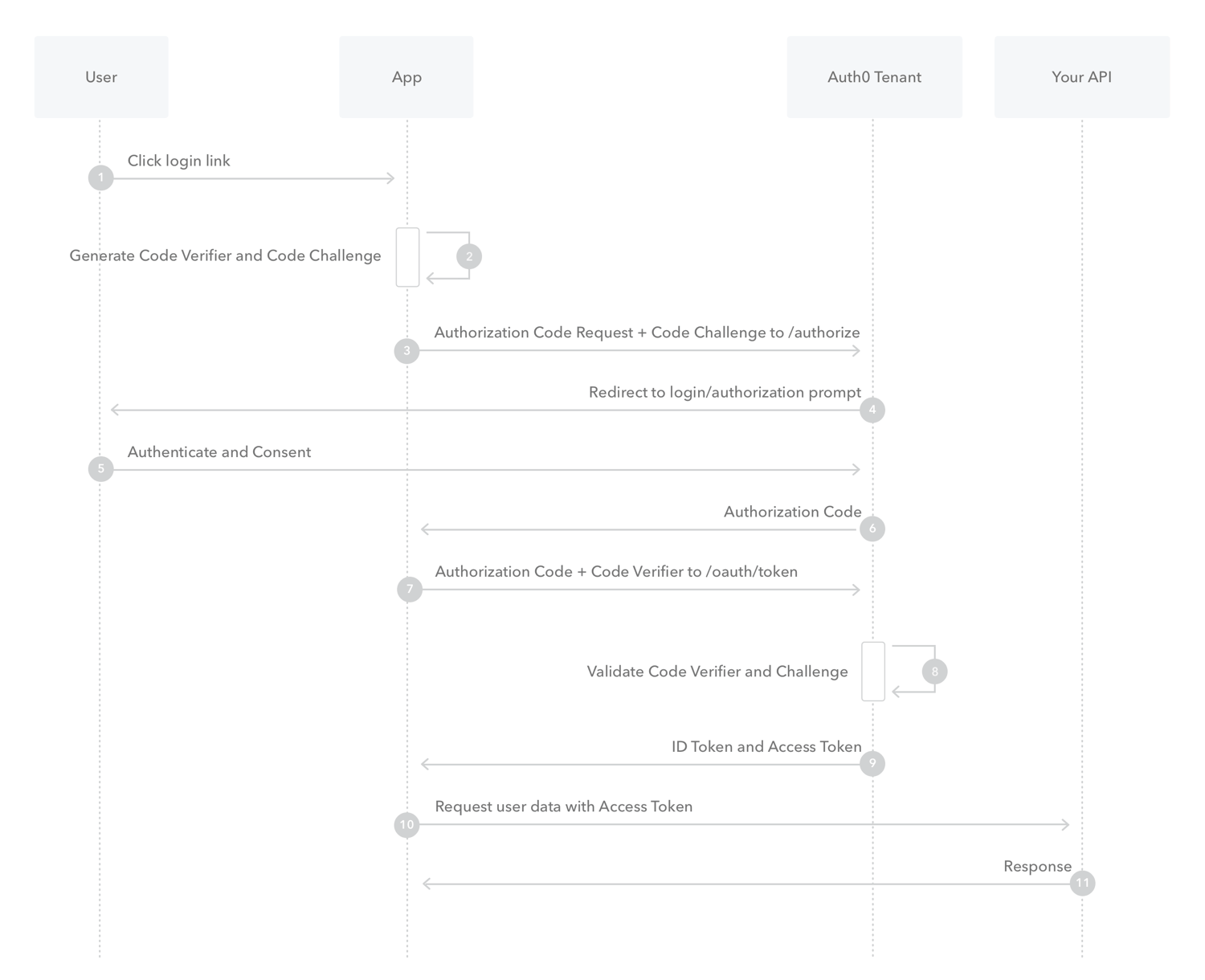
you obtain an ID token using authorization code flow performed by the app backend. This method is effective and robust, however, it requires your web app to obtain and manage a secret. You can avoid that burden if all you want to do is implement sign-in and you don’t need to obtain access tokens for invoking APIs.
With machine-to-machine (M2M) applications, such as CLIs, daemons, or services running on your back-end, the system authenticates and authorizes the app rather than a user.
With input-constrained devices that connect to the internet, rather than authenticate the user directly, the device asks the user to go to a link on their computer or smartphone and authorize the device. This avoids a poor user experience for devices that do not have an easy way to enter text. To do this, device apps use the Device Authorization Flow (ratified in OAuth 2.0), in which they pass along their Client ID to initiate the authorization process and get a token.