Web pages are electronic versions of some documents. They include ; Structure-text-images To describe the structure of a web page, we add codes to the words we want to appear on the page. We use HTML codes.
- HTML code is made up of characters that live inside angled brackets — these are called HTML elements.
- Elements are usually made up of two tags: an opening tag and a closing tag. (The closing tag has an extra forward slash in it.)
- Each HTML element tells the browser something about the information that sits between its opening and closing tags. Attributes
- provide additional information about the contents of an element.
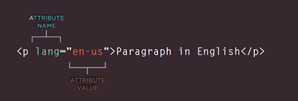
- They appear on the opening tag of the element and are made up of two parts: a name and value, separated by an equals sign.
- It should be written in lowercase
- The value is the information or setting for the attribute. It should be placed in double quotes
- (Lang) is used to indicate the language used in this element.
HTML stands for Hyper Text Markup Language. The HyperText part allows you to create links that allow visitors to move from one page to another quickly and easily. How to create a Web Page ?
- Start All Programs (or Programs) Accessories Notepad
- Type the code shown
- Go to the File menu and select Save as.. put quote marks around the name "firsttest.html").
- Browse to the file that you just created, select it and click on the Open button.
When working in management system, blogging platform, or e-commerce application, you will rarely see the , < body> elements. That is because they use a single 'template' to control all of the pages for a section of the site.
How to view the source of a web page ? The link of the website-view-View Source-A ew window appears with the source code.
HTML5 Layout HTML5 are elements indicate the purpose of different parts of a web page and help to describe its structure.
-
The element < Nav> is used to contain the major navigational blocks on the site such as the primary site navigation.
-
The element < article> element acts as a container for any section of a page that could stand alone and potentially be syndicated.
-
The element < aside> element has two purposes, depending on whether it is inside an element or not. When the element is used inside an element, it should contain information that is related to the article but not essential to its overall meaning. When the element is used outside of an element, it acts as a container for content that is related to the entire page.
-
The element < section > element groups related content together, and typically each section would have its own heading. it may contain several distinct elements that have a common theme or purpose.
-
The element < hgroup > groups together a set of one or more <1> through <6> elements so that they are treated as one single heading.
-
The element < figure> .can be used to contain any content that is referenced from the main flow of an article (not just images).it can be a video, graph,diagram or code samples.
.
To create a website, these things must be taken into consideration;
- Study target audience.
- Why People Visit YOUR Website
- What Information Your Visitors Need
- How often you should update the site.
- Design a site map.
wireframe
A design that has all of the information that needs to be on a page is included. ONLY information.
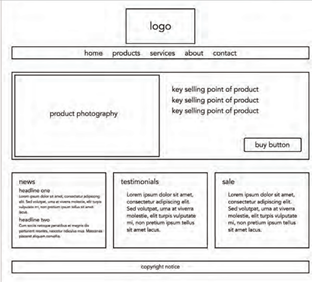
Three steps have to be followed ;
- Content ; Information, Logo, copy rights, links related to the content, etc..
- Prioritizing ; making parts to draw readers’ attention.
- Organizing ; Having blocks and chunks to make the page looks simpler and easier to readers.
Visual hierarchy It helps users find what they are looking for by focusing on size, color and style.