Now that we've gone over adding HTML tags to the page, let's cover adding styles to those tags. We can do quite a lot with styles! We can change:
- Typography
- Colors
- Appearance (Corners, Borders, Decorations)
- Layout
- Position
- Inline vs Block
- Animations
- and many more
CSS styles are always written in property: value pairs (like background: blue;) and terminated with a semicolon.
CSS can be applied to HTML tags in three different ways.
- Inline using an HTML tag's
styleattribute<div style="background: blue; color: white;">Hello </div>
- Via a
<style>tag in the HTML page - Through an external CSS file
<link rel="stylesheet" href="./css-demo-finished.css" />
Inline styles are always applied directly to the element you place them on, but <style> tags and external CSS files need a way to match elements with their respective style sets. This is done with CSS selectors. When selectors are combined with CSS styles, we call this a ruleset.
CSS rulesets take on the following form:
selector1,
selector2 {
  property1: value1;
  property2: value2;
}
Here's a more detailed view from Chris Eppstein:
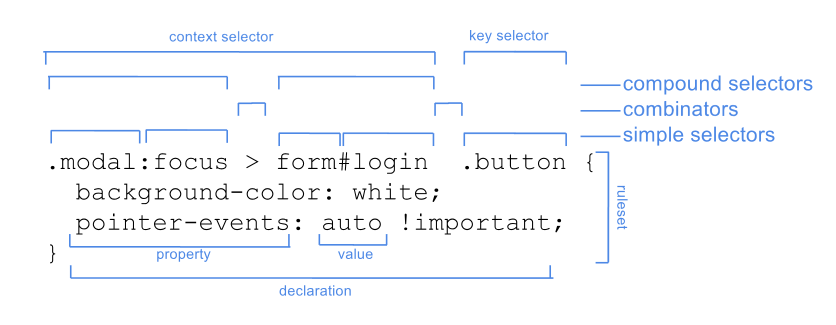
Selectors can be a single tag, class, ID, or attribute. It can also be a combination of those elements.
Below is a series of selectors and property/value combinations that we'll apply to our CSS demo page.
/* Targeting the entire page */
body {
  font: 1.2em sans-serif;
}

/* Targeting an HTML tag */
h1 {
  /* Color name */
  color: black;

  /* 6-digit hex  */
  background: #ababab;

  /* Margin: specified separately for each side */
  margin-bottom: 15px;
  margin-top: 15px;

  /* Shorthand: Padding applies to all sides  */
  padding: 10px;

  /* Border shorthand and 3-digit hex */
  border: 1px solid #ddd;
}

/* Overriding inherited styles */
span {
  color: #004578;
}

/* Sibling selector */
a ~ a {
  /* Changing elements from inline to block */
  display: block;
}

/* Targeting a class name  */
.tiles {
  display: flex;
}

/* Descendant selector */
.tiles img {
  width: 100%;
}

/* Direct descendant selector */
.tiles > div {
  /* rgb color */
  background: rgb(10, 10, 10);
  color: white;
  flex-basis: 100%;
  /* Padding/margin shorthand. Goes clockwise from top.
  10px - all
  10px 20px - top/bottom left/right
  10px 20px 15px - top left/right bottom
  */
  padding: 10px 20px 15px;
  margin: 10px 20px 10px 0;
  border: 1px solid white;
}

/* Qualified selector */
div.important-links {
  background: #004578;
}

/* Style inheritance only works for unstyled elements */
a {
  color: white;
}

/* Hover pseudo-selector */
a:hover {
  color: #ccc;
}

/* Positional pseudo-selector  */
.tiles > div:last-child {
  /* overrides margin-right but leaves other margins alone */
  margin-right: 0;
}

/* ID selector */
#contact-form {
  display: flex;
  flex-direction: column;
}

/* Attribute selector */
input[type='submit'] {
  margin-top: 10px;
}