ACCESS CONTENT You can use JavaScript to select any element, attribute, or text from an HTML page. For example: • Select the text inside all of the elements on a page • Select any elements that have a c 1 ass attribute with a value of note • Find out what was entered into a text input whose id attribute has a value of email
MODIFY CONTENT You can use JavaScript to add elements, attributes, and text to the page, or remove them. For example: • Add a paragraph of text after the first element • Change the value of c 1 ass attributes to trigger new CSS rules for those elements • Change the size or position of an element
PROGRAM RULES You can specify a set of steps for the browser to follow (like a recipe), which allows it to access or change the content of a page. For example: • A gallery script could check which image a user clicked on and display a larger version of that image. • A mortgage calculator could collect values from a fo rm, perform a ca lculation, and display repayments. • An animation could check the dimensions of the browser window and move an image to the bottom of the viewable area (also known as the viewport).
REACT TO EVENTS You can specify that a script should run when a specific event has occurred. For example, it could be run when: • A button is pressed • A link is clicked (or tapped) on • A cursor hovers over an element • Information is added to a form • An interval of time has passed • A web page has finished loading
Expressions rely on things called operators; they allow programmers to create a single value from one or more values.
- ASSIGNMENT OPERATORS
- ARITHMETIC OPERATORS
- STRING OPERATORS
- COMPARISON OPERATORS
- LOGICAL OPERATORS
Here I will talk about two
JavaScript contains the following mathematical operators, which you can use with numbers. You may remember some from math class.
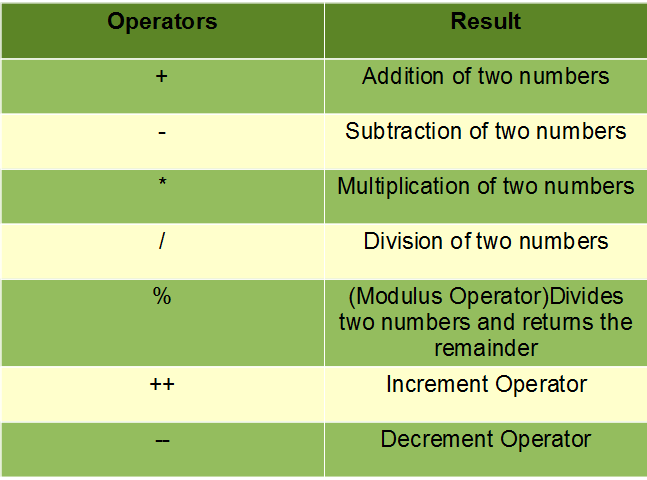
There is just one string operator: the+ symbol. It is used to join the strings on either side of it.

Functions let you group a series of statements together to perform a specific task. If different parts of a script repeat the same task, you can reuse the function (rather than repeating the same set of st atements).
There is two type of function in Javascript
The main difference between a function expression and a function declaration is the function name, which can be omitted in function expressions to create anonymous functions. A function expression can be used as an IIFE (Immediately Invoked Function Expression) which runs as soon as it is defined.
The function statement declares a function. A declared function is “saved for later use”, and will be executed later, when it is invoked (called). Just as Variable Declarations must start with “var”, Function Declarations must begin with “function”.
A JavaScript function can also be defined using an expression. A function expression can be stored in a variable: var x = function (a, b) {return a * b}; After a function expression has been stored in a variable, the variable can be used as a function. Functions stored in variables do not need function names. They are always invoked (called) using the variable name.
For more Information Please CLICK ME