HTML is the standard markup language for creating Web pages.
the HTML is the way that we creat page structer and design fpr the clint . **its content 2 mager part **
- head
the titel of the page in url you can see it
- body
what you writ what you read and the user can read it also


- The Nav Element. ...
- The Section and Article Elements. ...
- The Aside Element. ...
- Taking Care of Internet Explorer. ...
- Conclusion.

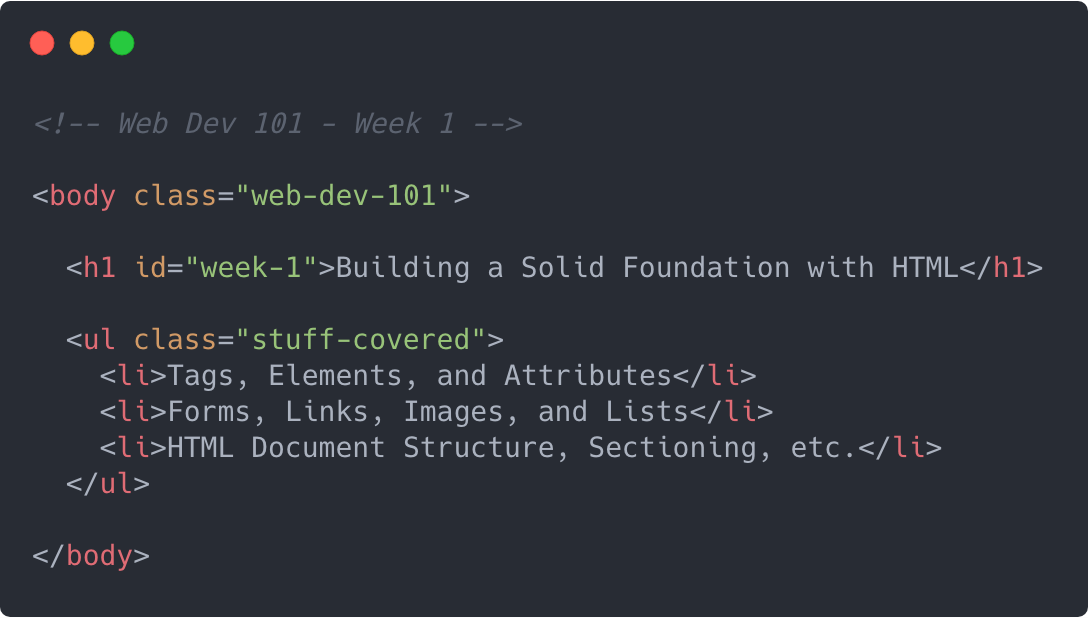
HTML pages are text documents. X HTML uses tags (characters that sit inside angled brackets) to give the information they surround special meaning. X Tags are often referred to as elements. X Tags usually come in pairs. The opening tag denotes the start of a piece of content; the closing tag denotes the end. X Opening tags can carry attributes, which tell us more about the content of that element. X Attributes require a name and a value. X To learn HTML you need to know what tags are available for you to use, what they do, and where they can go
markers.DOCTYPES tell browsers which version of HTML you are using. X You can add comments to your code between the
X The id and class attributes allow you to identify particular elements. X cut windows into your web pages through which other pages can be displayed. X Escape characters are used to include special characters in your pages such as <, >, and ©. X The
example
Headers & Footers
> where we writ the main titel and the referance of te page like the claoseing and copy right .-
The main header or footer that appears at the top or bottom of every page on the site.
-
A header or footer for an individual
or
The sectioning elements in HTML5 are
, , , andHere is a brief explanation of each sectioning element and how they are used:
- – Equivalent to role="navigation". Major site navigation that consistently appears frequently across the site. Examples include the primary navigation, secondary navigation, and in-page navigation.
- – Equivalent to role="complementary". Content that is only tangentially related (or not related) to the main content. Think of something like a sidebar with supplementary information, a note within an article, or the outer container for a list of related articles at the bottom of a blog post.
- – Equivalent to role="article". Content that is self-contained in that it makes sense on its own when taken out of context. That could mean a widget, a blog post or even a comment within a blog post.
-
– Equivalent to role="region". Content that needs extra context from its parent sectioning element to make sense. This is a generic sectioning element that is used whenever it doesn’t make sense to use the other more semantic ones

when we design page we have to make the study about the user age.background . education and intrest then we can have the page that can fit the use
sitmap
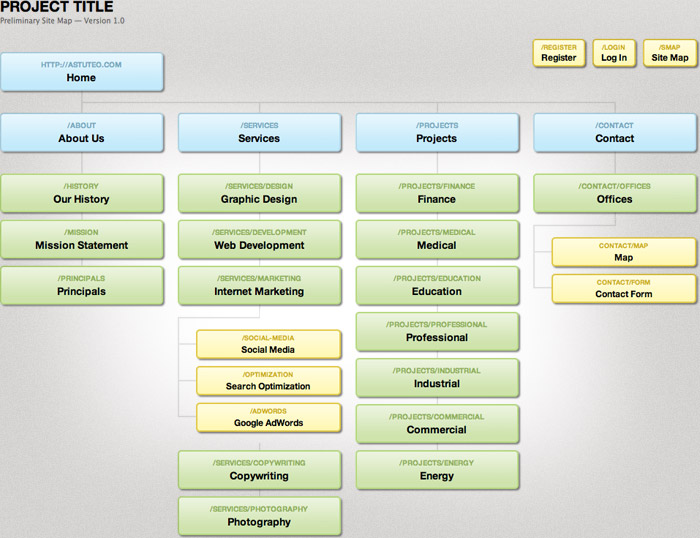
allow you to understand te page and its purpuse .The aim is to create a diagram of the pages that will be used to structure the site. This is known as a site map and it will show how those pages can be grouped. To help you decide what information should go on each page, you can use a technique called card sorting.
WireFrames

A lot of designers will take the elements that need to appear on each page and start by creating wireframes. This involves sketching or shading areas where each element of the page will go (such as the logo, primary navigation, headings and main bodies of text, user logins etc). By creating a wireframe you can ensure that all of the information that needs to be on a page is included.
**short note **
| tag | Element content | End tag |
|---|---|---|
| My First Heading | ||
| My First paragraph | ||
| non | non | |
| <img | image | |
| link |
A B C
A script is a series of instructions that the computer can follow in order to achieve a goal. Each time the script runs, it might only use a subset of all the instructions. Computers approach tasks in a different way than humans, so your instructions must let the computer solve the task prggrammatically. To approach writing a script, break down your goal into a series of tasks and then work out each step needed to complete that task (a flowchart can help).
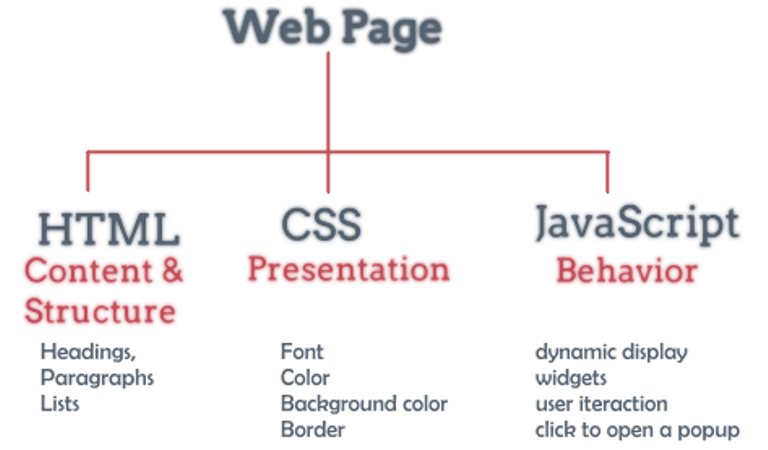
computer use code to fit the opject and the event .so it use html for the structercode and applie it to see it as phiscal opject. and use the cade to make it interactive wit the user to sow him as example "welcome to my page"
It is best to keep JavaScript code in its own JavaScript file. JavaScript files are text files (like HTML pages and CSS style sheets), but they have the . j s extension. The HTML <script> element is used in HTML pages to tell the browser to load the JavaScript file (rather like the element can be used to load a CSS file). If you view the source code of the page in the browser, the JavaScript will not have changed the HTML, because the script works with the model of the web page that the browser has created.
- What does HTML stand for?
2.what is HTML element for the largest heading?
3.what is HTML element for inserting a line break?
- how to use HTML for adding a background color?
-
HTML element to define important text........
-
HTML element to define emphasized text.......
3.Which character is used to indicate an end tag?.......
-
deign the page befor start up ......
-
head.bady.header and footer are HTML ........
*** for more please click*** w3school and java and html
best regards qusai alqaisi