dynamic web page and how we can change in the web page that we can make this change by useing JavaScript in html [main atructur of the page ]
- PROPERTIES Properties describe characteristics of the current web page (such as the title of the page).
- METHODS Methods perform tasks associated with the document currently loaded in the browser (such as getting information from a specified element or adding new content).
- EVENTS You can respond to events, such as a user clicking or tapping on an element.
- CREATE A MODEL how the page should look
- HTML which the beging of the page with the main stuctur.
- USE A RENDERINGENGINE TO SHOW THE PAGE ON SCREEN by useing css .

***All major browsers use a JavaScript interpreter to translate your instructions (in JavaScript) into instructions the computer can follow. ***
in any page we start with the structur in our case html and we do css to make it live and make change by JavaScript
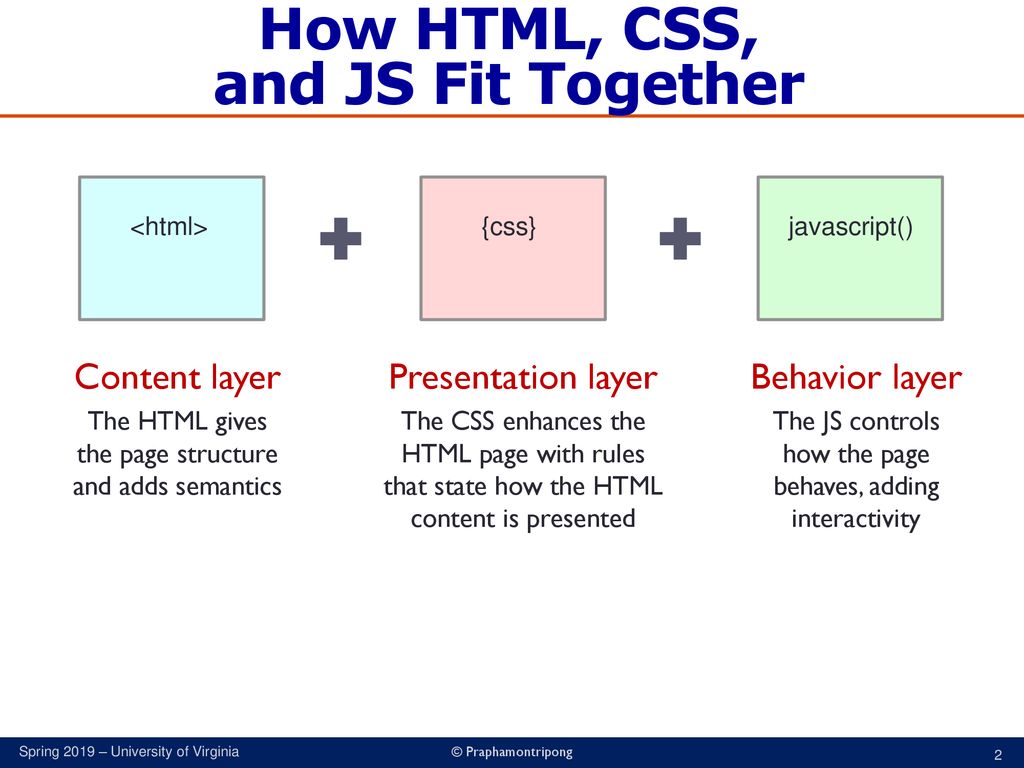
JavaScript
JavaScript are more inter active language that we use to make our web page more life and to inter act with the user it self .
-
internal source

-
extrnal SRC

***javascript have easy way to writ and to understand ***
its logic language to use and the this example
how its work How it Works? Line 8 declares a variable called username, via the keyword var. A variable is a named storage location that holds a value. Once the variable is declared, you can assign (and re-assign) a value to that variable, via the assignment operator '=' (Line 9). Line 9 invokes the prompt(promptingString, defaultString?) function to pop out a dialog box, and reads in the string entered by the user. The string read is assigned to the variable username. The function prompt() is similar to the alert(), but it accepts a user's input. In Line 10, the confirm(aString) function puts up the message and returns either true or false, depending on whether the user hits the OK or Cancel button. If the result is true, Line 11 prints "Hello, username!". Otherwise, Line 13 prints "Hello, world!".
for example:
<title>JavaScript Example: Variables and functions prompt() and confirm()</title> <script> var username = prompt("Enter your name: ", ""); if (confirm("Your name is " + username)) { document.write(""); } else { document.write(""); } </script>Welcome to JavaScript!
<title>JavaScript Example: Variables and functions prompt() and confirm()</title> <script> var username = prompt("Enter your name: ", ""); if (confirm("Your name is " + username)) { document.write(""); } else { document.write(""); }Welcome to JavaScript!
thank you