The
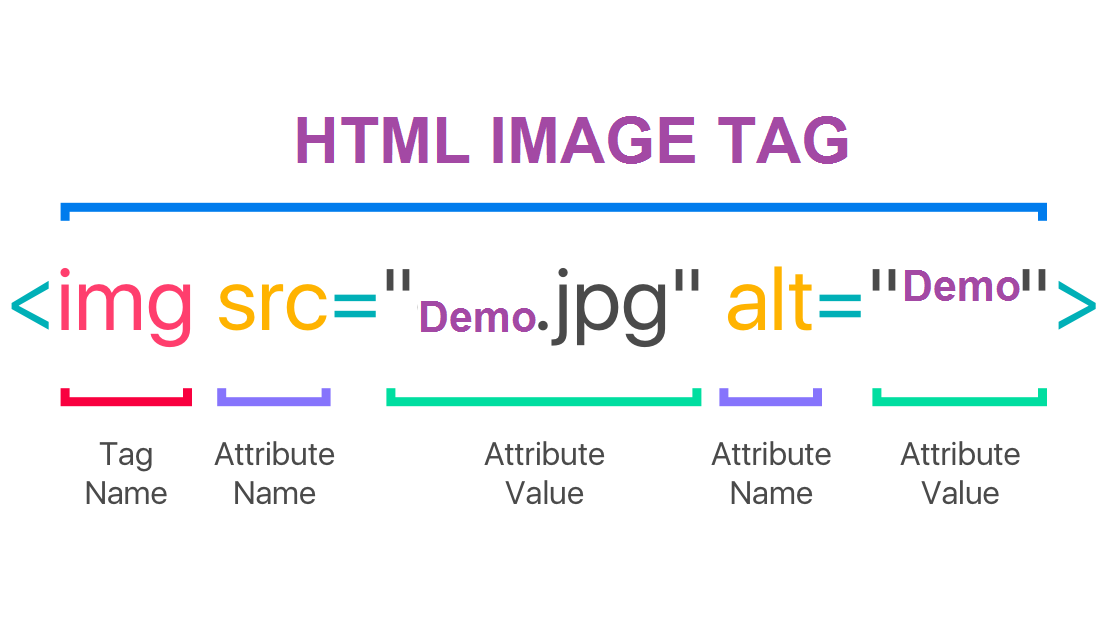
tag is used to embed an image in an HTML page. Images are not technically inserted into a web page; images are linked to web pages. The
tag creates a holding space for the referenced image. The
tag has two required attributes: src - Specifies the path to the image. Choosing Images On the Internet, images are used for all kinds of reasons: to enhance websites, to illustrate stories, in ad displays, to present products or services,as stand-alone “a picture is worth a thousand words” meaning-rich tools, and sure, on social media .and images can provide more beuaty to our wedpage.
save your image when we create a webpage we have to save all the image that we use to have our referunces that we can go back and use and to create new point of view.

Adding Images
how to add image that we use tag called (imag) and inside it will find src : which is the sorces alt : This provides a text description of the image which describes the image if you cannot see it. title : that you want to show in the image .
Height & Width
height : ues to specified the height of the images in PX . width : This specifies the width of the image in PX .
Place Images
image is a slef closeing tage which is mean it can be used in any palce that we want in paragraph that insid it or in top of it or in end of it . bay using (aling) and wirt the place you want it like aling:right

Three Rules for Creating Images
- Save images in the right format.
- Save images at the right size.
- Use the correct resolution .
tools to edit images
we can change the dimntion and croping the image . and we have a lot of resurce that we can use it to change and save the image .
1.You should save images at the size you will be using them on the web page and in the appropriate format
2.Photographs are best saved as JPEGs; illustrations or logos that use flat colors are better saved as GIFs.
3.You must always specify a src attribute to indicate the source of an image and an alt attribute to describe the content of an image
Color is the aspect of things that is caused by differing qualities of light being reflected or emitted by them. To see color, you have to have light. When light shines on an object some colors bounce off the object and others are absorbed by it. Our eyes only see the colors that are bounced off or reflected. and which make our page more meaningfull .

type of color
- RGB Values
- Hex Codes
- Color Names
- Hue
- Saturation
- Brigh tness
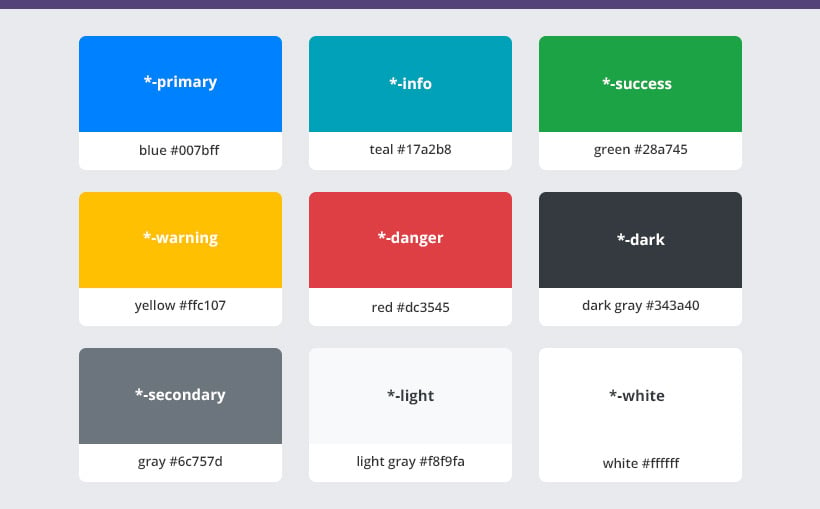
There are three ways to specify colors in CSS: RGB values, hex codes, and color names. XX Color pickers can help you find the color you want. XX It is important to ensure that there is enough contrast between any text and the background color (otherwise people will not be able to read your content). XX CSS3 has introduced an extra value for RGB colors to indicate opacity. It is known as RGBA. XX CSS3 also allows you to specify colors as HSL values, with an optional opacity value. It is known as HSLA .