Second magnetometer over spi? #8


-
|
from @ecburns33 in #2:
You're setting the SPI bus up twice (which is why it's telling you SCK is in use). from pycubed import cubesat
spi_bus = cubesat.spiThen proceed with initializing your external magnetometer from there. Oh and don't forget to set up your chip select pin. any of the remaining GPIO pins on the payload header will work. There's also another example of of this scenario on code examples page: spi.py where I show how it initialize and use the SPI bus with and without the pycubed.py helper library. Does this answer your question? Report back with how it goes! |
Beta Was this translation helpful? Give feedback.
Replies: 3 comments 6 replies

-
Thank you so much for the help! I've heeded your advice and am still working to connect to the magnetometer. Based upon the hardware we're using (which I admittedly now understand to be overcomplicated), I have to make several connections in addition to the CS pin; the magnetometer also needs a RESET and DRDY pin to be used in order to make the connection. Here is an example wiring and C++ Arduino code provided by the manufacturer for reference: I know I can translate most of the code to python for use on the Pycubed board, particularly the math. However, I am still struggling to make some of the connections to the pins as done by the pinMode() and digitalWrite() methods normally used in Arduino. |
Beta Was this translation helpful? Give feedback.
-
|
@ecburns33 Fear not! 😄 There are PyCubed examples for this
Now let's break this down.
Whew! Ok well I ended up writing pretty much a full library and example. Hope this helps! |
Beta Was this translation helpful? Give feedback.

-
|
Max, -Ethan |
Beta Was this translation helpful? Give feedback.

-
|
Happy to help! 😄 |
Beta Was this translation helpful? Give feedback.
-
|
I have been working the past couple of days to implement your example. The only changes I have really made are changing the GPIO pins to the specific ones we are using and changing the value of period as initialized in the read() function to 2048. When I run the program, it goes to completion, but always outputs zeros for the data. I've tried checking the connections over and over again and replaced the Mag board with a spare just in case it was a dud, but I can't get the data to output. It seems to me your implementation follows the process to read data as prescribed on the product data sheet. Do you have any ideas for troubleshooting? Thank you always for the help. |
Beta Was this translation helpful? Give feedback.
-
|
@ecburns33 hmm here's somethings to try: OH! What micromag version is your sensor? I see there are some examples that are powered with 5V. So that likely means that's what the digital VDD is expecting as well. Double check this. 5V is rarely used for these types of things these days, but if that's the case, the PyCubed's 3.3V logic wont be enough.
Troubleshooting tips I was writing when I stumbled upon the 5V thing:
|
Beta Was this translation helpful? Give feedback.
-
|
@maholli Okay, I made the changes you suggested. Changing the timeout didn't reveal anything more. When I added the print(DRDY) lines, the DRDY always prints false..... could this be because the magnetometer isn't getting the required 5V? |
Beta Was this translation helpful? Give feedback.
-
|
Yep, seems like it. What does your datasheet say it requires? If the datasheet says 5V, make sure to add level-shifters to the signal lines before powering again. You can snag 5V off the RF regulator (see below), but make sure to add level shifting on the signal lines before connecting those (basically anything except for 5V and GND). If you just want to see if your module powers on, you can disconnect everything -> connect only 5V and GND, -> and use a multimeter to see if DRDY ever goes high. (you could even do this with a benchtop power supply if that's easier) The RF regulator is off by default. You turn it on with this line of python code: cubesat.enable_rf.value = 1
|
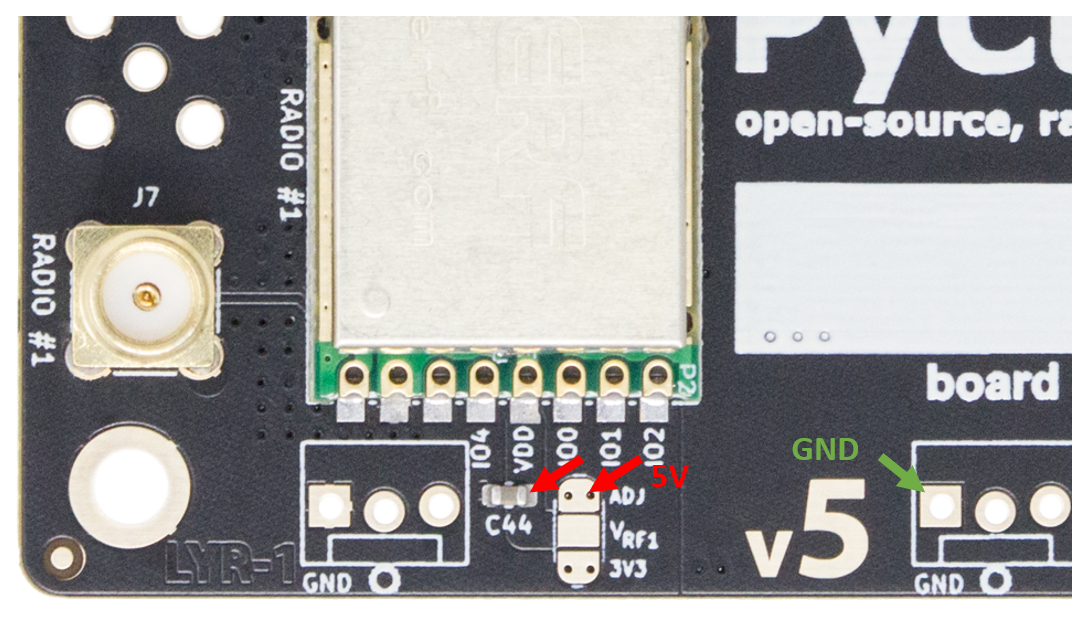
Beta Was this translation helpful? Give feedback.
-
|
Max, Ethan |
Beta Was this translation helpful? Give feedback.


@ecburns33 Fear not! 😄 There are PyCubed examples for this
RESETandDRDY. Can do!busiofor these pins,busiois for serial bus communication (like SPI or I2C). We just need general control of the digital pin. CircuitPython calls thisdigitalio.digitalioexample here for a taste of how this is done.Now let's break this down.
Here's what the arduino code you linked says for the pins assignments and configuration.
arduino code