A task that executes a tasks in a directed graph as specified by a DSL that is
passed in via the --graph command line argument.
The Composed Task Runner parses the graph DSL and for each node in the graph it will execute a restful call against a specified Spring Cloud Data Flow instance to launch the associated task definition. For each task definition that is executed the Composed Task Runner will poll the database to verify that the task completed. Once complete the Composed Task Runner will either continue to the next task in the graph or fail based on how the DSL specified the sequence of tasks should be executed.
The Graph DSL is comprised of Task Definitions that have been defined within the Spring Cloud Data Flow server referenced by the data-flow-uri (default: http://localhost:9393). These definitions can be placed into a derived graph based on a DSL through the use of sequences, transitions, splits, or a combination therein.
Composed Task Runner is built using
Spring Batch
to execute the directed graph. As such each node in the graph is a
Step.
As discussed in the overview, each step in the graph will post a request to a
Spring Cloud Data Flow Server to execute a task definition. If the task launched by
the step fails to complete within the time specified by the maxWaitTime
property, a
org.springframework.cloud.task.app.composedtaskrunner.support.TimeoutException
will be thrown. Once task launched by the step completes,
the ComposedTaskRunner will set the ExitStatus of that step based on the following rules:
-
If the
TaskExecutionhas anExitMessagethat will be used as theExitStatus -
If no
ExitMessageis present and theExitCodeis set to 0 then theExitStatusfor the step will beCOMPLETED. -
If no
ExitMessageis present and theExitCodeis set to 1 then theExitStatusfor the step will beFAILED.
If the state of any step in the graph is set to FAILED and is not handled by the DSL the Directed Graph execution will terminate.
The Composed Task Runner supports the ability to traverse sequences of task
definitions. This is represented by a task definition name followed by the
&& symbol then the next task definition to be launched.
For example if we have tasks AAA, BBB and CCC to be launched in sequence it
will look like this:
AAA && BBB && CCC
You can execute the same task multiple times in a sequence. For example:
AAA && AAA && AAA
If an ExitStatus 'FAILED' is returned in a sequence the Composed Task
Runner will terminate. For example if AAA && BBB && CCC composed task is
executed and BBB fails. Then CCC will not be launched.
The Composed Task Runner supports the ability to control what tasks get
executed based on the ExitStatus of the previous task. This is
done by specifying ExitStatus after the task definition followed by
the → operator and the task definition that should be launched based on
the result. For example:
AAA 'FAILED' -> BBB 'COMPLETED' -> CCC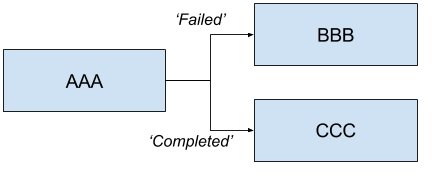
Will launch AAA and if AAA fails then BBB will be launched. Else if AAA completes successfully then CCC will launch.
You can also have a sequence that follows a transition. For example:
AAA 'FAILED' -> BBB && CCC && DDD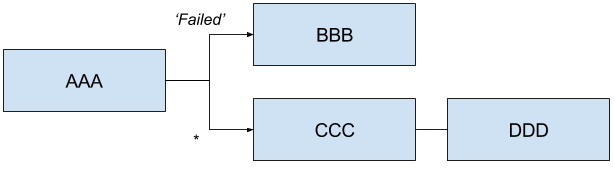
Will launch AAA and for any ExitStatus that is returned other than 'FAILED' then
CCC && DDD will be launched. However if AAA returns 'FAILED' then BBB will
be launched, but CCC && DDD will not.
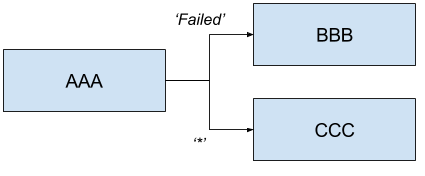
Allows a user to execute tasks in parallel. For example:
<AAA || BBB || CCC>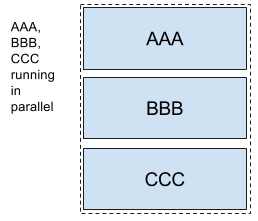
Will launch AAA, BBB and CCC in parallel. When launching splits as a part of a composed task all elements of the split must finish successfully before the next task definition can be launched for example:
<AAA || BBB || CCC> && DDD && EEE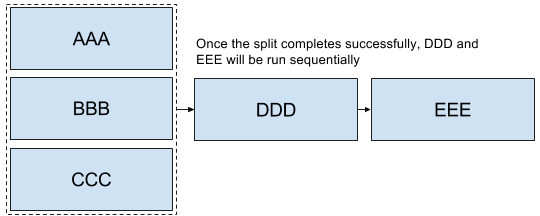
In the case above once AAA, BBB and CCC complete sucessfully then DDD and EEE will be launched in the sequence enumerated above. However if one of the task definitions fails in the split then DDD and EEE will not fire. For example if BBB fails then AAA and CCC will be marked successful and BBB will be marked a failure and DDD and EEE will not be launched.
The ComposedTaskRunner task has the following options:
- composed-task-arguments
-
The arguments to be used for each of the tasks. (String, default:
<none>) - composed-task-properties
-
The properties to be used for each of the tasks as well as their deployments. (String, default:
<none>) - dataflow-server-uri
-
The URI for the dataflow server that will receive task launch requests. Default is http://localhost:9393; (URI, default:
<none>) - graph
-
The DSL for the composed task directed graph. (String, default:
<none>) - interval-time-between-checks
-
The amount of time in millis that the ComposedTaskRunner will wait between checks of the database to see if a task has completed. (Integer, default:
10000) - max-wait-time
-
The maximum amount of time in millis that a individual step can run before the execution of the Composed task is failed. (Integer, default:
0) - split-thread-allow-core-thread-timeout
-
Specifies whether to allow split core threads to timeout. Default is false; (Boolean, default:
false) - split-thread-core-pool-size
-
Split's core pool size. Default is 1; (Integer, default:
1) - split-thread-keep-alive-seconds
-
Split's thread keep alive seconds. Default is 60. (Integer, default:
60) - split-thread-max-pool-size
-
Split's maximum pool size. Default is {@code Integer.MAX_VALUE}. (Integer, default:
<none>) - split-thread-queue-capacity
-
Capacity for Split's BlockingQueue. Default is {@code Integer.MAX_VALUE}. (Integer, default:
<none>) - split-thread-wait-for-tasks-to-complete-on-shutdown
-
Whether to wait for scheduled tasks to complete on shutdown, not interrupting running tasks and executing all tasks in the queue. Default is false; (Boolean, default:
false) //end::configuration-properties[]