Releases: pfedick/DeckerGame
0.9.0 - Tropical update


It's this time of the year, where I find time to work on my game. So here is the next big release! It has so many new features, that it felt hard to find a suitable name for it. As I created a lot of new tropical sprites, which I used in the new desert level, I decided to call it the "tropical update". So here it is!
New Features:
- Added "End of Level" and "Game over" Screens. When the player reaches the end of the level, he gets a nice screen with a summary of the items, he collected: coins, diamonds, chrystals, treasure chests and extra lives. The screen also shows the total amount of these items in the level and the percentage of collected items. When the player collected all items of a kind, he gets a point bonus: all points he got for this item will get doubled. The "game over" screen is essentialy the same, it only differst in the background colour and the melody played. And you will get transfered back to the beginning of the failed level instead of the next level. I also composed two little melodies for these screens, where I only used sounds common for the NES or other 8-Bit computers from the 80s.

- More sprite grafix and a complete set of tropical trees, bushes and cactuses
- New enemy "ostrich". He runs from side to side, faster than the player, and makes serious damage. He cannot be killed, but the player can jump over it and when he jumps on his head (and only his head!), the ostrich goes to the ground and puts his head down into the ground. It also has sound and when running, it will produce dust behind it - we have a particle engine, so let's use it! ;-)

- New enemy "scarabeus". There are different kinds of them and they have a lot of parameters, which can be configured within the level editor. He can have different speeds and can get really fast, when the player is near. It cannot be killed or disabled, the player always dies when he touches the scarabeus.

- Much faster game start! Yes! Until now, I generated the outlines for all sprites and objects for the level editor during game start, which took a significant amount of time and gpu memory, even when the user just wanted to play and not edit something. So I completely removed this process. The outlines are now generated only when they are needed in the editor. On my system this change gave me a speed up of 50%, which means game starts within 4 seconds instead of 8!
- worked a bit on the "Heaven"-level and started a new level called "Desert". The later one has all the new tropical sprites, ostrich and scarabeus.
- completely overhauled doors and keys. Doors, frames and keys can now have different look and colours. Doors can now also open to the front or back and "teleport" the player to another door
Bugfixes:
- Fixed a serious problem in the particle engine, which often led to a crash of the game. The engine sometimes tried to draw particles, which have already been deleted (access of already freed memory with undefined condition)
- Fixed a lot of uncritical memory leaks, when ending the game! They didn't affect the gameplay, but it's always nicer to give the operating system back, what you got before :-)
- Also fixed some minor memory leaks during gameplay. The loaded level was not completely freed from memory, when loading the next level.
- Fixed "double free" error when ending the game. We tried to free memory, which was already freed before. This didn't affect gameplay, but often led to a "segmentation fault" error when ending the game
- big tiles do not pop into the bottom of the screen anymore (like the ladder)
- many more
Changes:
- removed some obsolete code
- strip debug information from binary before packaging, to decrease size of installer
- removed video player from binary and installer, which was based on ffmpeg and hat so much dependencies, that it alone took 35 MB of space inside the windows installer. I will look for a more lightwight soloution in the future.
- speed up particle engine a little bit by ensure that spritesets and sprite numbers cannot get negative. By that I could remove a check inside the drawing loop.
- changed way points are visualized at the bottom of the screen. When the player gets a huge amount of points, the counter will increase much faster and don't take minutes to reach the final value
- exchange the 3d model of the rat, which does now look much nicer and more like a rat
- Adjusted jumps and falling physics in the physic engine and added ability for small jumps, when player walks slowly
How to play
When you want to play on windows, simply download the setup program below. If you are on linux see the README.md in the github project.
How to control the player
The player can be controlled by the arrow keys or alternatively with "wasd" or "ijkl"
- cursor up / w / i: climb up a ladder or jump up in the air
- cursor down / s / k: climb down a ladder
- cursor left / a / j: walk to the left
- cursor right / d / l: walk to the right
- shift left / shift right: walk faster, jump higher
- e: action key, it activates switches or open doors
When walking an pressing the key for up, the player will jump in the direction of walking.
0.8.2 - Bugfixes
This release does not have any new features, but a lot of bugfixes. I also played all levels and fixed some broken passages and made few things easier.
- fixed "executable stack" warnings in assembler files from pplib
- fixed collsion detection of left sided door
- clear Inventory, when Player is resetet, Add Debug Key F5 to Reset the Player
- speaker now saves all values correctly (volume, range)
- allocate audio mixbuffer after calling SDL_OpenAudioDevice, not before
- Added FPS compensation to metrics
- fixed a lot of issues inside the physics engine, when framerates are below or above 60 Hz
- the behaviour of jumps is a bit different now. I hope this does not break too much.
- fixed memory leak in audio system. Sound of objects, which were out of hearable range to the player, did never start to play and therefore didn't get deleted from the audio system
- fixed movement calculation of scarabeus. With framerates lower than 60, they could get really fast and teleport out of the level. This confused the audio engine, which turned up the volume of the scarabeus so hight, that only white noise was audible on the left channel. Only the left channel was affected, because the position of the scarabeus got negative. This bug was really interesting ;-)
- added a few checks in audio engine to prevent the above bug in the future.
- fixed framerate compensation for scarabeus
- fixed framerate compensation in ai figure (AutoGeorge, Wallenstein, Helena, Yeti)
- fixed physics in airstream
Oh, after all, there is something new:
- I added a new audio track from me called "Spring"

0.8.0 - Level consistency
Until now, everytime I changed something in the format of the level file, I had to convert all existing levels by loading them with the old loader code and saving them in the new format. This was cumbersome, and only possible for me, as I'm working directly on the code. A user, who created a level, could not do that.
So I made a bigger change to the level format and introduced a format-version-flag to every record in the level file. Every item (a tile, sprite, object, level description, color palette, and so on) now indicates in which format it was saved. New game versions will now be able to load levels written by older versions of the game, starting with version 0.8.0. (unfortunately older levels can not be loaded anymore).
Changes:
- Refactored save and load and enabled the game to load levels from older game versions
- Introduced a "Level End" door, which can be switched on and off and brings the player to the next level
- Updated start level, which is running in the background of the start screen, and added an automated version of George, which is running through the level
- The bird added in the last version is now fully working, ehm, I ment "flying" ;-) It flies from side to side and occasionally attacks the player
- Added frame rate compensation to all objects, player and physics, so the came should now play with the same speed on all displays, regardless of their frequency
- Introduced a Yeti. He is armless, as long as you don't touch him
- Performance improvements when drawing particles and tiles by removing unnecessary code, calculations and checks
- The Windows installer now creates a folder in the users documents folder for custom levels
- when trying to save a level in the program folder (where we have no write permission), the program does not crash anymore, but shows the "save as" dialog, where the user can choose to save in another folder. It defaults to the users documents folder.
Experimental:
- Water!
- Yes!
- Added a water section, where George has to swim and dive. But there are a lot of issues with this feature. The transition form land to water is not working correct, also the physics. I will concentrate on this in a later version of the game or remove it, when I'm not satisfied with it.
Other:
- various bugfixes
- RainEmitter can emmit on all available particle layers and can be toggled
- refactored ui of Speaker and added Toggle-Feature
- refactored ui of switch
- refactored ui of stamper
- moved background images to subdirectory
- Updated and fixed some Sprites
- level updates
- added debug Message when Particle Thread is too slow
- added metrics per minute and print them on console (disabled in the release version)
- try to speed up particles
- Updated Readme for installation on Fedora and Windows
- Windows: added msys2 github action to code and updated to latest msys2 version with ucrt64
- filedialog: fixed iteration over drives on windows
- introduced config version variable and changed default path of CustomLevelPath
- removed crow at start of "heaven"-level, so player won't get attacked when idle
0.7.0 - Particle Update
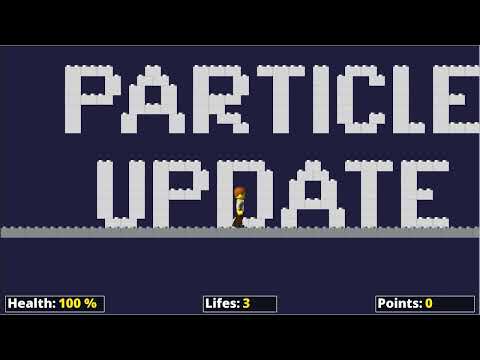
Ups, I totaly forgot to release this last year...
Until now, I had only a simple particle effect, the small bubbles, which came out of a vent in the testlevel and fly into the air. I always thought, when I turn this around, it would look like rain. So I started to write a particle emitter, which produced rain. And it looked nice and with a small modification, I had snow. After that, I implemented a generic particle emitter, which could do all of the above and much more!
So here is the Particle Update:
- Added particle emitters for rain, snow, fire, smoke and water effects
- Particles can change color, size and opacity over time
- Particle emitters can be triggered by switches
- Particle emitter can be added to objects, like the floater
- Particles can be effected by gravity
- Added Code Generator for ParticleEmitters
- Emitter can have different shapes: point, rectangle, circle
- Particles can be turned on and off in debug menu
- Particle movement is connected to the framerate, so that speed is always the same
- Particles are managed by a ParticleSystem, running in it's own thread to utilize multiple CPU cores and don't affect the main thread
- In addition to the tiles, you can now colorize sprites also
Other changes:
- removed object and sprite count from statusbar and added version
- updated level
- code cleanup
- fixed keyboard focus after calling ingame settings menue
- Metrics display can be toggled by pressing F10
- new widgets for the UI, like TabWidtget and ColorGradient
- pressing ESC opens the settings screen
- added performance metrics
- various fixes and enhancements on Widgets and UI
- lowerd volume of coin and gem
- updated textures
- movable dialogs
- added new objecst: Cherry, Apple
- added bird as new enemy
- added renderings for snowflakes
- new grafix
Full Changelog: 0.6.1...0.7.0
Have fun!
0.6.1: Holiday update - Summer 2022
I was on vacation and had plenty of time to work on the game! So this is the holiday update!
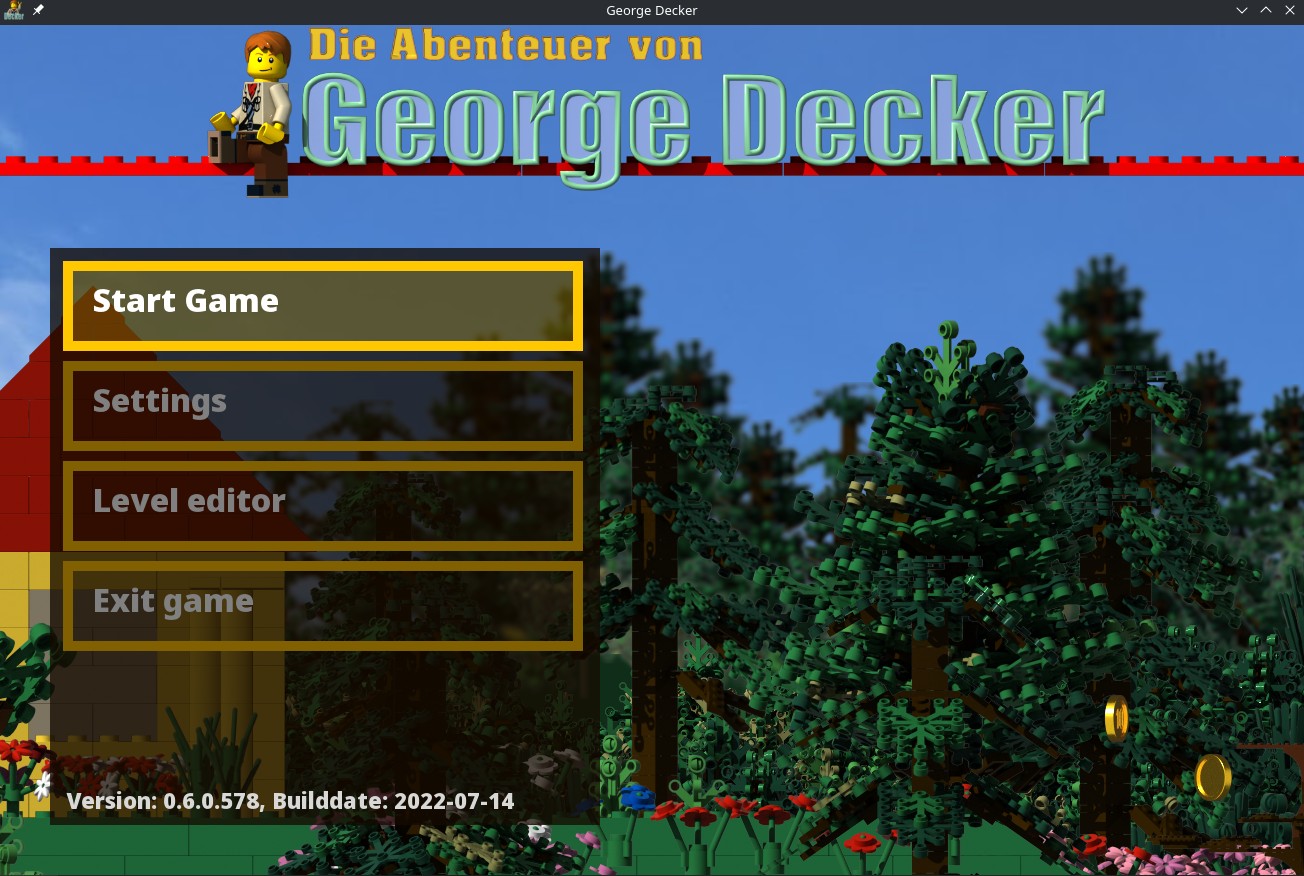
In this release I focused on the user interface:
- We can now play an intro video at startup. The video player is based on ffmpeg. As the video is not yet finished, I disabled it for this release. I only mention it, because we have a lot of new dependencies because of ffmpeg.
- We now have a start screen (see screenshot above), where you can select between starting a new game, open the setting screen, open the world editor or exit the game. You can also see the current Version in the bottom of the menu.
- In the new settings screen, you can switch screen resolutions and screen modes and change volume levels for soundtrack and effects. There's also an option to select the language of the user interface, which has no effect at the moment, because there's only english available yet.
- When in window mode, you can resize the game window at any time (drag and drop at the window edges) and also switch to fullscreen and back by pressing Alt & Enter
There are also a lot of new user interfaces in the level editor:
- There's now a dialog for saving and loading a level
- A dialog to create a new level. You can specify a name and the dimensions of your level, background color or image and the soundtrack which is automatically played when loading the level.
- You can change nearly all level parameters at any time except the dimension of the level
- Redesigned the Tiles selection dialog. You can now select a tileset and a color from a palette. You can define up to 256 colors and change them any time. Every change is reflected in real time in your level! Colors are saved within a level, so you can define different colors for different levels.
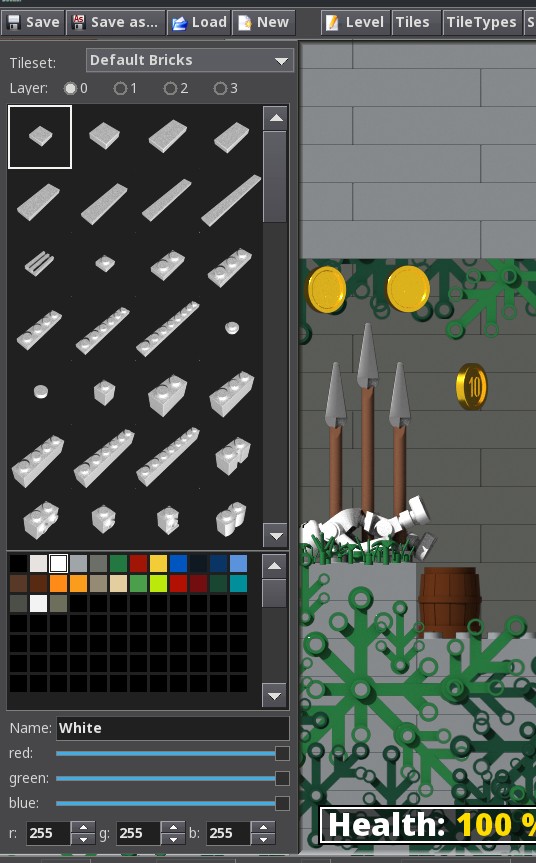
- The tiles dialog remembers the last selection when you close and reopen it. You can also pick a tile from the level screen by holding shift and pressing the right or middle mouse button.
I've also worked on the game engine:
- Background image does not get distorted anymore
- Object positions are now 32 Bit instead of 16 Bit. So in theory you can create realy huge levels.
- Tilesets are loaded only once in a white color into the graphic card, and not several times for each color. Color is added when the tile get's drawn on the screen
- Objects can be placed in different layers on the player plane. So objects can now appear before or behind the player or even behind the tiles of the player plane
- Additional plane near to the camera (nearplane), which scrolls faster than the player plane. This gives an nice, additional 3D-effect
Also worth to mention:
- The test level is finaly finished!
This means it has a start and an end point and no level holes inbetween. You can not really end the level, because that's not implemented yet. - There's a new item to collect, which gives the player an extra life. I made a YouTube video how I implemented it. You can watch it here: https://youtu.be/tWerSmDxnrU
- And by the way: I also made a "Let's play" video with a complete walkthrough of the testlevel: https://youtu.be/qsdu96tx-d8
- Added icons for setup tool
- Many bugfixes and enhancements
This is a huge update, so there will be bugs. I sometimes have random crashes, which I can't reproduce when running in the debugger.
And don't expect another huge update in the next time. My vacation is over, so I will not have so much time to work on the game. You can always see what's going on (or not) on my kanban backlog on github: https://github.com/pfedick/DeckerGame/projects/1
So have fun with this release!
One-year-wrap-up
It's a long time ago since the last updated. I implemented a lot of new features and extended the level, but in autumn last year, I got busy with other things. So in this release are a lot of new features, I already implemented last year.
Added new Enemies and Traps:
- Flying mini scarabeus
- New Lasers
- Switches, which can enable or disable things like lasers or floaters
- "stamper", a hughe stamp, which comes out of the ceiling
- added Wallenstein and Helena as new enemies, which are able to follow and hunt the player
- added a Waynet to help find Wallenstein and Helena a way through the level
- added treasure chest
- added bat enemy
Other Features:
- Doors which can only be opened, when player found the right key
- Updated George's grafix. He is now dressed as in the egypt-part in the movie (adventure George)
- Updated the test-level a lot
- Initial State and Type of Floater can be set by UI
- Updated Lasers
- changed how objects are selected in edit mode
- added a "god-mode" for easier testing
- hide ui (it can toggled on and off by pressing F9)
- Lot's of refactorings
What's next?
As the major game mechanics are in place now, I will concentrate on the user interface around the game:
- play an intro video
- start screen, where you can start a game and select a level
- settings screen
- create or edit your own level
- finish a level and continue to next level
- make more levels
Refactoring of game mechanics
In this release I did a lot of refactoring of the core game mechanics:
- completely refactored the jump and fall mechanics and physics
- a jump only lasts as long as the up-key is pressed, so if you press up very short, you will do a small jump
- when jumping upwards, you can't change the direction, but if you are falling down, you can
- you can't run in the air anymore when jumping
- when falling too deep, player will get hurt or even die
- refactored collision detection on feet, head and sides
- the ui of an object can now be opened by pressing middle mouse button or left button together with shift
- eliminated the gap between bricks, so the background does not shine through anymore
- fixed collision dtection on very small objects like the rat
- fixed a bug where the WindEmitter emits normal objects instead of spawned objects
I also added new features:
- mini mushroom
- treasure chest
- doors, which can only be opened, when the player found the correct key (so there's some kind of inventory implemented yet)
- if you have the key, you can open a door by pressing "e"- or "o"-Key
- fully implemented the "TouchEmitter"
- new "flower" sprites
Have fun! :-)
We have sound!
In this pre-release I implemented the sound engine and lot's of other stuff:
- Soundtrack playing in background with 3 of my own previous trance tracks
- Sound effects playing as ambience or when things happen
- positional sound: if an objects comes in from left to right, sound will also travel from left to right
- added sound effects to a lot of objects
- speaker, which can be positioned in the world as an object, and plays endless sounds.
- UI for some objects to configure object specific parameters
- implemented arrow-trap
- death animation for player and skeleton
- sliding down inclines is finally working
- walking on shallow inclines and plates is working
- ladder is finally working as expected
- floater has sound and implemented the vertical floater
Lots of new traps and enemies
In this release I added a lot of traps and enemies:
- rat
- spider
- skeleton
- mummy
- dissolving ground
- floater
- laser barriers
- fire
- speers
You can kill the enemies, if you jump on them. Otherwise, if they touch you, you will die! You will also die, if you fall into the speers, the fire or if you touch a laser barrier :-)
Have fun!
More planes, graphics and objects
This prerelease is a huge progress compared to the last one!
- I added more planes for the parallax scrolling to get more depth. And
- Player can finaly be controlled by using the cursor keys and shift.
- physics and collision detection is working
- introduced the first collectable objects and traps!
- display player health, lifes and points
Movement of the player needs a bit more work, especially jumping.