Have you ever wanted to create spatialized sound works in the browser? p5.spatial.js adds multichannel audio output support for the popular p5.sound.js library.
🔈🔈🔈🔈
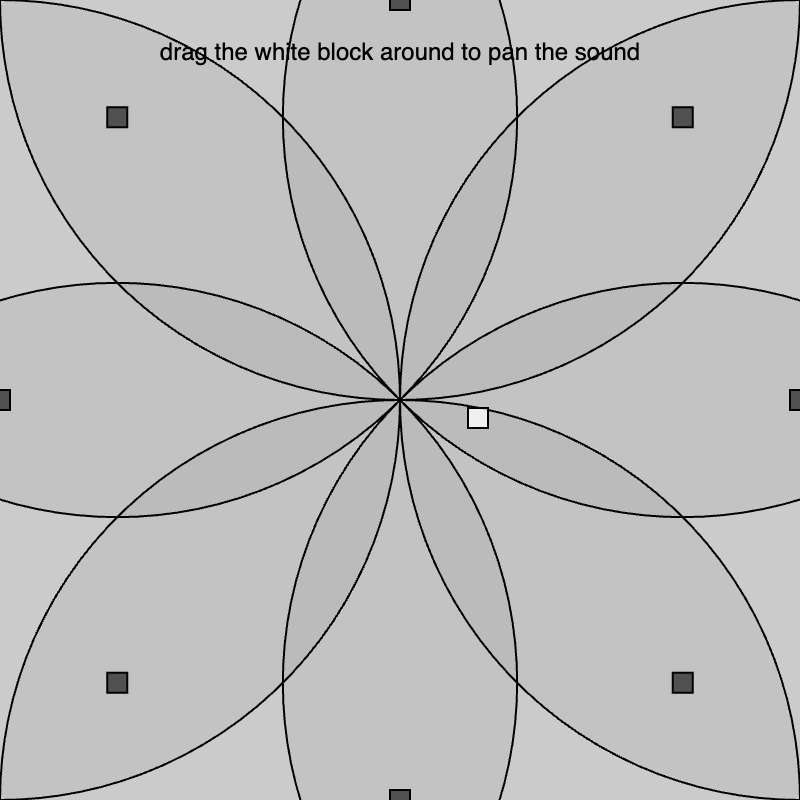
Combine this library with your p5.js and p5.sound.js sketches to create moving and interactive spatialized sound objects with the included p5.AudioSource class. Connect your sketch to quadraphonic and other non-standardized speaker setups!
Select the connected multichannel audio interface as the default output device in your system settings.
Include the library in your tag using the CDN link after p5.js and p5.sound.js.
<script src="https://cdn.jsdelivr.net/gh/ogbabydiesal/p5.spatial.js@latest/dist/p5.spatial.js"></script>
Below is a simple example that uses the multichannel audio class, p5.AudioSource from p5.spatial.js. A live example can be found here.
Note how the audio graph follows the a similar pattern found in vanilla p5.sound.js, where source nodes are chained to the spatial p5.AudioSource class with the connect() method. Calling p5.AudioSource()) with no arguments initializes a quadraphonic panner (with speakers in a clockwise layout). Custom speaker layouts can be defined using a JSON object that describes the position of each speaker in the system. An example of how these layouts should be formatted is illustrated in the General Usage section below. Calling the move(x, y) method on the p5.AudioSource object updates the position of the audio source and evaluates the gain relative to each channel in the speaker layout.
let osc;
let spatSource;

let pos, speed;

function setup() {
  createCanvas(100, 100);

  pos = createVector(0, 0);
  speed = createVector(1, 1.3);

  osc = new p5.Oscillator('sine');
  osc.disconnect();

  /*
  Creates a multichannel audio node and connects a sound source to it!
  */
  spatSource = new p5.AudioSource();
  osc.connect(spatSource);

  textAlign(CENTER);
  textWrap(WORD);
  textSize(10);
}

function draw() {
  background(220);

  pos.x += speed.x;
  pos.y += speed.y;

  if (pos.x < 0 || pos.x > width) {
    speed.x *= -1;
  }

  if (pos.y < 0 || pos.y > height) {
    speed.y *= -1;
  }

  //Draw a moving rectangle and attach a sound source to it
  rect(pos.x, pos.y, 10, 10);
  spatSource.move(pos.x, pos.y);

  text('click to start the sound', 0, 20, 100);
}

function mousePressed() {
  osc.start();
}For more examples of the library in use see the p5 editor examples here.
- Configure a multichannel audio interface as your systems default audio output device. (i.e in your Mac or Windows system preferences.)
- Include the
p5.spatial.jslibrary after thep5.sound.jsandp5.jscore library - (optional) Create a
JSON Objectcontaining the positions of the virtual speakers in the top of your sketch usingcanvascoordinates. A standard quad setup in a clockwise channel configuration might look like this for example:
let speakers = {
  out_1 : {
    x: 0,
    y: 0,
    w: 10,
    h: 10
  },
  out_2 : {
    x: width,
    y: 0,
    w: 10,
    h: 10
  },
  out_3 : {
    x: width,
    y: height,
    w: 10,
    h: 10
  },
  out_4 : {
    x: 0,
    y: height,
    w: 10,
    h: 10
  }
}
You don't need to specifiy the widths or heights (w, h) for the speakers but it may be helpful if you are visualizing the sources with rect(x,y,w,h) for example. By default p5.AudioSource() defaults to this quad configuration. The custom speaker JSON object should be defined in the p5 setup function, after createCanvas() (if you want to use width or height params).
- Create a
p5.sound.jsaudio graph and calldisconnect()on the final node in the chain. - Create a
new p5.AudioSource()class and optionally, a speaker layout (you can choose 'quad', 'oct) The pickup radius of the speakers is determined by the second argument. Your code might look something likeaudioSource_1 = new p5.AudioSource(speakers, 100). Additionally you maybe specify a built-in layout. Currently there are three,'quad','octophonic'. and'5.1'. Create an octophonic multichannel layout like this:p5.AudioSource('octophonic', 45), where 45 adjusts the speaker's pickup radius/overlap factor. - Connect the
p5.sound.jsaudio graph to thep5.AudioSourceoject using the standardconnect()method. - Call the
move()method on thep5.AudioSourceobject and pass in andxandycoordinate for the sound source.p5.AudioSource()will automatically calculate the amplitudes of your sound source in each speaker based on the proximity of the source to the virtual output nodes. - Make sure to call
start()on any sound making objects in your sketch! - To visualize the speaker layout call the
renderLayout()andrenderDistance()methods. See this example for more info.
Do you want to extend or add to the library?
- Clone the repo and run
npm installto download the dependencies. - Create a new class like the
AudioSource.jsfile in thesrcfolder. - Add that exported class to the
app.jsfile. - In the root directory use the
npm run buildcommand to build the library. - The built library will appear in the
distfolder.
- Separate source and ouput logic so you can treat output channels with indepent effects.
- Allow movement of speaker positions post-setup.
- Create more examples with common speaker setups (8-channel cube, ring, etc...).
- Make 3D examples using the
WebGLproperty ofcanvas. - Create flocking examples 🐥.
- Allow the renderLayout and renderPickup methods to accept rgb values.
- Create method to report positions of speakers for custom layout drawing.
- Create method to draw speaker output numbers
- Signals can modulate source positions
- stereo fall back example