Hopper sensor issue #83

Replies: 4 comments 10 replies

-
|
Did you select the VL53L0X Tof when you setup PiFire? When installing it defaults to prototype which will always show 100% regardless if hopper sensor is attached or not. You can change this setting with the modules.sh script. ssh into your pi then you should probably reboot the pi when finished. |
Beta Was this translation helpful? Give feedback.

-
|
Yes, I did this setup. |
Beta Was this translation helpful? Give feedback.

-
|
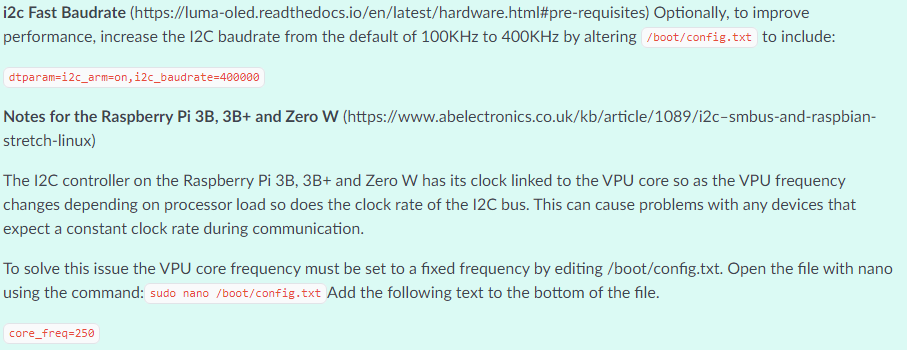
Try backing out those changes to do faster baud rate and doing a reboot. I don't really think they are necessary, as the architecture has changed enough that reading the temperatures from I2C seems to work just fine now. In older versions, I was seeing some values drop out from time to time - which I assumed was a speed issue. But I don't think it was. |
Beta Was this translation helpful? Give feedback.
-
|
I hashtags the changes and still do not get any value from the sensors. Is there any logfile I can check? |
Beta Was this translation helpful? Give feedback.

-
|
Yes, let's check your control.err.log and control.out.log in the
~/pifire/logs directory. Can you post the output of those?
Also, worth checking your settings.json (just the modules section) to make
sure it's setup correctly. Should look something like this:
```
"modules": {
"adc": "prototype",
"display": "prototype",
"dist": "prototype",
"grillplat": "prototype"
},
```
I would expect none of these to be prototype on yours.
…On Sat, Feb 12, 2022 at 1:11 AM thomasstrach ***@***.***> wrote:
I hashtags the changes and still do not get any value from the sensors. Is
there any logfile I can check?
—
Reply to this email directly, view it on GitHub
<#83 (reply in thread)>,
or unsubscribe
<https://github.com/notifications/unsubscribe-auth/AEXUYFQ64KI6HC6S7ENWF2LU2YP2NANCNFSM5OAVITPQ>
.
Triage notifications on the go with GitHub Mobile for iOS
<https://apps.apple.com/app/apple-store/id1477376905?ct=notification-email&mt=8&pt=524675>
or Android
<https://play.google.com/store/apps/details?id=com.github.android&referrer=utm_campaign%3Dnotification-email%26utm_medium%3Demail%26utm_source%3Dgithub>.
You are receiving this because you commented.Message ID:
***@***.***>
|
Beta Was this translation helpful? Give feedback.

-
|
Find attached the requested 2 files. control.out.log Hope you can find some more details. |
Beta Was this translation helpful? Give feedback.
-
|
Thanks! OK, so your settings are correct, so we can rule out any issues with that part. As for the log files, I'm seeing a lot of SPI errors on the ADC side in the 'control.err.log' file. Those might be old errors, however, it's something to look at. Are your temperature readings working correctly right now? It's possible that these errors happened previously if there wasn't an ADS1115 plugged in, or the I2C wasn't enabled. As for the 'control.out.log', we can see that the range finder is having some trouble talking to the I2C device via the API. This is what it should look like: But your log has an error here: The module can't seem to communicate with your device. This may mean you have a physical issue with the I2C bus. I would recommend re-confirming that your I2C pins and wiring is correct. If you are using the PCB, make sure the solder joints to the I2C bus pins are flowed well. Maybe reflow them. |
Beta Was this translation helpful? Give feedback.
-
|
I have checked the connections on the PCB and there was no issue at all. So I decided to buy a different Tof sensor and with this 3rd new sensor all,is working fine. https://www.az-delivery.de/en/products/vl53l0x-time-of-flight-tof-laser-abstandssensor Maybe you have an idea why these are not working? They look like many others on Amazon. This one here is working fine: https://www.amazon.de/dp/B07VJ87PZC/ref=cm_sw_em_r_mt_dp_FVEQ6TTJZK8QERQKB75E?_encoding=UTF8&psc=1 Thanks a lot for having a look into my files and supporting me with my topic. |
Beta Was this translation helpful? Give feedback.

-
|
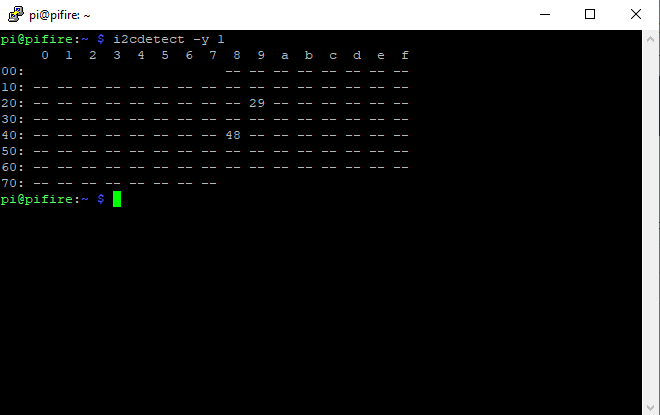
I am just finishing my build and I ran into a problem with the VL53L0X Tof sensor...it would work correctly with a short cable but not with a cable that is about 1m long. I was using 28AWG ribbon cable with parallel wires and I switched to some stranded 24AWG twisted pair that I stripped out of some Cat6 UTP ethernet cable. Problem solved. I think the long length of parallel wires was adding capacitance and reflectance along the cable that was causing interference with the sensor. Something to check if you are having issues. Prior to changing the wiring I wasn't getting an address for the sensor on the I2C bus (0x29). Adafruit has a device list, BTW https://learn.adafruit.com/i2c-addresses/the-list
|
Beta Was this translation helpful? Give feedback.

-
|
This turned out to be a less than perfect solution. After installing the ToF on the hopper, I'm getting inconsistent reporting from the sensor. Originally, even with soldering the ribbon cable directly to the headers, the capacitance/resistance of the ribbon cable interfered with getting an I2C address from the sensor. Now I'm getting a consistent address, but the distance reporting is spotty, sometimes timing out or reporting 0% (if the sensor isn't present, 100% is reported). I've ordered an inexpensive Adafruit LTC4311 I2C Extender/Active Terminator that will hopefully clean up the signal from the ToF sensor. |
Beta Was this translation helpful? Give feedback.
-
|
One other thing to try, is adding 10k pullups (to 3.3V) on the SCA/SDA lines, near the TOF sensor, if you haven't tried this already. |
Beta Was this translation helpful? Give feedback.
-
|
I suppose I could solder up something on a female header and plug it in on the bus to try it out... |
Beta Was this translation helpful? Give feedback.
-
|
And I'm kicking myself now but I should have used the gold-plated pins on those JST connectors that I forgot I had and just discovered this morning! |
Beta Was this translation helpful? Give feedback.
-
|
Re-reading your reply, "near the TOF sensor"...putting the pullups on the bus likely won't help. Not one of my better ideas. |
Beta Was this translation helpful? Give feedback.


Uh oh!
There was an error while loading. Please reload this page.
-
I am using the VL53L0X Tof sensor and the display always stays with 100% hopper level.
So I tried a second one with the same outcome.
Originally, last year, I had the problem that the value was altering (protype SW version) but with the new releases I end up with this problem. Any idea how to solve or investigate in this?
Beta Was this translation helpful? Give feedback.
All reactions