- Serverless is a cloud computing execution model where the cloud provider dynamically manages the allocation and provisioning of servers. A serverless application runs in stateless compute containers that are event-triggered, ephemeral (may last for one invocation), and fully managed by the cloud provider.
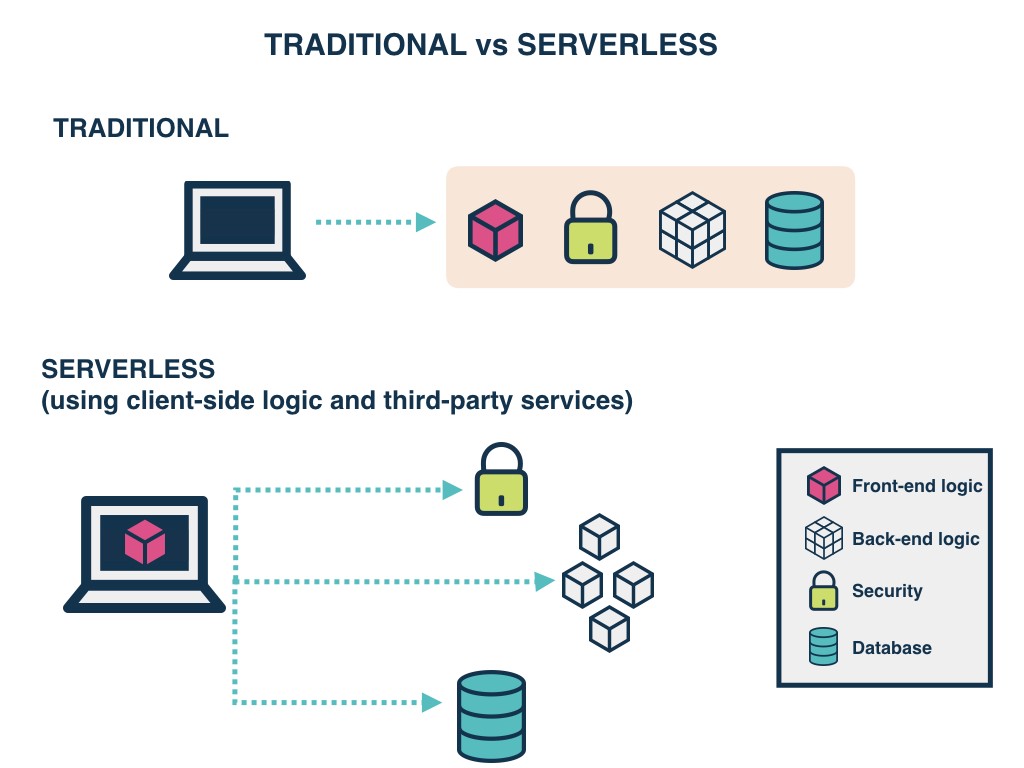
- Serverless applications are event-driven cloud-based systems where application development rely solely on a combination of third-party services, client-side logic and cloud-hosted remote procedure calls (Functions as a Service).
-
- The downside is that Serverless functions are accessed only as private APIs. To access these you must set up an API Gateway.
FaaS is an implementation of Serverless architectures where engineers can deploy an individual function or a piece of business logic.
-
- Complete management of servers
- Invocation based billing
- Event-driven and instantaneously scalable
-
-
FaaS are similar to the functions you’re used to writing in programming languages, small, separate, units of logic that take input arguments, operate on the input and return the result.
-
With Serverless, everything is stateless, you can’t save a file to disk on one execution of your function and expect it to be there at the next. Any two invocations of the same function could run on completely different containers under the hood.
-
FaaS are designed to spin up quickly, do their work and then shut down again. They do not linger unused. As long as the task is performed the underlying containers are scrapped.
-
Although functions can be invoked directly, yet they are usually triggered by events from other cloud services such as HTTP requests, new database entries or inbound message notifications. FaaS are often used and thought of as the glue between services in a cloud environment.
-
With stateless functions multiple containers can be initialised, allowing as many functions to be run (in parallel, if necessary) as needed to continually service all incoming requests.
-
AWS Lambda, Azure Functions, IBM OpenWhisk and Google Cloud Functions are most well-known FaaS solutions available. Each offering typically supports a range of languages and runtimes e.g. Node.js, Python, .NET Core, Java.
-
- Serverless Framework (Javascript, Python, Golang)
- Apex (Javascript)
- ClaudiaJS (Javascript)
- Sparta (Golang)
- Gordon (Javascript)
- Zappa (Python)
- Up (Javascript, Python, Golang, Crystal)
.86135eef1e1961cf5cc41fba8c1a5fc46bf38cf2.png)
-
example
type Blog @model { id: ID! name: String! posts: [Post] @connection(name: "BlogPosts") } type Post @model { id: ID! title: String! blog: Blog @connection(name: "BlogPosts") comments: [Comment] @connection(name: "PostComments") } type Comment @model { id: ID! content: String post: Post @connection(name: "PostComments") } -
-
Navigate into the root of a JavaScript, iOS, or Android project and run:
amplify init -
Follow the wizard to create a new app. After finishing the wizard run:
amplify add api -
You can leave the sample as is or try this schema.
type Blog @model { id: ID! name: String! posts: [Post] @connection(name: "BlogPosts") } type Post @model { id: ID! title: String! blog: Blog @connection(name: "BlogPosts") comments: [Comment] @connection(name: "PostComments") } type Comment @model { id: ID! content: String post: Post @connection(name: "PostComments") } -
if no error messages are thrown this means the transformation was successful and you can deploy your new API.
amplify push
-
-
Once the API is finished deploying, go to the AWS AppSync console or run amplify mock api to try some of these queries in your new API's query page.
      # Create a blog. Remember the returned id.
      # Provide the returned id as the "blogId" variable.
      mutation CreateBlog {
      createBlog(input: {
          name: "My New Blog!"
      }) {
          id
          name
      }
      }

      # Create a post and associate it with the blog via the "postBlogId" input field.
      # Provide the returned id as the "postId" variable.
      mutation CreatePost($blogId:ID!) {
      createPost(input:{title:"My Post!", postBlogId: $blogId}) {
          id
          title
          blog {
          id
          name
          }
      }
      }

      # Provide the returned id from the CreateBlog mutation as the "blogId" variable
      # in the "variables" pane (bottom left pane) of the query editor:
      {
      "blogId": "returned-id-goes-here"
      }

      # Create a comment and associate it with the post via the "commentPostId" input field.
      mutation CreateComment($postId:ID!) {
      createComment(input:{content:"A comment!", commentPostId:$postId}) {
          id
          content
          post {
          id
          title
          blog {
              id
              name
          }
          }
      }
      }

      # Provide the returned id from the CreatePost mutation as the "postId" variable
      # in the "variables" pane (bottom left pane) of the query editor:
      {
      "postId": "returned-id-goes-here"
      }

      # Get a blog, its posts, and its posts' comments.
      query GetBlog($blogId:ID!) {
      getBlog(id:$blogId) {
          id
          name
          posts(filter: {
          title: {
              eq: "My Post!"
          }
          }) {
          items {
              id
              title
              comments {
              items {
                  id
                  content
              }
              }
          }
          }
      }
      }

      # List all blogs, their posts, and their posts' comments.
      query ListBlogs {
      listBlogs { # Try adding: listBlog(filter: { name: { eq: "My New Blog!" } })
          items {
          id
          name
          posts { # or try adding: posts(filter: { title: { eq: "My Post!" } })
              items {
              id
              title
              comments { # and so on ...
                  items {
                  id
                  content
                  }
              }
              }
          }
          }
      }
      }
amplify api gql-compile