Car IQ is an iOS application that leverages deep learning and computer vision to detect and recognize cars from images. The user can take a picture of a car or upload one from their gallery, and the app will identify key attributes such as:
- 🚗 Make
- 🏷️ Model
- 🕓 Generation and Year Range
- ✅ Confidence Score




- 📸 Snap or Upload Car Photo: Users can take a picture or upload an image of any car.
- 🔍 Car Recognition (Deep Learning and Computer Vision): CarNET API is used to return:
- Car make
- Car model
- Car generation
- Approximate production years
- Confidence score
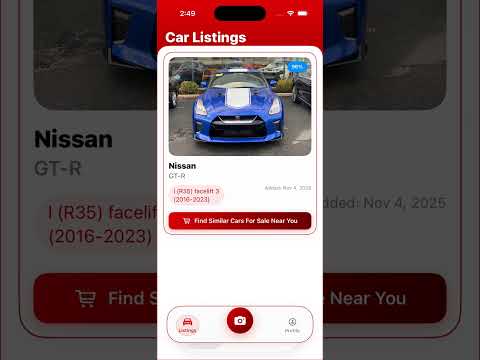
- 🛒 Smart Marketplace Integration: After identifying a car, users can browse similar cars for sale in their area with one tap.
- 🗃️ Feed-Style Listings UI: Car listings are shown in a sleek, scrollable feed layout, allowing users to browse previously scanned or saved vehicles effortlessly.
- 👤 User Authentication: Secure login and account management using Firebase Auth.
- ☁️ Cloud Storage: Stores uploaded photos and metadata in Firebase.
- 📅 Timestamping: Each entry is timestamped for record-keeping.
To run this app locally:
- macOS with Xcode installed
- Firebase project with Auth and Firestore
- CarNET API credentials
- Clone the repository
git clone https://github.com/mingleg7756/cardentification.git
cd cardentification- Open the project in Xcode
open cardentification.xcodeproj-
Replace the
GoogleService-Info.plistfile with your Firebase config -
Update your own
Config.xconfigwith the necessary API keys or variables -
Build and run on a real device or simulator
- Ming
- Anthony
- Anas
- Ye Htut
- Robert Neagu (Project Presenter)