- Browsers
People access websites using software called a web browser. Popular examples include Firefox, Internet Explorer, Safari, Chrome, and Opera
- Web Servers
When you ask your browser for a web page, the request is sent across the Internet to a special computer known as a web server which hosts the website.
- Screen readers
are programs that read out the contents of a computer screen to a user. They are commonly used by people with visual impairments. In the same way that man
- Devices
People are accessing websites on an increasing range of devices including desktop computers, laptops, tablets, and mobile phones. It is important to remember that various devices have different screen sizes and some have faster connections to the web than others
-
To describe the structure of a web page, we add code to the words we want to appear on the page.
-
Elements are usually made up of two tags: an opening tag and a closing tag. (The closing tag has an extra forward slash in it.) Each HTML element tells the browser something about the information that sits between its opening and closing tags
-
Attributes provide additional information about the contents of an element. They appear on the opening tag of the element and are made up of two parts: a name and a value, separated by an equals sign
-
** **
Everything inside this element is shown inside the main browser window.
Before the element you will often see a element. This contains information about the page (rather than information that is shown within the main part of the browser window that is highlighted in blue on the opposite page).
You will usually find a <title> element inside the element. **<title>**The contents of the <title> element are either shown in the top of the browser, above where you usually type in the URL of the page you want to visit, or on the tab for that page (if your browser uses tabs to allow you to view multiple pages at the same time)
The
element uses the action attribute to indicate the page that the data is being sent to. Each of the form controls sits inside the element. Different types of form control are suited to collecting different types of data. The element is used to group related questions together. The element indicates the purpose of each form control- Whenever you want to collect information from visitors you will need a form, which lives inside a
- Each form control is given a name, and the text the user types in or the values of the options they select are sent to the server.
- HTML5 introduces new form elements which make it easier for visitors to fill in forms
Because there have been several versions of HTML, each web page should begin with a DOCTYPE declaration to tell a browser which version of HTML the page is using
If you want to add a comment to your code that will not be visible in the user's browser, you can add the text between these characters
Every HTML element can carry the id attribute. It is used to uniquely identify that element from other elements on the page. Its value should start with a letter or an underscore (not a number or any other character). It is important that no two elements on the same page have the same value for their id attributes (otherwise the value is no longer unique)
Every HTML element can also carry a class attribute. Sometimes, rather than uniquely identifying one element within a document, you will want a way to identify several elements as being different from the other elements on the page.
Some elements will always appear to start on a new line in the browser window. **These are known as block level elements. **
- Examples of block elements are
,
,
- , and
- .
inline elements
Some elements will always appear to continue on the same line as their neighbouring elements. These are known as inline elements.
Examples of inline elements are , , , and
.
The
element allows you to group a set of elements together in one block-level boxGrouping Text & Elements Inline
-
** ** elements is so that they can control the appearance of the content of these elements using CSS.
-
iframe is like a little window that has been cut into your page — and in that window you can see another page. The term iframe is an abbreviation of inline frame.
-
src The src attribute specifies the URL of the page to show in the frame.
-
height The height attribute specifies the height of the iframe in pixels.
-
width The width attribute specifies the width of the iframe in pixels
image
- You can specify the dimensions of images using CSS. This is very helpful when you use the same sized images on several pages of your site.
- Images can be aligned both horizontally and vertically using CSS.
- You can use a background image behind the box created by any element on a page.
- Background images can appear just once or be repeated across the background of the box.
- You can create image rollover effects by moving the background position of an image. *To reduce the number of images your browser has to load, you can create image sprite
header / footer / nav / article /section
The
and elements can be used for:- The main header or footer that appears at the top or bottom of every page on the site.
- A header or footer for an individual or
within the page. ** The
**
element is used to contain the major navigational blocks on the site such as the primary site navigationThe
element acts as a container for any section of a page that could stand alone and potentially be syndicated.
The
element groups related content together, and typically each section would have its own heading.
HTML5 LAYOUT
- The new HTML5 elements indicate the purpose of different parts of a web page and help to describe its structure.
- The new elements provide clearer code (compared
with using multiple elements).
- Older browsers that do not understand HTML5 elements need to be told which elements are block-level elements.
- To make HTML5 elements work in Internet Explorer 8 (and older versions of IE), extra JavaScript is needed, which is available free from Google
java script
-
A script is a series of instructions that a computer can follow to achieve a goal.
-
To write a script, you need to first state your goal and then list the tasks that need to be completed in order to achieve it.
1: DEFINE THE GOAL First, you need to define the task you want to achieve.
2: DESIGN THE SCRIPT To design a script you split the goal out into a series of tasks that are going to be involved in solving this puzzle.
3: CODE EACH STEP Each of the steps needs to be written in a programming language that the compu ter understands..
- Vocabulary: The words that computers understand
- Syntax: How you put those words together to create instructions computers can follow
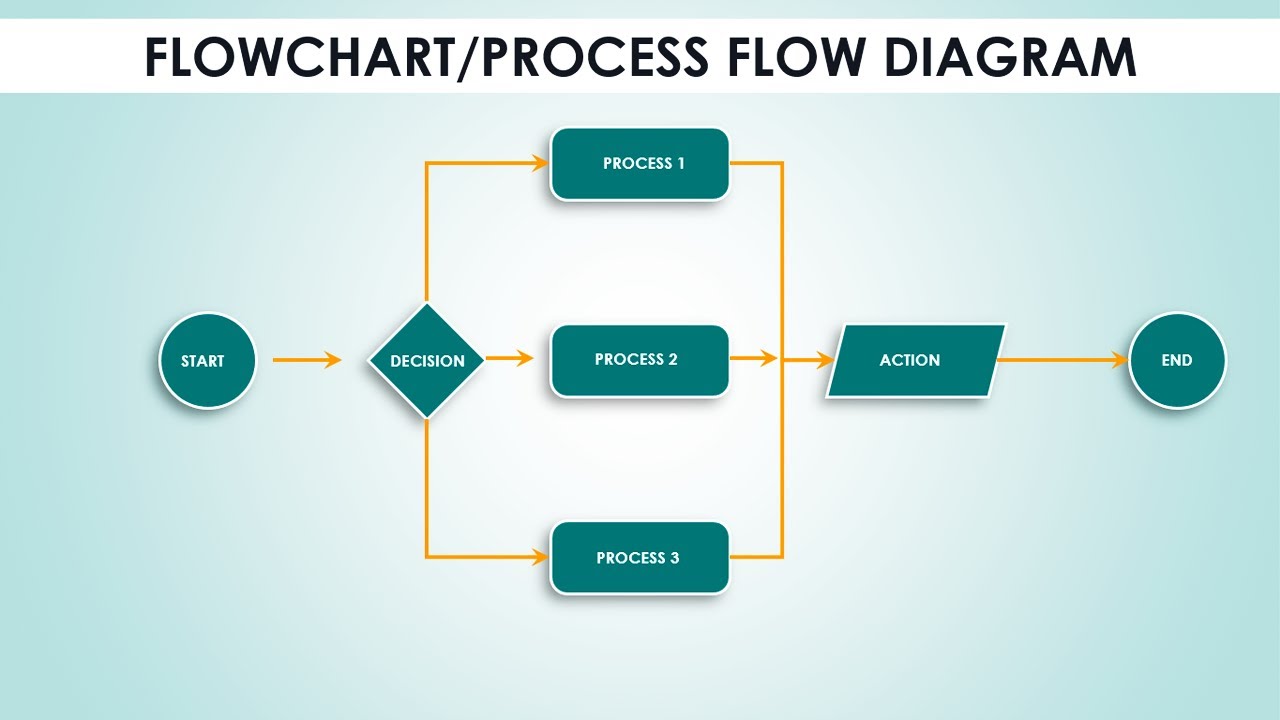
FLOWCHART
- Arrows show how the script moves from one task to the next. The different shapes represent diff€rent types of tasks. In some places there are decisions which cause the code to follow different paths.
COMPUTERS CREATE MODELS OF THE WORLD USING DATA
- OBJECTS (TH INGS) In computer programming, each physical thing in the world can be represented as an object.
Each object can have its own:
-
Properties
-
Events
-
Methods
-
PROPERTIES (CHARACTERISTICS) Both of the cars share common characteristics. Programmers call these characteristics the properties of an object.
-
Each property has a name and a value, and each of these name/value pairs tells you something about each individual instance of the object.
-
AN EVENT
Programmers choose which events they respond to. When a specific event happens, that event can be used to trigger a specific section of the code.
Scripts often use different events to trigger different types of functionality.
So a script will state which events the programmer wants to respond to, and what part of the script should be run when each of those events occur.
- METHOD
When you use a method, you do not always need to know how it achieves its task; you just need to know how to ask the question and how to interpret any answers it gives you
-