- What are "REST APIs"?
- Why use / build REST APIs?
- Core REST Concepts & Principles
- First REST API
기본적인 컨셉은 프론트엔드(UI) 를 모두 HTML 페이지를 렌더링 할 필요가 없다!
예
- Mobile Apps (e.g. Twitter)
- Single Page Web Apps (e.g. Udemy Course Player)
- Service APIs (e.g Google Maps API)
- 유저에게 페이지를 전송하는 대신 데이터를 보내주는 방식입니다.
- 기본 프로젝트에서 단지 response 와 request 데이터만 바뀝니다. 일반적인 서버 사이드 로직은 이전과 동일합니다.
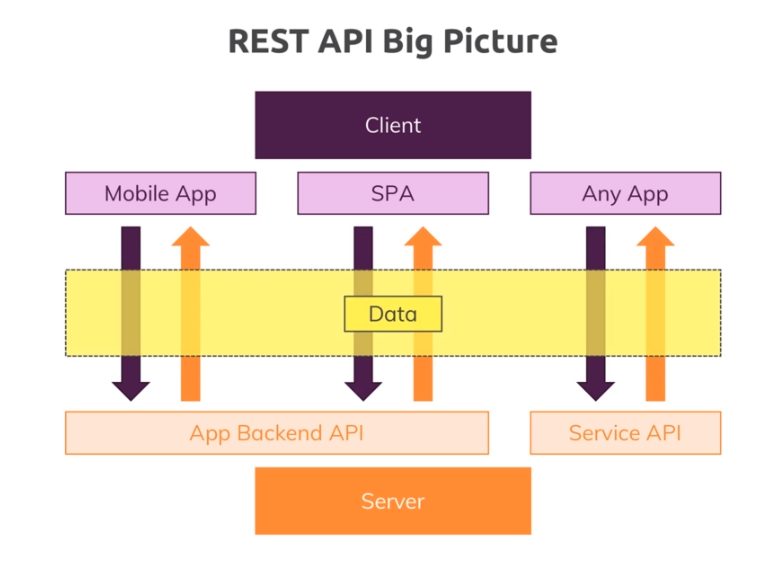
- 위 그림과 같이 서비스와 상관없이 REST API는 사용자에게 데이터를 전송해줍니다.
- UI 전체를 response로 주는 것이 아닙니다.
| HTML | Pain Text | XML | JSON | |
|---|---|---|---|---|
| 예시 | Node.js |
Node.js | Node.js | {"title" : "Node.js"} |
| 형태 | Data + Structure | Data | Data | Data |
| UI | UI 가 포함되어 있음 | x | x | x |
| 장단점 | 안에서 데이터를 parse하기가 어렵고 너무 큰 데이터를 형태이다. | parse 하기 어렵다. | XML-parser가 있어야 서버가 읽을 수 있다. | 쉽게 자바스크립트 객체로 가져올 수 있다. |
- Client가 request 보내는 방식은 같다.
- Endpoint 란 클라이언트 요청에 따라 응답을 보내기 위해 명확하게 구별된 Http Method와 경로의 조합입니다. 여기서 Client의 요청을 받습니다.
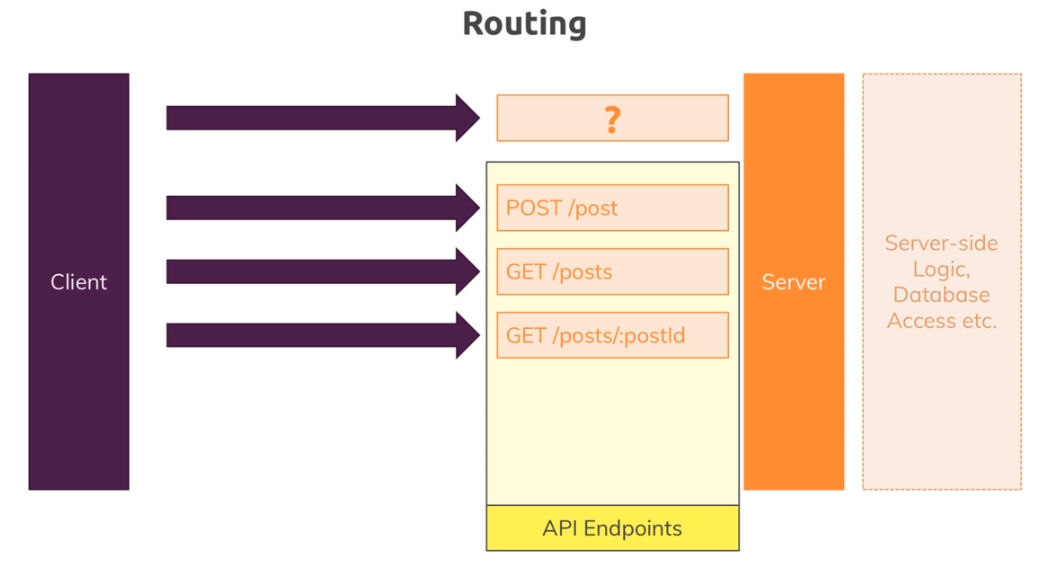
-
GET : 리소스를 서버로 부터 가져옴
-
POST : 서버에 리소스를 전달함
-
PUT : 서버에 리소스를 전달함 (만들거나 덮어쓰기함)
-
PATCH : 서버에 존재하는 리소스를 업데이트 함
-
DELETE : 서버에 있는 데이터를 삭제함
-
Http Method를 사용해서 요청을 보낸다고 해도 해당 리소스를 메소드 이름에 맞게 실행하는 것은 아닙니다.
-
이러한 이름은 유지 보수를 쉽게하는 역할을 합니다.
- Uniform Interface 명확하게 정의된 request + response 데이터 구조로 이루어진 알기 쉽게 구성된 API endpoints. 직관적으로 알 수 있게 만들어야 합니다.
- Stateless Interactions 서버와 클라이언트는 이전에 했던 요청에 관한 어떠한 기록도 남겨놓지 않고 모든 request는 독립적으로 다루어 집니다. 그럼 로그인 처리는 어떻게 해야할 까요? 기존에는 session 정보를 데이터베이스에 저장했습니다. 이것을 해결하기 위한 방법은 아래에서 알아보도록 합시다.
-
$ npm init -
$ npm i --save express -
app.js 생성하기
const express = require('express');

const feedRoutes = require('./routes/feed');

const app = express();

app.use('/feed', feedRoutes);

app.listen(8080);
-
body-parser 설치하기
-
$ npm i --save body-parser -
app.js에 가져오기
const bodyParser = require('body-parser')

app.use(bodyParser.json()); //application/json
-
-
routes 폴더 생성하고 feed.js 만들기
const express = require('express');

const feedController = require('../controllers/feed');

const router = express.Router();

// GET /feed/posts
router.get('/posts', feedController.getPosts);

module.exports = router;
-
controllers/feed.js 만들기
exports.getPosts = (req, res, next) => {
  res.status(200).json({
    posts: [{ title: 'First Posts', content: 'This is the first post!' }]
  });
};
-
router/feed.js
-
createPost라우터 만들기router.post('/post', feedController.createPost);
-
-
controllers/feed.js
-
createPost컨트롤러 만들기exports.createPost = (req, res, next) => { const title = req.body.title; const content = req.body.content; // Create post in db // status : 201 새로운 리소스 생성을 성공했다. res.status(201).json({ message: 'Post created successfully!', post: { id: new Date().toISOString(), title: title, content: content } }); };
-
-
postman으로 `http://localhost:8080/feed/post 요청보내기
-
request{ "title":"My first Post!", "content" : "This is the content" } -
response{ "message": "Post created successfully!", "post": { "id": "2020-03-26T10:26:38.095Z", "title": "My first Post!", "content": "This is the content" } }
코드펜 : https://codepen.io/ UI를 제작하고 바로 확인할 수 있는 사이트
-
html
<button id="get">Get Posts</button>
<button id="post">Create a Post</button>
-
JavaScript
const getButton = document.getElementById('get');
const postButton = document.getElementById('post');

getButton.addEventListener('click', () => {
  fetch('http://localhost:8080/feed/posts').then(res => res.json())
    .then(resData => console.log(resData))
    .catch(err => console.log(err))
})
하지만 버튼을 클릭하면 CORS에러가 생긴다
-
-
Cross - Origin - Resource - Sharing
-
보안을 유지하기 위해 서로 다른 도메인에서 요청을 보내면 브라우저에서 막아주는 기능입니다.
-
프론트사이드 JavaScript 코드가 아닌 Server-Side에서 해결해야 합니다.
-
app.js 해결 코드 넣기
// CORS 해결하기
// '*' 모든 URL에서 오는 request 허용
app.use((req, res, next) => {
  res.setHeader('Access-Control-Allow-Origin', '*');
  res.setHeader(
    'Access-Control-Allow-Headers',
    'GET, POST, PUT, PATCH, DELETE'
  );
  res.setHeader('Access-Control-Allow-Headers', 'Content-Type, Authorization');
  next();
});
-
postButton추가const getButton = document.getElementById('get'); const postButton = document.getElementById('post'); getButton.addEventListener('click', () => { fetch('http://localhost:8080/feed/posts').then(res => res.json()) .then(resData => console.log(resData)) .catch(err => console.log(err)) }) postButton.addEventListener('click', () => { fetch('http://localhost:8080/feed/post', { method: 'POST', body: JSON.stringify({ title: 'A Codepen Post', content: 'Created via Codepen' }), headers: { 'Content-Type' : 'application/json' } }) .then(res => res.json()) .then(resData => console.log(resData)) .catch(err => console.log(err)) });
- body를 꼭
JSON.stringify로 감싸줄것! 아니면 기본 text로 전달 되서 서버가 body에 있는 객체를 인식하지 못한다. - 추가로 post요청에
Content-Type을 명시해주어 서버가 JSON 객체를 인식할 수 있도록 전달
- body를 꼭