- Collect Payment Method
- Verify Payment Method
- Charge Payment Method
- Manage Payments
- Process Order in App
- 1~4번은 실제 구현하기가 어렵습니다. 수레바퀴를 두번 만들 필요가 없기 때문에 외부 서비스를 이용하면 됩니다.
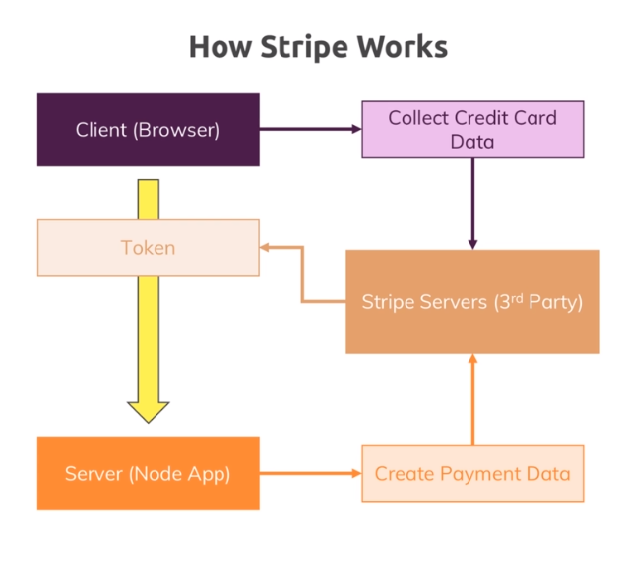
-
views/shop/checkout.ejs
<%- include('../includes/head.ejs') %>
<link rel="stylesheet" href="/css/cart.css">
</head>

<body>
    <%- include('../includes/navigation.ejs') %>
    <main>
        <ul class="cart__item-list">
            <% products.forEach(p => { %>
            <li class="cart__item">
                <h1><%= p.productId.title %></h1>
                <h2>Quantity: <%= p.quantity %></h2>

            </li>
            <% }) %>
        </ul>
        <div>
            <h2>Total: <%= totalSum %></h2>
        </div>
    </main>
    <%- include('../includes/end.ejs') %>
-
routes/shop.js
-
checkout 라우터 생성하기
router.get('/checkout', isAuth, shopController.getCheckout)
-
-
controllers/shop.js
-
getCheckout만들기exports.getCheckout = (req, res, next) => { req.user .populate('cart.items.productId') .execPopulate() .then(user => { const products = user.cart.items; let total = 0; products.forEach(p => { total += p.quantity * p.productid.price; }); res.render('shop/checkout', { path: '/checkout', pageTitle: 'Checkout', products: products, totalSum: total }); }); };
-
-
views/cart.ejs
-
order 수정하기
<main>
    <% if (products.length > 0) { %>
    <ul class="cart__item-list">
        <% products.forEach(p => { %>
        <li class="cart__item">
            <h1><%= p.productId.title %></h1>
            <h2>Quantity: <%= p.quantity %></h2>
            <form action="/cart-delete-item" method="POST">
                <input type="hidden" value="<%= p.productId._id %>" name="productId">
                <button class="btn danger" type="submit">Delete</button>
                <input type="hidden" name="_csrf" value="<%= csrfToken %>" />
            </form>
        </li>
        <% }) %>
    </ul>
    <hr>
    <div class="centered">
        <!-- <form action="/create-order" method="POST">
<button type="submit" class="btn">Order Now!</button>
<input type="hidden" name="_csrf" value="<%= csrfToken %>" />
</form> -->
        <a class='btn' href="/checkout">Order Now!</a>
    </div>

    <% } else { %>
    <h1>No Products in Cart!</h1>
    <% } %>
</main>
-
-
$ npm i --save stripe -
views/shop/checkout.ejs
-
stripe JavaScript 가져오기
<div class="centered">
                <button id="order-btn" class="btn">ORDER</button>
                <script src="https://js.stripe.com/v3/"></script>
                <script>
                    var stripe = Stripe('pk_test_ouFwvc15dCinOCaeFH1FilvL00iMgMSlWu');
                    var orderBtn = document.getElementById('order-btn');
                    orderBtn.addEventListener('click', function() {
                        stripe.redirectToCheckout({
                            sessionId: '<%= sessionId %>'
                        })
                    });
                </script>
            </div>
-
-
controllers/shop.js
-
stripe 가져오기
// test키 => 실제 사용때는 키 값 관리하기
const stripe = require('stripe')('sk_test_VcdhLGxzdUt7qVGkutsg2QEg00c1trPHkf');
-
getCheckout에서 view로sessionId넘겨주기exports.getCheckout = (req, res, next) => { let products; let total = 0; req.user .populate('cart.items.productId') .execPopulate() .then(user => { products = user.cart.items; total = 0; products.forEach(p => { total += p.quantity * p.productId.price; }); // stripe 세션 만들기 return stripe.checkout.sessions .create({ payment_method_types: ['card'], line_items: products.map(p => { return { name: p.productId.title, description: p.productId.description, amount: p.productId.price * 100, currency: 'usd', quantity: p.quantity }; }), // 성공했을 때 요청 success_url: req.protocol + '://' + req.get('host') + '/checkout/success', // 실패했을 때 요청 cancel_url: req.protocol + '://' + req.get('host') + '/checkout/cancel' }) .then(session => { res.render('shop/checkout', { path: '/checkout', pageTitle: 'Checkout', products: products, totalSum: total, sessionId: session.id }); }); }); };
-
-
routes/shop.js
-
checkout 라우터 생성하기
// 기존 주문 대신
// router.post('/create-order', isAuth, shopController.postOrder);

// stripe checkout 만들기
router.get('/checkout/success', shopController.getCheckoutSuccess);

router.get('/checkout/cancel', shopController.getCheckout);
-
-
controllers/shop.js
-
postOrder을getCheckoutSuccess로 변경하기exports.getCheckoutSuccess = (req, res, next) => { req.user .populate('cart.items.productId') .execPopulate() .then(user => { const products = user.cart.items.map(i => { return { quantity: i.quantity, product: { ...i.productId._doc } }; }); const order = new Order({ user: { email: req.user.email, userId: req.user }, products: products }); return order.save(); }) .then(result => { return req.user.clearCart(); }) .then(() => { res.redirect('/orders'); }) .catch(err => { const error = new Error(err); error.httpStatusCode = 500; return next(error); }); };
-
- 현재는 결제가 성공하면 URL 요청으로 우리 서버에 결제 완료를 알린다.
- 만약 카트에 제품을 담고
/checkout/successURL 로 접근하면 결제가 성공한다. - 이를 해결하기 위해선 실제 도매인위에 사이트를 올리고 Stripe 서버에서 결제 성공 response를 받아서 사용하면 된다.
- 테스트 용이니 이 부분은 생략함.