- This is a forked version of the origial library. This package adds the following methods:
SetExpressCheckoutSingle()
CreateRecurringPaymentsProfile()
BillOutstandingAmount()
paypal is a Go package that allows you to access PayPal APIs, with optional Google AppEngine support, using the "PayPal NVP" format.
Included is a method for using the Digital Goods for Express Checkout payment option.
This fork lets you choose to use AppEngine's urlfetch package to create the HTTP Client
####### Standard Go Usage
import (
  "fmt"
  "github.com/crowdmob/paypal"
)

func paypalExpressCheckoutHandler(w http.ResponseWriter, r *http.Request) {
  // An example to setup paypal express checkout for digital goods
  currencyCode := "USD"
  isSandbox    := true
  returnURL    := "http://example.com/returnURL"
  cancelURL    := "http://example.com/cancelURL"

  // Create the paypal Client with default http client
  client := paypal.NewDefaultClient("Your_Username", "Your_Password", "Your_Signature", isSandbox)

  // Make a array of your digital-goods
  testGoods := []paypal.PayPalDigitalGood{paypal.PayPalDigitalGood{
    Name: "Test Good",
    Amount: 200.000,
    Quantity: 5,
  }}

  // Sum amounts and get the token!
  response, err := client.SetExpressCheckoutDigitalGoods(paypal.SumPayPalDigitalGoodAmounts(&testGoods),
    currencyCode,
    returnURL,
    cancelURL,
    testGoods,
  )

  if err != nil {
    // ... gracefully handle error
  } else { // redirect to paypal
    http.Redirect(w, r, response.CheckoutUrl(), 301)
  }
}
####### App Engine Usage
import (
	"fmt"
	"github.com/crowdmob/paypal"
	"appengine"
	"appengine/urlfetch"
)

func paypalExpressCheckoutHandler(w http.ResponseWriter, r *http.Request) {
	// An example to setup paypal express checkout for digital goods
	currencyCode := "USD"
	isSandbox    := true
	returnURL    := "http://example.com/returnURL"
	cancelURL    := "http://example.com/cancelURL"

	// Create the paypal Client with urlfetch
	client := paypal.NewClient("Your_Username", "Your_Password", "Your_Signature", urlfetch.Client(appengine.NewContext(r)), isSandbox)

  // Make a array of your digital-goods
  testGoods := []paypal.PayPalDigitalGood{paypal.PayPalDigitalGood{
    Name: "Test Good",
    Amount: 200.000,
    Quantity: 5,
  }}

  // Sum amounts and get the token!
  response, err := client.SetExpressCheckoutDigitalGoods(paypal.SumPayPalDigitalGoodAmounts(&testGoods),
    currencyCode,
    returnURL,
    cancelURL,
    testGoods,
  )

  if err != nil {
  // ... gracefully handle error
  } else { // redirect to paypal
    http.Redirect(w, r, response.CheckoutUrl(), 301)
  }
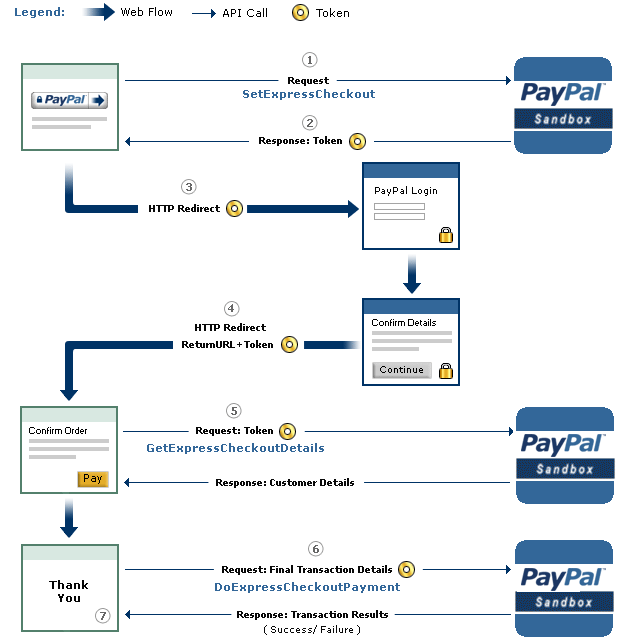
}According to their documentation (see bottom of page), you'll have to call their DoExpressCheckoutPayment api to successfully charge a transaction.
In the Return URL, PayPal will append a token and PayerId to your return URL as parameters, like this: token=XX-XXXXXXXXXXXXXXXXXX&PayerID=XXXXXXXXXXXXX.
Your controller for the Return URL typically will call the DoExpressCheckoutSale (or DoExpressCheckoutPayment for more control), as follows:
client := paypal.NewDefaultClient("Your_Username", "Your_Password", "Your_Signature", isSandbox)
response, err := client.DoExpressCheckoutSale(r.FormValue("token"), r.FormValue("PayerID"), "USD", AMOUNT_OF_SALE)

if err != nil { // handle error in charging
  http.Redirect(w, r, MY_CHARGE_ERROR_URL, 301)
} else { // success!
  // ... handle successful charge
  http.Redirect(w, r, fmt.Sprintf("%s?receipt-id=%s", MY_RECEIPT_URL, response.Values["PAYMENTREQUEST_0_TRANSACTIONID"][0]), 301)
}There's a test suite included. To run it, simply run:
go test paypal_test.go
You'll have to have set the following environment variables to run the tests:
export PAYPAL_TEST_USERNAME=XXX
export PAYPAL_TEST_PASSWORD=XXX
export PAYPAL_TEST_SIGNATURE=XXX
Tests currently run in sandbox.
PayPal documentation is scattered at best. Here's the best link I've found that describes it: How to Create One-Time Payments Using Express Checkout