Product page
✨ Branch: pdp
Introduction
Once the store's homepage is done, we can start working on a new store template: the product page. Product pages are probably the templates with the most blocks, which makes them extremely flexible and customizable.
MVP
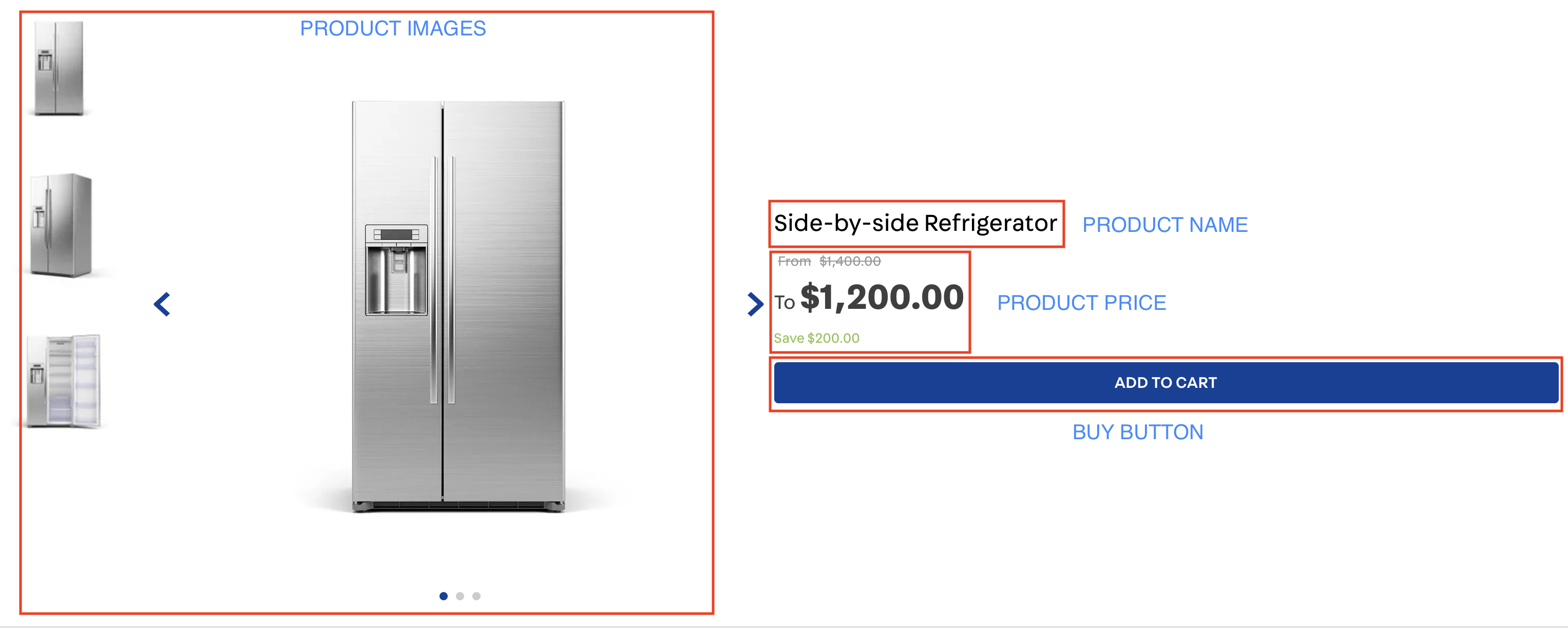
Let's build a minimal product page, with only the bare essentials:
- images;
- prices;
- names;
- buy button
Product blocks
Most product blocks, unlike content blocks, are inserted into a certain context, making them a little bit "plug-n-play": placing product-images on the product page will automatically lead to images being rendered on that page, the same being valid for price and name.
This doesn't mean that these blocks are less customizable, quite the opposite actually, as we'll soon see.
Activity
Build a product page using the following blocks in product.jsonc and declare it in the store/blocks folder: product-images, product-price, product-name and buy-button. We expect the structure to contain the following:
-
A line in store.product;
{
"store.product": {
    "children": [
      "flex-layout.row#main"
    ]
  }
}
-
That line should have two columns;
"flex-layout.row#main": {
  "props": {
    "marginTop": 6
  },
  "children": [
    "flex-layout.col#left",
    "flex-layout.col#right"
  ]
}
-
The left column must contain a product-images;
"flex-layout.col#left": {
  "children": [
    "product-images"
  ]
}
-
The right column must contain the product-name, product-price and buy-button;
In addition, we want:
- the right column to be vertically aligned to the center (see the
verticalAlign and preventVerticalStretch props in the Flex Layout Column documentation)
- the
product-price to show the total savings and list price (showSavings and showListPrice)
ℹ️ Remember to access the product-images, product-price, product-name e buy-button documentation in case you have any questions during your activity.
If you're still unsure as to how to send your answers, click here.

Product page
✨ Branch: pdp
Introduction
Once the store's homepage is done, we can start working on a new store template: the product page. Product pages are probably the templates with the most blocks, which makes them extremely flexible and customizable.
MVP
Let's build a minimal product page, with only the bare essentials:
Product blocks
Most product blocks, unlike content blocks, are inserted into a certain context, making them a little bit "plug-n-play": placing
product-imageson the product page will automatically lead to images being rendered on that page, the same being valid for price and name.This doesn't mean that these blocks are less customizable, quite the opposite actually, as we'll soon see.
Activity
Build a product page using the following blocks in
product.jsoncand declare it in thestore/blocksfolder:product-images,product-price,product-nameandbuy-button. We expect the structure to contain the following:A line in
store.product;{ "store.product": { "children": [ "flex-layout.row#main" ] } }That line should have two columns;
The left column must contain a
product-images;The right column must contain the
product-name,product-priceandbuy-button;In addition, we want:
verticalAlignandpreventVerticalStretchprops in the Flex Layout Column documentation)product-priceto show the total savings and list price (showSavingsandshowListPrice)ℹ️ Remember to access the
product-images,product-price,product-nameebuy-buttondocumentation in case you have any questions during your activity.If you're still unsure as to how to send your answers, click here.